Hook up ps2 to a pc computer
|
New member Username: Nightmare3020Leamington, Ontario Canada Post Number: 1 Registered: Jul-04 | im not sure if it is possible but is there anyway to hook up my sony to, to my computer so i can view it through monitor. Im assuming you can with the right wiring, just not sure how thanks your your guys help |
|
New member Username: Usd144Reston, VA USA Post Number: 1 Registered: Aug-04 | is there any way to hook my Playstation 2 up to my laptop and if so how do i hook it up |
|
Unregistered guest | You can use a capture card, or a card that has video in on it, or a tv tuner card. For a laptop, probably the easiest way would be to get a USB tv tuner card and hook it up to the laptop through the video in. |
|
Anonymous | U can get ur PS2 to work on ur labtop if u have a video in connection, by getting a Female RCA to Mini Plug for audio (red & white), then RCA to S-video Adapter, then S-video cord. But what if u only have a video out conection then what can u do? |
|
Unregistered guest | would i need a top of the line laptop to hook up my playstation 2 on it so i can see on the screen or would a windows 98 pentium 2 work? |
|
Unregistered guest | how do we hook up the ps2 directly to the laptop screen if we have no video inputs? |
|
Gold Member Username: Project6Post Number: 1788 Registered: Dec-03 | you don't. |
|
Your mom Unregistered guest | That sounds pretty tight |
|
New member Username: MarkiebPost Number: 2 Registered: Nov-04 | Hi, i was wondering if anyone could give me info about the supposed "Hard-Drive", that are in the ps2......and how i can save games on them |
|
New member Username: MarkiebPost Number: 3 Registered: Nov-04 | Hi, i was wondering if anyone could give me info about the supposed "Hard-Drive", that are in the ps2......and how i can save games on them |
|
Eric Shin Unregistered guest | u could hook up the Ps2 if u splice the a AV cord of the ps2 with a USB cord..maby... |
|
Random Act of Kindness Unregistered guest | You need to do the following: Get an ATI All TV_Wonder USB. Connect it to your pc/laptop. Make sure it's compatible with your PCs VIDEO CARD!!! Then plug the PS2 into the TV Wonder and you should be able to watch your PS2 on your laptop/pc. I've done it before and it should only cost `$150. there are PS2->VGA cables but note your monitor (in this case) will NEED TO SYNC ON GREEN!!! Hope that helps... |
|
Rushk Unregistered guest | i have a Dazzle digital video creator 80, which connects the 3 cables, video, and the audio to my laptop which is a gateway, but i don't have the right software, do any of you have any ideas of what type of software can play it full screen. thanks alot |
|
Unregistered guest | I want connect my PS2 to may mac laptop (G4) anyone know how, I have EyeTV if that helps? |
|
Unregistered guest | I would like to hook up an external pc hard drive to a playstation2, so i don't have to worry about burning games onto a dvd for play. |
|
Unregistered guest | hello im trying to "watch" my computer by splicing to monitor output from computer to simple male rca input is this possible? |
|
Murre Unregistered guest | I just got a WIN TV Usb2 device to play my ps2 on my laptop. it does not work. the ps2 does run on the screen and everything seems fine untill you have to push a button.from you push a button on your controller till it is recorded to the screen it takes 1.2 seconds... is there the same problem with the ATI wonder USB? |
|
mc637011296370 Unregistered guest | Yes is it a hauppauge digital terrestrail card if so it will not work becuse ur ps2 has an analouge output whist the tv card only takes digtal is there any way of plugging your ps2 into your comptuer moniter, by passing your P.C.???? many thanks MC |
|
scotty y j Unregistered guest | I want to hook up my ps2 to my portable dvd player, but i don't know what to do??? Please help me!! |
|
alie Unregistered guest | I was just wondering if there is anyway to play my ps2 on my computer. I don't have a TV and really want to play my ps2. Would a USB cord work? |
|
Anonymous | I know that you can connect a webcam into a usb port but can you get video by connecting a ps2 to a computer through the usb or firewire connection? |
|
Anonymous | I know that you can connect a webcam into a usb port but can you get video by connecting a ps2 to a computer through the usb or firewire connection? |
|
Anonymous | I know that you can connect a webcam into a usb port but can you get video by connecting a ps2 to a computer through the usb or firewire connection? |
|
Unregistered guest | OK, I recently purchase a Pixelview Media Center PlayTV@P3000 so that I can play PS2 on my 17" Compaq monitor. The trouble is, on the boot screen, the picture quality was grade but when I enter the game (after the PlayStation 2 logo), the picture turned bad, it was move a little bit up and the screen was very washed out. There is also a lot of noise, so can someone advice me how to resolve this, thank you |
|
yamamisfat Unregistered guest | hey a**hole poo out of a crack if that is true y wank. anyone diises me i will ejac in your face so there shut up. ya mam lick my d**k |
|
unknownin Unregistered guest | how do you hook up a ps2 to a portable dvd player?!!!?!!?!?! |
|
Unregistered guest | I have questions on how to use the PlayStation 2 gameshark. I can't find one where I live, and I don't know how to use one. Can someone please help me with some questions I have. Thanks. |
|
Anonymous | I want to take my ps2 on an airplane with me. Is there a way to make it work on an airplane? |
|
Unregistered guest | Help! I'm a girl, (crack what jokes you may) But I really want the new PS2, mostly to play GT4, but I don't have a TV. I just have my baby LCD screen, and I want to be able to play the PS2 through my computer using the screen. I know I will need a better video card. So I need to know what to upgrade to, and then which cables and such I will need. I would love any advice and help I can get. Thank you So much. Darci |
|
bobophat Unregistered guest | Hi! Same questions as above ----^ |
|
CrimsonCrayon Unregistered guest | I have hooked up my PS2 to my computer. As was mentioned already... you need a TV tuner card. I happen to be using the WinFast TV2000 XP Expert card... i think it cost me about 50 bucks. With it and the cables that came with it and the PS2 cables... I was easily able to hook up my PS2... in fact... I am playing Tony Hawk 2 Underground right now. Enjoy. |
|
Zap Unregistered guest | how can i copy my mtv music generator 3 beats to my pc for buring? It pisses me off that i can only listen to em on the console... |
|
Zephiris Unregistered guest | hi CrimsoncCrayon, how is the picture quality with your winfast card in full screen? Can you play NTSC and PAL games? And does it support 480p? And finally, what is the specs for your computer? I am thinking of getting a similar WinFast TV USB II card and would like to know how good it performs. Thanks. |
|
tony1234 Unregistered guest | I have a Theatre Pro 550 TV tuner however once the PS2 is hooked up through the composite video inputs it's not displaying on my monitor. My monitor does support sync on green. Any ideas? I was using Cyberlink Powercinema software, is there something else that will support this? |
|
FLCLcowdude Unregistered guest | USB=SLOW! Get a PCI capture card. USB cards have low response rates. I am still trying to figure out how to splice a VGA cable. I am not buying a capture card because I don't have but shiit in the way of cash. 10 bucks is all I would spend on this. |
|
Bronze Member Username: VideoguyPost Number: 45 Registered: Apr-05 | Okay guys, this should do what you want. Link: http://www.sjgreatdeals.com/jasho27699.html It's an adapter that takes composite or S-video and converts to vga resolution (basically it allows you to use a computer monitor as a TV) You don't even need to run the video through your computer. |
|
Anonymous | My questions a little different than the others. I have Winfast Tv Tuner and I have my VCR hooked up to it to watch vhs tapes on my computer whihc works fine. However, I just brought over a ps2 to see if i can connect it through the vcr so what I did was I plugged in ithe ps2 audio/vido cables to the vcr and i thought that i wouldbe able to see the ps2 on the computer just like you would on a tv if you hooked it up the same way but it doesn't seem to work. |
|
Unregistered guest | i want to do the same thing however i have the video composite ports on my computer already but i don't know what to do next do i need a driver to install the video composite ports because its not detecting the ps2 when i plug it in. Do i need special software? what do i need to make this work? |
|
KCimino26 Unregistered guest | yeah i was wondering how to hook a ps2 to a emachine pc computer asap. |
|
Unregistered guest | I have not registered to this forum, however, I do have insight to these questions. A monitors resolution is completely dependent upon the adapter it is connected to. Adapter meaning video card. Most video cards only have video out. This is a single connection to a monitor or display source. Some however, have DVO/DVI or TV/S-Video/Composite out/in. Drivers such as WDM capture will of been detected when the video card was installed on a WINXP OS. These are necessary and almost always accompany the video card with WDM capture ability. These types of cards allow for a much broader range of applications. A PS2 can connect to a laptop/desktop ONLY if your video card allows for s-video/rca/a-v cable/DV IN. (Consult your users manual for the laptop or video card if you have more then 1 s-video port. 1 is obviously for video OUT which will not help you. You can purchase an after market set of PS2 cable with all of these in/out features on them for about $25. USB or IEE1394 firewire will not work. I have successfully connected a PS2 to a ATI 9700 Pro video card through S-Video input AND through an ATI Mobility X800 256mb video card using the s-video IN port on the laptop casing of my laptop. Both worked fine, but without sound. I hope this helps. Caz |
|
Anonymous | How do you hook up a PS2 to your computer to download files onto a PS2 hard drive? |
|
Ta-Yu Unregistered guest | You say USB and Firewire wont work to attach a PS2 to a laptop. From my own experience, a TV card attached via USB wont work either- I had sound but the image was frozen- info was carried too slowly or something. However- would a PCMCIA TV card work? I only have video out on my card for the laptop. |
|
Unregistered guest | i need to know if i can store games on my computer like saves and stuff from my ps2 if so how. |
|
Help me please!!! Unregistered guest | how do I make a picture of my ps2 and get it to my PC because you can't do it with a camera that stupid line keeps getting in the way write me an answer to my e-mail please eminem8757@hotmail.com and make the topic "bout your ps2 pics" ok thanx |
|
Help me please!!! Unregistered guest | forget about that how do I play playstation on my computer?? do I need to buy extra plug-ins? Help me please!!! send it to eminem8757@hotmail.com |
|
Bronze Member Username: VideoguyPost Number: 97 Registered: Apr-05 | Read further up the thread. I posted a link to a device that should do what you all of you are trying to do. Don't even bother with those USB capture things (dazzle, USB Gear, etc.) they capture at vary low resolutions (like 320 X 240 and under) so they are crap for gaming, you actually get a worse picture then just using a regular TV. This is what I suggest: http://www.sjgreatdeals.com/jasho27699.html The way this works is you plug the regular yellow, white, red av cable from you game system into it and it converts the signal to VGA. You then plug the computer monitor that you want to view the game system on (or any other AV source for that matter) into the converter and you are good to go. It even has a VGA pass-through so you can use the same monitor for your computer and game system. But obviously this won't work for laptops so my suggestion for viewing PS2 on your laptop would be to get a TV tuner card (an internal PCMCIA one, not USB!) Here is a link to one I found doing a Google search: http://www.goldenshop.com.hk/AI-trad/pc/pc_pcmciatv.htm |
|
New member Username: MugsyPost Number: 1 Registered: May-05 | Aha!!! I was hoping there would be a thread like this! Doesn't it drive you crazy that when you want to do something with your computer you often have to practically re-invent modern technology? I've got a Toshiba Qosmio G-15. It's probably the most AV built laptop today. It has Windows XP Media Center and has video in, S Video in, the works. Now came the problems. You can hook up a cable or satellite or just a regular antenna and watch tv like it ain't no thang. If you want to convert video from analog camera, VCR it's a pain in the butt. No one knew how to do it and I and a Toshiba technician had to spend 2 hours to find out why people were having such a problem. Turned out something dumb like during the set up procedure you're required to use the remote control to punch in channel numbers but the remote doesn't have numbers! I figured out to use the keyboard instead and that saved the day. Now it's on to trying to use it's great monitor to view PS2. I dread having to go through all that again but I'll try. If anyone has gone through this lemme know. This computer come with an adapter for all three in cables. Audio is awesome and configuring it for picture is gonna be the test. If anyone has a Qosmio please lemme know. |
|
joe 3866 Unregistered guest | how do i hook up my ps2 (slim version) to my portable dvd player??? |
|
New member Username: Bill_kill_mePost Number: 1 Registered: May-05 | I was also wondering if anyone knows how to hook up PS2 to my portable DVD player. I dont really need sound but obviously I need picture. My player has a yello Video port , S-Video, AV in, and component video/progressive scan out. Any info would be appreciated. |
|
New member Username: MugsyPost Number: 2 Registered: May-05 | Ha! After much searching I found out that the Toshiba Qosmio I bought has a procedure for realtime display from my PS2. Two problems however, the resolution is not as superior as it's normal viewing resolution and you have to put the computer in hibernation and then it's just three button pushes and you're away. As for portable DVDs it depends on the configuration. What brand of portable DVD do you have? It should just be a matter of adapters BUT don't know if you'll get realtime play. |
|
New member Username: Bill_kill_mePost Number: 2 Registered: May-05 | Well its a Mintek 10.2inch MDP-1010. I went to Best Buy today and they said that it is not possible because all the ports are earphones jack size. They said it might be possible with some special adapters and cables that they dont have. I dont know if I trust them or not though. http://www.mintekdigital.com/detail.asp?ProdID=MDP-1010 This is my unit. Man I wish I knew what I was talking about to prove that Best Buy jerk wrong. |
|
Unregistered guest | would a usb-live connector work with a ps2 you can check out what i'm talkin about at: http://www.hauppauge.co.uk/pages/products/data_usblive.html write to me if you've got any comments |
|
Silver Member Username: VideoguyPost Number: 113 Registered: Apr-05 | These USB adapters capture at a low resolution (like 320 X 240 or less), so the picture would not be good for gaming. |
|
Unregistered guest | hey smart people... i recently purchased a dell (Dimension 8400 Intel Pentium 4 Processor 630 with HT Technology, Microsoft Windows XP Media Center 2005 Edition) i want to play my slim ps2 on my computer because i don't have a tv in my room... i bought an audio adapter and plugged the RCA plugs into it, and then into the audio in jack... then i plugged the other RCA thing into video in my problem is, i have no idea how to get my computer to recognize the ps2... any suggestions? thanks... |
|
owenl282 Unregistered guest | I have a mercury tv tuner/capture card connected to my P1 133mhz (yep thats right!!!!) all i use this pc for is TV. Connected to the video in is the PS2 connected to the svid is my vcr. SOund works like a charm. I bought the tv card for bout 60$ with remote. |
|
stumpedguy Unregistered guest | is it possible for me to connect my playstation to my computer via ilink s400(firewire). i have an ilink on the front of my computer and i also have one on my PS2. could i somehow use the ilink to play my playstation on my computer screen |
|
CDR The Great Unregistered guest | Hello, I was wondering if i could hook up my PS2 to my PC to check if some files are corrupted. I'm kinda' tight on cash so I can't buy another game.Another soultion to my problem would be to find a driver for .PSS files. Could anyone help me with this? |
|
stumpedguy Unregistered guest | if anyone wants to know. there is a product by ViewSonic called the NextVision N4. this product connects into your computer screen cord and allows you to connect dvd players cameras or ps2's to your computer screen. the hyperlink is below. http://viewsonic.com/products/tventertainment/tvvideoprocessors/nextvisionn4/#sp ecs ViewSonic NextVision N4 |
|
Anonymous | hey...i suck with computers so this may be dumb but can i play pc games on a ps2?????? |
|
ultragabe Unregistered guest | so i have the Dazzle 150 with all the A/V plugs in the back but when i try to plug it in, only the dazzle software recongnizes that it's there. i want to use it on other software because the dazzle software is friggin laggy and really bad resolution. I have been working at the Dscaler program for about an hour and getting nowhere. someone help! how do i get the software to recongnize my hardware!? |
|
stumpedguy Unregistered guest | no you cant play pc games on a ps2 or else they would only sell ps2 games. |
|
Unregistered guest | on the new thin PS2 ,where could you get a network connection cord and where would it plug into on the computer tower |
|
Anonymous | I have S400 to USB Cable is their any way to send & Recive Data between My Notebook & PS2 |
|
Unregistered guest | i have a hp media center 2005, i wanna know how can a i connect my PS2 to my computer o my monitor. My computer cames with the yellow. white and red thing that the tvs came now, in the instruction say that these thing i would needed if a wanna to connect my vhs to my computer and record a vhs movie to a dvd disc, soo i wanna know how can a i use this to play my PS2, HOW CAN i put my monitor in "video" or somthing, how can my computer reconize my PS2?? |
|
New member Username: IbapimpHmmm, Afgahnastan Dickwad Post Number: 2 Registered: Jul-05 | i just cleaned my ps2 out,and put it all bac together,and now it wont even start up , the lights wont even turn on, whats wrong????????????????????????????????? |
|
Unregistered guest | the only video out on my computer is VGA, and i want to hook it up to my tv. which has rca and s-video, is there any way of splicing the vga cable, or finding an adapter to hook it up. anyway without buying a new video card ??? |
|
darthwolverine Unregistered guest | to answer the last 2 questions: firstly, Ben: there could be a number of things wrong with your ps2. check to make sure you didnt unplug some ribbon cables inside, mainly the one that goes from the power on button down inside the ps2 secondly, Questionable Wiring: there are adapters you can buy to convert VGA to something you can plug into a TV for around 60 some dollars but you have to understand that the resolution of the average TV is extrememly poor, using a TV as a PC monitor is going to look pretty crappy and practically unreadable. you'll have to lower your output resolution to 640x480 or 800x600 to even see the whole screen. However, if you get a new video card that will output to a monitor and TV simultaneously, watching DVD's from your PC on your TV doesnt look too bad, or recorded TV shows if you have windows media edition hope that helps, Blake |
|
Francesco Unregistered guest | Hi, I am trying to view my xbox display on my Gateway notebook using ATI TV Wonder USB 2.0. The picture comes through fine with composite cables, but there's a half-second delay, which makes it impossible to play the game properly. Is there anything I can do? |
|
Unregistered guest | ... thank ya darth, i guess my best bet would be to just go and buy another video card, something with s-video. i appreciate the help, later, oh ps... if i were to get an adapter, where could i go about finding one ? |
|
New member Username: Sanmwaugh2001Rrr, Wwwwwwr Post Number: 1 Registered: Jul-05 | i have an intel celeron laptop .i am desperate to play playstation in my laptop is it possible to do.I have an S-Video option in my laptop.tell me how will i have do it . |
|
Jethro Unregistered guest | I work on a ambulance and post time sucks. I will be trying a tuner or 2 and will let you know how it goes. thanks to all for the info |
|
Once Unregistered guest | Buy a better monitor. |
|
Unregistered guest | Hi all, I hav a Ex Tv Tuner with VGA cable but don't know how to plug it to my laptop. A extra VGA port found on the back of my laptop. Is there any way to plug tv tuner to my laptop. Pls help me. |
|
customhotrodbri Unregistered guest | i was wondering how to download a ps2 saved game that someone has online into your ps2 thank you |
|
Sweeti Unregistered guest | Hi, I have a HP ZD8000 media center. This has a tv tuner, it's own tv box, remote ... Problem is that I cannot figure out how to hook my playstation to it. I called HP and they said it wasn't compatible with the playstation, so therefore, it won't work. It doesn't read the signal when connected, so I'm sure they are correct. What would happen if I got a high resolution vga box? Amazon.com sells one here: http://www.amazon.com/exec/obidos/tg/detail/-/B0006B522Y Would I be able to hook that to my laptop, and still have real-time gameplay and sound? Anyone try this? Thanks |
|
Sweeti Unregistered guest | Ooops, I neglected to say that I want to hook my PS2 to my computer, not the playstation one system. |
|
Anonymous | how do i hook up my ps2 to a pc hard drive? i want to play the games on the computor (like max payne, gt4, stars shotter e.t.c.) on the sony ps2 machine cos my brother wont let me use the pc sometimes, he is a meanie sometimez... some1 plzzz help me i'm in real need!!!!!!!!! |
|
HITMAn4 Unregistered guest | for christmaS I GOT THE NEW PS2 SLIM and i wAS WONDERING HOW I HOOK IT UP TO MY COMPUTER FOR ONLINE Gaming i got diaL UP DOES THat mATTER? |
|
this_forum_sucks Unregistered guest | This is terible!! I dont know how to hook my PS2 2 my WIN-98 how!!!!! |
|
Unregistered guest | Hi Guys, I have a emachine windows xp pc, with a fairly good monitor. I also have a ps2 but no room for a tele to use it on!!! I wish to play my ps2 over on my pc monitor. Reading the recent posts, is it correct in me thinking all i need is a tv card for my pc with a video - in socket? Is it possible if you could e-mail me the detail, please, 'robjbragg@msn.com' Thank you for all your help, you lot are so knowledgable about this!!! |
|
Media Center man Unregistered guest | I have a HP Media Center 7060n and i have the same av connectors on the front of my computer that the ps2 has in connectors. But how do you swich to video mode? |
|
Unregistered guest | <<>> But I'll explain that to you about that later... First there is something i'm about to try myself That does'nt envolve a computer at all!!! well in the end it will get there for post production clean-up and filtering but your not hooking it up yo a computer. "Ohh-oh-oh- what's that!" You say, well it is...(3dot's dramatic pause)...(Another dramatic pause)..............(damn! this is really a dramatic pause, oh waIT I SHOULD BE USING ALL CAPITAL LETTERS AND THEY SHOULD BE BOLD TYPE...(DRAMATIC PAUSE)-DAMN! NO BOLD TYPE!!! THIS WILL HAVE TO DO. OK,OK, NOW WHERE WAS I, -OH YEAH!...(DRAMATIC PAUSE)..dot..dot..dot. And some of # should compliment those dots nicley three should work, ###...No four! #. "yeah, Im digg'n it" -Now, all we need is ^ and'ah ~ also a couple of $$ almost finished! It just needs one more thing...(dramatic pause)... An Asterisk! ******************** Well, Twenty*one**three*four fi..no,twentyfour is plenty But we still need A semi-colon, NO!wait...A FULL-colon : "BAAAMM!" just like that Now it's PERFECT-like Ford!!! But why should that matter to you! "MR. I DONT CARE FOR THOSE FANCY LOOKING LETTERS THAT DONT SPELL SH*T!" ---OR DO THEY??? OR MAYBE YOU SHOULD TRY A -PHILLIPS/MAGNAVOX-Home CD recorder/burner, I've seen them advertised on TV A couple years back, I dont think they realy caught-on, Probably for the same reason I never bought one... I have a computer! "it can all be done with a CompuuuTeR!!!" Well I geuss not? Well actually it can, but this seems to be the easy way to do it because all you have to do is plug the L/R audio cables straight into the back of the CD-recorder unit. BUT,,, I've never looked in the back of one to see if they have any kind of aux. plug-in. It should, the only thing that leads me to believe elsewise is the fact that every Unit I have seen in the past has a two disk set-up wich could mean it will only record from the other CD drive??? Meaning there for duplication of CD's only and that would be the only reason I can think of why it would'nt work. So now you have an idea of what another option that can be possible, And what to look for on the unit (r.e.)- L/R Auxiliary jacks - Now all you have to do ask the salesman questions about these things I've told you and hopefully he/she is knowledgable anuff to give some further detail about what these home-stereo CD-recorders are realy capable of for sure. "Because im not?" Now there is a chance that they wont have any sort of speaker output jacks, So you'll probably have to purchase A Receiver to hook the speakers into (thats if you want to them to check the set-up and make sure your music/beats are actually going into to the CD-burner properly before the burn (like I said I have'nt done any of these things before so im not sure of what other sort of problems can accure, that is between the componets that might require you to do a sound check to find out whats wrong! my advice CHECK IT ALL OUT BEFORE YOU BUY more equipment than you realy need!) NOW IF THAT DOES'NT WORK... The answer is still...YES!!! ---EXPENSIVE!--- ----PROFESSIONAL!---- -----BUT THEY DO EXIST!----- I found one at A pawn shop (ghetto pawnshop usualy have realy good equip. for Dj's and studios!) for $499.99 And that for a pretty old dusty-looking one(but still better then any commercial CD-burners, just the hook-ups in the back alone make them better than any CD-burner you will find in a regular electronic store (i.e. best buy, circut city) and all the different functions WoW! but to be honest,if your not going to use any other studio type of equipment in combonation with it,All the feature included on it might be useless to you besides sampling, Because you got A computer! burn your music CD then transfer it to your "glorified calculator" DownLoad some software And then do the your post production work! The pro-unit seemed to have about the same features you can find in any descent adio editor. "Therefore just buy A cheap one that will get your music to the CD!" Oh yeah there is a way to hook your audio up to your computer(I think it sucks personaly!)I stumbled upon this site looking for some kind of plug-in's for the computer version (So if you know of any E-MAIL ME!)wich is what im using now because of the same damn problems you'll were having-AND-because I'm Sort of lazy and did'nt want to hassle with all of this, but the more i've looked into the method I've descibed above it seem more and more promissing-but the way it hooks up to your computer is pretty ghetto... You'd be probably better off using A Coat-Hanger,Your Neighbors Cat,And a roll of Duck-Tape!So if instrested in this method also E-mail me or something? ===On 2nd thought You Probably should'nt Use the coat hanger.=== |
|
Unregistered guest | i was wondering how to hook up my playstation 2 to my home computer to download cheats on to my action replay cd... help please |
|
Unregistered guest | This might be the easiest way to do this (though not necessarily the cheapest) http://www.easygameshop.com/xbox.htm don't be fooled by the link - will work with PS2 as well Mark |
|
Unregistered guest | Alright, so I have read through a majority of these posts and, believe it or not, my question still goes unanswered. I have a dell dimension 5100 with windows xp media center edition. I definitly have a good enough sound an video card so that shouldnt be an issue. Now my real issue is the fact that I have connected my Playstation 2 to my computer with an S-video cable (yes, in the S-video input), and I was wondering, where do I go from there? How exactly am I able to display it on my monitor? Should I go through media center in order to use it, some other software program, or configure my control in order to recognise and use it? These questions may not seem too hard, but if you could answer them as soon as possible, that would be great. |
|
Unregistered guest | Trying to run my ps2 through my media edition windows on channel 3. It comes through, but it has a delay of about 1 sec. Is there any way to stop this delay? Anyone have any idea? Not sure if it is possible. Have done a bit of looking on the web. Help! |
|
Media Center man Unregistered guest | how do u get it the ps2 to come up on channel three in the first place? |
|
Silver Member Username: Chaunb3400Huntsville, Alabama U.S. Post Number: 175 Registered: Jul-05 | MCM whats your question |
|
Media Center Man Unregistered guest | I am trying to hook up my ps2 throught the composite video inputs One time i got it to say soney dvd player on channel 3, but now it won't say anything What do it do? Do i unhook the cable in? |
|
New member Username: Mce_manPost Number: 1 Registered: Oct-05 | Help! How do I! |
|
Mistey92 Unregistered guest | Media center man, Unplug cable, wait an hour, plug it back in, unplug your tv, wait an hour, plug it back in, thats wat I did! If u like runescape, check out my site! www.rune411.net |
|
Jackie1967 Unregistered guest | PLEASE CAN YOU HELP ME? My friend in England has just sent my daughter a PS2 game (singstar) for her birthday. The problem is that we have a Canadian PS2 and TV which play NTSC. The English game is PAL. Does anyone know how I can play this game on our Canadian equipment and what I would need to get to do this. It's a great game and my daughter is dying to try it out. Jackie |
|
him Unregistered guest | Is it possible to take apart the ps2 and get the CD/DVD-rom driver and hook it up to you computer? or wouldnt the computer recognise it? |
|
New member Username: FockirPost Number: 1 Registered: Oct-05 | Hi, I have an HP Media Center PC with video input software, but I cant get media center or the pc itself to recongnize the ps2. Im wanting to do this because im wanting to somehow record scenes from my games. If anyone can help in anyway it would be greatly appreciated. |
|
Unregistered guest | Hi i am wondering what i need for my daughter to play here PS2 through her PC as her TV is broken now. will it work with a usb tv happauage system as i have no room for an internal card |
|
Unregistered guest | What is the best way to get the sound from the PS2 into a laptop so I can record sound from the PS2 onto music recording software? |
|
Unregistered guest | What is the best way to get the sound from the PS2 into a laptop so I can record sound from the PS2 onto music recording software? |
|
Jack123123412 Unregistered guest | You need to buy two things they should be cheap. You'll use the red and white phono cables that normally connect into your computer. Go into a shop (in the UK one like Maplins or PC World, in the US any computer shop), and ask a "an adapter to connect two mono audio phono plugs to one stereo 3.5mm jack plug" They will probably give you a little adapter that has two plugs together, that the red and white phono cable can fit into, and another plug that will fit into your laptop Microphone socket. If your microphone socket is in a awkward place, you might need to ask for a "3.5mm jack stereo extension lead" to get the cable all the way there. I know in the UK if you go into Maplins they'll take you right to it, PC world and others probably too. |
|
Reevo Unregistered guest | Ok I got the Caputre card, The software blows... Whats the best software for playing PS2 and DVDs through the card? |
|
david davidson Unregistered guest | i tryed cyberlink powercinema 3 tv plus but the pictures to small, anyone know any better software. tkz |
|
Unregistered guest | did you have any problems with delay between your controller and the video screen i have a media pc and its brand new and has 1gb of memory and 250 gb of hard drive i am able to play my dir tv through it with out delay but the ps2 delays what do you think i can do cause i would really likt to use my lcd flat screen for pic quality |
|
Unregistered guest | did you have any problems with delay between your controller and the video screen i have a media pc and its brand new and has 1gb of memory and 250 gb of hard drive i am able to play my dir tv through it with out delay but the ps2 delays what do you think i can do cause i would really likt to use my lcd flat screen for pic quality |
|
New member Username: LgmcbenPost Number: 1 Registered: Nov-05 | Hello. Could anyone tell me if this thing... http://grandtec.com/POP1280S.htm will display EVERY PS2 games on PC monotor without any problem? Speaking of 'problem', I've read stories about 'Video to VGA' box from http://www.vdigi.com. Their model is called VD-Z3 which allow signal from console games to display on PC monitor. It works fine with X-Box which games are in 480p resolution. However, it will not display PS2 or GC games that are in 480i resolution. Most PS2 games are in 480i. Some even have a mix of 480i and 480p. Forexample, a car racing game may be in 480i when in menu screen but it changes to 480p when in race screen. Which results in nothing showing up on the monitor when the game is in menu screen. VD-Z3 is not available in my country(even if it is, I won't buy it anyway). But the Grandtec POP1280S(the one in the above link) is available here. The VD-Z3 is a VGA box made exclusively for console systems, and it still have problem with PS2. This alone make me wonder if the POP 1280s will have no problem with my PS2. In this page http://grandtec.com/POP1280S.htm I can't find information regarding 480i/480p resolution. Will the Grandtec POP1280S display EVERY PS2 games with absolutely no problem? My systems : - PS2 + DVD component cable. - Sony SDM-HS75P 17' LCD monitor. Thank you  /bow |
|
Unregistered guest | so how do you connect the ps2 to a pc monitor |
|
Unregistered guest | I have a ps2 at home and i want to connect it to my computer ive got a tv card and ive pluged everthing in as normal but i turn the tv on and it doesnt show how do i resolve this problem and also i havnt got any shows on the tv either im using power cinema 4.0 Im fairly new to this so i dont really know what to do thnkss |
|
DrizzleDrizzt Unregistered guest | This is what I have as my setup. I have a ATI TV Wonder VE Tuner and Video capture card, with video connector for composite A/V cord, and S-Video jack. I bought a PS2 to PC S-video cord which is $10.99 at radioshack. It works exactly like a TV. I switch to channel of tuner for the ps2, works like a charm. Theres composite A/V cord, which is the 3 color coded connector (red yellow white) and theres s-video. I recommend buying an s-video cord like I did (generic pc ones wont work because the connector on the ps2 is special) because the s-video is WAY better quality and sound than an average composite A/V. Hope this is not too complicated for some of you |
|
ChronoTrigger456 Unregistered guest | ugh... Since I'm a nice guy, I'll frickin' write this whole tutorial on "How to hook up a PS2 to a PC Computer". Anyway... Here we go... Spend $45 on an ATI E-Home Wonder capture card... This can be found here http://www.newegg.com/Product/Product.asp?Item=N82E16815116308R Once you've gotten that, install the card (this should be fairly easy) then connect the composite A/V block (purple thing) to the back of the capture card. (this is also easy...) Install the drivers in Windows, INCLUDING ATI TV. (This is also in the Multimedia Center install. Hook up your PS2 by connecting its A/V cables to the A/V block connected to your capture card. Next, run ATI TV, and change the source to "Composite" instead of "Analog Television" or "AUX". You can find out how to change by reading the manual. Turn on your PS2 and play normally. However, when you press a button on your Analog controller, there will be a slight delay... That's how it is. But it won't matter on most games. The only games I found to have a huge problem with is Dance Dance Revolution. Anyway, go to my computer help forum at: http://winboards.engodesign.com (already have over 400 members and 100,000 posts!) |
|
little mouse Unregistered guest | hi, i have a dell dimension 5150 with media centre edition 2005 with a pvr 150mce tv card, i want to connect my ps2 but i dont no how any ideas ??? thnks |
|
adadadadadadadadadad Unregistered guest | I dont know how to hook up my ps2 to my d-link Xtreme G wireless Router in the room my ps2 is in but do have a d-link base modem in a differnt room and any ways I dont even know how to hook it up any ways |
|
New member Username: Kwd1990Post Number: 5 Registered: Dec-05 | i hooked my ps2 to my pc monitor via composite jack but i need to know how to get audio to work my monitor has s-video composite and d-sub would i use any of those to get sound or should i get a splitter or something? |
|
Masta' Shake Unregistered guest | John Doe i dont know cause im from aqua teen hunger force and im trying to figure out how to hook up my future PS3 to my hd comp moniter so i can play at the max resolution. Peace Out P.S.I'm Da Masta' Shake |
|
Anonymous | i have a nvidia VIVO card and i connected my ps2 to it trough S-Video... well how i can get the ps2 to the computer screen now? do i need somekind of program? pls help... |
|
taylor 'solution' Unregistered guest | How to connect a ps2 to a pc monitor what you need - 1: a vga monitor 2: a pc with a vga socket for your monitor 3: a ps2 4: 2 vga cables 5: a vga adaptor 6: an a/v scart adaptor (the one that connects it to a tv, exept with an a/v part in the middle 7: and an double ended a/v cable -- First, get your monitor and plug in 1 of the vga cables into it, then plug the other end in the vga adaptor. Then get your second vga cable and plug it in to the vga adaptor, and the other end in your pc. Now for the ps2. Get your ps2, and plug in your a/v scart adaptor in the back of it (dont connect it to the tv yet) Then get your double ended a/v cable and get the red, white, and yellow of one end of the cable and plug them into the a/v scart adapter in the correct coloured slots. Then put the other red, white, and yellow cables in the vga adaptor. Your'e now ready to go. If youre not stupid, you would not pay more than about £50 for the lot. Hope it works :D |
|
CloudStrife Unregistered guest | I hooked up my PS2 to my PC through the TV tuner and i have a one second or so delay when i use the ps2 controller. Is there anyway to fix this? |
|
lee22 Unregistered guest | how do you hook a ps2 to a laptop which wires and were do they go? im confused?????? : ( ???? and i have a ps2 adapter? |
|
Rajen4103 Unregistered guest | im guessing everyone asks this but, i have a laptop with no AV socket in, and want to play games on my PS2, through the lap top screen.(without delay!!!) from reading above i got 'winfast TV2000 XP Expert Card'. is this the best option? cheaper prices would be good too, lol. anyone got a solution?? |
|
Gazza15_2006 Unregistered guest | Hey i got my PS2 working with my PC moniter i bought a Hauppauge WinTv PCI Card. I just connected my yellow ps2 video cable into the s-video socket on the card then connected the red and white cables (sound Cables) from the PS2 into my HI-FI and it works fine |
|
Anonymous | Ok I REALLY NEED A SOLUTION HELP!!!!!!!!! I JUST Got a Nokia Computer Screen. Really Nice. But all I have for a computer other than my mini mac which i can't use is a windows 95 that barely turn on. I REALLY want to play my playstation on the scrren but all it has is 3 usbs a head phone jack audio in mike out and it has two modes Pc1 which has a d-sub and a Dc (what ever that is) and it has PC2 which has Pc P&D IF YOU CAN HELP PLLLLLLLLLEASE HELP DESPARTE |
|
bobbbbbbby Unregistered guest | Hello! I Have The TV Tuner, I Just Don't Know What Software To Use! PLEASE HELP ME |
|
answer the question Unregistered guest | i have a hewlett packard m7250n media center pc. i have audio and video plugs(the red, white and yellow plugs). i have hooked up my ps2 to those plugs. now, how can i get my computer to display my game on the screen? how do i get it to recognize the ps2? three people have already asked this question but no one has responded. its a simple question. someone please answer it. |
|
Gold Member Username: Project6Post Number: 6421 Registered: Dec-03 | Activate the media center. Make sure that the ps2 IS TURNED ON. You need to go to the set up screen of the media center. |
|
New member Username: Lilz01Melbourne, Victoria Australia Post Number: 1 Registered: Mar-06 | Hi i need some help .. please! Ive got a DVD player that shares the same connection as a regular monitor, and also has the red yellow and white connections on the back of it. Would it be possible to connect the dvd player to the monitor, and the ps2 coloured cords to the back of the dvd player so im able to play my ps2 on the computer? Im pretty sure this may work.. Any help? reply to this forum or my email address : bootyful_87@hotmail.com |
|
Gold Member Username: Project6Post Number: 6816 Registered: Dec-03 | Try it and find out. If you already have all the components that you need, you should have no problem. |
|
New member Username: Lilz01Melbourne, Victoria Australia Post Number: 2 Registered: Mar-06 | Thanks berny, but the dvd player has a vga output can it serve as a source for the ps2 onnection to the pc. Is there any other way to connect the ps2 to a pc without having to buy additional cords, tv tuners or vga adapters? |
|
Gold Member Username: Project6Post Number: 6822 Registered: Dec-03 | Unless you have inputs on your PC to accept the outputs of your PS2, then you will need additional cords. |
|
New member Username: Lilz01Melbourne, Victoria Australia Post Number: 3 Registered: Mar-06 | Ok .. i tried connecting the monitor to the dvd vga ouput, but no luck. The monitor displayed a black screen, and im stil nowhere. I at the moment short on money, so im tryin to see what i can work with. Here is what i have, DVD player with the vga output, lcd screen monitor with vga connection, ps2 and ps2 cords. Please help is appreciated 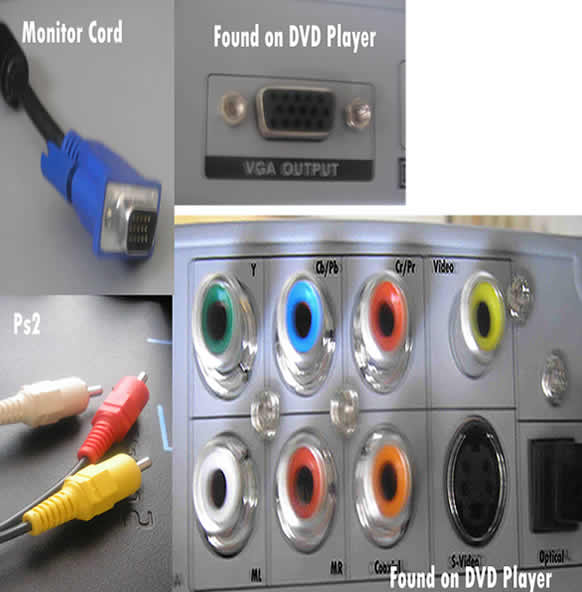 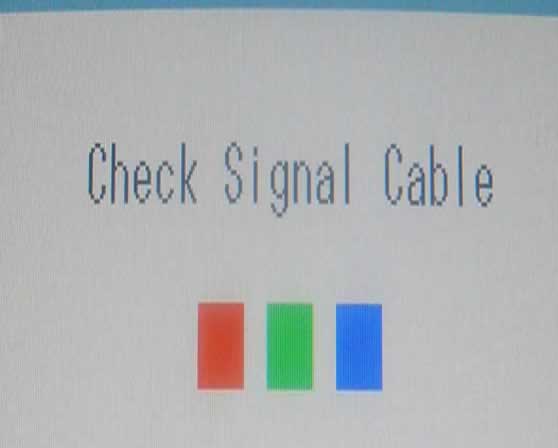 |
|
New member Username: Lilz01Melbourne, Victoria Australia Post Number: 4 Registered: Mar-06 | Is there a way to play ps2 on the monitor without using the pc hard drive? By the way i have a Samsung LCD SyncMaster 710v |
|
New member Username: HopelessPost Number: 1 Registered: Jul-06 | I have a ps2 and just a 20" viewsonic monitor is it posible to conect them and play ps2 on the monitor without having to buy a video card. Please help i am short on cash and can't buy a tv. |
|
Gold Member Username: Project6Post Number: 8663 Registered: Dec-03 | So you basically, just have a PS2 and no TV whatsoever? Why not sell the montior and buy a TV? |
|
New member Username: MagmellPost Number: 1 Registered: Jul-06 | I just picked up the ATI TV Wonder USB 2.0 NTSC with the intent on backing up my VHS tapes. Please note: I have a standard american television, vcr but my pc might be slightly odd in comparison. I have the SONY VAIO W30 series. What i am confused on is...what line into the ATI box ? the vcr line or the direct cable link? e.g. is it: cable line into vcr 3 cables (video, audio / audio) into ati box via vcr ati box to computer via usb does this sound right? i can on occasion get the television to obviously play on the pc...but i am having difficulty in getting the VHS tapes to play on the computer ... smoothly. i have one week before refund is impossible. any help would be appreciated |
|
New member Username: AnthonymatthewsPost Number: 1 Registered: Jul-06 | ok ok I HAVE a Nvidea Personal Cinema With my Gforce XFX graohics Card... i have A/V inputs and outputs when i plug my ps2 a/v ouputs into the inputs slot nothing comes up on screen ? what do i do?? |
|
New member Username: DothackkingPost Number: 1 Registered: Jul-06 | Hey, i have a s-video output on my ps2 and svideo (i think it's in)on my media center PC, how can i play it on there, when i plug it in nothing comes up. do i need a special program? |
|
Gold Member Username: Project6Post Number: 9007 Registered: Dec-03 | Anthony, check the manual that came with your NVidia or contact tech support. You whoudl have instructions that came with the GFX card. Benjamen, You have to activate the Media Center program. |
|
New member Username: 1fortheagesPost Number: 1 Registered: Jul-06 | hello, I have an rca television, and am trying to get it cook eggs for me but my smc 3 speed fan says that's not possible, is it crazy or something? |
|
New member Username: DothackkingPost Number: 2 Registered: Jul-06 | i turned on media center, and the closest thing i could figure was to go to TV but, it says i dont have a "tuner device" |
|
Gold Member Username: Project6Post Number: 9015 Registered: Dec-03 | Benjamen, Do you have analog video and audio input on your pc? |
|
New member Username: DothackkingPost Number: 3 Registered: Jul-06 | i have no clue, lol, i have a stock Sony Vaio VGN FE550G |
|
Gold Member Username: Project6Post Number: 9021 Registered: Dec-03 | Then you won't be able to connect your PS2, unless you can configure the USB to accept the signal from the play station. |
|
New member Username: DothackkingPost Number: 4 Registered: Jul-06 | well ty for tryin to help |
|
New member Username: TrishyaPost Number: 1 Registered: Sep-06 | hey ppl.. ok so this is like the 100000th time that i'm gonna ask the same question but i have to. I have a dell latitude x1 laptop. I've gone through all the posts and am pretty sure i understnad i need a tv tuner card or wtver to play my ps2 on my laptop... BUT i'm not sure what will be compatible with my laptop. Someone PLease help me .. i know its weird that a GIRl is obsessed with her ps2 but im going CRAZY without it..!! thanks guys reeally appreciate it Trish |
|
New member Username: DennisisstuckPost Number: 1 Registered: Sep-06 | ok ya still not seeing an effective solution to the question of where do we go after hooking the PS2 into our red/white/yellow jacks... i have a hp pavilion m7560n media center brand new, with ports front and back for input... i have put the appropriate cables into the appropriate plugs... and yet nothing... the computer makes no noise, nor acknowledgment that ive even plugged a new device in... nothing under my computer > other devices... nothing in Media center setup pertaining to "input devices" nothing in windows itself pertaining to input devices, yet i have 2 sets of red/white/yellow inputs and 2 s-video inputs... where in the heck is the option that allows me to access "input" on a television its simply channel 91 or 92 (at least on all mine it is) however i have no such luck when tryign this theory out on my tv tuner... yes i have all appropriate hardware needed to do this... i just need to know how to access the input signal coming into my computer, help at this point would be greatly appreciated, cause when i called hp i think buddies brian fell out the side of his head because he had no idea what i was telling him... please refer all help to bangin.beatz.84@gmail.com much thanx in advance for the help, hope to hear back soon from someone... Dennis |
|
New member Username: JamarGray, Georgia United states Post Number: 2 Registered: Oct-06 | i HAVE AN HP PAVILLION DV5218NR NOTEBOOK CAN ANYONE TELL ME HOW TO HOOK UP A PLAYSTATION 2 TO IT PLEASE |
|
New member Username: Cool114Post Number: 1 Registered: Nov-06 | what software do I use to connect my Ps2 to the computer(instead of t.v.) |
|
New member Username: Irish68Post Number: 1 Registered: Nov-06 | ya still not seeing an effective solution to the question of where do we go after hooking the PS2 into our red/white/yellow jacks... i have a hp pavilion m7360n media center brand new, with ports front and back for input... i have put the appropriate cables into the appropriate plugs... and yet nothing... the computer makes no noise, nor acknowledgment that ive even plugged a new device in... nothing under my computer > other devices... nothing in Media center setup pertaining to "input devices" nothing in windows itself pertaining to input devices, yet i have 2 sets of red/white/yellow inputs and 2 s-video inputs... where in the heck is the option that allows me to access "input" on a television its simply channel 91 or 92 (at least on all mine it is) however i have no such luck when tryign this theory out on my tv tuner... yes i have all appropriate hardware needed to do this... i just need to know how to access the input signal coming into my computer, help at this point would be greatly appreciated, cause when i called hp i think buddies brian fell out the side of his head because he had no idea what i was telling him... |
|
New member Username: Dougbaseball17Post Number: 1 Registered: Nov-06 | I wanted to hook my Playstation 2 up to my computer and I was wondering how to do it. Can you help me out? |
|
New member Username: Muller1688Post Number: 1 Registered: Feb-07 | does anyone know how to hook up a ps2 to a laptop? will the following product work? http://www.jr.com/JRProductPage.process?Product=3994821 |
|
New member Username: BulkronPost Number: 1 Registered: Feb-07 | I put all the cables in that i need and i can get video and sound on windows movie maker...but the window is too small to be able to play. I'm jus wondering what software i need be able to watch it in full screen. There are alot of posts saying how to set up the connections but it doesn't say what to do after that. I also have media centre if that helps. |
|
New member Username: Muller1688Post Number: 9 Registered: Feb-07 | http://shop2.outpost.com/product/4945601?site=sr:SEARCH:MAIN_RSLT_PG I bought the following product and it lets you use the full screen. |
|
New member Username: Ashley_jorgPost Number: 1 Registered: Apr-07 | hey everyone! believe it or not, i read all the postings and didnt find the answer to my question. i want to hook up my ps2 to my sweet samsung computer monitor. it seems there was the answer in one of the posts, but the link to whatever it was i needed to buy was expired! please let me know what it is i need to connect them. also, how is sound integrated into this? will computer surround speakers also run through this hub device? |
|
New member Username: Ashley_jorgPost Number: 2 Registered: Apr-07 | a continuation of my previous post.... my monitor has a DVI connection. for sound, i found this on newegg.com. im wondering if that would cover the sound part of my problem. it is an optical audio cable that hooks up to the front of the ps2. but i just realized... where do i hook this up to? my amp doesnt have a connection like this... http://www.newegg.com/Product/Product.aspx?Item=N82E16879104008 but for the video part, i still need something that will go from the back of the ps2 into the connection of my monitor... will any of these do the job? http://shop3.outpost.com/search?cat=-43230&pType=pDisplay email me directly at jock959@hotmail.com if necessary. THANKS A MILL! -ash} |
|
New member Username: Muller1688Post Number: 10 Registered: Feb-07 | http://shop4.outpost.com/product/4945601;jsessionid=kzMlo6Kci9Nbg3o1F9CF3g**.node1?site=sr:SEARCH:MAIN_RSLT_PG that is the link to buy a gamebridge all u do is hook ur av ps2 cables into the gamebridge and the gamebridge goes into a usb port I highly recommend it since its only $5 |
|
New member Username: Ashley_jorgPost Number: 3 Registered: Apr-07 | yes, but if you plug it into ur usb port, then it is running through your computer, right? in the other threads to this post people say that it has a super slow framerate, slower than a tv itself. im trying to find a way so that my computer is completely separate.... so my ps2 is connecting directly (as possible) to my monitor, and my computer is excluded. will this work? http://cgi.ebay.com/Super-VGA-Box-for-Xbox-PS2-Game-Cube-to-LCD-Monitor-S_W0QQit emZ180004214605QQcmdZViewItem#ebayphotohosting |
|
New member Username: NoahimePost Number: 1 Registered: Nov-07 | Ok, I know this has been asked and answered a million times, but all the answers are too old, and any helpful links are expired, and I'm completely lost. Basically I want to play my PS2 through the comp. I understand getting usb connectors aren't as good quality but I'm not sure what else to use. I had my eye on http://www.pinnaclesys.com/PublicSite/us/Products/Consumer+Products/Home+Video/S tudio+Family/Studio+MovieBox+Ultimate+version+11+Documents/Key+Features/Key+Feat ures+MovieBox+Ultimate+11.htm Does anybody know about this product? Otherwise, could anyone give an example of what they use, and if there's a special program needed on top of the product? Treat me like a complete idiot whom you pity because you'll answer back =( I've tried searching "TV Tuners" but I don't know what the computer jargon means in the dsecriptions. Plus I don't even know about installation. Your help is extremely appreciated. If it's easier you can contact me at noasjj@yahoo.ca Thank you in advanced. PS: If anyone's worried about legal things, I own a PS2, my mother hogs the TV. I also like making music videos and can't find FMV's online so I'd rather just get them off the game. Thanks again. |
|
New member Username: Mystery_manPost Number: 2 Registered: May-08 | Ok I have a tv tuner card with video capture(composite, s-video input). All I need now is the software to display the PS2 fullscreen. I have managed to play the ps2 o my computer but it has always been in a tiny video preview screen. I just need a link or the name of a software that will display live video capture stream fullscreen preferably with sound. Your help is appreciated. |
|
Bronze Member Username: LevelzeroPost Number: 41 Registered: Aug-07 | Try http://www.videolan.org/ VideoLAN, and see if it's large enough for you. I've used VLAN when my pc's tv tuner acted up and wouldn't capture video via Video Xpress' capture device http://www.adstech.com/products/USBAV-191-EF/intro/USBAV_191_intro.asp?pid=USBAV -191-EF BTW, the latest desktop I bought doesn't have a tv tuner built in. |
|
New member Username: VkxBloomingdale, Il Post Number: 1 Registered: Jun-08 | iHAVE A HP PAVILLION M9077C I HAVE AN S- VIDEO IN JACK AND HAVE CONNECTED THE PLAYSTATION THROUGH THAT BUT HOW DO I GET THE COMPUTER TO RECOGNISE THE PLAYSTATION |
|
New member Username: Pimp_420Post Number: 1 Registered: Jan-10 | Well the t.v. tuner card is the best way to go with it but would be better to use a decent home pc and use a pci card for the best screen results. I use a Compro 7500se with remote and its also a pvr was only 150 bucks and it works great. I would also recommend sticking with the drivers that came with your product because i updated mine with windows updater and the new driver causes serious issues with the tuner card and remote. I am use a Hp XW5000 workstation 2.4 ghz, 1.0 gb ram and a nividia geforce fx5500se with 128 mb video ram on a 19inch lcd monitor and its seriuos hd for a good price ad you can record your gameplay to make montages and etc... or for you brave few you can try downloading a ps2 emulator from a torrent site but it is hard to find a stable one. Then u can play the disks in your DVD-rom drive if you have one. also folks do-not connect your ps2 to your video card on your comp!!! it is and OUTPUT for a t.v. not a video INPUT you with have to get a tuner with video inputs. you can cause damage to your video card in your ps2 and computer. |
|
Bronze Member Username: AcestallionPost Number: 18 Registered: Jun-10 | ps3s use an RGB cable to hook up to a tv...i dunno bout a ps2 though |
|
Platinum Member Username: InsearchofbassPost Number: 16398 Registered: Jun-04 | wow busy thread but cool idea |
|
New member Username: Billabob1234Post Number: 1 Registered: Jun-11 | seriously get the gamebridge. it's designed to have no delay, and it hooks up through usb. i bought one on ebay, used on my laptop, and it works well. *** does not work with 64 bit o.s. though*** |