Sony camcorder problems
|
New member Username: Jacko811Post Number: 1 Registered: May-05 | hi guys, Im fairly young (14) and fairly inexperienced with computers and camcorders alike, but at the moment i just bought a new video camera for a movie me and my mates are making. The model is sony DCR-HC30E and im using Adobe premier as my editing software. The problem is, im using a firewire connection and i have a firewire cable and a card already installed (i know this because it tells me theres the proper firewire card installed) The problem i have is, the video camera is on Play/Edit and yet there is still no connection with the computer. Is there a certain setting i have to turn the video camera to? Sorry if it sounds like a silly question jack |
|
Unregistered guest | Greetings, I purchase a new trv-480 camcorder to record and re-play 8mm tape from a early sony 8mm model. Much to my surprise it could not play my old tapes (even though sony states it could). When calling support they stated that the heads are not the same as the old and could not. If that was true why state this new model works with the old format. Make me upset that they don't support previous customers and leaves then without an upgrade/support path. Especially since my old camcorder died and I was looking for a new version which would do double duty. Playing my old and recording new was my requirement. Any ideas would be appreciated. regards, Mike W (Unhappy Sony customer, might just return my camera). |
|
C. Ewart Unregistered guest | I have the same problem and would be really grateful if someone could provide a solution |
|
Anonymous | I have Sony TRV530 model camcorder. After usage of 4 years, all of a sudden, it is not working. Suddenly while in standby mode, the power gone and it never came back. Really, it is not a power problem. I heard that this problem in Sony camcorders in many of friends' case. Would Sony rectify the problem? |
|
Unregistered guest | i have a sony camcorder dcr-trv33e the problem is. when i turn it on and open the view screen all i get is green and yellow strips. this is all it will record as well. does anyone no what i can do or is it time to buy a new one this one is only 4 years old and was working ok untill a few weeks ago. thanks mark |
|
New member Username: ApplepiePost Number: 1 Registered: Jun-05 | Hello guys, I have a sony dvd handycam (DCR-DVD201E) and I've just moved to a Mac, which does not recognise the camera and doesn't import video. Image Mixer, I have just discovered, is not compatible with Mac, so how do I download my video clips onto my Mac?? Please help me!! |
|
Unregistered guest | Hi, I have a Sony CCD TRV118 handycam and I was filmed something and then out of nowhere "cleaning tape" started blinking on the screen, so I turned off the camera and now my lcd screen won't show anything that I recorded on the screen. The screen is just blue. I can record and when I fast-foward I can see in fast forward motion what i recorded and the same thing if i rewind it. Does anyone know what I should do? Thanks, Fran Perrone (13) |
|
Anurag Unregistered guest | Hi i have DCR-TRV33E when i down load movie from tape via USB i get no sound. Any know what should i do? please write to ajajaj94@yahoo.com |
|
arabanoo Unregistered guest | Possibly the CCD chips are faulty with this model (Sony DCR-TRV33E) and appear to degenerate at the age of between 2-4years. Repair costs vary, but I paid AUD$500 (US$375) to replace the chip. Strangely enough, when I had my camera in for repair, there were 5 others (same model) in for the same reason. |
|
shubha Venkatesh Unregistered guest | Hi I bought DCR -TRV22E last year, had a good tract till now, but recently when tape is inserted makes a noise and gives error message C31:23, Can anyone pls help.I am on a trip and desperately want to cover the places Thanks shubha |
|
Unregistered guest | I have SONY TRV 530. I used to be able to connect USB from camcorder to computer to upload pictures from the memory stick to the PC, but no more. I wonder if there's a USB problem inside the camcorder as other USB connections to PC still make the 'connected' noise on the PC. I have tried 3 different USB cables with no luck. Is there something on the PC that might need to be re-initialized so allow the camcoder to be recognized? |
|
Harbans Singh Unregistered guest | Hi My son pointed our trv245E at the sun! It now no onger records a picture. What might the damage be? Is it repairable? Any help/asvice gratefully recieved. |
|
Unregistered guest | I have a Sony DCR-TRV250. When I open the case to eject the tape nothing happens. Any ideas on what's wrong? |
|
New member Username: KondorekPost Number: 1 Registered: Aug-05 | Hi, I have sony camcorder DCR-DVD602E. I have problems finalizing DVD's : the camcorder starts to finalize but about half the way flashes error sign. It can though be read in my DVD player connected to TV, but not in a computer DVD drive. Could you advise me sth? thx |
|
New member Username: KondorekPost Number: 2 Registered: Aug-05 | Hi, I have sony camcorder DCR-DVD602E. I have problems finalizing DVD's : the camcorder starts to finalize but about half the way flashes error sign. It can though be read in my DVD player connected to TV, but not in a computer DVD drive. Could you advise me sth? thx |
|
New member Username: Deacon022Post Number: 10 Registered: Apr-05 | Does anyone get a Verical Blue Band when filming? I seem to get that when I film in my living room with the lights on. Thanks. |
|
New member Username: Sassyliptz15Post Number: 1 Registered: Sep-05 | Hi, I have a Sony handycam TRV118. And the code C:31:23 keeps popping up when I try and recored or watch viedo. I read the manual and did what it says but it did not work. Is there anything else that I can try before I take it to a shop? |
|
Gaunle Unregistered guest | I have a Sony TRV22E. I happened to left it ON over night. And next morning, It has black screen, and could not turn it on. Its not working, and even I cannot take out the cassette. Looks like its completely dead. Any Idea - I even tried to push the RESET button, but no luck. Regds |
|
New member Username: JadPost Number: 10 Registered: Aug-05 | try pluging i the power and leaving it off for an age of time then see if its startes without the power plugged in. also make sure that that everything is turned off. emial me at jadthebad@gmail.com if doesn't work. thanks jad |
|
Unregistered guest | I have a sony camcorder dcr-dvd602E. I have a problem in that the still photographs indoors come out really poorly. Outdoors it comes out beautifully . I have tried all the settings possible then the sony dealer said that in a camcorder indoor still photograph quality will not be great ! Any one with this model having a similar problem? |
|
New member Username: Browntim10Post Number: 1 Registered: Sep-05 | I have a Sony PC 1000. It is only 3 months old and it have been in repair twice now for a total of two months. I have many recuring problems witht the ejecting system. mainly not ejecting. Now radomlly it will not eject or it will eject its self if left turned off for a couple of minutes. Has anyone had the same problem or does any one out there know of any manufactory defects with the PC 1000. My main problem is that i brought in the states and now living in Central america. To ship it back and forth to the states is a pain inth but.. Thanks |
|
Unregistered guest | hi Gaunle, I am also using TVR22E and the same thing happend with me. with in Fraction of sec it went blank and its not working. Any Solution to this. |
|
rogerg Unregistered guest | i have a sony trv118 camcorder that no longer plays the sound on replay. I tried older tape that i know had sound on playback so i a pretty sure it is not the microphone. Any help would be appreciated. Thanks Roger |
|
rogerg Unregistered guest | i have a sony trv118 camcorder that no longer plays the sound on replay. I tried older tape that i know had sound on playback so i a pretty sure it is not the microphone. Any help would be appreciated. Thanks Roger |
|
Unregistered guest | hi everyone- i recently bought a sony DCR-DVD92e, but even after finalising the disks, neither my PC nor my DVD player will recognise the disk. any suggestions? |
|
Unregistered guest | I have a Sony TRV118 that is giving me a C:31:23 error message. Any ideas on how to fix this? Thanks |
|
allenjwa Unregistered guest | I have a Sony CCD-TRV118 that now you can't see anything out of the LCD screen or viewfinder. I found this though if anyone else is having the same problem. See link below: http://esupport.sony.com/perl/news-item.pl?mdl=CCDTRV118&news_id=95 |
|
Unregistered guest | Sony DCR-DVD-602ECamcorder How can I transfer movie/pictures from the DVDCassette to other permanent storage medium as I need to format the original cassette. Any ideas? Thx |
|
Unregistered guest | i am having the same problem. my computer wont detect my camera and i have everything i need. ive done this a million times, but for some reason it just stopped detecting my camera. its a sony digital with an lcd touch screen. any one know what to do? please email me at lloyd2aspen@aol.com thanks. |
|
Unregistered guest | I got a Sony CCD-TR517 camera. I cleaned it by contact spray. It was really clean and sharp picture first. But a long time later it got worse. And now, i can record but when i wanted to watch it, its only blue screen. When i FF or REW i can see it that it recorded well. Is there anyone who know what my cam's problem is? |
|
New 9300 Unregistered guest | I have a Sony DCR-PC109E and had no problems transferring video either through USB or Firewire from my ancient desktop (Win XP Pro (no updates at all cos it's not connected to internet, PIII 450mhz, 384MB SDRAM, 80GB HDD - Fat32). Except for the file size limitation due to Fat32, I've never had any problems, except that the video encoding to VCD took about 6 hours!). Then, I got myself a Dell Inspiron 9300 (Win XP Home SP2, Centrino 1.73ghz, 1GB DDR2 Ram, 100GB HDD). That's when problem started. Couldn't even detect the Handycam either through USB or Firewire. After I partitioned the drive and installed Win XP Pro, I can finally see it when I plug it through USB but not through firewire. I'm still trying to figure it out, but I hope it helps some of you people to know that Windows updates may have done something to affect the transfer of video. |
|
Chinli Unregistered guest | I have a CCD-TR57 sony Handycam. I use 8mm tapes and recently use Hi8 tapes. It happened on several tapes (but not on all of my tapes) that suddenly it cannot play (FF or REW). I don't know whether this is the problem with camera or the problem with tape. I hope that someone will answer my questions. Thanks |
|
Unregistered guest | I have sony handycam TRV-460E IN WHICH i am not able to download the pictures either from memory stick or cassette,and my set is also not connecting if i connect usb port,i am using windows 98 version,i think i need the driver please help me. regards kadam |
|
Anonymous | Hello guys, i can see that many people has the same problem i ran into. I have a Samsung VP-D107(i) camcorder. Recently i bought a firewire card, pluged it into my computer, it's working fine (my firewire hdd is working on it). When i try to connect my camera, nothing happens, does anyone have a clue what could be wrong? Or what to do with? The camera also has an usb connector, and it's working fine with that but the movie quality is too poor to use that one... Any help would be appreciated. |
|
Anonymous | My sony camcorder DCR HC 30. In video and audio mode,only black screen appears in the LCD / viewfinder. recording and photo clicking also works fine..(the counter gets updated,audio gets recorded...) but i am not able to visualise the image/video in the screen. what could be the problem..please help out. |
|
Anonymous | I have a SONY DCRTR7000E which has worked find up until last month. First of all I received a moisture has occurred error, followed by an error that stated the heads needed cleaning. I managed to rectify the moisture error and used a head cleaning tape but since using the head cleaning tape I am unable to see anything on prerecorded tape.. the screen remains blue as if the camcorder does not recognise the recordings. It will, however, record and then replay what was just recorded but will not display anything that was recorded prior to cleaning the heads. Any ideas on what has caused this and how to rectify the problem? |
|
Unregistered guest | i have a sony handy cam (minidv) model no - DCR-PC9E i want to convert the cassettes to a cd how can i do that when i connect my cam to the pc via usb it just shows that it has been connected but i cant load the recorded stuff to my pc can u tell me how and wht softwares to use i would apprecite if u would mail the ans to me thanks |
|
Unregistered guest | i need help with my trv-98 when i hook it up to a tv i cant seem to get a pic can anyone help me out thanks |
|
Unregistered guest | Hi all, I recently purchased a Sony trv460e camcorder. The problem I have is the Avid editing sytem I am using will not recognise the camera. Can anyone suggest a way around this dilemma, or suggest new/decent editng software options taht are compatable with this camcorder model. |
|
Unregistered guest | Hi everybody I have just bought DCR-DVD92E pal with optical zoom 20x digital video camera. but I have got a problem to transfer video from camera to pc.I don't have any idea if can use some cable like USB or firewire, or direct transfer from cd to PC.I woulød like to appriciate if any one help me at this point? |
|
Unregistered guest | Hi everybody I have just bought DCR-DVD92E pal with optical zoom 20x digital video camera. but I have got a problem to transfer video from camera to pc.I don't have any idea if can use some cable like USB or firewire, or direct transfer from cd to PC.I woulød like to appriciate if any one help me at this point? |
|
Unregistered guest | I have a sony camcorder In video and audio mode,only black screen appears in the LCD / viewfinder. The audio recording and photo clicking also works fine but video doesnt get recorded. what could be the problem..please help out. |
|
flordeluz Unregistered guest | Hi! i have a sony camcorder DCR-TRV33E. The usb port is anavailable.So i bought a firewire cable to connect it to my Pc, but i don't have the firewire driver.Does anyone know if it exists and where i could find it?please i need suggestions!  Really,really Thanks |
|
New member Username: Roc684Post Number: 1 Registered: Feb-06 | Hi I really need some help here. this is my problem I have a sony handycam dcr-dvd101 and I can't get it to finalize the dvd. I'm using windows movie maker and I think they won't work together. I need a copy of pixela image mixer could you please help |
|
New member Username: DevivdwPost Number: 1 Registered: Mar-06 | Greetings I bought a DCR-HC40 PAL and I am having problems with the transferring. How do you put the tape onto the computer, the thing is that i lost the CD so where could I download it from the net?The computer does not react when i plug in the camrecorder?I am not a technology person and I am stuck!Please if anyone could help out it would be very appreciated!!Thank you!!!!! |
|
New member Username: RacquelsrockPost Number: 1 Registered: Mar-06 | I have a Sony DCR-DVD403. Does this have the ability to be used as a Webcam?? It should considering how much these cost!! PLZ HELP ASAP!!!! |
|
New member Username: WendyrWAterloo, IL USA Post Number: 1 Registered: Mar-06 | I am want to purchase a camcorder, I am trying to decide what. Has anyone purchased the SONY DVD 505 camcorder? any comments? If I plan on doing some editing should I look at a MiniDV instead and if so I was looking into the Panasonic GS300 or the Sony HCR96? anyone have any comments about these. I am going to be taking a lot of inside video. Thanks WR |
|
New member Username: MmhPost Number: 1 Registered: Apr-06 | hi every1...finally found some ray of hope to solve my prob. i was really excited to buy sony dcr hc-42e handycam (wanted the best in market) and after recording some very memorable moments i am damn irritated..coz like many others i am facing the same problem of not being able to burn vcd..tried 'n' number times but just can't do it.i have a Lg cd writer using which i try to burn the mini dv to a cd, i always encounter the same prob i.e "Please insert a blank disc in the destination drive"..plz help me solve the prob.i stay in hyderabad,india..it would be really nice if som1 can tel me where to buy the required software..plzzzzzzz help! |
|
New member Username: AmapamapNottinghamUk Post Number: 1 Registered: Apr-06 | Hi.I have sony camcorder DCR-DVD92E pal .I have problem to transfer to PC .My pc does not read the cd.can you help me please. thanks |
|
New member Username: AmapamapNottinghamUk Post Number: 2 Registered: Apr-06 | Hi.I have sony camcorder DCR-DVD92E pal .I have problem to transfer to PC .My pc does not read the cd.can you help me Please .Thanks |
|
New member Username: AmapamapNottinghamUk Post Number: 3 Registered: Apr-06 | Hi.I have just bought DCR-DVD92E pal with optical zoom 20x digital video camera. but I have got a problem to transfer video from camera to pc.I don't have any idea if can use some cable like USB or firewire, or direct transfer from cd to PC.I woul?ke to appriciate if any one help me at this point? |
|
New member Username: AmapamapNottinghamUk Post Number: 4 Registered: Apr-06 | Hi.I have just bought DCR-DVD92E pal with optical zoom 20x digital video camera. but I have got a problem to transfer video from camera to pc.I don't have any idea if can use some cable like USB or firewire, or direct transfer from cd to PC.I woul?ke to appriciate if any one help me at this point?My e-mail is amapamapamap@yahoo.ca |
|
New member Username: AmapamapNottinghamUk Post Number: 5 Registered: Apr-06 | Hi.I have just bought DCR-DVD92E pal with optical zoom 20x digital video camera. but I have got a problem to transfer video from camera to pc.I don't have any idea if can use some cable like USB or firewire, or direct transfer from cd to PC.I woul?ke to appriciate if any one help me at this point?My e-mail is amapamapamap@yahoo.ca |
|
New member Username: TommydogPort Moody, B.C. Canada Post Number: 1 Registered: Apr-06 | My Sony TR517 will not eject the tape in the camera any suggestions |
|
Gold Member Username: Project6Post Number: 7382 Registered: Dec-03 | Other than removing the cover and risking more damage to your camcorder, send it in to a repair shop. |
|
New member Username: MansourPost Number: 1 Registered: Apr-06 | I just got a sony DCR HC32, works nice, except that it doesn't connect to my PC, I have an HP Media Center PCm7160n. This makes the camcorder nothing but junk for me, as I bought it so I can edit movies on my PC. |
|
Gold Member Username: Project6Post Number: 7404 Registered: Dec-03 | Only because you don't know how to connect it to to your pc. Read your manual and you will find out more info about your camcorder. |
|
New member Username: Tony_mPost Number: 1 Registered: May-06 | I have a Sony DCR-TRV245E.The problem I have is that when it is switched to camera mode, I getting no picture with or without a tape present.The screen just flickers, there is some change in resolution when the zoom is used. I've tried resetting the camera and fiddling about with the settings but nothing seems to work. Does anyone know of a solution or is it in need of repair? It is only 2 years old and hasn't had a lot of use. |
|
New member Username: MomirlanPost Number: 1 Registered: May-06 | For the tape problems, have you guys tried slapping the camera ? Just an ancient ritual ... see: http://www.camerahacker.com/Forums/DisplayComments.php?file=Video%20Camera/Sony/ Sony_DCR-TRV18_-_Error_Code..html |
|
New member Username: ChkouliPost Number: 1 Registered: Jun-06 | Hello, I am from Greece. I have a sony digital handycam (DCR-TRV245E) and my iMac does not recognise this camera, I can't find any drivers for this model, how can I download my videos now? Thank you for your responce. |
|
New member Username: Maxgg63Post Number: 1 Registered: Jun-06 | Hi, I have a DCRTRV22E and after 2 years of good use the objective went black. The screen is fine cause it plays old registration but it doesn't work now |
|
New member Username: Aid4hearingPost Number: 5 Registered: May-06 | OK,any of you who are having problems connecting the cameras to your pc's or mac's, have you considered installing the software your cameras came with, as far as an editing program? Try that, this may not be the type of program you're looking to use, but it's worth the try, and you might just be able to do what it is you're trying to do......this was posted by luvh8luv's girlfriend |
|
New member Username: ArtangoPost Number: 1 Registered: Aug-06 | i have a sony handycam hc42e. i can automaticlly download the pics via sony pic package but not the video. pc says cannot locate device and the handy cam reads disconnect usb, please help |
|
New member Username: UmiPost Number: 6 Registered: Aug-06 | Arnold - i had the same prob along with a lot of other people. Well, I did something that everyone suggested (in this thread and other threads as well - see Berne msgs) - USED FIREWIRE. So just connect your camcorder and computer with a firewire and transfer your video to hard-disk. Then you can use something like roxio, etc (WinDVD creator in my case that came along with my Toshiba laptop) to burn your video from hard-disk to a DVD. Just did it yesterday and worked fine. |
|
New member Username: AbhijitBangaloreIndia Post Number: 2 Registered: Oct-06 | i am unable to start my PC after installing the software supplied along with sony handycam DCR SR 40. is this a known problem since i have seen a couple of such queries on the web. Also is there anyway to get around this problem and recover my PC. |
|
New member Username: LiesmaryPost Number: 1 Registered: Mar-07 | I have handycam Sony type DCR DVD200E. i bought it 4 years ago.What's happen, i install my computer again from zero so all my data is gone. And when i want to install the cd rom image pixela v 1.5, I cannot find it. So I cannot transfer the picture & movie in the handycam to my computer. anyone can give me a copy image pixela v 1.5 or any other way so I can traansfer my picture... i really looking forward someone give me an idea or information about it. I really appreciate...Thank you. You can email liesmary@hotmail.com |
|
New member Username: EnglerjessicaPost Number: 1 Registered: Jul-07 | i am having trouble with my sony ccd-trv118 when i try to record or watch my tapes the message c:31:23 keeps popping up but i dont have a manual anyone with a manual willing to help would be appreciated |
|
New member Username: EnglerjessicaPost Number: 2 Registered: Jul-07 | please email englerjessica@yahoo.com |
|
New member Username: KalesinBelgrade, Serbia Serbia Post Number: 1 Registered: Jul-07 | Jessica you can download manual from Sony website, if your product is not listed try some european or asian sony website support websites, you can be directed there directly through USA Sony support page. here is the link to the sony support page where you can search for the manual. http://esupport.sony.com/US/perl/select-system.pl?DIRECTOR=DOCS |
|
New member Username: JustonlymeTrivandrum, Kerala India Post Number: 1 Registered: Jul-07 | I have purchased a Sony DCR TRV 285E Handycam recently. I have the same problem with the Sony Picture Package software like most others. Is there any other similar software to do the job? |
|
New member Username: Guest123456Post Number: 1 Registered: Jul-07 | Please follow this link for LCD blank problem. Sony is going to repair the CCs for free until Oct 2, 2007. Please read the info carefully. Glad I found this by chance. I had given up on my CC. http://esupport.sony.com/perl/news-item.pl?news_id=118&mdl=DCRDVD101 |
|
New member Username: Denis_beacherPost Number: 1 Registered: Jul-07 | Hi there, I have a sony DCR-DVD201E. I am trying to get about 3 double sided discs onto one DVD-R disc. It wont have it, what is the process of doing this please?? I am a real amateur at this so please be gentle!! Thanks for your help. Denis |
|
New member Username: Roha0612Calgary, AB Canada Post Number: 1 Registered: Jul-07 | HI, I have read through most of this thread and I think I can answer my own question but I just want to makesure.....I have a Sony DCR-HC38 and I am trying to download my movies onto my computer using Ulead VideoStudio 11. I have no problem downloading it (using USB port) but I am finding that the picture seems choppy when I am playing it on my computer. Is this because I am using USB and not FireWire? If some can someone explain why Firewire is better and could you also tell me what I should be looking at buying for my computer so I can use Firewire. Thanks Ronnie |
|
New member Username: FrozentracePost Number: 1 Registered: Aug-07 | Hi all experts, I have a problem whereby I connect my Handycam HC-96 to my Vaio and when I try to capture with any software prg, the prgs can't find the device. For example, for Adobe Premiere 7.0 it says "device offline" and for Pinnacle Studio 11 plus or DVgate Plus or Windows Movie Maker - they do not register that I have plugged in a mini DV-CAM with firewire. I tried using another firewire able that I just bought today and I still can't capture. Anyone care to enlighten me? I need my videos asap for a school assignment and I cannot tolerate USB transfers. Any response would be appreciated at frozenteddy@gmail.com |
|
New member Username: JustonlymeTrivandrum, Kerala India Post Number: 2 Registered: Jul-07 | I found out that the software Sony Vega is ideal to download form your sony Handycams to your PC. You get very good quality images. |
|
New member Username: GaleleeShanghaiP.R.China Post Number: 7 Registered: Oct-06 | IMHO,sometimes, my be the battery is low power, so if you connnet the power cable before poweron the machine, may solve the problem in some degree. |
|
New member Username: JennypCape Town, Cape South Africa Post Number: 2 Registered: Sep-07 | I would NEVER have bought a SONY Handycam if I had known so many people had problems downloading movies onto a computer! |
|
New member Username: LiveinhellPink, West Bengal India Post Number: 4 Registered: Sep-07 | }Knock'non Sony's Door . Same Prob. I bought a Sony handy cam MINIDV- DCR-HC38E,Last week of the month (August), Finally with a lots of effort('Cause I didn't get USB cable and other accessories with my Pack !!) when I got an usb cable and supplied Cd Software. That Ware didn't perform! No Response ! No Driver Found! No Link Discover! (Of course my PC is quiet steady. I use to prefer Micro soft windows xp professional (Servise pack 2)I bought a ilink too. What I'll Do with that spastic Handy Cam? If Supplied ware with that HandyCam doesn't work yes better to say corrupt . Then what I can do? Plz Plz Help me Out for this Ridiculous problem. jayanta_z@yahoo.co.in |
|
New member Username: LiveinhellPink, West Bengal India Post Number: 5 Registered: Sep-07 | 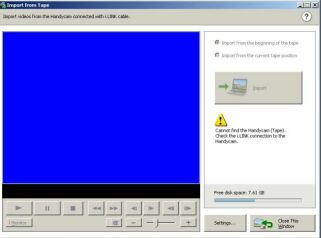 |
|
New member Username: JustonlymeTrivandrum, Kerala India Post Number: 3 Registered: Jul-07 | Jayanta - Lot of people did have this problems with Sony Handycam softwares. Best thing to do is install a Firewire card in your PC and tranfer from your Handycam to your PC using Sony Vega software (video capture). It works fine for me this way. |
|
New member Username: Meme88Post Number: 1 Registered: Sep-07 | I have a SONY handicam DCR-HC28, my firewire connection is good as has been tested with other device, but it wont detect my camera, or a friends camera, WHAT AM I DOING WRONG?????? |
|
New member Username: SmyrnaPost Number: 1 Registered: Sep-07 | hi guys... i have a problem about sony dvd305 camcorder.i can get photos and videos but i couldnt download them to my pc...what can i do ??? i think picture package programme broke down...how can i get picture pacakage??? please help me//// |
|
New member Username: Melo_yellowPost Number: 1 Registered: Oct-07 | I'm one of a million who is having the same problem. My ISB stream works great but I can't for the LIFE of me download the pictures into a file on my laptop so I can look at them. PLEEEEEEEEEEEZE Somebody help me! |
|
New member Username: KalesinBelgrade, Serbia Serbia Post Number: 2 Registered: Jul-07 | Hello Smyrna( eseakaakuyu)& Mello_yellow ( Melody Cook) Picture package programme you can download from Sony webpage (free registration required), I have downloaded it and it works, another thing is that that program requires JAVA and Flash player installed, so try to install those first then to load photos to your PC. But i recommend you to buy FIREWIRE card and dload through it it is much easier and much faster( card should not cost you more than 10USD, for me it was around 6eur), You will notice how easy it is to transfer movies and pix through that. For transfering also you can use Sony Vegas which has editing options too. If on lap top you do not have firewire or no option for expanding it to have firewire you will have to make sure that your camera is recognized by system, after that try using simplest thing Microsoft camera download manager to extract pix from it. Hope it will help. JJ |
|
New member Username: KalesinBelgrade, Serbia Serbia Post Number: 3 Registered: Jul-07 | Hello Meme88( meandme), make sure that your camera is set to transfer photos and movie to your pc, there is option in menu that needs to be enabled in order for you to transfer to PC. If again PC does not recognize your camera, try using another firewire port, do not use extensions or port multipliers but connect directly to the port. |
|
New member Username: AshokmohindraDelhi, Delhi India Post Number: 1 Registered: Nov-07 | Fungus problems with Sony Mini DV Handycam: I had purchased a Sony DCR HC 40E Mini DV Handycam in November 2004. After shooting about 10 Mini DV cassettes (total 10 hours recording time) in Australia and then in Singapore, I started getting a "head dirty" indication. Since I was a tourist in Singapore, and there was no time to go to a Sony repair center, I purchased a Sony head cleaning DV tape and tried to clean the head as per the Sony Instruction Manual. This did not solve the problem, and I could not shoot any more videos. On returning to my country (India), I went to an authorised Sony Repair Center. They kept the Handycam for about 3 days and informed me that the problem was due to fungus, which they said had been cleaned up. When I next used the camera after about 6 months when we went on a vacation, the same problem occured again within about 15 minutes of shooting. I went again to the Sony Repair Center and they repeated what they had done earlier. Last month we were going on a vacation again, and I took the precaution of showing the handycam to the Sony Repair Center. They again said there was a fungus infestation and it was cleaned up. The problem again cropped up when I shot a video for a total of about 30 minutes, and my vacation was again spoilt because of the faulty Handycam. I am strictly following all the instructions given in the Sony instruction manual regarding storage, usage after sudden change in temperature (for example after going out from an aircondtioned hotel room) etc. Please advise me if something can be done as I am sure if I go to the Sony repair center, they will repeat their so called solution which does not work. Please reply fast as the Guarantee expires on 16th Nov. |
|
New member Username: DesjakeyPost Number: 2 Registered: Nov-07 | Hi I have a sony dcr dvd 306 e. when I record stuff it plays fine on the sony motion browser however the minute i move it or convert it from there its all jumpy and with broken noise. I have tried lots of different things and now I am at a dead end..............Please help |
|
New member Username: DiwasPost Number: 1 Registered: Oct-10 | Hi! I have a new sony camcorder(handycam) but the still pictures are not so clear. I hope if you could provide a solution. |
|
New member Username: Inneedofhelp2Post Number: 1 Registered: Apr-11 | Hi, Sony Handycam digital video camera recorder. Model No: DCR-PC109E PAL I am having problems when recording. Every time I put the video camera in record mode, a dark (dark green-black) band appears across the middle of the screen. I can see the top of the image and the bottom of the image I am recording but not the middle because it is blocked out by this dark band. Can anyone help me as I am going on holiday soon and would like to take my video cam with me? If I need to send it off for repairs -- does anyone know roughly how much it would cost? Thank you for your help. |
|
New member Username: SonylistensPost Number: 3 Registered: Apr-08 | Hello Inneedofhelp2, I am Evelyn from Sony electronics the SonyListens Team. Please e-mail us at Sonylistens@am.sony.com with your information from your previous posting and contact information. Either I or one of SonyListens members will contact you. We look forward to hearing from you. Best Regards, Evelyn Perez SonyListens Team |