Digital out 3.5 mm (mono) to Digital Coaxial input
|
Computer Guy | How do I interconnect. Digital out 3.5 mm (mono) to Digital Coaxial input. Its a Creative Sound Blaster Audigy 2 and the Logitech Z-680. Anyone knows have an Idea? Thanks |
|
alan | any cable (analog or digital) will work. Got to http://www.maplin.co.uk and buy an analoge cable |
|
Derek | Use 3.5 mm to dual RCA adapter from Radio Shack. I would use one with a cable so as not to put too much strain on the jack. Digital Audio will be present on one of the RCA output. Part numbers 274-369, 42-2550 or 42-2540 |
|
| I was wondering how to do the same thing with the exact same setup. I tried using 3.5 mm to Dual RCA's but sound only came out of the lef tand right front speakers and no others. ?????? |
|
| Can i connect an analog headphone to the digital out on my soundcard ? Im using a Labtec Stereo Hi-Fi headphone and a Creative Sound Blaster Live 5.1 DE |
|
Anonymous | heck no, you're outputing either a PCM stream or AC3 (dolby digital 5.1) from your digital out, and unless you've got a Digital to Analog Converter (DAC) in your headphones (i've never heard of it but i guess it could happen, but not with any cheap labtecs), you're going to just hear wierd noise, if that. the digital coaxial output on these cards is to go to a DTS/Dolby Digital receiver, which decodes the encoded and compressed information. |
|
Jeff | Well, what about when you play a DVD on your computer? If it's encoded in Dolby Digital, I only pick up the music in the movie but no dialogue. I've got a DD and DTS decoding receiver so I know that's not the problem. Any ideas? |
|
| I have Logitech X620, works fine on 5.1 PC sound card but I want to set up surround sound with my Sony stand-alone DVD. The audio output is coaxial. Is there an adaptor that will permit me to connect to my X620's. There is a games adaptor giving left right channels but I would prefer surround. Any ideas would be appreciated. |
|
Haider Gill | You need a 3.5mm (male) to coaxial convertor. Maplin sell them (online) for £0.99 QQ66W 3.5mm Plg - Coax Skt. They also do a cable for about £1.50. Plug the convertor into digital out on your sound-card then plug a coaxial cable between your Dolby digital and or DTS receiver/amp. If your are already using your amp/receiver's coaxial input, you can buy a convertor to convert between coaxial to optical Toslink for about £20 (http://www.threedoubleyou.com/digital&fibre.htm) Digital Coaxial To Optical Converter REF: CPC:AV03254. Your amp/receiver must be able to handle the digital stream being input i.e. PCM (all amps will handle this for general CD playback, computer music etc...), Dolby digital and DTS. |
|
New member Username: AchispringPost Number: 1 Registered: 12-2003 | Hi guys, I am looking for a way, to do the same sort of thing, but for my car... So basically take the 3.5mm output directly from my MP3 player, to feed into the car amp, will this work? |
|
Unregistered guest | Am I to understand that on my Soundblaster Audigy Platinum 2, I can use a 3.5mm (mono) cable input, converted to coax on the other end, connect it to my digital coax input on my amp, and get 5.1 sound from my home system? If so, where would I find the cable with both required ends or the appropriate adapter? |
|
Unregistered guest | Hello!I was wondering if U could tell me how can I conect my soundcard SB live 5.1 to my reciever through a digital coaxial cable??Is that possible,or it`s just a dream?I tried with a 3.5 mm to RCA conector but all I am geting is a PCM signal.When I play a DVD it stays on PCM and it isn`t switchig to Dolby Dig.,is it somethings wrong with my settings,or simply it cannot be done!?Thank you!! |
|
New member Username: VgtvidzPost Number: 1 Registered: Jul-04 | Hi, I actualy have the same problem as some people here... here's my setup Yamaha receiver RX-V350 http://www.yamaha.ca/av/Receivers/RX_V350S.asp 5 satellites + 1 sub Sound Blaster Audigy (1) I'm using a mono RCA cable with a RCA to 3.5mm connector (mono)... So everything's plugged and I only get sound from the front l/r speakers. I can also read PCM on the amp, this is pissing me off because I would really enjoy using all my speakers, Thanks if you can help! |
|
Anonymous | Balaton and VCT- Have you guys made sure that the options for the sound card have it set to 6 Speakers (5.1) and have the digital output only checkbox selected? |
|
Microsoft Unregistered guest | I don't think the audigy 2 supports 5.1 via digital. my SONY Compact AV Home Theatre is connected to the audigy via toslink coaxial to optical converter. And I've tried all possiblities (digital out only, all decoding options) but nothing seems to work. I've sent creative several emails, they keep saying it'll work if you have AC3 audio file etc.. so basically you can't play games in 5.1 via digital in Creative products |
|
Whatasound Unregistered guest | I'm using a Yamaha HTR-5440. I take a stereo mini to RCA and one of the RCA's has a digital signal that I connect to the Coax on my reciever. All speakers work fine until I reinstalled windows, now both RCA jacks carry a digital signal one for the rear and one for the front. I can't connect them both at once. So how do I get back? |
|
Anonymous | The Audigy/Audigy 2 or any creative SB with the digital output requires a MONO 3.5mm to coax cable (or RCA, same bit different name). The best way to connect this is by getting a 3.5mm MONO to coax converter then plugging a coax or RCA video cable (yellow) from the converter to the Coax input of any reciever (use the yellow not the white or red as coax should be no less than 75ohm for quality reasons). You must select digital output only from your card options...also if you are using a DVD programme make sure you select SPDIF so your reciever decodes as opposed to the PC, this may require an upgrade with most DVD software players but is well worth it (if you have a good reciever to decode) I have an Audigy connected to my Sony STRDA5000ES reciever using the above solution, before I was using 5.1 direct (3 x 3.5mm stereo to 6 RCA) and the volume was very low, now it is digital (SPDIF) the volume is unbearably loud where before it was quiet. The recievers blue S-master pro light comes on also when playing DVD from the PC indicating it is recieving a raw signal...hope this helps, I was looking for ages and finally decided to look at the online Audigy manual that clearly shows the configuration for connectivity to external recievers  |
|
Hitspam Unregistered guest | The Audigy/Audigy 2 or any creative SB with the digital output requires a MONO 3.5mm to coax cable (or RCA, same bit different name). The best way to connect this is by getting a 3.5mm MONO to coax converter then plugging a coax or RCA video cable (yellow) from the converter to the Coax input of any reciever (use the yellow not the white or red as coax should be no less than 75ohm for quality reasons). You must select digital output only from your card options...also if you are using a DVD programme make sure you select SPDIF so your reciever decodes as opposed to the PC, this may require an upgrade with most DVD software players but is well worth it (if you have a good reciever to decode) I have an Audigy connected to my Sony STRDA5000ES reciever using the above solution, before I was using 5.1 direct (3 x 3.5mm stereo to 6 RCA) and the volume was very low, now it is digital (SPDIF) the volume is unbearably loud where before it was quiet. The recievers blue S-master pro light comes on also when playing DVD from the PC indicating it is recieving a raw signal...hope this helps, I was looking for ages and finally decided to look at the online Audigy manual that clearly shows the configuration for connectivity to external recievers |
|
Hitspam Unregistered guest | Oh Also, you have to change the speaker setup to 2 channel stereo (it does send raw 5.1 through the digital out) |
|
Unregistered guest | Gentlemen...I have the same exact problem as whatasound does...playing doom3 made me realize that I was only getting 2 channels of audio to my receiver. I reinstalled all of the creative drivers, uninstalled them, and reinstalled them, and even though I unchecked the AC3 decode and checked digital output only, it is still sending out a PCM signal over the 3 SPDIF connectors inside the digital port on my audigy 1 (I can tell because left front/right front are on the left channel of my stereo mini to RCA and rear left/rear right are on the right channel...and when I back the mini plug out a bit with the right channel hooked to my receiver, I can hear "center" come out of the sub on the surround mixer testing program). Anyways, it is still decoding the AC3 from the audigy, and outputting it as 3 discreet SPDIF channels...not passing the full AC3 signal to my receiver through the top pole (as per this picture: http://dmzweb4.europe.creative.com/usenglish/audio/audigy/images/audigy_dolby_di gital.image1.gif ) even though I am turning AC3 decoding off in the surround mixer. Any ideas???? Thanks. -rich |
|
Cory Unregistered guest | I can echo Rich's experience with Doom 3. In fact, in my case, utilizing the Radio Shack 3.5mm-to-RCA converter caused the L/R channels to be reversed. Ideally, what we'd all like is for the Audigy 2 cards to take all multi-channel material from games, etc. and encode it as a Dolby Digital signal to be decoded by our receivers. That's not what happens, apparently, unless your PC application is sending a Dolby Digital signal itself (i.e. DVD). Frankly, I'm extremely surprised that this isn't offered on a "flagship" product like the Audigy 2 ZS. The sound card market hasn't exactly had boatloads of technological breakthroughs and new features in the past 10 years...I would have expected that something like this would have been baked in for a while now. Short of a driver upgrade or better explanation from Creative, it seems like the only reasonable alternative is to make analog connections between all 5.1 channels and your receiver, for those who have discrete multi-channel inputs, and let the card do all the decoding. |
|
New member Username: MattholmePost Number: 1 Registered: Aug-04 | I have the AUdigy 2 card as well. What I want to know is if I need to get a special cable to use as my coxial out once it is converted to the 3.5mm jack. Or would an ordinary RCA work? |
|
New member Username: MattholmePost Number: 2 Registered: Aug-04 | Actually, let me change the question. Is there a diference between a coaxial cable with rca plugs on each end... and an AV video cable with RCA plugs on each end? |
|
Unregistered guest | How can I conect the external front jacks of my case? theres a "out" and a "mic in". Please help-me |
|
Anonymous | Hello, I have read what you guys have written but the issue stands still: I have Audigy2 with a 3.5mm digital output jack and a YAMAHA TSS-1 speaker system (with a "reciver" included") which has only coaxcial and optical input jacks. I have got a 3.5 to coax converter (the 3.5mm has only 1 black stripe on) and still after connecting i get sound only from the front left and right speaker. After doing a soundchack (where each speaker says it's location in his time) i noticed that only the front left and front right responded at all... Any ideas? was thinking maybe i need a 3.5mm converter that has 3 black stripes maybe... |
|
White^Fang Unregistered guest | Oh and plz, make it as specific as possible (pics of the needed parts would be good as well) |
|
tsesunku Unregistered guest | i'm having the same problem. audigy 2 zs to logitech z680. i have digital output only checked, 3.5mm to RCA adaptor connected to digital coax to receiver, only sound out of left and right speakers. anyone able to get all 6 speakers to work? |
|
White^Fang Unregistered guest | I have just noted something, apperantly the issue is that the "reciever" (TSS-1 YAMAHA) does not support AC3 (it supports DTS and other dolby digital stuff but not AC3). Is there a way to conenct em both using the digital mode? * I also noticed something about SPDIF, but have no idea how to use it... |
|
Bronze Member Username: Arnold_layneMadridSpain Post Number: 70 Registered: Jun-04 | White^Fang, AC3 is the implementation of Dolby Digital multichannel for consumer products. Your yammie should indeed be compatible. "Sony/Philips Digital Interface" a.k.a. S/PDIF is the formal name for coaxial digital interconnect. Optical version sometimes called Toslink (invented by Toshiba). To use it is just to decide what to send: DTS, DD or PCM. And to make sure receiver recognize what's coming through. Cheers AL |
|
Unregistered guest | I have a grundig Lenaro television (with integral speaker system) which has a digital 5.5mm coaxial input and I want to connect it to my cable STU which has a RCA SPDIF output. What cable/ connection do I require |
|
Unregistered guest | I have a Turtle Beach Santa Cruz.. they say to hook up a 3.5mm to left/right RCA cable but to just plug the red RCA into your coaxial input on your receiver.. i've got mine setup and can play dolby digital dvd's through powerdvd |
|
White^Fang Unregistered guest | Is there any way to connect a 3.5mm digital output jack to an optic input jack? |
|
Nocturnal Unregistered guest | What a mission! I'm in the same boat as most of you guys having trouble with the 3.5mm -> coax output to digi amp. I've been reading endless discussions on forums all over and this is what I've figured out/theorised to date (and will try tonight at home) I tried the original 3.5mm digital minijack to mini-din and rca(coax) from the Creative online store - I tried this with every possible config on my Live 5.1 DE card, but to no avail (even tried getting an optical connection working through the SPDIF out pins on the card) - except 1... Someone on this thread mentioned DEACTIVATING AC3 decoding, and ACTIVATING digital output only on the SB LIVE series for it to work, BUT also mentioned setting your speaker config to 2 speaker config. This makes sense, as the SB LIVE series maps the analogue out centre/subwoofer channel to the digi minijack in 5.1 mode. Try that guys, it just might work - as it is my last option to try also before the proverbial skin-of-my-teeth is about to break in search of a solution. White^Fang: You might want to try the 3.5mm minijack -> coax, and then adding a coax -> optical (toslink) converter onto that IF the aforementioned theory proves true. You can also make an optical converter (which is so simple that I still can't believe it.) by checking out this link: http://www.minidisc.org/cdrom_opticalout.htm I hope this helps... |
|
New member Username: LtburchChicago, IL USA Post Number: 1 Registered: Aug-04 | It is not an ideal solution for 5.1 audio but it does work. I have a SB Audigy and if I do set it to 2 speaker config using with decoding disabled and a 3.5MM mono -> RCA plug and connect that to my dolby digital decoder and setup my DVD software to use SPDIF (power DVD) I do infact get 3/2-1 (aka 5.1) output on the coax line. However this also means that the SB thinks I have two speakers so everything else having to do with surround sound will not play using my full compliment of speakers. Because of this I will be returning my fancy new sound card and going back to my old SB live since basically all this soundcard can do is be a passthough and even a card with no fancy features can do that. Anybody know if there are any sound cards which work well with external decoders? |
|
Anonymous | I use Audigy 2 with win2003 and it has no problems to pass-through the AC3/DTS on the S/PDIF out. I use a 3,5 stereo+video cable with 3 rcas. For games I have to use analog output, but if you are extremely rich, you could buy the DTS CAE-4 (USD 5000) real-time encoder to encode the discreet digital 5.1 output from audigy 2 into a dts stream which you can feed to your receiver. |
|
Phyrhk Unregistered guest | Hi. I have read this thread with great interest, but have not found the answer to my own problem. I connect to my Yamaha DSP-A1 via a 3.5mm stereo cable. I do not get one sigle sound out. Anybody got an idea how this could be? |
|
Vanquish Unregistered guest | does anyone know why i dont have the option to turn on/off AC3 decoding? (surround mixer) ive just got a SB Live 5.1 digital and no matter how much time i spend messin about with the setup i can only get sound from the front and left speakers. ive got the creative inspire 5.1 5500 surround sound decoder n speakers and it doesnt switch itself onto dolby digital by itself and when u select dolby prologic it doesnt split the sound up right?? :-/ |
|
Vanquish Unregistered guest | sorry that should say "front left and right speakers" |
|
Unregistered guest | Hmmm....... on the subject of 3.5mm jack SPDIF to RCA.....does anyone at least know where this cable can be bought? It's rarer than the unicorn. The only jack plug I've ever seen with 3 stripes (5 partitions) was in the creative PDF manual. I've looked everywhere.... but it seems it only exists on creative digital speakers. :rolleyes: |
|
Anonymous | For those of you who have posted to this group, I hope this information will help you. In reference to the original poster, to hook up a SB audigy card to an amplify using the digital output, you just need a cable with an RCA plug on one end, and an 1/8" (3.5mm) mono plug on the other. This cable is usually quit easy to find. You can buy them at dollar atores, audio shops, or can usually find adapters that convert an RCA plug to the 3.5mm jack. The cable itself is pretty much not that important, as digital signals are less prone to "noise", however severe degradation will result in spotty digital data, and therefore broken sound, so a really crappy cable might cause problems. You can use a coaxial cable, video cable, audio cable, whatever you want to call it, but as long as the physical ends are as mentioned, you are in business. That is the good news. Now, the bad news. For those of you hoping to hook up your nice fancy sound cards to your nice fancy amplifiers and speaker system, and get all the latest goodies without changing settings/cables etc, forget it. You are SOL. * special case exception. This is not to say that things won't work, it just means that there is not ONE setup, that will get you everything. This is due to the goofy way these sound cards are set up. Even though your amplifiers may support several different audio signal inputs, and the sound card can also support several different signals, the current implementation won't allow all your gear to play nice. If you simply want to get digital audio (5.1), using the above cable, make sure you change your sound card settings to use digital output only(find it yourself), make sure AC3 encoding on your Sb is on (another word for Digital), and make sure you set it up for two speakers (yes, two). If you try to set it to a 5.1 speaker system, you will only get the left and right audio. This is caused by stupid drivers that assume that if you have selected any more than 2 speakers, you must be using the SB as the digital decoder, and outputs the signals via the independent speaker outputs on the card, even though you have specified digital output. The end result is, with the above settings (you might have to tweak your independent configuration) you will get Dolby Digital 5.1 from your sound card, into your amplifier, and it will sound great. However, because you need to set your sound card up as a 2 speaker (stereo) configuration, your computer games will not play in surround modes properly, simply stereo. Few games (if any) support dolby digital, so you will just have to listen to them in stereo. That means Doom 3 is stereo only. Sorry. * exception. Two possible ways around this, are, to forget about using your amplifier as the Digital decoder, and to hook up the SB card outputs to you amplifier using the individual channel inputs, ie front to front, center to center, rear to rear. If you are lucky your amplifier can do this, and in this case, you turn your sound card digital output off, select a 5.1 speaker setup, and you will hear your movies in 5.1 dolby digital, AND your computer games will also play in surround modes. Of course, for purists, there will be an audio degradation as you will be sending an analog (converted from digital by your sound card) signal to your amp instead of a digital one, and the wiring is much uglier. Plus, you will have to use the SB software to adjust levels, sub cutoff, etc. it also may limit what other gear you can plug into your amplifier as all of the inputs may be used. But it does work. The second, as mentioned by another poster, is to spend gobs of money on a seperate digiatl encoder, and feed your sound card signals into it, then into your amp. The solution to this, would be if the sound card converted non digital signals (including surround modes) and converted them to dolby digital. Then, you could have it all, but I have not yet found a card that can do this, maybe some day. Hope this info helps. |
|
Anonymous | Hi. I have everything working fine (3.5mm jack -> RCA) with my Yamaha amplifier, BUT I have to turn the volume up extremely loud to hear anything. I use WMP10 and am clueless to what might cause this. Anybody know how this could be fixed? |
|
Simania Unregistered guest | Hi, The story of the guy posted on the 6th of september is perfect.... But for the people who have a SB Audigy 2 and want to watch movies via their amplifiers in Dolby Digital or DTS, make sure that the internal decoder function is set to off....Go to the 'AudioHQ' menu via the control panel and then to 'Device Controls'. Find the Decoder tab and select SPDIF Passthrough to on. Hopefully this helps and let's all pray for DTS/DD game support...... Ciau |
|
CoZMoSiS-UK Unregistered guest | I feel inclined to comment here after feeling sorry for everyone having problems... Those of you trying to take the digital signal out the back of the pci card on the Audigy2 (and i think the Audigy as well) are in for a slight dissapointment im afriad. Creative purposely altered the attenuation of the digital signals to all but the FL/FR channels so you will ONLY be able to get all channels on Creative speakers. I was in the same boat as you lot several months ago til i found that out, and the only solution is to either use a Creative speaker package (yeah right) or spend all the more money on the Platinum version of the card, which you can then use the digital output on the external I/O interface - which i have been told works perfectly tho i have not personally had the chance (or funds) to try yet. Whilst you can mess around and get it working for dvd's as it can output a raw signal, im afraid you just have to give up making it work for games etc. too. |
|
New member Username: LtburchChicago, IL USA Post Number: 2 Registered: Aug-04 | So you are saying that, to your knowledge, if you get the platinum version of the card then you can output 5.1 digital to an external dolby DTS decoder for all functions not just DVD playback? |
|
CoZMoSiS-UK Unregistered guest | Yes indeed. Also after having a look on Creative's site i never noticed before but it even says so on the specs page for the Audigy 2: http://us.creative.com/products/product.asp?category=1&subcategory=204&product=4 915&nav=technicalSpecifications to quote: Sound Blaster Audigy 2 ZS On-Board Connectors Line level out (Front / Side / Rear / Center / Subwoofer) Digital Out for 5.1 support (6-channel SPDIF output to Creative digital speakers) The _ON BOARD_ 5.1 support is only designed for thier own line of speakers. If you look at the specs of the platinum, the external I/O module has optical outputs on it and it mentions nothing about only being for thier speakers. Interestingly, the specs of the ordinary Audigy 2 dont mention anything about the back panel output being only for thier speakers, but as so many people so it doesnt work so we can assume that its the same case. Also, isnt it a bit coincidental that the only people having problems are those with a standard card trying to use the onboard digital output ? I'm gonna confirm with a friend of mine next time i speak to him as he has a platinum and i know uses the optical output on the external module, but no doubt he will confirm what all the evidence points to. |
|
Unregistered guest | Here is an answer from Audigy that might help people out: Thank you for contacting Creative Technical Support. With reference to your email, please kindly be informed that the Creative Sound Blaster Audigy and above series of sound cards do support 5.1 digital sound output. Please access the link below for a detailed technical specifications of the sound cards: http://us.creative.com/products/welcome.asp?category=1& I am very sorry for the inconvenience caused. Please email back on the status concerning the issue so that I can assist you further. Thanks For faster service please reply with previous correspondence when replying to this email. Best Regards , Rachel Low Technical Support Creative Labs Americas "Get Creative" |
|
New member Username: LtburchChicago, IL USA Post Number: 3 Registered: Aug-04 | The as stated above the question is not if it supports 5.1 surround on the digital out but if it supports 5.1 surround on the digital out in a matter compatible with external DTS decoders such as home theater systems/external amplifiers. Experiments have shown that at least the Audigy line below the platinum only support 5.1 surround on the digital out to an external decoder when dealing with a SPDIF source such as a DVD. An experiment with the platinum is pending. All other times the digital out to an external decoder only supports 2 speakers. The key here is the external decoder, I fully believe the card will output 5.1 to their own line of speakers (and maybe some other manufactures speakers) but not an external decoder. |
|
Art Saxby Unregistered guest | I can get everything except dialoge. I have followed everything above and can get great sounding surround music from my PC to my home theater system. My home theater system shows it is getting a digial signal and even recognizes DTS. But I don't get any dialoge in a movie. Can anyone help? Art |
|
New member Username: WardakPost Number: 1 Registered: Sep-04 | I found this thread while looking for a solution to a problem getting 5.1 out of my Audigy2 and a coax digital connection. I found the fix for this and wanted to share. Basically I was going for the 5.1 pass-through using PowerDVD 5, an Audigy 2 Gamer (no "Live Drive"), a coax output and an Onkyo 6.1 home theater system (with decoder built into the receiver). I wanted 6.1 (Dolby/DTS EX) for the movies, and channel for my regular Windows stuff, with the ability to use my headphone/microphone all without a bunch of clicking on sound settings everytime I changed applications (the analog 5.1 connections required me to change my control panel settings for each application--and denied me any use of the rear center 6.1 capability because the receiver didn't have an analog input for that channel). I use the headphones 50% of the time, and the amp'd sound the other 50%. This offers no capability that I have seen yet to get 5.1 out of games or whatever (not a factor for me really). I'm not sure I have any games that are capable of this... SW settings are like folks have already said: Creative Audio HQ-->Device Properties-->Decoder = SPDIF passthru. Creative Speaker Settings -->2/2.1, Synch with control panel, Digital Only. PowerDVD audio config is SPDIF. I feel like I tried all this already, but didn't see it working until now (was always stereo PCM at best)--maybe one of them was off or something. This lets everything in my Windows environment be 2-channel, except DVD playback which gives the 6.1 stuff--on my receiver I do have to push the "surround" button to get the receiver into multi-channel mode, otherwise it stays stereo-only. The receiver kicks straight back to stereo when I shut down PowerDVD (it senses the tremor in the Force or something...) None of the "speaker tests" in Windows will show all the channels working. My indications for success were hearing the good stuff, and seeing the correct things on the receiver info display. Bonus here is that the digital output in the stereo mode is decoded by the receiver to give me the 2.1 subwoofer action--so even stereo sounds better now. Nothing new really I guess, but the directions are not clear at all for this and I was beginning to wonder whether the Audigy2 was capable of this via the coax at all, thankfully it is. Also works for 6.1 from PowerDVD in HDD mode. |
|
JasonH Unregistered guest | CoZMoSiS-UK Any luck yet? |
|
Anonymous | This forum has been very helpful to me in making a decision regarding a new speaker setup for my computers. I thought I'd throw my own experience into the ring. I bought a set of Logitech Z-680s to use as a combined speaker system for my PC (Audigy 2 ZS sound card) and my Power Mac G5 (built-in optical digital out). I hooked up the speakers as follows: 1) Optical Out on the Mac to the Optical In on the speakers 2) 6-channel Analog Out on the Audigy to the 6-channel Analog In on the speakers 3) S/PDIF Out on the Audigy to a mono-to-RCA adapter, then digital coax to the Coax In on the speakers In Control Panel\Audio HQ\Device Controls\Decoder, I set the Decoder Options to "SPDIF Passthru". In the Speaker Settings and THX Console, I deselected "Digital Output Only", so that both the 6-channel and the digital outputs are active. I'm using Intervideo Home Theater on the PC for movies and TV viewing, having selected "S/PDIF" for the sound source. TV plays back in Dolby Pro Logic II, and DVDs play in Dolby Digital (the Z-680s switch decoding schemes automatically as the type of audio changes). When I want to play games, I switch the Input on the speakers to "6 Channel Direct" and the games play in full EAX surround. My biggest hurdle was finding that damn Control Panel option that kept the Audigy from encoding everything that came out of the digital port of the card. With the onboard encoder enabled, the TV/DVD audio never came out right. Anyway, thanks to all of you for posting your experiences/suggestions. It was a big help. Uncle Andrew |
|
PackSwede Unregistered guest | Thanks for that post Uncle Andrew, ordered an Audigy 2 and the Z-680 speakers today for my new computer and your post tells me what cables i need. Still haven't found a 3,5mm to RCA adaptor here in Sweden though... |
|
Silver Member Username: Arnold_layneMadridSpain Post Number: 150 Registered: Jun-04 | Inte ens i Clas Olssons katalog? |
|
PackSwede Unregistered guest | Arnold, they only had the 6,3mm to RCA... found it in Teknikmagasiner though ;) |
|
Anonymous | hiya I have a similar problem but with a slight twist. trying to hook my xbox up so that I can get surround sound going. my amp only has 6 rca plugs for audio and the xbox cables (as far as I have found) don't support this connection - only fibre optic or coax or spdif. I also haven't been able to find cable that can convert to rca. any help with this would be much appreciated. oh and the sound system specifies dolby digital and dts as supported. |
|
Unregistered guest | Guys, Thanks for all the help, well appreciated! Did anyone get the windows test to actually work? i.e. all speaker to say their name... Back Right, or Center? with the SB --> reciever option... Thanks, Stu |
|
Anonymous | I started researching this problem after purchasing a set of klipsch speakers with built in decoder and no multichannel inputs. The options you need to make this work is Dolby digital encoding. Currently this is supported on the nforce 2 motherboards and the new intel 915/925 boards. The Audigy will not encode to dolby digital. There is another manufacturer of sound cards which can do the same but I can't remember the name. Read the write up on tomshardware about the new intel boards and they will make mention of the feature. Hope this helps. |
|
Anonymous | Many thanks guys, i'm french and didn't find any usefull information on french forums. I've got a HP Media Center with an Audigy 2 ZS (not Plantinum), and it does work when I plug a basic jack to RCA cable between SPDIF output and digital coaxial input on my integrated home decoder. This is only a software configuration issue (for the sound card and DVD player) - see below to learn more about it. Great !! |
|
Unregistered guest | Hi, Currently i am using Asus a7n266VM motherboard with onboard 5.1 soundcard as well as i have Pioneer DVD Playesr with Optical&Coaxial Digital out(Dolby & DTS). My query is can i connect my DVD players Digtal out to SB Live DE 's digital in so that it will give me 5.1 anolog out. If no pls tell me is tehre any other sound card or exterbnal divice which will do it. Vishal T. |
|
chayzer Unregistered guest | No luck yet on getting digital output on audigy 2 ZS to Creative Inspire 5.1 Digital 5500 to put out 5.1. Just the typical front left and front right. Tried onboard optical out and same thing. |
|
chayzer Unregistered guest | From Creative Labs Knowledge Base: Solution ID # 4858 Speaker test only outputs from two front speakers If you connect speakers to your sound card using a digital cable (RCA/SPDIF or optical) then the software speaker test will only output from two speakers.The reason for this is that the speaker test signal is not in AC3 nor DTS format. The signal on a digital connection is either: Optical SPDIF - which is either Stereo PCM signal or AC-3/DTS Bitstream RCA SPDIF - which is either Stereo PCM signal or AC-3/DTS Bitstream If you play AC3 (Dolby Digital) or DTS encoded signals, the amplifier decodes this and outputs it to all 6 speakers (5 satellites & subwoofer) discretely. When playing back stereo signals (such as Wav/CD Audio or MP3/WMA files) the amplifier may generate 5.1 output based on the incoming stereo PCM signal, provided Dolby Pro Logic decoding is available and activated. Therefore the speaker test should not be relied on when using RCA or Optical digital connections. This applies to all speaker systems equipped with RCA or Optical digital connections. Once a system offers a multichannel digital interface such as Creatives Digital DIN (DTT 3500, Inspire 5700) or 4-Pole mini jack (MegaWorks 510 D / 650 D), 3 stereo PCM signals can be transferred simultaneously. Using either of those connections, the speaker test will function properly, as all available channels can be transferred to the speaker system within the digital domain. |
|
Anonymous | Uncle Andrew, thanks for your post. I have a problem when I try this though. My Control Panel\Audio HQ\Device Controls does not have a "Decoder tab" and thus no SPDIF passthrough option. I have an Audigy 2 that came with my Dell system. Does anyone know of any software that I need to update or can download to get this option? Jethro |
|
Beren Unregistered guest | Problem: I followed a lot of the advice people had, but sound played only on my front 2 speakers. Solution: I went into the AudioHQ, then into Device Controls, the first thing I noticed was the digital sampling was set to 96 KHz. This high sampling confused my reciever to believing that the input was just a stereo input. When I switched the rate down to 48 KHz, the music went to all speakers. |
|
Silver Member Username: Arnold_layneMadridSpain Post Number: 186 Registered: Jun-04 | Glad you resolved your problem. But I'd say the origin wasn't receiver "confusion". S/PDIF doesn't handle more than 2 channels at 96KHz/24 bits. So what happened was probably that the source sent 2-ch to output. Cheers AL |
|
Dave McG Unregistered guest | Having read all of the posts, I think this will work. I have an Audigy, and currently it is connected up to a Logitech amp and 5.1 speakers via the supplied 3 3.5mm jacks. I want to hook it up to my Sony amplifier, because it has some nice meaty speakers and a REL sub already hooked up. The Sony has 5.1 inputs that I do not currently use for anything else. I take 4 core, flat speaker wire. Split it in half lengthwise to get 2 core, flat speaker wire. Stick the 2 core to some of the remaining 4 core to give a length of 6 core wire. Connect one end of the 6 core wire to 3 3.5mm stereo jacks. Connect the other end to 6 RCA leads. The stereo jacks plug into the Audigy and the RCA leads plug into the 5.1 inputs on the Sony amp. That way I should get exactly the same sound out of my Sony amp that I currently get out of the Logitech amp. There will be a longer cable run from the Audigy to the Sony than there is from the Audigy to the Logitech because of the way the room is set up, so there will be some signal degradation, but other than that it should be identical. Assuming I switch the Audigy mode in the Control Centre; if I play a DVD I will get 5.1, if I play a CD I will get stereo, if I play a game I will get 4.1. Should this work? I have 4 core speaker wire already. All I would need are the 3.5mm jacks and phono plugs. Dave |
|
Anonymous | Who hoooo, I just got my Soundblaster Audigy to work via SPDIF with my Sony STR-K1900P reciever (5.1 setup). Im running XP SP2, I just finished a clean install and grabed the latest patches on creative.com, while setting up I found "Creative AudioHQ" icon in the "Creative" start menu group. Go "Device controls > Sampling Rate (tab) > 96Khz" All of a sudden my reciever would not allow me to change between Pro Logic I/II and I poped in a DVD it workes like a charm!! BTW I am running a Dell Dimension 8250 2.53GHz (533MHz bus) |
|
Anonymous | Well this all just seems to scream : "You can have dolby for audio streams that are in dolby, and same for DTS, but cant use more than 2 speakers if the signal isnt one of those 2 types" How sucky. Someone make a software encoder :> |
|
Silver Member Username: Arnold_layneMadridSpain Post Number: 204 Registered: Jun-04 | Nah, I think receiver doesn't handle multi-channel PCM or whatever this encoder send through S/PDIF. But you could send digital or analogue stereo to it, and let it process ProLogic I/II, CS, Neo 6 etc. Cheers AL |
|
Peter Sedeffow Unregistered guest | Hello, All Just recently got myself a 5.1 surround system (Yamaha amp + big speakers). Read this forum - very helpfull. Eventually I wanted to do more than was discussed here - so now i find it only fair to share my finidngs with the rest of you. I originally wanted to use my Audigy Player sound card. Used a standard 3.5mm (Stereo) -> RCA (left + right channel) cable (the normal cable you would use to connect a computer to an amp). I used the white RCA cable to connect to the S/PDIF digital input of my amp. With a few bumps in the beginning - it all worked fine. mixer->advanced, tick the "digital out only" checkbox - got sound creative sound control -> disable dolby digital decoder - managed to get AC3 from DVDs and DivX files with AC3 sound tracks. Use Zoom Player with ac3filter (http://ac3filter.sourceforge.net) and set output to be S/PDIF passthrough) This, I guess, is what most people want to do. But, wouldn't it be nice to be able to get 5.1 sound out of Winamp. There are quite a few plug-ins (the best I found is "KB 5.1 channel"). The problem is that all of them output 5 channels and all that gets passed on to the amp via the SPDIF is just 2 channels. There are plugins to encode the outputed stereo signal to dolby prologic or surround - however that is nowhere near as good as having 5 (.1) discreet channels delivered to the amp. So ideally I wanted someting that can encode the discreet channels that it receives into AC3. A realtime Ac3 encoder. Guess what - I couldn't find any. I even started looking into using besweet for the purpouse (an AC3 encoder) - but it was hopeless. Then thanks to the post of Anonymous from Tuesday, October 12, 2004 - 05:05 pm : RE: nforce2 support. I looked it up - and yes - there is a thing nvidia calls SoundStorm - and it encodes the sound output to AC3 in REALTIME!! This means - games, movies, winamp plugins - all being delivered to my amp in 5.1 AC3. I have the Abit NF7-S motherboard and it luckily supports this soundstorm feature. Unfortunately didn't have a coaxial S/PDIF out (only optical), so had to do some extra wiring to some jumers on the motherboard to get it out http://www.motherboardfaqs.com/content.php?content.11 The hassel was well worth it. 5.1 from winamp (using KB 5.1 plugin) 5.1 for AC3 DVD and divx 5.1 for all surround audio games Then I thoght - is it possible to get stereo encoded movies to play over 5.1 channels. Ohh yeah - the DirectShow filter you need is called MatrixMixer - http://matrix-mixer.sourceforge.net/ (don't download it yet though as it gets more interesting further down... ) MatrixMixer can convert a stereo source to whatever speaker configuration you require. Lots of settings you can change as well - not that I found a need to change any apart from setting my speakers to 5.1) As a matter of course I also installed the latest ffdshow video decoder. It is an MPEG-4 video decoder that I use to play divx movies because of all of its excellent postprocessing filters. It is still an alpha version though (http://sourceforge.net/projects/ffdshow) Surprise, surprise - this last alpha (only 2 weeks old) comes bundled with a ffdshow audio filter. And guess what - the MatrixMixer is included as a filter inside it (among many other very usefull filters). The alpha version I am writing about is from 2004-10-12. (DO NOT download the stable version as it is very old and does not have the features for 5.1) Now - here comes the interesting thinf I noticed which will make all of the NON-nForce2 owner out there VERY, VERY HAPPY. ffdshow audio filter -> Input/Output -> Supported output sample formats The default list is as follows [x] 16 bit integer [x] 24 bit integer [x] 32 bit integer [x] 32 bit floating point [ ] AC3 -> Bitrate: 640 Tick the AC3 checkbox and the filter will encode in REALTIME the audio to AC3. Enable the MatrixMixer and you wil have your stereo movies playing in AC3 on all speakers. Too good to be true? - YES Unfortunately - this feature - doesn't work yet. The release changelog states: " ... * working on ac3 output ... " So I guess very soon - perhaps next release - AC3 output will be functioning. Another thing ... If you are thinking - how will this help me with my MP3s? Zoom Player with FFDSHOW audio filter DOES play mp3s and the built-in MatrixMixer DOES convert them to 5.1. All you have to do is use Zoom Player instead of Winamp. I know it is a tough choice, but it is either that or switch to a soundstorm compatible motherboard. Peter |
|
hithere Unregistered guest | To anonymous user with the problem hooking up his x-box to a surround amp with only analog inputs: The product you are looking for is a soundblaster extigy, which can take the dolby digital output of your x-box and convert it to 5- or 6-channel analog to go into your amp. If you are talking about passing the dolby digital from your x-box or an external DVD player to a PC for decoding, you need any combination of a Soundblaster !Live, Audigy, or Audigy 2 as well as the riser from the Live Platinum, or the drive bay inputs from the Audigy Platinum (and yes, the output riser card from the !Live works on the audigy/audigy2 just fine). If you lack the drive bay or riser card input sections, but know a little about electronics, you can find the SPDIF in pins on the riser connector on the back of the audigy card and fudge something to both 1.make it think there's a riser or drive bay connected to it and 2.take the SPDIF input via the 2 pins designated for it in the pin-out diagram, available under the "product specs" section of soundblaster.com. I'll leave the details on that for those who think they can do it to do a google search on . Oh, and get the newest drivers off soundblaster.com. Once you have the new drivers, and the card hooked up for SPDIF in, all you have to do is turn on "dolby digital decode/spdif input" and away you go. |
|
New member Username: DarkfiberColumbus, OH USA Post Number: 1 Registered: Oct-04 | I just got a Logitech Z-5500 Digital speaker system which is the new version of the Z-680 I guess. Here are the details... I have a Soundblaster Audigy Gamer in my PC http://us.creative.com/products/product.asp?category=1&subcategory=205&product=2 37 Would be the best way to hook these up be like Uncle Andrew did in this post here?... https://www.ecoustics.com/cgi-bin/bbs/show.pl?tpc=5&post=151074#POST151074 Thanks, DK |
|
Uncle Andrew Unregistered guest | Jethro wrote: My Control Panel\Audio HQ\Device Controls does not have a "Decoder tab" and thus no SPDIF passthrough option. Hey Jethro, I don't know what to say about your system's lack of a "Decoder" tab in AudioHQ. My Audigy 2 ZS is a retail card, maybe that's where the difference lies. Or maybe it's the difference betwen an Audigy 2 and an Audigy 2 ZS. My version of AudioHQ is 1.60.05. Perhaps Dell offers a software update on their site, or maybe the updates on the Creative site will work with OEM cards. Uncle Andrew |
|
New member Username: SageangelPost Number: 1 Registered: Nov-04 | Here is the thing, since its digital I just used my motherboard soundcard (Asus A8v Deluxe) audi chipset (Realtek ACL850) instead of my audigy 2 and it works well. Creative wants people to buy their speakers only so they make it a pain for anything else. I have yet to try to select the spdif output option with powerdvd and see if that works. Also the digital output in the back of the audigy 2 is spdif. |
|
Unregistered guest | Hello folks, I have a SONY DVD player that had an digital/coaxial out and Audio left/right connection. I was looking at the creative website and the low end 5.1 speakers systems have inputs for a front/rear and subwoofer connections. Is there any way i can connect my DVD player to these kind of systems that do not have a digital input? Do you think i would need to buy a decoder. Let me know Ray |
|
New member Username: SageangelPost Number: 2 Registered: Nov-04 | U probable need a reciever with Digital in so u can hook up both ur speakers and dvd player |
|
Unregistered guest | I have the same problem playing 5.1. I have Sound blaster audigy, I have conected a 3.5 mm mono to coax converter at the back of the sound card digital output that is connected to a coax video cable that is conected to the coax digital input in the back of the receiver, I have the ac-3 decoder unchecked in the audioHQ settings, 2 speakers setup, digital output only is cheched, and played a ac-3 file. I have a sony receiver, aparently it works, the blue S-master pro light comes on in the receiver but It gets only "stereo sound". I played DTS Wave files (burned in a cd-r works excelent) but it does not work only play weird noises. How can I get all the 5 speakers to work and not just stereo. Anything wrong with the files? the Cables? any Plug Ins that make it work? do I need new drivers? any excisting program that make it work? something I am missing in the settings? If anyone can tell me I would apreciate |
|
smudger76 Unregistered guest | hi all, How do I interconnect. Digital out 3.5 mm to Digital Coaxial input or optical, so that i can get 5.1 surrond sound out of my pc. Its a Creative Sound Blaster Audigy 2 and the Logitech Z-680. does anyone have a clue? ive tryed a optical 3.5 mm jack to male optical, but it doesnt work, probaly becuse its not a optical jack on the sound card? and ive looked everywhere for a 3.5mm jack to phono digital coaxial cable but cant find one anywhere? please help me someone! Thanks |
|
New member Username: SageangelPost Number: 3 Registered: Nov-04 | just us an RCA one, im pretty sure it should work, but make sure to select spdif pass through in the audio hq settings |
|
Anonymous | hi all, i noticed creative has a cable they sell to go from mini on the soundblaster to sp/dif on their speakers (i have the creative inspire 5700): http://us.creative.com/products/product.asp?category=13&subcategory=58&product=1 0375 if I buy this cable, will I be able to have my cake and eat it too? i.e. will i have 5.1 sound for movies and for doom3 etc? or is this no different than doing the mini-->rca converter option? thanks, Wes |
|
New member Username: MikevernonPost Number: 1 Registered: Nov-04 | Can anybody tell me how to hook my PC up to my new Sony home theatre reciever? its a 5.1 DTS compatible , and has a way to connect im sure.. just dont know how. Thanks a lot! |
|
Silver Member Username: Arnold_layneMadridSpain Post Number: 257 Registered: Jun-04 | The only way to pass DTS is digital audio interconnect. I.e. PC sound card must have a suitable digital output. Cheers AL |
|
Silver Member Username: Arnold_layneMadridSpain Post Number: 258 Registered: Jun-04 | Actually there is one other possibility: DTS decoding by PC sound card with 5.1 analogue output. Requires 5.1 input in receiver. |
|
Anonymous | There is something which everybody is overlooking. If your sound card is set up to pass an undecoded Dolby Digital 5.1 bitstream over the digital audio connection to your Dolby Digital 5.1 external decoder, then you *will* get 5 + 1 channel sound. Now unless you are passing a 5.1 undecoded Dolby Digital 5.1 bitstream over the digital audio connection, then you will be passing a two channel PCM digital audio bitstream to your external amplifier, which will obviously only play the two channels through your loudspeakers namely left and right. The only way for example to get 4 or 5 channel sound from a *non* Dolby Digital encoded game sound to playback as 4 or 5 channels through your external amplifier would be to Dolby encode the audio stream prior to passing it over the digital audio connection. Since your sound card is not capable of doing this, what it passes is, as described above, a two channel LEFT + RIGHT PCM digital audio signal. So the only way to get more than two channel sound from a non Dolby Digital source to your external amplifier is using the individual analog channel outputs. |
|
Anonymous | Can someone help? I have got a dvd player with Digital output. However, my amp cannot receive Digital. Its a Bose lifestyle 12. Series I. Is it possible to convert this digital output from the (optical or Coaxial) output for input into a normal L/R RCA plug? |
|
Bronze Member Username: HobbitfeetManchesterUK Post Number: 11 Registered: Nov-04 | Is there not a stereo RCA L/R out of the DVD player? You'll not get digital audio, but at least you should get ProLogic from your receiver this way. |
|
Smv Unregistered guest | Hi can anyone help me? Currently I have a Audigy 2 and a set of Logitech Z-5500. I have hooked up them up via digital coax by making a mini jack -> coax line which works. I know this because my speakers play stereo sound when I set it up in 5.1 mode, Digital Out only. But when I try to get DTS or Dolby Digital in movies my reciever doesn't even get a signal. My settings so far is AudioHQ -> Device -> Decoder SPDIF passthru Speaker Settings -> 2.1, Digital Out only THX settings -> 2.1, Digital out and PowerDVD 5 -> SPDIF passthru the problem is there is no signal at all with this setup. Anyone else have a similar problem like this or better yet a solution? Thanks |
|
New member Username: DarkfiberColumbus, OH USA Post Number: 2 Registered: Oct-04 | Well I have an original Audigy (not Audigy 2), same speakers as you. My setup is the following... AudioHQ -> Speaker -> 2/2.1(Digital Output Only Checked) PowerDVD 6 ->SPDIF passthru (also works fine with WinDVD 6) Logitech Digital Z-5500 controller input set to COAX. Works fine for me in DD 5.1 as well as DTS 5.1 (on DVD's that have it). DF |
|
2smv Unregistered guest | Thanks for the reply DF but I found the cause of the problem. It was cause the cable I made. Before I had a stereo 3.5 mm with some sort of cable my cousin had. So I just bought a 3.5mm mono and used Coax cable to make the 3.5mm -> RCA and it works great now |
|
Sam S. Unregistered guest | What I am trying to do is connect my pc speakers to my stereo. The speakers use a 9-pin S/PDIF DIN plug. This is similar to the Soundblaster. Is there anyway I can directly connect the speakers to the stereo via stereo rca cables? Thanks |
|
help me Unregistered guest | hey guyz i got the z680s and a sound blaster audigy 2 zs can someone post some links to the things i need for digital connection? ive read the post and when i google the parts i get a bunch of different components. mean while i got monster wire fibre optic digital wire that doesnt fit in my sound card ... |
|
Unregistered guest | I have a three year old Dell computer with a Sound Blaster Live soundcard (it is not 5.1). The sound card has a digital output 1/8" jack. I want to connect it to my Sony receiver which has coaxial digital input. Do I need a special signal converter or can I get away with just an adapter to go from mono 1/8" to coaxial? Does it matter if the adapter is mono (I've been unable to find a stereo to coaxial converter)? Will it still play in stereo on my receiver? I have a 5.1 receiver - will the sound play to 5 speakers or just two (as I stated above the sound card is not 5.1 capable)? So many questions and no answers. Please help. |
|
Miah Unregistered guest | There is a great THX audio/video setup/test on the movie Shanghai Knights. This way you can test the surround from a DVD directly. Now why don't I have an "AudioHQ" button in my control panel? I have an Audigy 1. |
|
Webjammin Unregistered guest | I spent a few hours trying to get the Audigy 2 ZS digital out working with my Onkyo receiver. Now it is working fine. Here's what I did to get it to work: 1) Buy 6' Audio and Digital-Camera Cable (mono) from Radio Shack. Part No. 42-2444A. One end of this cable is RCA. The other end is 1/8" (3.5mm) mono mini jack. 2) Configure Sampling Rate: - "Start -> All Programs -> Creative -> Sound Blaster Audigy 2 ZS -> Creative AudioHQ" - Select the "Sampling Rate" tab - Select 48 KHz - Note: 96 KHz did not work for me. No sound. 3) Configure SPDIF Passthrough: - "Start -> All Programs -> Creative -> Sound Blaster Audigy 2 ZS -> Creative AudioHQ" - Double-click "Device Controls" - Select "Decoder" tab - Select "SPDIF Passthrough" 4) Configure Speaker Settings: - "Start -> All Programs -> Creative -> Sound Blaster Audigy 2 ZS -> Creative Speaker Settings" - Select "2/2.1 Speakers" - Select "Digital Output Only" 5) Reboot Hope this helps. Webjammin |
|
New member Username: DarkfiberColumbus, OH USA Post Number: 3 Registered: Oct-04 | Miah > AUDIOHQ isn't located in the Control Panel. It should be under the "Creative" menu when you go to START then select PROGRAMS. DF |
|
Anonymous | Why does the 3.5mm mini-plug going into the Audigy have to be mono? If you use a stereo (3.5mm) mini-plug won't the LEFT or RIGHT have the AC-3 stream regardless? (either a regular stereo PCM stream or an AC-3 coded compressed PCM stream ) ..I can't for the life of me see that combining PCM streams makes any sense..? Any one follow this? ..help. |
|
impressme Unregistered guest | Another solution might be to go with a different sound card, preferably a non-Creative product. Here is a 5.1 PCI card from M-Audio. It has a digital S/PDIF coaxial output. Check out the manual as it provides excellent information, eg. use a 75-Ohm rated S/PDIF cable instead of standard RCA, as they are only rated at 50-Ohm. I'm not sure how the settings would have to be configured in software with this card to play nicely with your amplifier, or even a product like the Xbox 5.1 system found here: http://www.spherexinc.com/products_xbox51.asp This is a setup I've been thinking about purchasing recently. I already have an OEM original Audigy, so it might work too, but it doesn't have the S/PDIF coaxial output like hte M-Audio card. |
|
Anonymous | I have a SB Audigy card with a 3.5mm to Coaxial connected from the S/PDIF on the card to my 5.1 Interact DSS-900 system. (On a side note, this topic actually led me to the 3.5mm to Coaxial converter I needed for this to work) I then set the speaker settings in the Creative Audio HQ to 2/2.1 the sampling rate to 48khz , checked the Digital Output Only box and started up Half Life 2 as a test (the Creative test only played audio in front left/right speakers). I selected the 5.1 speaker setting in the game and noticed IMMEDIATELY that all channels were recieving audio. The game gives sound to right/left surround, center and front right/left speakers. I'm not sure if this will work with any other games, but I know for certain it will work with HL2. |
|
Rise Of The Phoenix Unregistered guest | I was having the same problem with my Live 5.1 DE card. The digital output only sent out two chanel audio, no matter what I did. But seemingly, there is no problem, at least for me. For the purpose of listening to music and stereo encoded movies in 5.1, I can just use the normal stereo out and my Sony HT-SL500 does the rest. It decodes the 2.0 audio and reproduces it in DPLII format. That settles the un-encoded audio, and since I use an independent DVD player, that's done too. The previous post has really relieved me. even though I don't have a good GFX card right now, it feels good to know that when I will, I can simply use the SPDIF out to get 5.1 audio from games... hopefully what worked for Audigy also works on Live. Mission accomplished. |
|
c0nfused Unregistered guest | get a Nforce2 motherboard with SoundStorm Audio if you really want to have any multichannel audio on your PC encoded to Dolby Digital and outputted from the Digi-Coax or Toslink (depends on the mobo) |
|
Unregistered guest | For those with the SB Audigy 2ZS and Z680's. If you are using the optical (3.5 to coax) connection and getting 5.1 in games, what effect do you have it on? Thanx in advance. |
|
Anonymous | Anybody tried using a stereo 3.5mm jack cable, with the left and right pins soldered together and this way connecting it to a coax input on a 5.1 receiver? I think it should resolve the hearing of the rear speakers also beside the front speakers. Or it just mess up 2 digital signals, and in this case you won't hear a thing... I bought today an audigy 1 card, of course only for the firewire port ;) |
|
Steve needs help Unregistered guest | I was woundering if anyone knew a good site online to purchase a 3.5mm Mini plug to Coaxial female, so i can set up my sound card |
|
Cobra_vs_Rice...Cobra Wins Unregistered guest | I was having to jump through the same hoops as everyone else here in trying to get the Audigy 2 digital I/O to work in my receiver (Onkyo). Finally, saying f*ck it! I took the advice of "impressme" (12/20/04) and purchased the Revolution 7.1 sound card. It has the true digital coaxial connector on it so I can stick a simple 75 ohm rca connector from it to the receiver. After install, I connected said digital out and, like magic, everything works. DVDs sound awesome in 6.1. Haven't tried games yet, but the ease of install and configuration of the Revolution has converted me. So long, Creative! |
|
Anonymous | hi all! for the audigy 2 zs & z-680 users: i found this in a seperate forum, and it seems to be the right thing. http://www.dcscable.de/index.php?cPath=28_263 it propably works with other soundsystems/decoders,too. the thing is, that the 3,5" jack has to be MONO, not stereo (no, that doesn't mean you get only mono sound, it's because of the digital layout... with a stereo jack you it could eventually work if the contacts connect right, but thats not the right solution). i ordered it, but it hasn't arrived yet, so i will post if i get it to work... (the shop is a german one, but i hope you see what cable it is and that you can find one in your local one ;-)) greets, linus |
|
New member Username: SageangelPost Number: 4 Registered: Nov-04 | OK EVERYONE listen up, heres how it works, go to radioshack, get a mono male cable 3.5mm, and a female rca cable. End of story, it works, oh wait and you go into audio HQ and select decoder and turn off decoder. Send me and email if it does or doesnt work for you so i can help you. sageangel@cox.net cause i sure got it to work. Make sure you select the spdif option in your DVD program, should be under speakers in audio. And select dolby digital under audio too send email if you need help |
|
abc Unregistered guest | It is a good idea to change 3.5mm to RCA by Hosa GRM114. This way you can use any digital coax cable with your audigy 2. |
|
abc Unregistered guest | You can purchase a 3.5mm Mini plug to Coaxial female online at http://www.music123.com/Hosa-GRM114-i18572.music?source=priceg |
|
New member Username: AngelcityPost Number: 1 Registered: Feb-05 | I was wondering if anyone knows where I can order a cable like this in the U.S. Thanks http://www.dcscable.de/index.php?cPath=28_263 |
|
Anonymous | just got logitech Z-5500's and hooked up to my audigy 2 ZS, used the 3 analog connectors to direct 6 in. works ok for doom 3. Want to try the digital out using the radio shack connector and connecting to coaxial cable into digital coax in of speakers to see how that works... also found a all in one cable, a little pricey, http://www.soundprofessionals.com/cgi-bin/gold/category.cgi?item=SP-DCC-2 |
|
chasbronson Unregistered guest | I have the Audigy Player Pci Card. It states in the Audigy manual that the connector to use for the Digital Out is a "4 Pole 3.5mm Jack". As the socket on the audigy card doubles up as analogue for Centre/Subwoofer (if using analogue setup) Or digital out for 5.1, all through the same connector. Hence the 4 poles. I have managed to find this type of cable from With this you could use both digital and analogue. |
|
Quattro Unregistered guest | OK guys, ive read all your posts, and it seems though 5.1 DTS stream works via the audigys spdif jack for programs that provide a spdif passthrough option. But the problem that we have is that the games will only output to 2 channels? Thanks to guy who got HL2 working in 5.1 via digital coax. If he had set up 2/2.1 channels to begin with and only got 2 channels of sound, but then after switching to 5.1, had all the channels outputting sound. This can only mean one thing: When you change speaker settings in games to 5.1 it reflects on your speaker settings in your windows speaker control panel. So does this mean that HL2 is encoded in DTS/AC3? of course if you are playing other games where their 5.1 isnt encoded, you wont get all 5.1 channels of sound? |
|
Dickie Unregistered guest | Hi guys, I've bought a Yamaha RX-V650 AV Amplifier with big KEF speakers. Then I bought the Soundblaster Audigy 2 ZS. I connected the front speaker output to the Yamaha and it works, but only in stereo... So i wanted to use the digital out on the Audigy. I got an OPTICAL cable with a TOSLINK connector to plug into the Yamaha and a 3,5 mm optical connector on the other end, but no sound. So my question is: can i use an optical connector with the Audigy or do i have to switch to a coax cable with a different connector? And if yes what kind of connector exactly? |
|
Dru Unregistered guest | Here's my story... I have a Bose Lifestyle 28 and currently an Audigy Gamer card setup with a mono 3.5->RCA video cable -> digital audio input on the Lifestyle. I get DVD audio just fine but reguardless of settings I don't get rear channels correctly in HL2. The closest I've gotten is when I tell SB to use 2.1 and the rear channel gets put through on both the front and rear. I have also tried the Turtle Beach Riviera and Catalina (5.1/7.1 cards respectively) with the same results only using optical instead of digital coax. Does the M-Audio Revolution 5.1 or 7.1 convert everything to Dolby Digital for the digital coax connector? Anyone have one that could tell me? |
|
Troy54 Unregistered guest | Hey, My receiver has 6 rca inputs for 5.1 surround. left/right, back left/right, center and sub. My audigy 2 zs soundcard has only 3 outputs. One for front, one rear and one sub. How would i go about hooking up these 3 outputs to my 6 inputs on the receiver? Thanks. |
|
Unregistered guest | hi .. ive a audigy2 zs sound card .. but didnt buy the breakout box. The card has a 3.5mm jack with coaxial digital out. Ive tried this & it seems ok in stereo. I DONT need to "record" pc sounds to a external source .. as i have a burner & various sound editors & recoders on the pc .. BUT .. i want to record my minidisk "digital" out instead of using std analoge cables. In all the info ive seen .. it shows only a digital input on the pcb .. called " cd digital in sp-dif ... Q : so how do i get the "optical" digital output from the minidisk .. to the bl--dy PC !!! ???? any ideas ?? if i get a toshlink to coaxial convertor (for a small price at the big "M,s" ) do i just need to wire a lead from the phono out to the pc .. or cant it be done. I see that on the breakout box .. there are optical ins & outs !! so it must be able to get the optical in somehow ... thanks russ |
|
Anonymous | ====Here is the answer guys====== FROM : Connecting to AC Receivers Can I connect to a Dolby Digital or DTS AV receiver with a digital (optical or coaxial cable)? You will need to use 3 pairs of analog stereo mini-jack to RCA cables to connect the Live! 5.1 or Audigy to an AV (Dolby Digital or DTS) receiver. In addition, you need to check that your AV receiver has 6 analog RCA input connectors, to take in each of the 6 channels (in a 5.1 configuration). Non-5.1 Live! cards do not have the center and woofer channels, but you can still obtain 4.0 sound if you connect the front and rear line outs to the AV receiver with analog cables. Connecting digitally using coaxial or optical will only give you 2 channels (left & right) because the Live! and Audigy does not output in 5.1 (Dolby Digital or DTS) unless you are playing back audio from DVDs with a software that supports S/PDIF passthrough. So dont search for resolution anymore. Digital out port is for Creative Speakers only  |
|
New member Username: JackalPost Number: 1 Registered: Mar-05 | Hi guys, Im the one who post the previous one, the one that told you to give up :D, sorry about that :D , DONT GIVE UP , KEEP SEARCHING FOR RESOLUTION This is what I just found http://us.creative.com/products/product.asp?category=13&subcategory=58&product=10370 Hope this work :D Any one have tried this , please tell us the result. 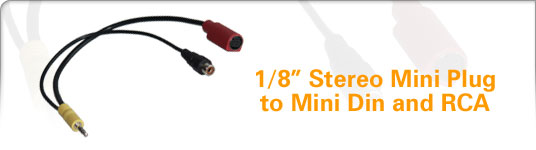 |
|
Anonymous | Would a sb audigy 4 pro have these problems? |
|
Anonymous | Posted on Tuesday, February 22, 2005 - 10:48 am: http://www.soundprofessionals.com/cgi-bin/gold/category.cgi?item=SP-DCC-2 Wonder if anyone try the above cable and work? cos' i think it's stupid enough to encode all the digital raw data to analogue with all these wiring (3.5mm to 3RCA). But rather, i think it would be much better to use the expensive amplifier to do the work. Mine is Audigy ZS and Yamaha RX-V2500. I would place the order immediately once anyone say "yes, it works." Thank you. |
|
Anonymous | I'm the one posted the message on Monday, April 11, 2005 - 09:46 pm. i've gone through the Creative website, and i think they have pretty much confirmed that signal from digital output only work for 4.1 or 5.1 with raw signal (without decoded by the soundcard) which then enable the amplifier to do the work. However, the "digital output" does not support 6.1 or 7.1 signal output. It requires the signal to be decoded by the soundcard and output through those MiniDIN output "holes" with analogue signal. And it works only with the Creative's speakers that only their amplifier can analysis these output signals and distribute to correspond speakers. I guess what i would/could do now is to play around with this card for another while, then possibly i would do what "Cobra_vs_Rice...Cobra Wins" suggested (posted on Tuesday, January 18, 2005 - 02:56 pm) that just to get another card... don't wanna waste my amplifier... GL. |
|
Unregistered guest | Hi I've read through the posts and done my best to understand the answers, but would really appreciate some help for the following problem I am experiencing Problem: Audigy 2 sound card digital out - to sony mini disc digital in. Mini disc says "No Signal". What cable do I need? - I assumed I could use the optical cable provided with my minidisc. What settings should I be using? - I set everything to 44.1 stereo, enabled digital playback, and am using sound card decoder Thanks in advance to anyone who can help :-)) |
|
Sangeeta Unregistered guest | Ooops! Sorry, I was very tired last night. I realised today I was trying to send the digital out from my pc to the minidisc optical in - I guess that was never going to work! |
|
Sangeeta Unregistered guest | Ok, sorry for the mess. Basically I'm confused, by the digital i/o, spdif and optical. My question is (last post!): can I use an optical cable to send output from my audigy 2 to an mini disc. If not, what cable(s) can I use to get the sound out of my audigy 2, to an external device (hi fi) etc. Thanks again! |
|
Anonymous | no one answered me so ill ask again. If i get a soundblaster audigy 4 pro will it have the same problem with getting real surround sound with the creative inspire 5500 digital speakers? |
|
ryan from malden Unregistered guest | OK i bought this InterAct DSS-900 5.1 Digital Speaker System off of one of my friends for $20 and the genius only gave me 5 speakers lost the subwoofer and all the cables. So i was just wandering if anyone knew what i need for cabels or anything else to hook it up to use as surround sound for my TV. |
|
Unregistered guest | thank you for you all~~~! I'm from Hong Kong. And after reading the above posts, i've been able to send unprocessed digital signals to my AV receiver ONKYO SR-502 for decoding~~ now I can enjoy good DVD picture quality and good DTS/DD~ when I buy the 3.5 mono minijack to RCA cable, at the same time, i bought 3 "1 3.5 minijack to 2 RCA" cables to, just to test my DOOM 3.. But unfortunately, I felt the steps are too tedious and finally didn't attempt to do so. I now have 3 sets of those "1 3.5 minijack to 2 RCA" cables left unopened here. Just want to ask if anybody needs it~ my e-mail: lclc033@yahoo.com.hk Once again, thanks for your help~ |
|
Unregistered guest | oH~ forgot to mention that they are 20 ft. long. |
|
Unregistered guest | The speaker test in SB Audigy's control panel, weill only play to all six or eight speakers if you are using their speaker system. You can not use it to test all six speakers when sending to an a/v receiver. The best way is to output three stereo channels form the internal card, to six analog mono (or three stereo) inputs on an amp (if you have it). The DVD playing software should output all 6 channels to your receiver through a coax rca cable (or a regular RCA cable (dangerous for some amps due to voltage differences - specifaclly some Yamaha models) when you convert it from the 3.5 mm output on the card as long as you have Pro Logic on, on your receiver, nad the correct setting for output on your software (digital out). Also make sure your amp is set to receive a digital coaxial signal on the input you are using. |
|
angered2020 Unregistered guest | Hi Guys, Right I've been looking into this bl**dy spdif rubbish on the creative audigy 2 soundcard for about 2 weeks. Basically (although I havent tried this) you may need a 4 pole mini jack (this is exactly the same end as a sony camcorder would use to output to a TV) you can get one of these from any maplins or radio shack. Now rip the RCA ends off that would normally go in to the TV and the solder the gits onto a single coaxial havent got a clue if it will work and I dont care but I'm gonna give it a go. I think the problem lies in the way the sound card channels different digital outputs from the spdif, it must have 3 seperate physical channels available inside the mini jack. The only thing that stands against this thoery is that power dvd can give you a 5.1 digital output to your decoder. I personally think this is something to do with the way the software forces all of the 3 channels coming out of the spdif to become exactly the same. Anyway I dont claim to be very clever but if im correct which from looking at creatives crappy din connectors I think I am I will award myself the noble peace prize for not going to creative and kicking the shite out of some mofos for being evil and corporate and doing something that would obviously piss off the money spending gaming market who demand that everythings perfect from their systems not forgetting those money grabbing sellout reviewers who never seem to test a god damn product correctly. |
|
even more angered2020 Unregistered guest | Sorry about the above rant and if Im talking utter rubbish I dont care because I'm a little annoyed about the cheekyness of it all and I'm sure there should be some law against what creative have done to force people to buy their sound systems. Whoops there I go again |
|
Unregistered guest | I already have 3sets of mini-to-stereo cables that I have been running into my Onkyo 6.1 receiver. Well watching movies on it last night , the sound was great, I had no problems with DVD playback. I mainly need the analog outputs for my games and DVD-Audio playback. However I am going to buy the Monster Cable mini-to-optical cable to out Digital for Movies only. IMO, the Audigy2 ZS sounds great and games running 5.1 through Analog is wonderful. What are the downsides to just have both analog and digital, and uses digital for DVD and analog for everything else? Issues? |
|
bassbar Unregistered guest | [quote=chasbronson]I have the Audigy Player Pci Card. It states in the Audigy manual that the connector to use for the Digital Out is a "4 Pole 3.5mm Jack". As the socket on the audigy card doubles up as analogue for Centre/Subwoofer (if using analogue setup) Or digital out for 5.1, all through the same connector. Hence the 4 poles. I have managed to find this type of cable from With this you could use both digital and analogue.[/quote] this is an interesting point. upon reading this post i remembered reading about a 4-pole 3.5mm jack in the documentation somewhere and it could be the answer despite creative saying that you can use a mono one. everyone who is using a mono one is only getting sound through two speakers (1 signal with two channels and 1 earth connection). surely a 4-pole which is 3 signal connections with 2 channels each plus the earth on the fourth connection would give the six required channels. i'm ordering one now so i'll post the results when it arrives |
|
bassbar Unregistered guest | test results so far: the 4 poles ARE different. running the speaker config noise test let's me hear all of the speakers but they still only come out of the left and right channel pole 1 (pointy end of 3.5mm jack): centre and sub pole 2 (next one in): rear left and right pole 3 (next one in again): front left and right i'm now trying to work out why it's only coming from the fronts everything is set to spdif and my decoder is on dd5.1 |
|
bassbar Unregistered guest | sorry, pole 1 and 3 should be the other way around |
|
bassbar Unregistered guest | after fiddling with this all day and not making any progress i've decided to go with the 6 discrete outputs. this is highly annoying since it means much more cabling when i only wanted to have one for the digital signal |
|
Unregistered guest | Hi All, I read the whole thread and lot of people are confused about the word "DIGITAL". That is, digital protocal (S/PDIF) is a signaling pattern, developed by SONY and PHILIPS. The digital protocol describes about how two audio devices communicate digitally. Any digital audio contents can be transported using this digital pattern without being converted to analog on top of any of the the digital connectors/conductor like S/PDIF Coaxial/Optical or the creative's digital DIN. The digital to digital communication minimize the quality degradation while being transported between devices. In other words, the digital transporters co-axial(developed sony/Philips) or optical (developed by Toshiba) can carry any of the following digital singal at any given time. AC3(Dolby Digital) (single audio stream, >2 channel. its like ZIP file) DTS (single audio stream, >2 channel. its like ZIP file) MPEG2/MPEG4 AAC (single audio stream, >2 channel. its like ZIP file) PCM Audio (CD audio/MP3 audio,only two channel) One thing for sure about the yellow color digital i/o jack on the back of Audigy 2 is that it is a special digital i/o connector has dual capability of sending either 3 PCM audio stream (which is not common among most pf the AMP or Speaker vendors) or the std. AC3/DTS single audio stream. This single port has 4 jack in it and hence capable of outputting 4 discrete channels. Since its a digital I/O jack and supposed to output only digital signal (again, the digital can be any of the above), it does output the following type of digital signal. 1)3 PCM audio stream + 1 Ground (in case of decoded AC3/DTS audio stream or CMSS upmix) which can be transported using the 4 pole (3 PCM +1 GND) --> 9pin digital DIN (1 PCM=2channel, 3PCM=6channel,ie. 5.1) to the compatible digital speakers or AMP. 2)A single unpacked AC3/DTS/AAC or PCM can be transported by the mono (single pole) --> RCA. Since the mono pole will touch the first jack(SPDIF) and 4th(ground)of this digital i/o port, it will output only one channel. It can be either one PCM or one AC3/DTS. So the expected output on the RCA connector is either one digital PCM audio stream (2 channel contains L/R) or one digital AC3/DTS audio stream (6 channel) I hope that people can understand why are they getting only two channel, the Front Left and Front Right on this RCA connector (while playing non DVD content) For example, in case of DVD playback, the audio output is an single uncompressed AC3 stream and it is passed to the RCA through the mono connector. But, let assume the following situation how it can processed. 1) Configure the DVD software to decode the Dolby or DTS signal 2) Skip the DVD soft and configure the Audigy2 to decode the Dolby or DTS signal. 3) Skip both DVD soft and Audigy2 and send it to your receiver to decode Depending on what you choose among the above three option, the output on the digital I/O might varry. In case of 1) DVD soft will unpack the Dobly/DTS signal and hence the Audiy2 just output whatever send by the DVD software.(output goes to both analog and digital) 2) The Audigy 2 engine receives the AC3/DTS, decodes it and output to both analog (5.1) and digital(3 PCM audio stream) 3) If you configure to skip bother DVD soft and Audigy2, the untouched AC3/DTS sigal is passed to external receiver (if any connected). It is now upto the external receiver to do whatever it can. Note: The receiver unpacks the AC3/DTS signal (like a unzipper) and hence you might see the LED on the external receiver glow. It indicates that it receives a raw Dolby or DTS signal on the S/PDIF RCA connector. Here lets talk about whats are the 3 PCM channels meant for and why does the digital i/o have this type of output. PCM is a way of easy digital signal to output the unpacked Dolby/DTS signal in digital. and hence the Audigy2 combines the 5.1 output into 3 PCM channel which is purely meant for the multiple PCM audio stream receivers like the digital speakers (like creative inspire) or AMP. This kind of digital communication is prefered if available becuase it send the real digital sound and the quality rocks. PCM audio is like a single file, i.e an uncompressed stereo and hence can be understood by most of the digital capable audio devices. However, AC3/DTS output is like a ZIP file contains multiple files in it (you need an expensive unzipper to see the files inside) so it is not worthy enough to output the raw AC3/DTS signal to the speakers eventhough the Audigy can deconde and send it in a simple and easy PCM digital audio to the speakers. This is why the multi PCM digital output plays the role. Now, you got the following option to choose with your Audigy2 1) If your receiver or speaker can handle the multiple audio stream, then you can use the 4 pole --> 9-pin DIN connector to get the multiple PCM audio out of the digital I/O jack. ie.this will work only i) when you configure your Audigy2 engine to decoded the DTS/DDS. (or) ii)for contents like EAX supported GAME (or) iii)if you have enabled the feature like "CMSS upmix" on the EAX console to convert the 2 channel audio such as MP3/WMA to 5.1 output) 2) If you have a receiver or speaker that can not handle the multiple PCM audio stream input, then look for multiple individual analog input, if it does, then forget about the digital and use all the 3 analog mini jacks --> 5.1/6.1/7.1 RCA connectors. Here you will receive both DDS/DTS and also non DDS/DTS contents(in case of CMSS) in 5.1 analog output. 3) If your receiver or speaker doesn't have either one of them and has a SPDIF co-axial/Optical, then you can connect the digital I/O to this RCA using the mono --> RCA connector. Here you can enjoy the 5.1 out put ONLY in case of AC3/DTS digital contents like DVD or AC3/DTS enabled GAMES or 5.1 enabled Audio-DVD Otherwise ONLY the front PCM audio stream (i.e front Left and front Right) P.S: Optical connector is also very similar to the co-axial that it can conduct either one PCM or one AC3/DTS audio stream. REF: http://forums.creative.com/creativelabs/board/message?board.id=soundblaster&mess age.id=12170 Hope it helps. |
|
New member Username: Jack_danielsPost Number: 1 Registered: Jul-05 | Hey guys, i pluged my realtek onboard soundcard into my sony receiver using a coax cable, and i have problems to listen sound onal speakers when i'm listening a DVD, so i go to setup options on windvd 6 -> audio -> and enable Audio Output options -> Digital S/PDIF options, but remember, disable 96KHz/24bit decoding because souncard don't support this !! Hope it helps you Jack Daniels |
|
ConfusedInCali Unregistered guest | Just bought a new home theater system and the receiver has both Coax and Optical inputs for the DVD. Any reason why I should use one over the other? My DVD recorder has both Coax and Optical out also. Thanks. |
|
Anonymous | ConfusedInCali, there are some things that should be posted and some that could run a quick google search. All I typed in google was "coax vs optical" and found tons of info. Remember Google! Short answer.... No. |
|
ConfusedInCali Unregistered guest | Yeah, that was my bad! I even found an existing thread on this website about the same thing. Stupid is as stupid does! |
|
Unregistered guest | I have a SB Audigy and an old creative 5.1 speaker system. I gave this whole article a readthrough and tried a couple things. I found out that setting the number of speakers did not matter..at least it didn't seem to. I was watching a PowerDVD with spdif selected, mono 3.5mm to coax spdif. Then I proceeded to select different speaker setups. 2/2.1, 4/4.1, 5.1, and headphones. I switched through all these. They all seem to pass the digital signal fine. Now of course, with non surround signals, PCM, it would only output to the front 2 as is the nature of the retared creative digital out jack. So therefore, no surround in games. However, I figured that since the speaker selection did not affect the signals, I could leave it in 4/4.1 surround mode in analog mode. Therefore, when I want 5.1, I select digital out only and when I want 4 surround in games, I turn off digital output only and select analog mode on my speakers which also happens to be a receiver. Breakdown Speaker selection does not matter. Leave at 4.1 or whatever surround you use for analog mode. Creative Audigy digital out 3.5mm mono to SPDIF into my receiever speakers. Digital Output only, AC3 off. PowerDVD - SPDIF output Receiver/Speaker settings, Analog mode off. For digital 5.1, Use digital output only. For other surround, use analog mode. Works for me. Hope it helps someone else. |
|
ENGLISH_BL0KE Unregistered guest | Hi guys, thought Id add myself to the misery and suffering that is pc digital sound. I have a SoundBlaster Audigy 2 ZS, 6.1 creative speakers, and the Creative Decoder DDTS-100. I have the same problem that if I try to play anything in digital it seems to make it a lot quieter - and also cut out all but the front speakers - but more worryingly is that I cant really tell the differnce when it is set to digital. can anyone tell me much more better or even if theres a way of telling when it is playing in digital? I was reading the soundcard manual and it states that digital out is always on by default. So basically whats the best way to tell when digital sound is actually working? Sorry to ask whats probably a very dumb question - if anyone wants me to experiment with the stuff I have, like different combinations etc then post a suggestion and I'll try it for you. thanks for any help you can provide. |
|
lordricearoni Unregistered guest | Webjammin's post on Wednesday, December 15, 2004 helped me out and got my Logitech Z5500's working. The big thing that he mentioned that no one else did was REBOOT. Once I put in the settings and restarted, the DVD DD and DTS worked great. Winamp audio and games played with the emulated surround through my analog outputs. Just have to switch from coax to analog when playing music or games. |
|
kossak Unregistered guest | Hello to everyone. The solution is basically hidden behind to one technical Dolby Decoding System "limitation". First of all you must reset your speaker system at the right number of speakers (5.1 or 6.1 etc.) to let's windows right choice the number of audio channels to play during game thats supports EAX & Co. Naturally you must set SPDIF passtrough and 48 khz for the rate. Set now all yuor media software (dvd player Etc.) to use the spdif output. Now the limitation is in ours dolby decoders !!! It's will decodes perfectly every raw multichannel stream. For the simple stereo streams the problem is this (and the female voice that tests yours speaker is recorded over two only channels): them borns on two only channels and in this way the sblaster pass them to yours decoders. If yours decoders supports the Dolby Pro Logic II (5.1) or Neo:6 (6.1) stereo upmix the problem is solved: you'll listen the stereo streams over all channels (the sblaster works by a software technology called CMSS upmix that works only for analog outputs.. try to deactivate this function and you'll have the same situation !!!) otherwise only over the two stereo front outputs. There is not any solutions to find because there is not any hardware or software problem ! a mini jack to rca cable is perfect to works. People have not found problems have a decoder sure that allows the upmix. If you have this capability try to active it! This is All ! Sorry for my bad english... i'm italian. bye bye KossaK |
|
Chokdii Unregistered guest | Hi, Just wondering if anyone has any tips for building a 3.5 mm digital out to TOSLINK optical that I can plug into my minidisc. i was thinking that I would be able to just add a 120 K resistor with and Led to a ground and a digital channel on mm soundblaster live 3.5 mm out. This does work on the digital out of a cd player. Any ideas as to whether this will work on the digital out of my sound card?? Thanks |
|
New member Username: M21incaPost Number: 1 Registered: Sep-05 | Hello, Having trouble here... what else it new Lol.. ok so my attempt with mono mini jack ---> stereo RCA left me with only static when my SB LIve! 5.1 was set to digital only and connected to my (analog only) Kenwood receiver. It seems other than running straight stereo and letting the receiver do it's own Dolby thing is my only way to get 5.1. (NOt the same) I then tried the more expensive approach. To acquire 5.1 analog from the SB Live! I used 3 seperate mini jacks funneled down to one and then connected to a single stereo RCA hook up. ($30!!!) My receiver can only play one input at a time. But this arrangement seems to have no difference at all from the single stereo mini jack to RCA. When I tried to install the Media play center to utilize the CMSS upmix the installer said I don't have any hardware to apply. I read the Creative has a software that can recreate 5.1 getting a input from your receiver to the sound card?? By the way the sound is amazing despite this difficulty. Thank you. |
|
DNose Unregistered guest | I just wanted to add my 2 cents. Firstly, electronic equipment is built to handle certain loads. A digital coax cable is supposed to appear as a 75ohm load, most normal coax cables read at 1 or 2 ohms. If your amp is fantastic, it might not care, but my amp is fiddle, and doesn't want to be stable unless i get a cable with proper matched impedence. Also, if you want a card which actually has real time dolby decoding, look for a card called a "Digital Mystique 7.1 Gold". Its reviews suggest its sound quality is easily competitive with Audigy 2, and it has a real time dolby decoder in it. Thanks ! |
|
mr fancy pants Unregistered guest | <link>http://www.ramelectronics.net/html/RCA-mini-spdif.html#rcabnc</link> this is what i just ordered, looks perfect |
|
JohnCalla123 Unregistered guest | Hello, I have logitech Z-5500s and an Audigy ZS 2 (Not platinum or pro) Soundcard. I currently connect via the standard provided analogue cables. However I need some advice on switching to digital. I listen to a lot of MP3 audio on my computer, watch a lot of films and game somewhat. Would I notice better sound if I switched to digital output? And also how exactly do I go about it? Any advice is really appreciated. Kind Regards John |
|
Harry Nuts Unregistered guest | I also have the same setup getting shipped to me except I will be using the Creative X-fi Xtreme music card which has the same connections as yours. I was also curious. I personally would prefer to have my computer setup for music and gaming. I beleive most music and games are not formatted for digital so I assume that I would be better off just hooking up the analog 5.1 setup on the sound card to the Z-5500's to get the surround from the games and music. Does anyone use the digital SPDIF out on their sound card for games and music? If so. How does it sound? Is it worth it? Is it true that you will only get stereo sound and no surround using the SPDIF out for games and music that dont support digital? Would I be better off just going analog? This forum is cool. First time here for me. Any advice or opinion would be great. Thanks |
|
Arun S Unregistered guest | I went through the same problem. I hooked up Marantz SR8400 receiver to Audigy 2 ZS Platinum. I couldnt get the digital signal to work properly. Go to Settings->Control Panel->Audio HQ ->Device Controls. Click on the Decoder tab. Select "SPDIF Passthrou". That solved my problem. |
|
Trout Unregistered guest | I came here with the same common problem: Connecting a SBAudigy2 digital output to my home theater system. The answer: The optical output is for "Creative Brand Speakers Only" Work Around: Mono mini-jack to RCA. With a lot of work you can get encoded 5.1 audio from a DVD, but not from games. Since I already have a real DVD player connected to my home theater system, this is useless. Actual Solution: Get three miniplug to stereo RCA female adapters, and run 6 cables into the amp. No digital audio, but it will work for games. If I was going to compromise on audio, I could have stuck with the trashy onboard audio of my motherboard. The end result would have been the same. There were cheaper soundcards on the shelf, with optical digital outputs, or real coaxial digital outputs. These were "no name" brands, half the price of an audigy, and like a sucker I went with the industry standard soundblaster. On a side note: I also bought a some 5.1 headphones that plug into the standard 5.1 sound card outputs using three miniplugs. Since I was counting on having the digital output do all the work, this would have been great. But since I discovered the digital output is completely useless, I have to sacrifice 3 connectors for the 6 RCA cables I mentioned above. Now I have nowhere to plug in my expensive new headphones. Has anyone heard of a multiplexer of three miniplug left/right/centre signals? How do people normally connect their 5.1 headphones to a PC? |
|
New member Username: Eddie55Post Number: 1 Registered: Dec-05 | I just got off technical support with creative and they are saying that the ONLY way to do what everyone wants to do is to buy http://us.creative.com/products/product.asp?category=1&subcategory=207&product=1 4191 which is called the DTS-610 and what it basically does is take your analog out using 1/8" to 1/8" connectors and converts the signal for you so you can plug in your digital cable from it to your reciever. I say this is not what everyone wants to do because the signal starts off analog anyways and im sure everyeone wants pure digital to whole way to your reciver not half way but then again i dont know much so maybe it doesnt matter. I think im just going to thumb my nose at them and just go off and buy the 3 seperate 1/8" to 2 rca and connect it to the back of my receiver and be done with it... this is just too much hassle for me. |
|
anonimous_gone_mad Unregistered guest | and im another to join this list, same problem. what alot of f**king hassle ive had and reading n stuff. anyway, lets see what i come up with. but as someone mentioned, the manual says to use a 4 pole plug, which isnt supplied.errr, hello, do they even exist, i cant hunt one day on the web anywhere |
|
Rob Newb Unregistered guest | Hi all, Forgive me, I'm not really up on my audio stuff, hiterhto having been more concerned with graphics, RAM, processors, etc. I've just bought the Xfi Extreme music. At the moment, i am running this through a Sony TA-VE110, which has Dolby ProLogic and, as far as I can tell, some kind of simulated surround effects (I inherited it from my gadget obsessed dad when he upgraded). The XFi is set up for 2/2.1 speakers as I can't get it to recognise the rear sets from the Sony. Be that as it may, I was thinking of getting a new amp anyway. From what I've just read, there seems no point getting one with an optical input to connect it to the X-fi. Is that right? The optical is just for creative stuff, effectively? But if I get an amp with three inputs for front, rear and centre and run then from the 3 jacsk on the back of the Xfi, that will give me 5.1? Sorry if that;s incredible basic, but as I say, I'm new to this. If that IS the case, then what a f***ing con. One of the reasons I bought the damn thing was to run an optical link to a home cinema amp. If so, apologies also to Eddie55 and trout whose posts I think deal with this, but it's too complicated for me. *sigh*. Nevermind. Would be grateful for your comments though. |
|
Anonymous | hi guys! i have a dvd player samsung with optical and coaxial out. I want to have a 5.1 digital sound but i can't find a home theather system with "digital in" conector. i live in colombia and you can imagine how's the technology around here. there is any way to solve my problem? sorry my english! |
|
Samtheman Unregistered guest | I have Boston Acoustics BA7500g speakers with the 3.5 digital input, and a Creative Audigy 2 card on the way for my laptop Will this work? |
|
Lee Griffiths Unregistered guest | Trout, try just using three minijack splitters. That should be fine if not a little messy. I have the Audigy 2 ZS and the Logitech Z-5500 speakers, so I guess I'll just use three minijack to minijack leads for games and the mono to RCA digital for DVDs. I'm beginning to wonder whether it's worth using my onboard 5.1 sound and selling the Audigy or putting it in another PC? Is the Audigy really making much of a difference in the set up I described? Cheers. |
|
Felix_unregistered Unregistered guest | Wo I just got here, while looking for something diffrent. However, I was amazed reading this topic regarding to get Dolby Digital out of the Audigy 2 SC to a 5.1 speaker setup. Now the solution is VERY simple, if people had just read the manual CAREFULLY. Look when this thread stared. ANd the only guy who gave the right answer is Bassbar on May24. Look I have the Audigy 2 SZ AND Creative Inspire 5.1 DOlby Digital speakerset and even then it doesn't work!!! WHY YOU ASK? I'll tell you. This speakerset even comes with a 3.5 minijack-to-Coax cable, but ONLY Front left and right is audible. Now if you look in the manuel(the one on the cd) it clearly stated you need a 3!, again A THREE-pole minijack-to-Coax. Now why they didn't include it in the 1st place is a mistery to me, since it's a very uncommon cable which I am still looking for. So before (and since this is old, most of you probably have) everyone runs to the nearest Radio Shack to buy an Minijack-to-COax...because it won't work. Even the one in the Dolby Digital speakerset from creative is a 1-pole minijac-to-coax, which can only transfer the front L/R channels. With 3 poles, you have 1 for Front L/R, 1 for Rear L/R and 3 for the Subwoofer/Centerspeaker. That is the ONLY solution to get true Dolby Digital from the Audigy 2 card to a Dolby Digital speakerset. So nothing's wrong with the Digital minijack output, it's the correct cable! |
|
Felix_unregistered Unregistered guest | ^^ I meant 4-pole minijack, since 1 pole is for ground. Haveing said that, I just checked my Audigy 2 quickstart manuel and strangly here they say you need a 4-pole minijack-to-DIN cable for digital connection (and just use the 3minijacks-to 3 minijacks for analog connection). However my Inspire 5500 Dolby Digital set (from Creative uses the DIN cable to connected the subwoofer (which has all speaker connected to it) to the external Dolby Digital decoder that comes with the 5500 set. So I can only guess from this, they assume (for both digital and analog hookup) that you ditch the External decoder (with all it's options and settings) and hook the subwoofer straight up to the (audigy) card. Sure this will work since the card had it's own decoders (and even more than the external one), but it's just habdy to keep the external one with the remote control functions and the ALL IMPORTANT Dynamic Mode setting (which may always be on on the card I don't know) but this so drastically enhances the sound, that I can't live wihtout having Dynamic Mode on (Dolby Digital only) Creative = strange! |
|
SJ Unregistered guest | Alright so its possible I missed it here, but I SEEM to be having the same type of issue. The thing is though that I have a front panel with my Live! 5.1 Platinum. It has SPDIF and optical outs on them. and i have tried all the settings with 2 speaker or 5.1 or optical or coaxial. and it appears as though my Yamaha reciever is still only decoding a PCM signal and only a left and right. I have no rear sound but I appear to have center and sub. but I dont know if thats the receiver doing that or what. When I test my system out in the AudioHQ I can only get 2 fronts. So do I have surround 5.1 sound right now or not? I'm thinking not, as I would THINK that the front of my reciever would read differently, like state 5.1 or show more than 2 speakers active, no? Thanks for any help you can give. SJ |
|
Loi Unregistered guest | Felix, someone stated that using the mono to coaxial cable gave them 5.1 DD when using DVD software with the right settings, yet not on games. I believe the 4-pole minijack solution is designed for Creative speakers, and the issue doesn't lie with the cable. You state one needs a 3/4-pole to coaxial cable, that wouldn't work, as RCA connectors only support one signal, so that would need to go to 3/4 RCA connectors. You don't need all of the different channels on a digital signal, as it's decoded by your receiver, which is why a mono should work if the card outputs it properly (which seems to be the thing it rarely does outside of specific DVD software). Just don't throw around talking about reading the manual and misquote it afterwards. =P I've read it back to back and it offers no support for the problem people here are having. |
|
TheAntiBot Unregistered guest | Alright..hahahah first off i would like to say that the last few minutes i have spent reading this thread have been extremely entertaining. Main reason is becasue i have spent the last few days pulling my hair out over this issue. Not even being able to use my new speakers is driving me mad. I have a diiferent setup...projector with my sattelite,computer,and dvd player signals going to it. Using SB Audigy2 ZS platinum and logitech 5500d. Since I already have dvd playing capabilities(using the optical I just got today) I only need my comp for music and games...3500 songs atm. so will the mono to rca work fine for my needs?? very confusing to take in what everyone has said |
|
TheAntiBot Unregistered guest | oh and before someone says it...i have tried everything i can think of to get these working..i cannot seem to get any sound from any program..even using the analog 3 mini to 3 mini connection..?? |
|
Lee Griffiths Unregistered guest | Just sorted out my set up (after much annoying tweaking with various media players). The mono-RCA cable WILL enable Dolby Digital on media players that support SPDIF passthrough, such as Media Player Classic and Zoom player, enabling full Dolby Digital or DTS for DVDs and AC3 encoded videos through the digital output. Sounds awesome. At all other times you will ONLY get stereo, so this can be used for Dolby Pro Logic II content (rare) or 2xStereo for music if you fancy. My Logitech Z5500 also has a Pro Logic II for music, but it doesn't sound as good as true stereo. I also need to have my PC plugged in through the analogue cables for games, as there is currently no way to get digital surround for PC games unless you have Creative speakers and use the DIN cable. At least with the current Sound Blaster cards. |
|
audigy2Plat.ex+z5500 Unregistered guest | just bought a mono 3.5mm and mono3.5-to-RCA adaptor. works fine for dvds using SPDIF pass. looks like ill have to use the analogue cable for games. but i'll have to change speaker setting from 2/2.1 to 5.1 when switching between the two???????? annoying, but only takes 2 secs I suppose... |
|
Frater Unregistered guest | I'm curious about the unending talk about special mono-to-RCA cables. Since the digital signal we all want is sent though the head and first band of the connector it works perfectly well to use a *very* common 3.5 stereo to twin RCA cable and connect the Coax to one of the RCA:s. Problem solved, works fine for me... My main problem is that when i send raw digital (AC3 for instance) from the Audigy 2 to my Marantz SR-7500 receiver I get FANTASTICALLY LOUD audio! Its like 20 decibels louder than the common stereo PCM signal that gets converted to digital out on the audigy. I have no clue what is causing this, its great for blowing up speakers and waking the neigborhood though :-/ Finally, let me posit that the Audigy line are toys meant for kids who want to play games on prepackaged PC:s with crappy bundled speakers. Thats where the money is for the people at Creative... Dont let them fool you into believing that this is proper home cinema or hifi equipment. (M-Audio anyone?) Yours, Frater. |
|
Anonymous | Here is my two cents It is amazing this thread has been active for over 2 years. I feel the main problem alot of you guys are facing is with the software you are using to send the supposed Digital signal out to your decoders or recievers. Dvd Software and Dvd contents of course already has AC3 encoded audio. SB Audigy can easily pass the signal through and your recievers will identify it as digital encoded audio can be decoded for all relevant speakers. However, games (especially the ones that advertise EAX and the various mp3 files or other audio formats that are included with them are PCM and were 2 channels. Back in 2003 I remember Running Madden 2003 which is support Dolby Digital. It ran fine from the SPDIF output on my Audigy 1 to my Phillips decoder. Even the Audigy speaker test ran swell. Yet that is the only game i can remember that i was able to get to work with the SPDIF output. I think the fundamental problem alot of you guys have is your expecting digital output from files or programs that are PCM 2 channels audio. |
|
Johnny I Unregistered guest | Hey guys, I just found the creative solution in Germany. Take a look at this http://de.europe.creative.com/shop/product.asp?category=14&subcategory=0&product =773& That is the solution. This will do the same thing as that $100 dollar DTS thing, and it is 10x smaller. Thank you creative in germany!! |
|
Jamie556 Unregistered guest | Hi, I have my SB Audigy linked to surround-sound camp through 3.5mm-->coax link. DVD's play fine, 5.1Digital comes up on the amp... The problem I'm having is playing DIVX-films that have AC3 sound... Shouldn't these also come through as double digital? Thanks for ANY help! x |
|
Unregistered guest | Try installing a Matroska pack... they're free and will probably solve your audio issue Jamie556. Also... it may just come through as pcm stream...that would be a digital signal which is not in dolby digital format.... not to sure about divx... didn't know they had ac3 on em. Cheers! |
|
New member Username: UkdoobLondonUK Post Number: 1 Registered: Mar-06 | Hi PPL. I have just purchased an Advent Home Media Center. It's great and I have it hooked up to the 5.1 DVD player at present. Question: how do I connect the speakers direct to my on-board soundcard? I have standard 2 core speaker cable to Bi Poles to each speaker. |
|
New member Username: BlliusPost Number: 1 Registered: Mar-06 | I cannot get this to work. Audigy 2 Platinum eX Logitech Z5500 Cyberlink PowerDVD NB: I am using the external box with the platinum soundcard. I have the soundcard hooked up to the speakers via the front optical digial output to the optical digital input on the Logitech controller. I am not using 3.5 mm to RCA (should I? - does it make a difference?) Audio HQ->Device Controls -sampling rate -> 48 KHz -decoder -> SPDIF Bypass Sound Mixer -> Speaker Settings -Speaker Selection -> 5.1 -synchronized with control panel -digital output only Cyberlink PowerDVD -configuration -> audio -> speaker environment -> use SPDIF -DTS sound selected in options menu for Reservoir Dogs -i've rebooted the computer after all settings were set -the logitech controllers says there is 'no digital data' on the input selector for the optical input -no sound comes out of the speakers (speakers work on analog, 6 ch direct). Am I missing something? Is there a setting that I need to fix? Should I use the 3.5 mm to RCA from the external box to the logitech controller? |
|
New member Username: The_solutionPost Number: 1 Registered: Sep-06 | Gentlemen, After screwing around for about 6 years (yes years) with creative "digital" out I have a solution. About 4 years ago I got a 4 pole to Din (I had to phoen creative and get them to send it out to me as it was a special request, complete crap as it should have come with the card) and even bought a separate surround system just for my games as I could never get it to work with my home theatre setup. IT is my job and in essense it all boils down to this. Yes the new X-fi is great but creative want to tie you in to their products and make you buy extra Input/output boxes. I bought one a few days ago and then sent it back. I bought this: HDA Digital X-Plosion 7.1 DTS Connect PCI Dolby Soundcard (SC-003-HT) I plugged it in, set it to digital and the sound in unbelievable. I just registered on this board just for this message. Enabled digital out (BUILT IN Optical out, coax and toslink) I wish id bought this years ago. |
|
New member Username: AccessPerth, Western Aust... Australia Post Number: 1 Registered: May-07 | Hi all Newbie i have a computer widesceen monitor samsung 730mw with digital inputs DVI(Video), RGB(15 pin)'also a 3.5mm audio input jack is located near these and is group under digital input with them. Have a Settop HD box with digital outs = HDMI out(Video) and coaxial digital out(Sound) and optical digital out (sound).. I know i can get hdmi to dvi cable for the video in to the screen... how do i get the sound in from the coaxial or optical on the box to 3.5mm stereo jack on the screen???????? thanks in advance |
|
New member Username: Joeb_ukPost Number: 1 Registered: May-07 | Hey! I recently bought a new pc, and it has 7.1 capability. It's a realtek 7.1 HD sound (or something similar). Now the connections on the PC are only 3.5mm jacks, it has one for the two rear speakers, one for the centre two speakers, one for the centre two speakers (sub/lfe), and one for the side two. The only problem is, I'm unsure on how to connect this to my 5.1 system/amp (which only has two rca slots, and a video in). Obviously for my 5.1 system I have the speakers for that connected to the back, but it doesn't seem as if there is any room for the new 7.1 connection from the pc. On my PC/Soundcard I just have the four 3.5mm jacks (so I'm guessing this means no digital, as it's all I have got). On my reciever, for each input e.g. cd, dvd, video etc (there is only one rca slot, not separate ones for different speakers etc). What I'm doing with it right now, is I have a 3.5mm jack coming out from the pc (front speakers output), and then rca lead going into the reciever. Sadly, there is no more room for more rca slots to go into the reciever (to hook up the rear, center speakers), so I'm really only have sound coming from the front output on the pc. There is a coaxial slot, is there anyway I could get an adapter for that? Or am I stuck without being able to take advantage of that. I have the sony STR-DE495P setup/amp btw. Cheers! |
|
New member Username: RyujinxPost Number: 1 Registered: May-07 | Hey guys. All your posts are great. It seems that Windows Vista has it's own generic drivers which converts all audio signals to AC3/DD/DTS via Digital out/SPDIF. Considering this, I removed my Audigy 2 ZS, and used the onboard SPDIF out on my motherboard instead (Using Realtek HD SD833 I believe, coaxial to coaxial digital input on my receiver. On my ASUS P5N-E-SLI 650 motherboard). My receiver picks it up and a 5.1 surround is used throughout anything I do. Even doing the basic things in which it usually outputs to PCB (2-channel) on receivers, such as playing music, playing games, so forth. Even the generic Windows volume settings gives me the opportunity to change volumes, low db responses, rear left/right volumes, center volumes with such ease compared to Audigy's Control Panel. I am very happy about this considering I have been trying to find software to do this for many years, instead of going through hardware. |
|
New member Username: FedaykinPost Number: 1 Registered: May-07 | Wow, i've read all the posts in this long, long thread. You have been very useful to me. It all began when my parents bought me a Thompson DPL 1000 amp for my birthday. I use to play electric guitar, and i have two big, big speakers built by my father, but the goal was to connect it to my audigy 2 ZS and to play games\movies\trve heavy fkn Metal through a REAL 5.1, not this crappy little thing signed "creative". The problem is that my amp hasn't got separate analogic input, and, as you all say, it is quite impossible to play games through an amp in 5.1 with the digital output, at least, with a Creative. But if i understood right, with a real-time DTS compression, i could connect my ampli to my sound card with the digital thing and hear everything in 5.1 without any problems, right? Well, today my eyes saw this: http://www.overclockers.co.uk/showproduct.php?prodid=SC-000-RA&groupid=701&catid =11&subcat= in the description, it is said: "- DTS Interactive Real-time 5.1 encoder that takes any 2 or more channels and encodes it into DTS bit stream" Will it work for me? Please i need an aswer!!! Uh, and sorry for the bad english - i'm from italy :D |
|
New member Username: Saumitra75Post Number: 1 Registered: Aug-07 | Please Help How do I connect Creative 2.1 Speaker SBS 370 with my pagaria DVD player. The Jack can not be inserted in the player. Thanks & Regards, Saumitra |
Main Forums
Today's Posts- Home Audio Forum
- Home Video Forum
- Home Theater Forum
- Car Audio Forum
- Accessories Forum
- All Forum Topics