Home > Message Board > Product Reviews > Roku SoundBridge M2000 Network Music Player

Roku SoundBridge M2000 Network Music Player

Share Share | Create New | Reply | Edit
Upload

What To Do With My CDs
How many CDs do you own and how many of those do you ever get to play? If your collection is as large as mine, rummaging through hundreds of CDs can be frustrating and time consuming. I have even bought some of the same CDs I already own. I almost forgot gems like Medusa by Clan of Xymox, Mouth By Mouth by His Name is Alive, Spiritchaser by Dead Can Dance, and Bad Brains Live. Unfortunately, I have been neglecting my treasures for too long. Now with free iTunes and the Roku SoundBridge, I have complete access to my music collection anywhere in my house.

The SoundBridge connects directly into your stereo system or receiver just like a CD player. It receives/plays music from your computer through a wireless connection or via Ethernet cable. I had already copied hundreds of my CDs to my Mac, using Apple's lossless format. I also had been using iTunes for about two years, mainly to listen to Internet radio, and some CDs imported to the AIFF format. Now with the SoundBridge I can listen to all of my music without having to be at my computer.

It should be noted that SoundBridge is also compatible with other music formats and servers, which are mainly for the Microsoft Windows platform.

Startup Setting: Automatic
No need to dwell here. Just plug the SoundBridge to a network hub, switch, router, etc., and it automatically finds the music library in your PC or Mac. The included wireless card takes a few additional steps, namely setting the SSID and WEP passwords, which unfortunately only work with an open system configuration. I also wished the wireless setup were configurable from a web browser like most other wireless hardware.

Because my wireless network uses a shared key configuration, I opted to remove the wireless card and connect SoundBridge to my Mac via an Ethernet cable or a high-speed 108Mbps bridge (D-Link DWL-G810), rather than changing my wireless network configuration. The D-Link bridge works as good as the wired setup when the access point (D-Link DWL-2100AP), which is dedicated exclusively for SoundBridge, is positioned close to the bridge and with no wall obstructions.

SoundBridge Firmware v 2.0.28: Simple to Upgrade
There were some issues with the pre 2.0 version, one of them having to do with obtaining an IP address. The 2.0 version appears to have corrected these problems. Upgrading the firmware is simple, just select the System Configuration from the main menu, check for the latest software upgrade, and find out whether an upgrade is available. This could not be any simpler.

Choosing File Format
I had already nixed the idea of importing my CDs to the lossy formats, i.e., MP3, AAC, Ogg Vorbis, because of their shortcomings (lower fidelity sound). My goal was to duplicate the original CD sound, not just come close to it. I would have preferred the uncompressed AIFF format, but it's not practical since AIFF files are too large. Therefore, I imported almost all of my CDs to the Apple lossless format.

I used free iTunes and open source software, called SlimServer for my Mac to categorize and select my music. The SoundBridge works well with either program. However, each program has its limitations, as discussed below.

iTunes version 4.7: So So
SoundBridge can play WMA, AAC (non-protected), MP3, AIFF, and WAV formats, but cannot play AAC protected songs purchased from the Apple Music Store. For me, however, the playability of protected AAC format is not an issue since I do not plan on purchasing any AAC protected songs, purely because they are not in a lossless format.

Browsing and searching by Songs, Albums, Artists, and Composers, as well as keyword searching and browsing by Genres, are all featured here. Also, all the songs in the playlists created in iTunes can be played.

The user interface for iTunes is a bit more intuitive and user friendly than SlimServer. For example, the remote "menu" and "exit" buttons do what they should, respectively bringing the home menu and exiting the current menu selection. I also liked the fast browsing feature. Instead of having to scroll through the items in the list one by one, I could skip to the next or previous letter in the list using the left and right arrow buttons. Although, I did not like the inability to loop to the first/last item in the list. In other words, if the last item was displayed, pressing the down button would not loop to the first item in the list. The loop feature, however, is available under SlimServer.

I am not sure why SoundBridge was unable to play the Apple lossless format under iTunes, while it was playable under SlimServer. This is a big deal for me since my music collection is in the Apple lossless format. For this reason alone, I gave the iTunes option a mediocre grade.

SlimServer (Version 5.2.1): Good
SlimServer versions 5.3.1 and the latest 5.4 do not work with SoundBridge. However, prior version 5.2.1 does work, and is recommended by Roku. Fortunately, SlimServer supports lossless formats, namely Apple Lossless and FLAC, in addition to the other formats available under iTunes. AAC protected songs are again not playable either.

SlimServer allows browsing by Songs, Albums, Artists, Genres, and Music Folder, while limiting the search by Songs, Albums, and Artists. The saved playlists accessible by SoundBridge can include the combination of the playlists from iTunes and the customized playlists created either from SlimServer or directly from SoundBridge. That's right, one nice feature, which is currently missing under iTunes, is the ability to create and save playlists directly from SoundBridge. The spectrum analyzer, which is available under the iTunes, however, is not available here. Another feature I liked was the ability to play ShoutCast radio stations. ITunes does have the ability to play radio stations listed under ShoutCast, but requires additional manipulation. Moreover, ShoutCast conveniently categorized the stations by genres, making it easier to surf radio stations.

SlimServer provides more flexibility and control because settings and the home menu can be customized from a Mac/PC using a web browser. The SlimServer interface, however, is not as friendly or intuitive as the iTunes interface. For example, pressing the menu button while playing a song changes the display format rather than going to the home menu. Instead, the left arrow button brings the display to the home menu. Also, the exit button doesn't exit the current menu, but rather SlimServer. The interface thus adds a minor learning curve. In my opinion, the SoundBridge interface under iTunes has a slight edge primarily because of the faster browsing feature, which I really liked, even though it lacks the looping feature.

I tried putting all of my 7,000 plus songs into the playlist from the web browser. It seemed to take forever. If you have a large list of songs in your collection, be selective and include only the songs you really want to listen in the playlist. It makes browsing a lot easier too.

Sadly, the SoundBridge/SlimServer combination has annoying sound drop glitches during playback. For no apparent reason, sound drops intermittently even though the timer indicates the song is playing. At other times, it will simply stop playing altogether. The sound drops got worse when I simultaneously played iTunes directly at my Mac while playing songs through SoundBridge. If this issue did not exist, I would have rated the SlimServer option higher. The sound drop problems did not occur under iTunes.

Alarm Clock: Excellent
SlimServer provides an alarm clock, which is not available under iTunes. This feature alone is worth getting a SoundBridge. Now I could wake up to any song of my choice in the playlists. Note, however, for the alarm clock to work, my Mac had to be running all the time. So I had set up my Mac to never sleep. This is unfortunate, at least in terms of wasting energy. Perhaps Roku will add the wake-on-demand feature with the next update.
Upload

Remote Control: Poor
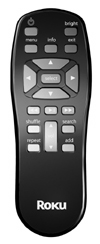
I own a great deal of remotes. I would rate the SoundBridge remote as my worst. The ergonomics and controls are in the right place, but the buttons extend out too far and do not provide any feel (in my humble opinion). Moreover, the buttons tended to stick and too often had to be pressed multiple times to get them to work.

Sound Quality: Excellent
I ran subjective "ear" listening tests, toggling between AIFF formatted songs played through SoundBridge/iTunes and the same played directly from iTunes. Sounds from these two sources were indistinguishable to my ears. I know that this is subjective, but the audio output specification appears to support my conclusion that the SoundBridge is a capable hi-fi component.

I listened to the Until the End of the World soundtrack because it contains a wide range of music/dynamics. The soundtrack was imported to iTunes in AIFF format so the same track could be simultaneously played directly from both iTunes and SoundBridge. The output from the iTunes was input to a M-Audio Firewire 410 interface via a Firewire 400 cable, while the output from SoundBridge was input to the M-Audio interface via an optical cable. The outputs from iTunes and SoundBridge were directed respectively to output channels 1/2 and 3/4 of the M-Audio interface using its driver/mixer. Output channels 1/2 and 3/4 were directed to a headphone. These output channels were selectively output to the headphones for comparison.

Support: Excellent
I must say that Roku's interactive Forum is an excellent way of sharing and resolving problems. The forums are frequently answered directly by Roku's engineering team.

Conclusion
Would I recommend SoundBridge? Unequivocally yes, in spite of the shortcomings of its remote, inability to play Apple Lossless under iTunes, and sound drops with SlimServer. In fact, I will likely buy several units in the near future. Hopefully by then all of the shortcomings mentioned will be resolved.

Pros
Alarm Clock
Excellent Audio Specification
Big (12") and bright Display (with dim control)
Open Source Support (SlimServer)
Easily Upgradeable Firmware
Multiple SoundBrige access to a single iTunes.

Cons
Poor buttons on the Remote
Sound drop with SlimServer
No support for Shared Key for wireless

Wish List
Alarm for iTunes
Loop Scroll with iTunes (like SlimServer)
Fast Forward Capability during Playback
Apple lossless playability with iTunes
Better remote
Wake on demand

Test equipment
Apple Power Mac G4
M-Audio Firewire 410 Interface with driver/mixer version 1.2.4
Sennheiser HD202 Headphones
Until the End of the World Soundtrack

Two models to choose from
Roku SoundBridge M2000 - MSRP $499
Roku SoundBridge M1000 - MSRP $249 (same device, with a smaller display)

by Lyle Kimms
eCoustics Contributing Editor/Technical Writer

Author Comments
Top of pagePrevious messageNext messageBottom of page Link to this message

Unregistered guest
Edit Post

Have you seen anything about the sonos music system? seems like that product is somewhat similar, but they have a cool remote. not sure about the aac support though, i doubt it.
Top of pagePrevious messageNext messageBottom of page Link to this message

New member
Username: Lyle_kimms

Post Number: 1
Registered: Nov-04
Edit Post

Sorry, not heard much about Sonos's performance and features. Based on their press releases, however, it doesn't support any lossless format. But for some people, the ability to play lossless format is meangless since they don't store music in that format.

Just a follow up to my review. Roku just released beta version 2.1 (only available by logging in and providing Roku's mac ID). This version supports SlimServer's latest version 5.4. I've been running them since yesterday. The sound drop issues still remain with Apple lossless files played under SlimServer, although it seems to appear less frequently. There's still no support of Apple lossless format under iTunes.
Top of pagePrevious messageNext messageBottom of page Link to this message

Mike Kobb
Unregistered guest
Edit Post

We'd like to thank eCoustics.com for the thorough review of our SoundBridge music player. A couple of questions were raised in the article, and we appreciate the opportunity to answer those questions.

First, wireless setup. It's true that this needs to be configured via the remote control at this point. There's a bit of a chicken-and-egg issue here, though. In order to configure settings via a built-in web page, the product actually has to be accessible via the network. If the WiFi isn't configured yet, then there's no way to get to the web page. It might be possible to set up the WiFi options with the SoundBridge connected via the wired interface, then switch to wireless, but at some point this becomes more work than just using the remote for the one-time setup.

However, we do agree that web-based configuration is a great convenience!

In fact, starting with our 2.1 release (now in beta testing), the SoundBridge has an on-board web page that allows setting the name of the unit and configuring a new internet radio feature that works even if the server computers are shut down. This page also allows control of the sound playback, with features to pause, resume, change tracks and see the currently-playing track.

Wrap-around lists are a popular request, and we're considering them for inclusion in a future software release.

Regarding Apple Lossless files, the issue here is that Apple Lossless is a proprietary Apple format. To date, Apple has kept the specifics of this format secret from third parties. We have asked for the specifications so that we can add support, and if Apple decides to release them, we will do so.

SlimServer is able to play Apple Lossless files because the server component (running on the Mac or PC) does the decoding of the lossless file using QuickTime, then either streams the uncompressed audio to the player, or re-compresses it with MP3 if network bandwidth is an issue. Since iTunes does not offer this "transcoding" feature through its sharing interface, it is not available when connected directly to iTunes.

We always appreciate honest criticism, and your comments on the remote will be looked into. Generally, though, users are happy with the remote control. It's possible that there is some variability in manufacturing that needs to be improved.

We'd like to take just a moment in closing to expand upon a couple of features touched on in the review. First, the article did mention that SoundBridge also connects to other servers. In fact, SoundBridge is unique in the industry in the variety of music servers and online services that it supports.

In addition to iTunes and SlimServer, mentioned in your review, SoundBridge also supports Microsoft's new Windows Media Connect server, which allows the
SoundBridge to play music downloaded from any PlaysForSure-compatible music service, including MSN Music, Napster, Walmart.com, MusicMatch, MusicNow, etc.

Support for another major music service will be announced in just a few days as part of our 2.1 software update!

SoundBridge also includes UPnP/AV support, which means that it can connect to most UPnP-compatible music servers (like MusicMatch and TwonkyVision),
and can be controlled from UPnP-compatible control points.

Finally, both the M2000 you reviewed and our smaller M1000 model offer optional wall-mount and under-cabinet brackets for flexible installation.

Once again, thanks for the review.

-Mike Kobb

Senior Software Engineer, Roku
Top of pagePrevious messageNext messageBottom of page Link to this message

New member
Username: Lyle_kimms

Post Number: 2
Registered: Nov-04
Edit Post

Mike, Thanks for filling in the areas that I haven't reviewed (due to Mac limitation with respect to other servers).

Who (in Apple) do we need to nag for them to release the Apple lossless format code, and/or have the iTunes do the transcoding?
Top of pagePrevious messageNext messageBottom of page Link to this message

earth
Unregistered guest
Edit Post

The main feature I want to see offered (at least on a premium model?) would be the simplest UI on the unit itself. Simply a pause/unpause button would be a huge upgrade when you're in that "I need to stop this for a second" mode and don't want to run around looking for the remote.

I know that a lot of UI can get aesthetically and engineeringly cumbersome, but obviously a version with a row of buttons under the screen would be welcome as well.
Top of pagePrevious messageNext messageBottom of page Link to this message

Anonymous
 
Edit Post

Why do you use shared key authentication for your wireless network? It's even LESS secure!
Top of pagePrevious messageNext messageBottom of page Link to this message

New member
Username: Lyle_kimms

Post Number: 3
Registered: Nov-04
Edit Post

Thanks for the info. I was lead to believe that Shared Key was more secure, but upon doing some research, it appears that the open system is more secure because it doesn't send out encryption information unsecurely.
Top of pagePrevious messageNext messageBottom of page Link to this message

tbase
Unregistered guest
Edit Post

Startup Setting: Automatic
No need to dwell here. Just plug the SoundBridge to a network hub, switch, router, etc., and it automatically finds the music library in your PC or Mac.


I would have like to have seen a little more dwelling here. I don't see how it can "automatically find the music library on your PC or Mac". At a minimum I would think you'd have to have file sharing turned on or install some sort of software on the host. You also mention it works with a number of servers, but you only mention servers that stream music. What about just playing audio files from a plain old file server? Rather than have a computer on all the time, I'm looking at getting a NAS device (a networked external hard drive) so that any computer (or the SoundBridge) on the network would be able to access the collection. Can the SoundBridge access any type of file server? What about logins and passwords? You don't mention installing any software that came with it? Do you have to? You talk about upgrading to the beta version 2.1, but is that software for the host or some sort of firmware for the SoundBridge? Maybe I'm missing something, but somehow I don't think I could just plug it into my router and start playing music as you suggest, without installing some sort of software or changing my configuration.
Top of pagePrevious messageNext messageBottom of page Link to this message

Unregistered guest
Edit Post

Hi,
I'm in the same boat as tbase. I have a NAS device (200Gb HD on a linksys NLSU2) and have moved my entire music collection (over 5k songs) to this file server. I WISH there was a stand-alone music player that could access and play this music without tying up my computer also. I have 4 computer users in my family so I'm not about to buy a product that requires me to run software in one place so I can listen to music elsewhere. My family would disown me. Comments?
Top of pagePrevious messageNext messageBottom of page Link to this message

Unregistered guest
Edit Post

I'd like an answer to tbase and smash591- I too have a 300gb external hard drive where my music sits (30,000 songs) I am in the process of selling a turtlebeach audiotron as it could not hold all of the music- is the Roku an mp3 player or merely a piece of hardware that receives music playing from my itunes. Are there no controls on the unit? reviews on the remote of been less than stellar. Can someone respond? thanx
Top of pagePrevious messageNext messageBottom of page Link to this message

MNsoundguy
Unregistered guest
Edit Post

To Tbase amd smash591: I have an M1000- no software install on your PC as such. You need to be running some sort of server software already, but it's not part of the Roku package. Some NAS devices support Slimserver if they are Linux-based, but just creating a file share won't work. Kind of a bummer, but on the upside the Soundbridge is smart enought to understand the playlists on your server. That means you can create a playlist on a keyboard at a full-size monitor instead of via a remote on an LED panel. Much easier. Just depends on what you want I guess.
Top of pagePrevious messageNext messageBottom of page Link to this message

Unregistered guest
Edit Post

The latest Roku Soundbridge manual says that you can enter radio station URLs into a web page to make them appear on the SB screen.

Great! But can anybody tell me how to do this?

I've enabled my network UPnP but cannot find the device in order to double-clik it and bring up the web page. I can only see my LAN, a 1394 connection and a network bridge.

Dave Hobbins
Top of pagePrevious messageNext messageBottom of page Link to this message

gonzali6
Unregistered guest
Edit Post

Can I use this device to listen to streaming audio from subscription services such as Musicmatch Jukebox On-Demand. I mostly use these types of services rather than actually downloading or buying albums.
Top of pagePrevious messageNext messageBottom of page Link to this message

Unregistered guest
Edit Post

>>> The latest Roku Soundbridge manual says that you can enter radio station URLs into a web page to make them appear on the SB screen.

I guess it is a while you posted this and probably figured out how to do it in the meantime. 1. Find the dynamically assigned IP address through the settings menu of your SoundBridge 2. Use the displayed IP address in your PC's browser address field to access the web interface. If you connect PC and SoundBridge to a router, the address would normally look like 192.168.1.xxx, where xxx is any number within the dynamic address range as set in your router.

Regards,
Thalueng
Top of pagePrevious messageNext messageBottom of page Link to this message

New member
Username: Bradquintano

Post Number: 1
Registered: Oct-05
Edit Post

it's been a while since this review, roku now has a new Internet radio model, but whether we are talking about this older model or the new one, I'd still prefer to go for a more "HiFi" type of solution, like the new Phillips WACS 700 (www.streamium.com) or the Musica from Olive Inc (www.olive.us)
Top of pagePrevious messageNext messageBottom of page Link to this message

New member
Username: Neilsmith

Post Number: 1
Registered: Jan-06
Edit Post

Smash RE "I'm in the same boat as tbase. I have a NAS device (200Gb HD on a linksys NLSU2) and have moved my entire music collection (over 5k songs) to this file server. I WISH there was a stand-alone music player that could access and play this music without tying up my computer also"

The NLSU can be "unslung" with only an hours work. Once that's done, you can download mt-daapd for it (simply ipkg install mt-daapd and create an MP3 folder, and it's done). Have a look at the http://www.nslu2-linux.org website for details on the process.

DAAP is the iTunes auto-discovery protocol, so all your iTunes players as well as the Roku will detect the NLSU running the service.

HTH
Cheers - Neil Smith
MVP Digital Media 2004-6
[ « Previous Review ]
[ Next Review » ]