The high-definition craze is beginning to affect every type of video component, and your old VCR is no exception. DVHS allows you to tape HD material, but it comes at a high price. With a little trickery, you can get all the benefits of DVHS at a fraction of the cost.
Just as TiVo enthusiasts are getting used to having the ability to record all their favorite programs, HD has come along and changed things. A standard TiVo set can’t record HD content; you’ll have to shell out at least $500 for an HD-recording unit. Additionally, not everyone has TiVo, and many that do don’t get their local channels (where a lot of HD content is to be found) except through an antenna.
Amazingly enough, this has caused a renewed interest in VCRs—but VCRs that can record HD content. These HD-VCRs are great, but the tapes are expensive, and they make keeping a lot of HD content—such as an entire season of Stargate SG-1 or Alias—difficult, if not impossible. But a little bit of work and a lot of clever experimentation can get you around this limitation, keep you in HD content, and impress your buddies.
A History Lesson First, a little bit of history about the Super VHS (SVHS) format, which JVC introduced in 1987. This format was an upgrade to the existing VHS format; SVHS was designed to record at a higher horizontal resolution than VHS. The boost to detail came in the luminance domain (a.k.a. the black and white information), while the color resolution was still unchanged from VHS. The horizontal resolution specification for SVHS was greater than 400 lines, compared to VHS, which was only 240 lines. Strangely, the increased detail in the black and white information sulted in an image that looked like the color saturation was low all the time.
In practice, most consumer SVHS VCRs typically recorded only 360 to 380 lines at the best SP (standard play) speed, so they were not quite as good as the specification for the new format; still, this was a large leap in image quality. Some of the cheaper SVHS VCRs of the time were actually down in the 340-line range for recorded horizontal resolution. The current JVC higher-end SVHS units (circa 2001) record greater than 420 lines while their budget units are still in the 350-line range.
The catch with the SVHS format was that the improved format required a special tape for the higher-resolution recording, and thus the SVHS tape was born. Regular VHS tapes could not be used to record in the SVHS mode because the cassette shell design prevented it. However, the SVHS tapes are simply a higher grade of VHS tape, and nothing more. In fact, there are several different tape formats, all of varying quality. They’re all listed here, from lowest to highest grade:
Standard Grade
High Grade
Hi-Fi Grade
Professional Grade
Industrial Professional Grade (probably SVHS quality)
SVHS
Industrial Grade SVHS
DVHS (Digital VHS)
Enter the Hackers This wealth of varying formats required the higher-grade tapes to guarantee a certain recorded quality. Astute enthusiasts quickly figured out that the difference between the two types of tape, from a cassette design standpoint, was nothing more than a small recognition hole drilled on the bottom of the SVHS cassette! A sensor within the SVHS VCR would detect the presence of the hole and permit the recording of SVHS signals on the tape.
Of course, in these early days of the format, the SVHS tapes were simply far more expensive than regular VHS tapes. Even in the early 1990s, the SVHS tapes were $10 compared to $2.50 for a good TDK standard-grade VHS tape. For people who loved to archive their TV programs and maximize the recorded quality, SVHS was the only way to go. Unfortunately, the six-hour EP speed in SVHS, although superior in detail, was still just as unreliable when it came to archiving important tapes. So, the SVHS enthusiast was stuck with buying the expensive SVHS tapes and using the SP speed. But $10 for a two-hour video was (and still is) awfully expensive, especially if you’ve got several hundred movies archived.
Early in the life of the format, enthusiasts such as myself started to experiment with VHS tape formulations at SVHS quality. We found that we could drill a similar recognition hole into a standard VHS cassette and the SVHS VCR would then see this tape as an SVHS tape. People used drills and soldering irons to create these holes in the VHS cassettes and suddenly they were able to archive many more programs far more cost effectively and at far greater image quality.
Taping SVHS signals onto a typical cheap VHS tape resulted in a higher-resolution image that was viewable, but would never be mistaken for true SVHS taped images. The images were grainy. As one went up the VHS tape quality chain, the SVHS images rapidly approached the quality of the true SVHS tapes. The challenge in those days was to find the right standardgrade VHS formulation that came closest to the true SVHS quality. The best solution was found in TDK standard-grade tapes.
Modding the VCR With this history behind us, we come to the new DVHS format for HD recording, and once more we have the dilemma of expensive DVHS tapes, and the need to keep the quality while minimizing the dollars we have to spend on premium tape.
Drilling holes into the cassette shells was considered a bad idea, even at the time the hacking community tried it (and we did!). Plastic shavings affected the tapes and the soldering iron didn’t work. This led us to open up the first SVHS VCRs to look closely at the so-called recognition pins used to read the recognition holes on tapes. It did not take long to see that the recognition pin was merely a spring-loaded plastic device about six millimeters tall, with a diameter of two or three millimeters. When the VHS cassette depressed the spring, SVHS mode was disabled. When the spring was not disturbed, SVHS was fully capable.
So, what was to stop us from taking a small knife or pair of scissors to cut off the first 4 millimeters of this plastic pin? Snip… After this minor bit of surgery, all VHS tapes inserted into the SVHS player were now recognized by the VCR as being SVHS tapes (albeit poor-quality ones). If we still wanted to record in regular crappy VHS, we would simply manually shut off the SVHS mode—simple as that.
A DVHS Application What makes these DVHS tapes so special that we have to use them for DVHS recordings? Why can’t we use SVHS tapes instead, just to see what happens? Well, aside from the fact that DVHS tapes are pretty much just high-grade SVHS tapes, not much is special about them, except—another recognition hole.
Figure 2-10 shows the two holes on a DVHS cassette, and the single hole on the SVHS tape. The hole common to both permits DVHS tapes to handle SVHS signals; the hole unique to DVHS is what we want to focus on, as it allows the DVHS to work with HD signals.
For the pictures here, I am using the current JVC DVHS D-Theater VCR.
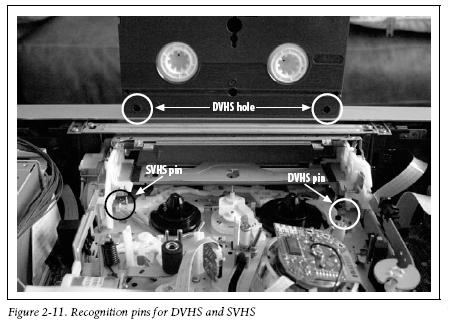
Pull the top off of your DVHS VCR, and you should see two pins, one for SVHS and one for DVHS. The inside of my VCR is shown in Figure 2-11.
Once you remove the screws that hold the top on, you’ve probably voided your warranty.
Look for the pin specific to the DVHS tape, and cut off the top four to five millimeters of the pin.
Please disconnect all power to the VCR when you attempt this. If your hand slips, you could short-circuit the VCR and damage it or injure yourself.
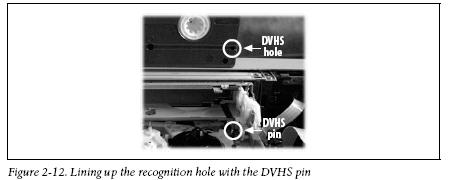
In case you are confused about which pin is which, Figure 2-12 shows a propped-up DVHS tape, lined up with the corresponding recognition hole.
You don’t need to perform this procedure to the SVHS pin on the other side because the VCR has SVHS-ET capability for recording SVHS on VHS tapes.
What a way to try to add life back into a format—disabling their own pin, and offering it to the buying public as a new improved feature! Manufacturers spent years telling us that it was bad to record SVHS on a VHS tape, and then suddenly it was OK. You gotta love SVHS-ET technology!
Once you do this, try to fish out the small plastic piece that you cut off. Then put the unit back together. Now all tapes are DVHS tapes! Most SVHS tapes should work just fine with the DVHS signal; I’ve used both T-120 and T-160 SVHS tapes with no problems.
If you don’t want DVHS mode recorded on the SVHS tape, simply select the SP or EP speeds instead. Playback-wise, the signal selection process of the VCR is entirely automated. The VCR will identify the signal type of the tape and play it back in the original recorded form. —Michael Chen
This material has been adapted from Home Theater Hacks by Brett McLaughlin, published by O'Reilly Media, Inc. Copyright O'Reilly Media, Inc., 2005. All rights reserved.
A smart collection of insider tips and tricks, Home Theater Hacks covers home theater installation from start to finish, purchase to experience. Just imagine: no frustrating trial and error process and better yet, no expensive appointments with installation experts. Home Theater Hacks prevents both by imparting down-and-dirty technique not found anywhere else.
The cost of D-VHS tapes isn't that high. Tape Resources in Virginia Beach, VA sells Maxell DF300s @ $6.99 per tape in small quantities. I think a case is cheaper yet. DF300s are 2.5 hours of recording time. Only JVC makes the 3.5 hour DF420s.
Maxell ST-126BQ (126 minutes) S-VHS tapes are $7.11 each, so the genuine D-VHS tapes are actually cheaper.
The older Panasonic PV-HD1000 D-VHS decks will record MPEG to S-VHS with no problems. They have a 3-hour version of this tape (Maxell ST-182BQ), but it's pretty pricey.
The Mitsubishi D-VHS decks won't play back S-VHS tapes with MPEG, probably due to the pin setup. The JVC HM-DH30000U will play them back, it just takes a few seconds to recognize the MPEG bit stream and change into D-VHS mode.
Bottom line: No sense playing with or modifying your VCR and risking warranty problems when you can buy the Maxell D-VHS tapes for less money than S-VHS. I stopped using the S-VHS tapes for D-VHS about 2 years ago and have stuck with the Maxell product ever since. Of course, i have an off-air DVR for HDTV (Zenith HDR230) and don't find i need to record that many HD programs to tape anymore.
Yes it could, sometimes. Just don't cry when being cheap ends up being more expensive because you have to buy 3 tapes just to find one that will work poperly.
Alexander Burke
Unregistered guest
Posted on Sunday, March 06, 2005 - 06:25 pm:
Nice editing work. Not only are the labels in Figure 2-10 reversed (see Figure 2-12; that hole is not present on the cassette marked DVHS in Figure 2-10), but you claim in Figure 2-11 that the DVHS hole is actually in a totally different place, much closer to the bottom edge of the cassette.
Speak not from whence you know not...
LAcKu
Unregistered guest
Posted on Sunday, March 06, 2005 - 07:22 pm:
^^^do not flame^^^ you write the damn tutorial
rabbit
Unregistered guest
Posted on Monday, March 07, 2005 - 02:15 am:
The writer should catch such obvious mistakes. It's also good to inform the writer of such mistakes so that it can be fixed and not confuse the reader. Otherwise the article looks like it was created by a 12yo.
monkeysvsrobotsdotcom
Unregistered guest
Posted on Monday, March 07, 2005 - 05:13 am:
ummm... why butcher your vcr isntead of snagging the pin circuit and soldering together an external switch so you can decide whether or not you want the pin to work as it was intended? my idea would cost very little, would likely be easy to do and if done right wouldn't permanently modify your deck.
anyway, the article is a fun twist on a very old idea but as history has shown your mileage will likely vary a lot with this hack...
[quote]SVHS-ET: What a way to try to add life back into a format — disabling their own pin, and offering it to the buying public as a new improved feature! Manufacturers spent years telling us that it was bad to record SVHS on a VHS tape, and then suddenly it was OK. You gotta love SVHS-ET technology![/quote]
Actually S-VHS-ET is *not* the same signal as S-VHS. Don't believe me? Record the ET signal..... then move it to an old Super-VHS vcr that doesn't support ET. You'll get a picture with out-of-sync color (blurred).
I think S-VHS-ET is a great feature. I am recording on old 20-year standard vhs, and getting a picture equal to live TV. Goodbye blurriness! :-)
Anyway, it's good to know that I can buy D-VHS tapes for <$6.00. When I saw the ~$20 pricetag at crutchfield, I was hesitant, but now that I know it can be had cheaper, I think I'll go ahead and upgrade to the new tape standard.
troy
Troy Heagy
Unregistered guest
Posted on Wednesday, April 27, 2005 - 02:54 pm:
By the way...
.....will using D-VHS tapes in a Super VHS vcr result in a higher-quality picture?
Why all the fuss? My JVC HMDH30000u copies D-vhs onto S-vhs tapes at the push of a button without resorting to opening up the machine or tape or drilling holes.
Armstrong: I have a JVC HM-DH30,000U, which I have not modified by clipping off the D-VHS tape-sensing pin, btw, and it will NOT permit me to record in D-VHS mode on S-VHS tapes unless I put a D-VHS ID hole in them. I have done this to the 15-20 S-VHS tapes I have used in it so far with great success... no repercussions from the plastic bits from the hole-poking with a nail of the appropriate diameter. I'm an old hand, having put S-VHS recognition holes in hundreds of HG-quality std VHS tapes to record in S-mode on my old non-ET S-VHS machines (I've had at least 8-10 non-ET S-VHS machines, including camcorders, and professional as well as consumer ones, over the years). But I DID pay about $7.00 each for the 20 Maxell ST-180's I bought recently (a few years ago, I could get them for a dollar or two cheaper). I'll be checking for the deal on Maxell DF300's at Tape Resources in Virginia Beach mentioned by Pete Putman at the top of this list... hope it's still a valid price and that I can find their website! It appears that the prices on S-VHS tapes are going up as demand for them drops, and that of D-VHS is going down, a little bit at a time.
One point... an ST-180-length cassette is equal in running time to a DF360, so the exact cost-length ratio isn't quite equal.
BTW, I have tried a few various std VHS tapes, including HG-quality ones, in D-VHS mode and they do a poor job. They only work to a barely passable degree in the fastest speed, HS mode when recording SD material (I don't have the means to try to record HD on my machine yet [no HDTV box that provides a HD bitstream on an i-link/firewire output], but I assume it would be a similar result... the std VHS formulation can't handle the bandwidth of the 28.2Mbps rate - and tho the bitrates at the lower speeds are correspondingly lower, this doesn't seem to help the problem of poorer playback of the mpg-2 bitstream off of them). I only have one true D-VHS tape, a pre-recorded copy of "I Robot" in HD. I used the last 4-5 HS/SP minutes of the tape to test the D-VHS record modes' qualities when I first got the machine a few months ago.