
When it comes to home theater, nothing’s more confusing than hooking up a powered subwoofer and configuring the “speaker set-up” or “bass management” functions of a 5.1 channel Dolby Digital processor. We conducted a survey of home theater owners and were shocked to learn that over 30% are confused by these settings or at least not sure whether they are getting optimal performance from their systems. Is this you? If so, we now present what we know about the subject. But first, some caveats:
- If you’re really happy with the way your system sounds, and hate messing around with audio hardware, skip this article and put on some nice music. But if you’re a tortured soul who just has to know you’re getting 100% of the performance you paid for dang it, read on:
- If you really just want to know what to do and don’t care about all the theory behind it, skip right to the section below that best describes your system and do what we advise and trust that we actually know what we’re talking about.
- Feel free to experiment.
- We’re going to tell you what is technically correct for most systems, but you may find that a technically “incorrect” hook up may sound better to you. Maybe your equipment has non-standard bass management or maybe you just like the sound–whatever. Audio is not rocket science; there is no “right” answer. Do whatever makes you happy and you’ll get no judgmental jive from us.
The Case Against Subwoofer Output Jacks
In some systems the worst place to hook up your subwoofer is the subwoofer output jack. Some people get mad at us when we tell them that. “Whadda ya mean, don’t use the subwoofer jack? The receiver manufacturer, the salesperson and all my friends tell me that’s the right thing to do. Where do you get off tellin’ me different?” First, calm down. Second, please let me explain:
- Some receivers and processors do not send a signal to the sub out jack when in the stereo mode. That means when you listen to music in stereo, you lose the benefit of the subwoofer. Not good.
- In the vast majority of receivers and processors, the subwoofer output jack is low-pass filtered. That means that there is a filter (sometimes mistakenly referred to as a crossover) that blocks sounds above a given frequency from getting out of the sub out jack. Usually that filter is in the 100Hz-150Hz, range . Why is that so bad?Your powered subwoofer also has a built-in low pass filter, and when the two filters combine you are increasing the steepness of the filter. Without boring you with the details, too steep of a filter slope makes for worse sound. Some subwoofers have LFE inputs that bypass the sub’s filter. If you insist on using the sub out jack, you may want to use the sub’s LFE input. Read on to see hwat is best for your system.
- In the case of many systems, especially sub/sat systems (like Polk Audio’s RM Series products), the low pass filter that’s built-in to a receiver or processor may be set to the wrong frequency.
- The variable low-pass filter (crossover) adjustment is one of the most useful tools for adjusting your subwoofer to “blend” with the rest of the system. By using a pre-filtered signal, you are defeating this excellent and useful feature. Using the sub out jack is sometimes the right thing to do. Some high-end separate component processors like those from Adcom, B&K, Parasound, Proceed and others, allow you to defeat the built-in low pass filter or select the frequency. Check your electronics manual to learn how. Some processors and receivers have unfiltered subwoofer output jacks-so it’s OK to connect the line in of your subwoofer to the sub out jack.Unfortunately electronics manufacturers rarely specify the filter characteristics of the sub out jack in their manuals. Carefully check the electronics’ specs or contact the manufacturer to find out whether or not your receiver’s subwoofer output jack is filtered.
- When using the sub out jack with palm-of-hand sized satellite speakers, you are forced to use the Small setting on the front left and right speakers (more about this later). The Small setting introduces a high pass filter on the satellites in addition to the one that is built into the satellite’s crossover. Bottom line, this arrangement severely degrades the sound of the satellite speakers and exacerbates the hole-in-the midrange effect. Sub/sat users should absolutely follow our hook up and bass management advice.
Some subwoofers (like most Polk Audio subwoofer models) have “LFE” line inputs (Fig. 1) that bypass the subwoofer’s built-in low-pass filter This feature is great for avoiding the double-filter effect when using a filtered sub out jack.
Fig. 1 – Subwoofer/LFE Out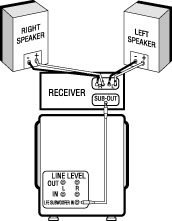
Many people are worried that if they don’t use the subwoofer output jack, they’ll miss the Low Frequency Effects (LFE) channel on 5.1 channel DVDs. Not true. We’ll tell you the secret to getting every last bit of bass, regardless of which hook up you use, in the “Setting Bass Management” section below.
So What’s The Alternative?
For the most people, the easiest and best sounding thing to do is connect the subwoofer to the Front Left and Right speaker outputs (Fig. 2). You can either connect your front main speakers to the subwoofer’s speaker output terminals or you can “parallel wire” them to the same terminals.
Fig. 2 – Speaker Level Out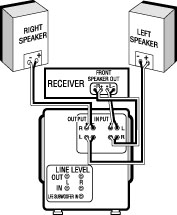
You may get some performance advantages by using low level (line level) connections from the Front Left and Right preamp outputs instead, if your receiver has them. If you have only one set of preamp outputs and they are being used to feed the power amp input, use a “Y” type connector as illustrated in Figure 3.
Fig. 3 – Preamp Out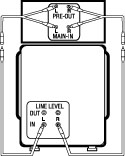
Setting Bass Management: Programming Your Electronics for the Best Sound
Digital surround sound receivers, preamps, or processors must be configured properly to get the best performance from the other important part of your home theater system: your speakers. You must “tell” the surround processor where to send each channel’s bass information. This is known as “Bass Management” or “Speaker Set-Up.” Most processors and receivers allow you to adjust these functions using an “on-screen” display. (Check the user’s manual of your electronics to learn how to access these functions.) Bass management can be confusing. Good news is that once you’ve selected the bass management modes that you’re happy with, all receivers remember your settings allowing you to forget about it and just enjoy your system.
When-in your receiver’s bass management function-a channel is selected as “Large,” it means all of that channel’s sounds, the whole spectrum of frequencies including the bass information, will be directed to that speaker. When “Small” is selected, the deep bass sounds (usually below 150Hz) are filtered out of that speaker and directed to either the subwoofer output jack or to the Left and Right channels (depending on whether the subwoofer is selected as “On” or “Off”). For example, if you select the center channel speaker as “Large,” the center channel bass will go to the center speaker. If you select “Small,” the center bass will be filtered out by the receiver and sent elsewhere.
When you select the subwoofer as “On” (sometimes it’s “Yes/No” rather than “On/Off”), the LFE channel will be directed to the sub out jack along with any bass information from channels you selected as “Small.” When the subwoofer is selected as “Off,” the LFE channel and bass from “Small” channels will be directed to the Front Left and Right outputs (speaker level and line level). OK, enough theory. Let’s get down to specific recommendations for your system.
Hook-Up/Set-Up Recommendations
Left And Right Front Speakers
When you’re using the Front L&R outputs to “feed” the subwoofer (with speaker wire or line cable), always select front speakers as “Large” and subwoofer “Off.” When using the sub output jack to feed the sub, sometimes the front speaker choice between “Small” and “Large” is not clear-cut. There are tradeoffs: When the main speakers are set to “Small,” you’ll be increasing the top volume capability of those speakers and probably lowering their midrange distortion as well. The downside is that the more speakers you select as “Small” the greater the workload on the subwoofer, increasing the odds that you will overtax it. Also, you will probably get better blending between main speakers and subwoofer if the main speakers are run as “Large.” Experiment and see what works best. Here are some speaker set-up suggestions based on typical main speaker types:
Floor-Standing With Built-In Subwoofer (like the Polk Audio LSi25) Without an Additional Subwoofer In The System
Hook them up in the normal fashion with speaker wire as if they were regular speakers. If you are adventurous and looking for that last little bit of sound quality, remove the flat metal jumpers from the input terminals of the speakers. Connect the subwoofers with line level (RCA type) cables from the Front Left and Right preamp outputs of your electronics (use Y connectors as shown in Figure 3 if necessary). With either hook up, select front speakers as “Large” and Sub as “Off” in the speaker set-up function of your electronics.
Floor-Standing With Built-In Subwoofer (Polk Audio LSi25) With an Additional Subwoofer in the System
Follow the same hook-up instructions for your main fronts. If the sub out jack is unfiltered, connect one of the line inputs of the subwoofer to the sub out jack of your electronics and set the sub’s low pass filter to taste. If the sub out jack is filtered, either use an unfiltered input on the sub (if it has one) or use a line input and turn the sub’s variable low-pass filter all the way up. Set the Front L&R speakers as “Large” and Sub as “On.”
Large Floor-Standing Speaker with Good Bass Response (like the Polk Audio LSi15 or RTi12)
Follow the same guidelines as described above.
Any Speaker System That Does Not Have a Subwoofer in the System
Always select front speakers as “Large” even if it the speakers are physically small. Select subwoofer as “Off.”
Bookshelf Speaker with Single 6.5″ or Smaller Woofer (such as Polk Audio RTi4, RTi6, LSi7, etc.) With a Separate Powered Subwoofer
Select front as “Small.” If the sub out jack is unfiltered, connect one of the line inputs of the subwoofer to the sub out jack of your electronics and set the subs low pass filter to taste. If the sub out jack is filtered, either use an unfiltered input on the sub (if it has one) or use a line input and turn the sub’s variable low-pass filter all the way up.
Bookshelf Speaker with 8″ Woofer or Dual Woofers (such as Polk Audio LSi9)
If the sub output jack on your electronics is unfiltered go ahead and connect the subwoofer to the sub out jack via the subwoofer’s line in jack. Set the front speakers as “Small” or “Large” depending on whether your priority is louder volume or better sub-to-speaker blending. Set the sub as “On.” If the subwoofer output jack is filtered we believe the system will sound better if you connect the sub to the Front Left and Right speaker level or preamp level outputs; set the Fronts to “Large” and the Sub to “Off.”
Small Satellite/Subwoofer Systems (like the Polk RM Series)
Connect the subwoofer to the Front Left & Right speaker level (fig. 2) or preamp level outputs (fig. 3), set the Fronts to “Large” and Sub to “Off.” Resist all temptation to use the subwoofer output jack-please.
Center Speaker
Few center channel speakers produce as much bass as a subwoofer or most main speakers. Unless you have a truly full-range (big) center speaker, set the center speaker as “Small.”
Surround Speakers
If you’re using bookshelf, on-wall or in-wall speakers as surrounds, select “Small.” If you have large floor-standing surround speakers with good bass response, or have a second subwoofer for the surround channels (you’re a bass freak, eh?), select “Large.”
Subwoofer
If you have connected your subwoofer to the subwoofer output jack, select subwoofer as “On.” The subwoofer will now play Dolby Digital’s dedicated Low Frequency Effects bass channel (AKA: the LFE channel, the “.1” in “5.1”), as well as the bass of any other speakers selected as “Small.” If you connect your subwoofer to your system in any other way (such as via L&R pre-outs or L&R speaker outputs), select sub as “Off” in bass management. LFE and bass from channels selected as “Small” will now go to the Left and Right front channels, and be filtered out and played by the subwoofer which in turn feeds the filtered, low-passed signal to the satellites.
The THX Exception
(NOTE: Read this section only if you have a THX certified receiver or processor.) Receivers and processors that are THX certified are required to have a very specific set of bass management filters that are active when the processor is set to THX mode. All channels (front, center and surround) are automatically high-pass filtered at 80Hz (the bass is taken out below 80Hz), the subwoofer output jack is turned on and low pass filtered at 80Hz. For many speaker set-ups this is a good configuration. For a system of bookshelf or small floor-standing speakers with a powered sub with an unfiltered line input, this filter set is a good choice. But if your speakers are small satellites or large floor-standers with built-in sub-woofers, this filter set may result in poor performance.
To avoid the standard THX bass management filters, do not engage the THX function of your processor. The processor will revert to its standard user-configured bass management system. As THX is not a surround processing system per se, but an enhancement of Dolby surround processing, you do not need to engage the THX mode to properly decode any surround source.
Why? Why? Why?
You may be asking yourself, why is it so confusing to set up a digital home theater system? Dolby Labs had your best interests at heart when they set the standards for bass management in Dolby Digital processors. They wanted to make sure you could get excellent performance no matter what speakers you use. Every time you design a system for all eventualities, you’re asking for complication, confusion and compromise. And that’s just what we got. The whole sub output jack filter foolishness stems from the early days of home theater when many subs were not self-filtered and powered. Nowadays, 99% of all subwoofers are self-filtered and powered, ending the need for built-in filters.
So why continue? It’s tough to break habits, or maybe those big electronics companies are just not paying any attention to the speaker business. Go ask them.
Still In Doubt?
Polk’s customer service gurus are standing by (at least during normal US East Coast business hours) to help you get the highest performance from your audio system and reach inner peace. Call (800) 377-7655 for enlightenment.
from The Speaker Specialist, Issue 2
by Paul DiComo, Polk Audio (reprinted with permission)



