Cable Splitter
| Thread | Last Poster | Posts | Last Post | |
|---|---|---|---|---|
| Archive through April 03, 2007 | Darren L | 100 |
|
New member Username: BozitoPost Number: 6 Registered: Dec-06 | I get ghosting on the low channels. I am guessing that the cable is acting like an antenna and picking up signal from the air and mixing it with the cable signal. Any way to get rid of this? |
|
New member Username: DrdarrenPost Number: 2 Registered: Apr-07 | ok i have done a review of my setup and this is what i have found. please disregard the above setup. from my main cable line, it attaches to a tap. the tap connects to a 2W-1000mA amplifier. that attaches to a two way splitter. from the 2way splitter are each another 2way splitter, one going to a tivo and the other to hd cable box from each splitter. from the "out" port on the tap, it connects to a 4 way splitter, which goes to 4 tvs.(these i am not really concerned about. my analog and digital signals on the hd sets and not great and i would like to improve them. what else can i do? i just bought a motorola amplifier 25-2000 with +15db gain but i have not put it in yet. before i open it , i was hoping for input from this forum. |
|
New member Username: Jimmy07Saranac Lake, New York USA Post Number: 1 Registered: May-07 | I have the problem of splitting a coaxial 8 times. The 3 offices are that are wired are "daisy chained" from box to box, 50 feet at the most. I do not have the option of using a multiple port splitter. I was told to start with a 20dB tap and descend in value dB to as low as possible. Is this correct? I would think I need to tap as little as possible at each 2way split. Thanks for any help! |
|
Gold Member Username: TapemanNew York City in-HD, NY Post Number: 1175 Registered: Oct-06 | RG6 quad shield with snap compression connectors can lower dB loss. Presuming utility cable line is coming to your house fine |
|
New member Username: Jimmy07Saranac Lake, New York USA Post Number: 2 Registered: May-07 | Tapeman, Can you sedgiest the best method to get around the "daisy-chain" problem? |
|
New member Username: EkaplanPost Number: 2 Registered: Jun-07 | Sorry to jump on the thread with my own problem, I have a HD LCD TV in my living room and a cable modem in my bedroom. The cable signal coming into the apartment is split between the two but all the cable wires are in the walls (behind based boards) and not accessible. Every so often the picture on my TV freezes or gets interrupted (like a mosaic) even though the sound continues. This happens more frequently on the HD channels. Is there a problem with a wire in the wall? Could this be fixed with a new splitter? Is it a problem with my TV. Please help. but... |
|
New member Username: Fyrebyrd84Post Number: 1 Registered: Jul-07 | Hello, I have one cable connection coming into the house from Comcast but I want to spilt it 8 ways so that I have a connection in every room of the house. At this time only 3 connections would be in use and I plan to put terminators on the connections not used. I do not use Comcast for internet so I'm not worried about a cable connection for that right now. Would you recommend the Channel Vision CVT28PIA II Amplified 8-Way Splitter as I have seen mentioned above in another posting ( |
|
New member Username: LandkcPost Number: 1 Registered: Sep-07 | I just bought a Toshiba 57" HD with a QAM tuner. I get some of the local HD channels through basic cable, but NBC and ABC don't come through. I know the broadcast them cause several people in town can get them on basic cable. Could it be the wire from the pole outside to my house? I have just recently replaced all the wire in the house and still get only ESPN HD, CBS and FOX, and the Universal HD channel. Thanks! |
|
Gold Member Username: TapemanNew York City in-HD, NY Post Number: 1352 Registered: Oct-06 | Did yo do Scan channels? Just go to menu and re-scan all channels Keep in Mind they may not always be on HD all the time and yo'll only get what it is in clear (non-encrypted) It can be also from the pole (trap) If scan won't work try HD Antenna https://www.ecoustics.com/cgi-bin/bbs/show.pl?tpc=2&post=1062457#POST1062457 |
|
New member Username: LandkcPost Number: 2 Registered: Sep-07 | Thanks. I have an installer coming out today and I'll post what happens. I did scan all the channels (Took like 15 minutes). I've done it every day this week at different times, just in case they were broadcasting HD on NBC or ABC and still nothing. Hopefully the cable rep will be willing to change the line from the pole. |
|
New member Username: LandkcPost Number: 3 Registered: Sep-07 | You're not going to believe what caused my problem. I actually had a VERY knowledgable and helpful installer come out. Back in the dark ages when there was only HBO, the home I bought didn't opt for the premium channel and Cableone put a filter in the line. This filter was from the early 80's and STILL on the line, causing my digital high def channels to be blocked. |
|
New member Username: DlimPost Number: 1 Registered: Sep-07 | Hi I'm new here. I was looking around online for some help with my problem and came upon this forum. You guys seem to know a lot about cable splitting so here goes: I am trying to split a cable service from Time Warner Cable three ways. One to my cable modem, one to an hdtv upstairs, and one to a non-hdtv downstairs near the modem. I purchased a 4-way splitter from monoprice.com (http://www.monoprice.com/products/product.asp?c_id=104&cp_id=10422&cs_id=1042206 &p_id=2871&seq=1&format=2) in hopes that it would solve my problem. However, when using the 4-way splitter, my cable modem receives no signal and the internet does not work. The hdtv upstairs and the tv downstairs receive signal fine though. I've read that some splits reduce the signal by 3.5db and others reduce it by 7.5db, i'm not home at the moment but will be home soon and will try to connect the cable modem box to the 3.5db one (which one would it be in the link above? the splits are unmarked). When I use the 2-way splitter my cable company provided for me, my cable modem box and my tv upstairs both receive signal just fine and there are no problems. However with the addition of another tv I would like to split the signal. My set up is like this. 3 rg6 coax cables provided by the cable company. 1 from the cable outlet in the wall to the splitter. 1 from the splitter to the cable modem. 1 from the splitter to the downstairs tv. I also have a 25ft rg6 coax cable running from the splitter to a coupler that connects it to another 25ft rg6 cable that is quad shielded. Could it be just a defective splitter? Or could it be the cabling? |
|
New member Username: LandkcPost Number: 4 Registered: Sep-07 | I would suggest using a single splitter, one in and two out for your cable modem and then going to the larger splitter for your televisions. That would ensure that you get the best possible connection for your cable modem. |
|
New member Username: AlrankinManhattan, Kansas United States Post Number: 1 Registered: Nov-07 | I'm thinking of installing a slingbox and have a question about setup. Currently have HD digital cable service. Cable company installed a splitter just inside the house with a line to the HD system, a line to a SDTV and a line to a cable modem for internet and telephone. Now if I were to put a splitter in front of the cable modem so I can branch off to the slingbox, will I weaken the signal too much for the cable modem? I thought I remember the technician saying they are pretty sensative to signal strength. Will I need a preamp somewhere to avoid problems? |
|
Gold Member Username: Donnie1973Post Number: 1735 Registered: May-06 | I think u would be ok. try it... connect a splitter AT the end of the cable for the modem, run 1 to modem, 1 to slingbox. That will tell u if u can do it. |
|
New member Username: SmrPost Number: 1 Registered: Dec-07 | My apartment was pre-wired for cable in two different locations. I recently added a third and I'm wondering what is the best way to bring service to the third outlet. I have a cable wire that I've installed that acts as a connector that will bring service to the third source. My plan was to add a two-way splitter between the connecting cable I've installed and the third source, and to change the originating source to a three-way from a two-way. Will this work or do I stand a chance of losing signal strength? |
|
New member Username: Dclayton002Post Number: 1 Registered: Dec-07 | We have a somewhat complex cable setup right now due to the # of TVs in our house and it's about to get more complex. Current setup is: * Cable modem on main floor * 3 TVs on main floor (1 digital) * 4 TVs on 2nd floor (1 digital) New setup: * Adding 4 TVs in basement (2 will be HDTV) Signal strength is already a battle (we are splitting using 3-way and 4-way splitters now with an amplifier downstream from the modem split) prior to adding the new TVs and I might like to switch to satellite for the extra HD channels. Any help with these questions would be appreciated: * Are there good options for switching to satellite with this many TVs (without breaking the bank)? We would be open to having one receiver control 2-3 TVs on the same floors if a satellite remote is RF. * What are the best options for splitting the signal this many times? Would an 8-way splitter or a 2nd line from the cable company into the house help? Before anyone says it, I know the # of TVs is excessive, but we all have our vices! Thanks for any suggestions. |
|
New member Username: RondaPost Number: 1 Registered: Dec-07 | We just upgraded from regular cable to digital. The cable guy was in a major hurry and I think I see shortcuts but want to verify before I call cable service. He said our wiring was outdated so he ran new wiring from outside to house the added digital splitter, one to modem 2 lines to extra tv's and one line to cable /dvr box on big tv. All lines using new cable except for line going to main tv/cable box. On this one he used the old two-ended cable but only used one line of it. The extra end is just hanging there. Then on the back of the plasma tv there is an air cable hook up. He used one of my short cables hooked to a 4db splitter (1input and then 2 exits). One one of these he left the old A/B switch box attached and the other a line going to the old splitter that I had hooked up to split to 3 other tvs(which now do not received cable signals) What the heck did this guy do? What is the "air cable hook up on the tv for"? Should he have used the old "outdated two end cable and just left one end hanging? The first extra end is hooked to a splitter that splits nowhere and the second end is just hanging by the tv. Thank you. |
|
New member Username: LandkcPost Number: 5 Registered: Sep-07 | Ronda, How many TV's do you have in the house that are hooked to cable? How many outputs does the digital cable splitter have on it? It seems to me that the line may be split too many times. Is your picture ok? |
|
New member Username: Tink_vPost Number: 1 Registered: Mar-08 | hi, my friend is having problems with cable reception, She has 1TV downstairs and 3 upstairs with computer cable and phone cable downstairs, her reception on the upstairs tvs are terrible and dont get the major channels, what splitter should i get? she basically went from tv to tv upstairs with splitters rather than going directly from downstairs PLEASE HELP |
|
New member Username: AlyxhamPost Number: 1 Registered: Mar-08 | I have just upgrade our cable to HD extended by Rogers from basic cable. Everything is workingon the plasma but when split to the CRT TV upstairs we only still get basic cable. How do I correct this?? |
|
New member Username: JaycocamperPost Number: 1 Registered: Mar-08 | I have an HDTV and a cable modem. I tried splitting the cable with a two way, but it wasn't enough for the cable modem. I also tried amplifying the signal after the split, but it didn't work either. Is there some device where I can switch between the two? Sort of like an A/B switch in reverse? |
|
New member Username: SimpjrPost Number: 1 Registered: Mar-08 | This past Thursday, I lost an HD channel (CBS - no HD NCAA, Ugh!) on my Comcast HD receiver. When I went to check out the splitters, I noticed that I get a small shock when I disconnect one of the lines. Could that be the cause? My setup: 1 HDTV, 3 TVs, and 1 Cable modem. one line into the house with 2 three way splitters. one has -3,5db and 2 -7dbs, the other has 3 -5.5db. Any help would be appreciated. |
|
New member Username: MurmalPost Number: 2 Registered: Apr-08 | Dear Cableguy, I have just ordered Fios TV. I already have Fios Internet (over a year) and Telephone. I currently have DishNetwork. I would like to keep Dishnetwork's international channels while add Fios for all American Channels. How can I get both into the house. Fios Tec. guy is saying he will disconnect the dish's connection coming to our house and use that connection point to broadcast Fios TV througout the house. Is there a way I can use any splitters to get both the signals in the same cable. I am not a pro on TV stuff, can you guide me. Yours, Murali. |
|
Gold Member Username: CableguySomewhere on... U.S. Post Number: 1023 Registered: Mar-05 | Murali~ Unfortunately unless you drop some serious cash on insertion equipment you only have 1 option- Have them run all new wiring. This would mean you would have 2 wires at each location, 1 for Fios and 1 for DishNetwork. It's not uncommon for somebody to use existing wiring because it's more work for the installer to run dedicated lines. If you use splitters to combine the 2 signals the frequencies are going to conflict with each other and nothing is going to work right. I also caution you that I'm a cableguy and not a dish or fios expert, but I have encountered problems with our cable and sat systems where they used combiners to inject the sat feed onto the same cable line we use and nothing good ever comes from it. To properly utilize both systems on the same line insertion and deletion equipment can accomplish this task, but it does not come cheap. |
|
New member Username: TomatoPost Number: 1 Registered: Apr-08 | I split one cable in my condo to two TVs (one HD, one not). I lost about 2/3 the channels. Is this due to a weak signal or bad connections? I just used the splitter provided by Comcast. Is this a high-enough quality splitter, or should I buy a new one? I don't think I can amplify the signal because I have no idea where the cable is entering my place (plus, if it's accessible to anyone, I don't want them to steal my amplifier). I just bought some run-of-the-mill connectors, should I have looked for better ones? It seems like I should be able to split a cable ONCE without too much signal degradation. Any suggestions? |
|
Gold Member Username: CableguySomewhere on... U.S. Post Number: 1024 Registered: Mar-05 | " split one cable in my condo to two TVs (one HD, one not). I lost about 2/3 the channels. Is this due to a weak signal or bad connections? " Could be all the above. Isolate the issue and put it back together one side at a time to see what triggers the issue. Bad wires, bad connector, bad splitter, etc...etc... You should barrel the wires together without the splitte to see if it's a wire/connector issue. If you don't have a problem with the wires connect the splitter. If you lose the channels try a different splitter first. |
|
New member Username: 2behindPost Number: 1 Registered: Apr-08 | I recently moved to a new house. I had cable internet and basic cable tv installed. The cable tv has never had a problem but the internet keeps dropping out. Called the cable company and they were going to send someone out but I decided to troubleshoot some myself. I found that if I hook the internet directly to the modem without the splitter it works. I replaced the splitter they put on and thought I had it fixed. That worked for a couple days and then it dropped out again. Hooked up direct and it works. I replaced the splitter again this time with one that has a power pass to the cable modem, no worky. Im guessing my signal to the house is too weak to add a splitter I dont know. Its a short run from the house to where it hooks up to the box at the street. I will be calling them shortly but wondered if you had any ideas cableguy or anyone. Thanks for any help. |
|
Gold Member Username: Donnie1973Post Number: 2988 Registered: May-06 | call them out to fix it. Make sure u show them what its doing. They will replace the whole cable run if necessary |
|
New member Username: TripplePost Number: 1 Registered: May-08 | Test it yourself. Type in |
|
Bronze Member Username: LevelzeroPost Number: 28 Registered: Aug-07 | Jim, Try using a splitter that looks like this one: |
|
New member Username: Thefly1013Post Number: 1 Registered: May-08 | I've got a general question about directional couplers that I'm hoping someone can answer. I've noticed that Regal has DC taps from 4dB to 30 dB, with a bunch in between. I understand the dB number comes from the amount of signal loss on the TAP. My question though is why would you ever want a 30dB loss when you could only have a 4dB loss (it looks like they all cost the same)? Does the 30dB one have less loss on the OUT leg? My understanding is that all of these DCs had minimal loss on the OUT leg. I've also got a specific question for Level Zero. In other posts in this thread, the recommendation seems to be to run the modem from the TAP and the TVs from the OUT line. But you recommended the opposite, so I was curious as to why? Thanks. |
|
New member Username: TripplePost Number: 2 Registered: May-08 | Thefly: Out at the street were the cable box is located the db level is about 15 to 30 db. These levels can be adjusted depending on how far the houses are for that tap. One house could be 10 feet from the tap, there could be another house across the street that is 300 feet away runnig on that same tap. the cable company can ether run a new tap closer to the house that is 300 feet away or just raise the db level at the tap. DC splitters are used to bring down the levels for your digital boxes and modems(+9to-9)db. so if you needed to drop the signal level for your modem you would use the tap leg to drop the signal down. the out leg on all dc splitter is about 1.5db loss. |
|
New member Username: LadybogPost Number: 1 Registered: May-08 | Hello Cableguy. Moved into a new home, and don't understand the setup that we have. We are attempting to connect 4 items that are all in different rooms: 1 plasma tv downstairs, 1 regular tv upstairs, 1 computer with internet, 1 digital phone When the cable company came they didn't use the 8 way Eaton module that is in our central panel, but used a 3 way splitter. 7.5 for the digital phone, 7.5 for the internet, and 3.5 for the plasma tv (I think). This worked when the internet was in the room adjacent to the plasma tv. Had to move the computer to another room and am now unsure as to how to get everything connected. Disconnected the 3 way splitter. Moved this line so that it fed into the 8 way module. Attached the black coax cables to the 8 way module. This easily connected the internet, regular tv and digital phone but I have been unable to connect the plasma tv. Plasma TV has two cable connection options at its location. One is a white and the other is a black cable. I have a black coax hooked up to it currently. But can you advise what connection it should go into at the outlet, and then also at the central panel, what needs to be done to make the cable work? There are numerous white and black coax cables, and we aren't sure of how it should be setup. Is the 8 way module sufficient or should some sort of splitter be used? Would be appreciative of any tips you have.  |
|
New member Username: TripplePost Number: 3 Registered: May-08 | the purpose of the double jacks at the wall is for satellite options. the color just makes it a little easier to track at the panel. make no differance what the color is for signal. If your only gonna hook up 4 outlets your best bet would be to get a 4 way spliter. your 8 way is pulling about 12-15 db loss. All your wires in the panel are you cable jacks in the house. If you dont have a test toner, use a small tv, start in one room. connect tv to wall jack, then go into the panel and start connecting one line at a time untill you get a pic on the tv. label as you go. |
|
New member Username: Cjstl78Post Number: 1 Registered: Jun-08 | Cableguy (or anyone else), I need help! I've read this entire thread and I'm still not sure what to do. I have 3 TV's - 1 plasma w/ a cablecard, 1 LCD with an HD Box and 1 CRT with a digital box. I also have two TiVos and a data modem. Finally, I have a modem for my phone service (no one has been talking about those). The main line coming into the house feeds into a 3-way splitter. One of the -7dB outputs is connected to the voice modem. The second was connected to the dig box on the CRT. The -3.5dB output feeds into another 3-way splitter with all -5.5dB outputs. The broadband modem is connected to one of those and has had some issues in the past where it will temporarily drop connection, although that hasn't been as bad since the last time a cable tech came out to the house. The remaining outputs feed into 2-way splitters, which each connect to an HD TV and a TiVo. The HD/Digital connection is fairly good, although it could be better on some channels. The TiVo reception (Expanded Basic) is absolutely terrible. The one connected to the plasma is worse than the one connected to the LCD, but this could be because the plasma is so much sharper. I'd like to get an HD TiVo and use the cablecard from the plasma, but my wife won't agree to the expense. I identified where all the cable runs go this evening and immediately moved the plasma/TiVo#1 to the first splitter and the CRT to the second splitter, and I came across this thread while searching for information on signal loss from splitters. There's great info here, but I'm confused as to how to handle the two modems. If there was just one, I'd use a tapper as recommended earlier. I would imagine the voice modem is more sensitive than the data modem, but maybe someone can verify this? Of course it would be nice if the cable company would just combine into one since there is already an Ethernet port on the voice modem, but they won't give me a time frame as to when that might happen. I would like to drastically improve the TiVo reception and also boost the digital signal. The cablecard isn't too bad, but the HD box and the dig box sometimes have long delays "acquiring signal" when switching channels. I'd also like to add an output for a TV card on my PC and leave room for two more outputs when I finish my basement. Would my best option be to keep the first 3-way splitter and use the 2 -7dB outputs for the modems and feed the -3.5dB output into a 6- or 8-way amplifier? Or should I keep the 3-way with the -5.5dB outputs and do the same thing? I can't do anything about the 2-way splitter for the LCD/TiVo#2 in the master, but I could run a second direct cable to the family room to eliminate the 2-way splitter for the plasma/TiVo#1. |
|
New member Username: ArtietheonemanpartyPost Number: 1 Registered: Jul-08 | I'm having a problem with my PIP connection. Long story short, my HD dvr cable box was causing major pixelation on almost all channels. Comcast changed out my box, 3-way splitter where the cable comes to the house, and the wire going to the HD dvr, but I was still having problems. The cable comes in through the wall, and into a 2-way splitter, one into the hd dvr box, one into the tv for PIP. With the splitter connected, I was still getting pixelation. When we removed the splitter, the hd dvr signal was perfect. We tried replacing the 2-way splitter too, but no difference. All of this was working flawlessly a couple of weeks ago. We've had quite a few t-storms over the last two weeks, maybe that's caused some problems? |
|
New member Username: JwcolbyPost Number: 1 Registered: Sep-08 | Cable guy, I had the cable company come in and find an AC Hum issue (turned out to be the connection on the outside wall of my house). Although I told him the signal was coming in to the house (disconnecting the cable coming in eliminated the hum) he worked backwards and in the process pretty much rebuilt my interior wiring. That's cool! He finally found the issue on the outside wall, replaced that connector and left. My remaining issue is as follows. I built an HTPC which I placed in the living room, which is about 75 feet of cable and one two way splitter from the main splitter. As it comes out of the wall I placed a 5 way splitter to feed a cable to my tv, one to the HTPC and have a few left over. Haveing read this thread I now realize that I should have a two way splitter to minimize the loss there, and will probably do that. What I am seeing now is that the tv shows great pictures on all channels, but the HTPC gets poor reception on the higher channels, basically anything above channel 60. When the cable guy did his thing, he took out a quality 15 db amp and replaced it with his own. So I took the amp and plugged it in immediately behind the tv so that it is amplifying the signal just before the splitter. By and large that cleaned up the bad signals on the upper channels. My question is, should I install the amp down in the basement to drive just the leg going up to the living room (and a splitter to feed the rec room below the basement), i.e. would it a) be enough amplification and b) would the signal shape be better. IOW is amplifying a clean signal and sending it 75 feet (and through a couple of splitters) better than amplifying a degraded signal at the far end of the 75 foot run and a single two way splitter? TIA for your assistance. |
|
New member Username: PalesiusPost Number: 1 Registered: Oct-08 | I have a question for anyone who wants to offer suggestions on the best way to set this up. We're building a new house (and in-law cottage) in North Carolina. I have a backround in data wiring, so am planning on doing the structured wiring myself. While I know what I'm doing with the Network and Voice side of things, I'm not that sure on the best way to arrange things to maintain a quality signal. There will be one line coming in to the main house from the cable company (charter). The current plan is to feed that into a 3-way splitter. 1 leg will go to a cable modem. 1 leg will go to an amplifier/splitter that will service any jacks on the basement and main floors (14 of which probably no more than 2/3 will be in use). 1 of the outputs on the amp/splitter will go to a passive splitter on the top floor which will service any jacks on that floor (6 of which probably 1 or 2 will be in use). The third leg of the original splitter will go to the cottage, into another amp/splitter which will service 6 jacks (of which 1/2 will be in use) and 1 will go to a passive splitter on the top floor which will server 2 jacks (of which probably only 1 will be in use). I'm trying to avoid running a lot of cables from the basement to the top floor, but is that a mistake, am I better off having longer cables and ditching the splitter on the top floor? As far as the cables running to the guest house I'd rather not all 8 jacks all the way back to the basement of the main house, but does that make much more sense as far as the signal quality goes? Is there a better way to lay this all out? |
|
New member Username: ShebalordPost Number: 1 Registered: Nov-08 | Cableguy: Can you recommend me splitters that I should use and a directional coupler to use with Time Warner digital cable service? Right now I'm getting a few problems: 1) Internet seems slower than normal. 2) In room 3, Digital Receiver STB is used but gets fuzzy picture and missing channels. I only tried using one STB at any given time but with the cable modem always on. Please see the attached pic for my setup. Thanks in advance! |
|
New member Username: ShebalordPost Number: 2 Registered: Nov-08 | 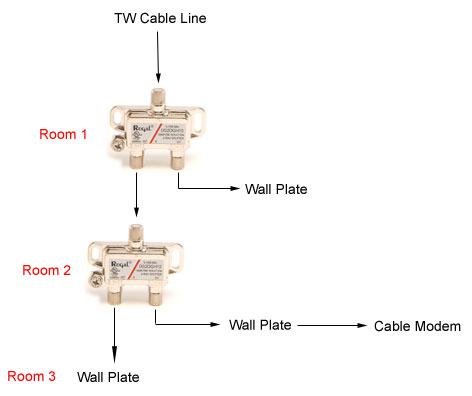 |
|
Gold Member Username: TapemanNew York City in-HD, NY Post Number: 3702 Registered: Oct-06 | There is yor problem: "In room 3, Digital Receiver STB is used but gets fuzzy picture and missing channels." Plus yo possibly shorting entire house wiring Try to use a 4 way splitter going to all yor house wiring (i.e. what's going to all coax cables at yor basement or garage etc.) Out of the wall use a 2-way splitter 1- To yor cable modem 1- To yor Digital Receiver |
|
New member Username: DrfranksddsCleveland, Oh Usa Post Number: 1 Registered: Nov-08 | I have Time Warner.My house has a three way splitter. One line to my hdtv-great. One line to my cable modem-great. One line to an in line amp to a two way splitter to two non hd tvs-great. Now i need to add a small tv in the kitchen. Would I be better just swapping the three way for a four way splitter, or put a two way splitter on the modem line(directly neare the kitchen)? I do not want to lose internet speed however.Any ideas out there? |
|
Gold Member Username: TapemanNew York City in-HD, NY Post Number: 3703 Registered: Oct-06 | I would change to a 4 way splitter instead of 3 Yo'll be fine Keep in mind As od Feb 19th 2009 Digital box will be required for each TV Unless yor TV has Digital tuner |
|
New member Username: DrfranksddsCleveland, Oh Usa Post Number: 2 Registered: Nov-08 | Thanks for your time K.T. Are all of the splitters OK or is there a brand you like? Same question for the cable...any brand OK? |
|
Gold Member Username: TapemanNew York City in-HD, NY Post Number: 3707 Registered: Oct-06 | For CableTV usually 900MHz is all yo need 1000MHz is even better 2000MHz usually for satellites Yo won't need that high e-bay: Check this item http://cgi.ebay.com/NEW-DIGITAL-CATV-SPLITTER-4-WAY5-1000MHz_W0QQitemZ1301097190 61QQcmdZViewItemQQptZLH_DefaultDomain_0 or this item: http://cgi.ebay.com/4-WAY-HDTV-COAX-SPLITTER-5-1000MHz-CMC2004H-NEW_W0QQitemZ350 115502379QQcmdZViewItemQQptZLH_DefaultDomain_0 |
|
New member Username: Rock48njPost Number: 1 Registered: Dec-08 | I found this thread researching my problem... hopeful some folks on here are still around may be able to help. I have Time Warner Digital Cable with RoadRunner online. In my apartment I have an LCD running with a standard digital box in my bedroom and a LCD with an HD box in my living room. 1 bedroom NYC apartment so its not a sprawling space. About a year ago I had some problems with my internet connection dropping out. Called had an appointment scheduled but by the time that got there it was working again. Tech was pleasant but not really interested in investigating much, checked my signal strength said it seemed fine and went on his way. A few months later same problem, guy came out replaced a splitter that was in my wall which fixed the problem and was on his way. A few months later again... bye this time I could not handle the call process so I hooked my modem up directly to my line in and it worked fine. Tried calling but lady was insistent she walk me through all the troubleshooting before scheduling an appointment I got frustrated and said I would call back. I went out and bought a bidirectional amplifier from RadioShack and hooked it up and everything has seemed fine until now. A bunch of my channels are doing the pixelating, skipping audio thing which has kept up longer than some of the random anomalies that seem to be common. Most of the channels where this happens seem to be random SD channels that I don't watch much (and can't imagine many people do) but now its happening on a select HD channel or two I definitely will be watching. My set-up is: Cable line in to a splitter one to bedroom SD box one to wall jack from wall h jack to amp to splitter to cable modem and HD box. From my lengthy read through I guess my question is... is the pixelating issue most likely a TWC problem as opposed to my problem? Should I try and change my set-up at all to help. Any other ways to troubleshoot or recos for splitters to use that may help. |
|
New member Username: AcpcpaBrooklyn, NY Post Number: 1 Registered: Dec-08 | I have a cable line coming in to one tv. I want to split it to have the tv in my bedroom receive the signal. The problem is that when I did this, I can only control the channel through the cable box which means both tv's will always be on the same channel (not to mention I have to go to the living room to change the channel). Is there anything that would allow me to split the cable and also be able to have differenct channels on each tv? |
|
Gold Member Username: John_sColumbus, Ohio US Post Number: 2413 Registered: Feb-04 | (not to mention I have to go to the living room to change the channel) Wow, not a very good "channel surfing" situation, is it Alexis? Install your splitter before the cable goes into the box. You can watch different channels in the bedroom regardless of what the cable box is doing. However, you would be limited to only those channels your bedroom TV can tune in on basic cable. |
|
New member Username: GteclassPost Number: 1 Registered: Jan-09 | I have a very strange problem with my cable modem. I stumbled on this thread from a google search and it sounds like a few people on here know what they are talking about. I live in a condo association. My unit has 2 cable outlets. One on each floor. The cable modem was always hooked up on the second floor and the tv on the first. I moved the computer and cable modem down stairs and used a digital splitter I bought from the cable company(has their name on it) to feed both the TV and cable modem. All of a sudden I have intermittent packet loss. Sometimes 100% loss for 5 or 6 seconds. So I fought with it, tried just hooking up the cable modem to that outlet with one coax, no splitters, same old packet loss. Eventually I figured it was the socket on the wall gave up and moved it back upstairs and everything was wonderful again. That is until I moved the TV upstairs. After hooking it up using the same splitter I started in with the same packet loss. Tried removing the splitter and going to just the wire. Still dropping packets. So now what? Do I move the cable modem downstairs again? |
|
New member Username: GteclassPost Number: 2 Registered: Jan-09 | I logged onto the signal page in my modem and found that the signal without the splitter is 3db downstream and 40db upstream. SNR is 34db. With the splitter it is -3db downstream and 44db upstream. SNR is still 34db. It seems like I lose the same amount of packets in either configuration. Probly gonna go to RadShack tomorrow and get a two way digital amplifier to try to resolve this issue but I am going on a hunch that the signal is even the issue here. |
|
New member Username: GteclassPost Number: 3 Registered: Jan-09 | k, got that amplifier. Upstream and downstream frequencies of my modem from its datasheet(Surfboard 5120) are within the operating ranges of the amplifier. I can now adjust the signal from the -3db all the way up to 14db, tested at every 3 db levels and still droppin packets. I unplug the modem power line before adjusting the amp every time so it has to resync. Cable comes out of the wall, into the amp, into the splitter, then to the tv and modem. SNR with the amp went down to 32db, 33db if the tv is off. I am lost at this point, well I've been lost the whole time, but now I'm really lost. |
|
New member Username: GteclassPost Number: 4 Registered: Jan-09 | actually it seems to have done the trick, maybe i just had to let things settle in for a bit. The amplifier I got is sold at radio shack for 32$ its the one that mounts on the wall, the inline barrel types are no good for two way communication. Oddly enough, they are more expensive. I hope this helps someone out there who has the same issue. |
|
New member Username: ShebalordPost Number: 4 Registered: Nov-08 | Jason: typically Radio Shack amps are not recommended, but if it works, then keep it. Otherwise, I would recommend an Electroline Amp. It costs about the same as the Radio Shack ones but with better quality. Last time I went to Radio Shack their amps had returns of 5-40 for cable modems. But from what I read on these forums, cable modems need return of 5-42. I recently bought an Electroline Amp from eBay and it works flawlessly. Hope this helps! |
|
New member Username: ZonaguyTucson, AZ USA Post Number: 1 Registered: Jan-09 | Hello. I'm adding a new room to the house. I'd like to run a hdtv and cable modem. I'm wondering if you can recommend a splitter and amp. This room is nearest to cable in, so it will run modem, tv in same room, then run to existing den tv, to bed tv. Thank you for any advice. |
|
New member Username: DukenycPost Number: 1 Registered: Mar-09 | Hi, I just received my Scientic Atlanta 3250 cable box from Time Warner and I am not getting any signals. I am using a cheap 2-way splitter I installed over 10 years ago. Would this be the problem? Thanks. |
|
New member Username: FishhawkPost Number: 1 Registered: Mar-09 | What is the best way for this senario. Incomming cable in the basement. Want to hook up cable modum in basement T.V in the basement T.V in upstairs bedroom T.V in a upstairs living room. Should I just use a 4 way splitter in the basement and run a cable to each unit??? Thanks Dave |
|
New member Username: JshillPost Number: 1 Registered: Apr-09 | Question to anyone who knows... I have a signal coming into my home for internet modem and tv. It worked fine for about a month when I had a splitter hooked up sending the signal to both my cable modem and the other to my tv for basic cable. Last night, my signal for internet went out, but came back on for short times. Then it quit working completely. When I take the splitter out, I can get internet. With the splitter in place, all I can get it tv. Any suggestions as to what might have happened? My splitter was new out the bag, made by "Holland Electronics", Model "GHS-2FC LI", 5-1000 MHz. It also says "Low Intermodulation" on it, and next to each "out" source, it states "-3.5 dB". |
|
Gold Member Username: TapemanNew York Citay in-HD, NY Post Number: 4233 Registered: Oct-06 | JS Hill I'm using CMC 2002H-A Which is the same frequency splitter 5-1000MHZ It works like a charm for me I think it's yor connectors or some other unknown short somewhere david bongiorno 2 way splitter first Then another 3 way splitter is how I got mine Also look into this unit It can connect 3 different video sources To up to 5 user rooms It's like a video share if yo have at least 2 different video sources like Cable and Satellite or DVR etc. Channel Plus 3025 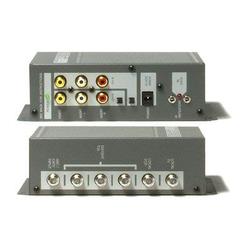 |
|
New member Username: AustinwgreenPost Number: 1 Registered: May-09 | my cable reception is pretty horrible on all channels on all the TVs in my house, we have two regular TVs and one hdtv, then the cable modem, and a capture card on a computer, I upgraded to the digital cable so will be getting a box, not sure if that's going to help much but won't get that until this coming up Friday. From the line coming inside the house, I have a two port splitter, the first split its hooked to another three port splitter, the second split is hooked to one of the regular TVs, on the three port splitter, the first split is hooked to the other regular TV, the second split is coming to the modem. that line also has a three port splitter, the third split is to my hdtv, on the other 3 port splitter going to my cable modem the first split is not hooked up, or covered, the second is to the modem, and the third is hooked to my capture card on my pc, I plan on getting two digital receivers with my upgrade, will hooked them up to my hdtv and my dad's regular TV, I may end up getting a 3rd box to hook up to my capture card. The two port splitter is 5-1000 MHz and the 2 3 port splitters are 5-900 MHz I don't really have a problem with internet, that is fine, only my TV reception, where all the channels have fuzz or are noisy, or they have lines going threw them. Some channels blank out or go straight to the black and white noise sometimes. I've been doing a bit of research and see I can get higher grade splitters or a amplifier or amplified splitters lol, but then I stumbled onto this page, figured I'd ask since I'm not really sure I what I should look into.. Any help is appreciated Thanks, Austin |
|
New member Username: AustinwgreenPost Number: 2 Registered: May-09 | so i got the digital boxes installed today I also purchased a pct 4 port amplified splitter, my setup now is cableline coming into the house. hooked to a 3 port splitter at 5-1000 mhz, the first line is hooked to the amp, the second line is hooked to one of my regular tv's without a digital receiver ( I had this originaly hooked to the amp in port 3, with the cableline coming from outside hooked to the amp. but all the channels had 20 times the noise, when I hooked it up to the 3 port splitter the picture quaility is better than on the amp and the same as the before setup but still not great) the 3rd port is hooked to my cable modem, on the 4 port amp I got the first port going to my hdtv with a digital reciever (this is better also but still not fantastic but I think that's just cause it's a hdtv, its mainly a lil blurry, I have the second port going to my other regular tv with a digital reciever ( this tv had lots of noise and would cut out a lot, so far this tv looks fantastic compaired to before and its about the best out of the 3 tvs and capture card) and the 3rd port is hooked to my capture card on my pc which will be hooked to a digital reciever in about a week (this now looks worse hooked up to the amp mainly on lower channels which are really fuzzy, noisey, the higher channels look better but you can see horizontal lines going threw parts of picture, not sure if this would be my capture card or if it's the amp, the fourth port is not in use anymore and capped off. Any reconmendations or other ideas? |
|
New member Username: AustinwgreenPost Number: 3 Registered: May-09 | here are some of the channels on my capture card. the rest of the tvs i can deal with. http://i397.photobucket.com/albums/pp54/hate_machine420/tmntpic.jpg http://i397.photobucket.com/albums/pp54/hate_machine420/phineasandferbpic.jpg http://i397.photobucket.com/albums/pp54/hate_machine420/dinosquadpic.jpg these are with the amp hooked up. |
|
New member Username: AustinwgreenPost Number: 4 Registered: May-09 | the 3rd port on the amp is bad. hooked it to the 4th port and the channels are as clear as it will probably get. thanks for the help everyone.... not.. lol |
|
New member Username: Mikej262Post Number: 1 Registered: Jun-09 | Here's a new test on problems similar to those on this thread . . . I just moved into a 5-year old house. The house is completely wired for cable and phone. I called the local cableco to come hook us up, but when I got home, only 3 coax lines are active. Turns out that the cableco has 3 coax cables coming into the house, NOT connected to the main house. Previous owners also had satellite TV, so the garage has coax all over the place. Poking around in the ceiling of the basement, I found an 8-split amplifier with coax going every which direction, which I believe is the house circuit, but I'm having trouble following the path of the input coax to reveal where it begins. Two questions: 1) why would the cableco not connect to this house circuit? and 2) any suggestions for tracing the input cable so I can connect the cableco's input line to this line? I'm a bit perplexed and peeved that the cableco hooked up their own external lines and didn't bother looking for the internal circuitry. |
|
New member Username: Dat280sunPost Number: 1 Registered: Jun-09 | I have hdtv up stairs and a cable modem in the basement. I was wanting to add a tv in the basement I called the cable and said it would be 20 bucks and prolly next week before they could do anytyhing. They also said that i shoundnt slpit it myself because i would lose my signal on 1 tv or internet. I looked in the grey TWC box outside it is a 2 way sv-2gt splitter. I dont want to lose any signal to internet (cable modem RCA modem) or to HD tv what kinda splitter do i need and where can i get one before this weekend. |
|
New member Username: Hevis1Post Number: 1 Registered: Jul-09 | Splitter / Distribution question... My current set up is as follows... Incoming digital cable line > amplifier >single splitter > 1 leg to HD, the other leg to 4-way splitter. I need to configure my Comcast cable to supply 2 HD TVs and 5 analog TVs. Any suggestion(s) would be appreciated. |
|
New member Username: GjbPost Number: 1 Registered: Jul-09 | I have read this thread and can't find the answer to what is the specified use for a DC-12, DC-9 and DC-6 directional cable splitter? I know the number is the loss on the tap side, but what is an example of where you would use each type? Thanks. |
|
New member Username: CableguyindianaPost Number: 1 Registered: Jul-09 | I don't know where you guys are getting your information but the losses for splitters are pretty universal. A 2way will lose 3.5 db per side.. A 3way comes in two general types: balanced/unbalanced. A balanced will lose about 5.5 on all 3 output legs, an unbalanced will lose 3.5/7/7 respectively. A 4 way loses 7 on all outputs. a 6 way 9db, and an 8way 11db. The splitter you're describing is also overkill in terms of it's mhz rating. On a modern 860mhz system you only need .. you guessed it 860. A 50-2000mhz splitter is generally for satellite systems that run at those frequencies. You only need a normal splitter which is 5-1000mhz. Please do not waste your money on an after market splitter especially if you have digital products. Just call the cable company and let them do it right. Save the guy the hassle of taking it out to put a decent splitter in and chucking this one on top of your water heater. |
|
New member Username: CableguyindianaPost Number: 2 Registered: Jul-09 | Mr Jenkins, Your cableco did not hook to that because we can't use satellite equipment....it's a completely different system type which uses a different set of frequencies, splitting, forward and return schemes. Secondly you're describing a 11 outlet install (3 outlets another 8 remotely) which actually equals 12 lines as you'll need a feed to the second network. Did you actually ask for 11 outlets when you called it in or did you assume they'd just hook up whatever was existing and go? You're cable guy probably was scheduled to hook up beetween 1 and 3 and therefore alotted enough time to do only that. You'll need ridiculous signal strength to run 11 outlets that aren't even homerun to one place. To look for the input you'd need a line toner (much like the one your cable guy would have had) and the better part of a day to tone out all of the lines and satellite backfeeds. Then mark or tag them, and sketch out a schematic to make up a decent plan as to how to power 11 outlets piggybacked on 3. Without seeing your specific house and wiring scheme I can't say anymore without making large assumptions. Good luck, my suggestion is call the cableco back and let them get the migraine figuring out what the satco did. Be patient and forthcoming in what you need ... these guys are routed based on what you actually scheduled. You may even need a secondary drop line. |
|
New member Username: CableguyindianaPost Number: 3 Registered: Jul-09 | Jay dub, There is no way to split it without losing signal. The cablco also knows this but they have the signal meters, wiring and splitters to make the most out of what signal you have to work with at your ground block. Pretty much anything you purchase aftermarket is garbage except maybe the most expensive 5-1000mhz spliters which ironically will cost you far more than the measly 20 bucks the cableco charges you to install the new line, signal test, and install the (free) splitter. Don't forget you'll need a jumper wire also to go from your new gold splitter to the new set.... cha-ching! Finally if you botch it or get a defective splitter the cableco will nail you for a svc call fee if they have to come out and do what they could have just done in the first place. Consider that you have HD on a 2nd floor, and internet in bsmt both of which are digital products, both are sensitive to noise and poor signal strength. My suggestion would be to wait the week for the calbeco to get there and pay them 20 bucks instead of paying radio shack 35$ and then the cableco 27.99 for a svc call fee. |
|
New member Username: CableguyindianaPost Number: 4 Registered: Jul-09 | Hevis, My suggestion would be to call Comcast since they're you're provider and allow them to do it correctly. You'll need a very high quality amplifier, squeaky clean wiring, clean input levels, a balanced 3way and an unbalanced 3way. Amazingly Comcast being a cable provider already has all that stuff and are willing to install it for you. Problem solved! PS Unsure why you've amplified all splitters, if you are beefing up the signal before a 2way which feeds an HD box or set you're probably cooking the tuner in them. Most amplifiers are 15-20db across a wide spectrum, a little 2way only loses 3.5 to each output leg. In essence whatever is coming in on the input feed from outside is leaving that first splitter on the RF autobahn to your HD tuner 12-17db hotter than what's coming in. ouch  |
|
New member Username: CableguyindianaPost Number: 5 Registered: Jul-09 | G Buydos, This is a little complex but I'll do my best here. A DC is a directional coupler.. DC's are used in residential wiring and in hardline cable plant. DC6's are essentially an unbalanced 2way splitter, DC9's and 12's are much the same but more extreme. There's is a diminishing return as you go higher into the unbalanced value to the point where 9's & 12's are pretty much useless in residential applications. If you can't get the job done with a DC6 or standard 2way then you have another larger problem to correct first. One use for a DC is a situation where you have a network with noise that for some reason cannot be fixed. You would "isolate" any outlets that have noise sensitive equipment on it on the low loss leg because any noise coming back upstream would have to overcome the insertion loss (resistance) of the high loss leg (on a return path output becomes input) before introducing itself into the data streams of the safeguarded leg thereby corrupting it. Example: If it's a DC9 return noise on the high loss leg would have to overcome about 8-8.5DB of resistance before recombining with the signal of the low loss leg to corrupt it's data streams. That's isolation, you're isolating the low loss leg with the inherent resistance of the high loss leg. Secondly one might use a DC in times where you have to balance a cable network out in an unusual manner to even out your forward levels. This is the most common use for a DC although in my experience they're never as dependable or durable as a plain 2way. |
|
New member Username: CableguyindianaPost Number: 6 Registered: Jul-09 | Jason Stedman, I'll post this in reply to yours and others that have gone to radio shack (or where ever) for amps. If you are amplifying the return path of anything in your house and the cableco sees it on a spectrum analyzer while a lineman/field tech is doing routine system maintenance they WILL shut your service off and likely fine you. Depending on the level of noise you're amplifying and then introducing on the return path you could even take down a fiber optic node which will make your neighbors for a few miles around you unhappy. It happened last year in my area. If you are experiencing packet loss it's usually not a levels issue! Despite what the guy at radio shack, who is not an RF technician but a commission based salesman, tells you not every problem is solved with amplification. If your signal is low but basically clean then maybe but call the cableco first to see if they can fix your signal issues on their end first before buying an expensive amplifier that may do nothing or it may get you fined, shut off, and talked to firmly by a nice person from the FCC. Packet loss is almost always due to noise and ingress, it may be something as simple as a loose connector at the pole. Another common packet loss cause is a dying network device in the modem, computer, or at the local switch. Witness the fact that your SNR went down to 32 with the amp. You want your SNR or Signal to Noise Ratio to be higher ...not lower. 32 SNR is horrible. 34 is more normal but not great. I've been doing cable, data networks, and RF linework for over 15 years and I can tell you from experience that amplifiers are usually just expensive bandaids, and when the one you purchased stops working you have to buy another one. You shouldn't need an amp for any reason at all unless your drop line services more than 5 outlets or if your drop line is over 400 ft long, non-rg11, and you have more than 3 outlets. In Austin Green's situation his splitters are completely unbalanced and he's describing open/unused ports on one of the 3ways. Not only is his modem 2 or 3? splitters deep causing his transmit power to go through the roof but also if there are open splitter ports it's pulling ingress and the wrong splitter altogether. Instead of fixing the problem with appropriate line balancing he's simply beating it over the head with amylification. That is until his modem eventually burns out from fighting high transmit over a long periond of time. Please keep in mind if your signal from outside is bad all your doing with an amplifier is making it worse. Bad signal in = bad signal out +20db noise. |
|
New member Username: 2hondasPost Number: 1 Registered: Jul-09 | I bought an IDEAL 3-Way Digitial Cable Splitter model 85-133, http://www.idealindustries.com/prodDetail.do?prodId=85-133&div=2&l1=splitters&l2 =5mhz_1ghz_splitters&;3=85-133. One output reads 4db, the other two both read 8db. I am splitting to a cable modem and two tvs. Should I hook my cable modem up to the 4db or one of the 8db outputs? Thanks! |
|
New member Username: CableguyindianaPost Number: 7 Registered: Jul-09 | Mr. Barkow, If you have cable as your service provider you should return the splitter and get your money back. Then call the cableco and set up an appt to have them do it properly. They will give you an excellent splitter for FREE and do the maths and wiring for you. With that disclaimer out of the way what you have there is essentially an unbalanced 3 way splitter (UB3). Most good UB3 ways from reputable companies with good craftsmanship will produce passive losses of 3.5/7/7 respctively. I can't vouch for the quality of your splitter given it's passive losses but now that you've bought it it's too late anyway. A good indication of the quality of a splitter is it's passive losses and whether or not the back plate is a simple piece of tin that's glued in place or something a little heavier that's soldered. (you want the soldered one) If the two tv's are analog then the modem needs to be on the low loss leg, in this case "4". This insures isolation and a low (return path) transmit level. If you have digital equipment/boxes on these tv lines you've bought the wrong splitter and there's no right way to split this without seeing your house to figure out which outlet could benefit most from the extra "4" db of signal. In that case you may have been better off with a balanced 3 way. Or.... you could just call the cableco and let them do it properly. In my line of work (cable) I replace and throw away 10-20 aftermarket splitters a week running svc calls. The quality is just not there, not only that but ppl tend to buy the wrong splitters entirely for their personal applications. I'd save that reciept. |
|
New member Username: 2hondasPost Number: 2 Registered: Jul-09 | Thanks for answering my question and giving me the additional suggestions Mr. Spencer. |
|
New member Username: VvilliammPost Number: 1 Registered: Aug-09 | Ok hmm you guys seem to know alot 0.0 and im new and facing problems. I have a simple setup that i want to do I want to get an splitter that will split the line one for my tv one for my router simple but i dont know which splitter to buy and which one wouldn't affect my internet speed here is my current cable modem readings 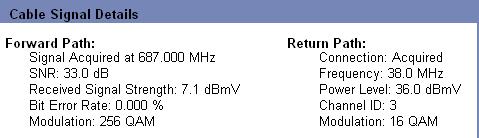 if i do a split will my speed decrease? Which one of these Cable Splitters are better? for my internet and tv? I recently got Roadrunner cable and i want to use an splitter on the coax cable so it will make it one for my router and one for my tv. having higher DB better or worse? here i have two different splitters Monster Cable 2-Way MKII RF Splitter Low-Loss output 5mhz-1ghz 3.5db 1-2ghz 4.9db Monoprice http://www.monoprice.com/products/product.asp?c_id=104&cp_id=10422&cs_id=1042206&p_id=2872&seq=1&format=2 PREMIUM 2 way Splitter F type Screw - 5~2400 MHz (for Video VCR Cable TV antenna) Frequency Range (MHz) 5~47 47~950 950~2150 2150~2400 Insertion Loss In Out 4.5 dB 6.0 dB 6.8 dB 7.0 dB Isolation Out - Out 8 dB 18 dB 18 dB 18 dB Return Loss In 8 dB 8 dB 8 dB 8 dB Return Loss Out 8 dB 8 dB 8 dB 8 dB |
|
New member Username: CableguyindianaPost Number: 8 Registered: Jul-09 | Hey WIlliam, I'm confused, you said you need to split it to your router but I'm assuming you mean your cable modem. If that's true you should have already gotten a splitter from Roadrunner. If you have a router you purchased it will be connected to the modem via an ethernet category 5 (CAT5) cable. Just a warning: I may be missing the nature of your question but if you're paying for cable internet and hoping to get tv too your line is probably trapped out to where this won't work for you at all, splitter or not. The same thing goes for trying to get internet if you're paying for tv only. Either way, to answer your question: Splitting it will not affect speed whatsoever, unless the splitter you buy is faulty and creats data corruption and/or packet loss, then you'll see speed loss. Putting a splitter in reduces or pads down the forward travelling (downstream) data by whatever it's db designation is. On a 2 way it's usually 3.5db. On the other hand it also creates resistance in the reverse path (upstream) and causes the modem to have to work harder to get your data back to our system where it's picked up and relayed on. So, in looking at your cable modem reading (nice job those are helpful) your downstream will become 3.5-ish and your "power level" will become 41.5-ish because you're adding to transmit while reducing forward power. These are good levels as most modems aren't struggling till about 50 on the (transmit) power level. That's not to say it's ok to hook up an even larger splitter just because you have some room to play with. The monoprice gold splitter is a satellite splitter and useless to you for this application. I didn't see a link for the monster cable one but a normal cable/broadband 2-way will be 5-1000mhz (1000mhz = one gigahertz). It will have an input and two outs with 3.5db loss. In the end you should call Roadrunner and allow them to install it and just get the splitter free but if you want to try it yourself keep the reciept in case the splitter is defective or you find it doesn't do what you needed it to. |
|
New member Username: Ori_dreifuss_onnPost Number: 1 Registered: Sep-09 | i want to make it so i have Cable television in my room instead of just the living room. i was wondering if i just put a 2 way on the cable coming from the comcast black box (router?), put cables going to the Living room TV and my TV, i will be ok? PS. do i need another cable box? |
|
New member Username: LabornursePost Number: 1 Registered: Dec-09 | This is probably a stupid question. We have Charter HD via a Motorola DCH6200 box (no DVR). All is fantastic. Now I want to connect my older (2006) Tivo Series 2 DT so I can record missed shows. What kind of splitter is recommended to split the signal from the wall to both devices - will the splitter that came with the TIVO work with HD? I don't want the signal to the TV to have less quality. |
|
New member Username: Naylor07Post Number: 1 Registered: Dec-09 | I got a quick question. I was having some problems with some of my HD channels not coming in or becoming pixelated. I currently have the signal coming into the house split 4 ways, 3 HDTV boxes and 1 cable modem. It had a cheap splitter in the box, so I bought an amplifier (http://www.amazon.com/gp/product/B001EKCGT8) but I am now wondering if that was necessary. Would a higher quality splitter solve the problem or should I just stick with the amplifier? |
|
New member Username: KevinjamesSan Jose, CA USA Post Number: 1 Registered: Dec-09 | Trying to set up my mom's TV and VCRs to work with digital as it did with analog. She has Comcast service, lives in an apartment complex - all "wiring" for the cable service is "no access." She only has a single cable coming out of wall in front room and one in each of 2 bedrooms. The supplied digital upgrade consists of a digital-to-analog converter box that only allows one 1 converted signal out - recording on VCR only same channel and program as being watched on the TV. Previously the cable in all rooms fed into a VCR (1 in each bedroom, and 5 serially chained in front room) and then into TVs. The TV signal in front room was a little degraded on rare occassions, but all 5 VCRs could record different programs/channels while watching another on the TV; six channels in total. The VCR recordings are pristine when played back on TV. Front room - would like to know what to do with the cable, etc., to allow the VCRs to continue to record converted signals and then play back to TV when desired. Under analog conditions, each VCR programmed individually while others "off" - assume that the analog signals are "passed through" each VCR when each is powered "off." |
|
New member Username: Bd86Post Number: 1 Registered: Dec-09 | Cable Guy, great forum, and I am glad i found it just a few minutes ago. thank you for being here. I currently have at home all of my services (HDTV/DVR, phone, and internet) with my cable company. Our office is in one room of the house where the main modem is, and where I have the computer wired to, and where the cable company placed the main phone wire. I also have a Linksys Wireless Router-N hooked up for the smart phones and laptop my wife uses around the house. My Home Theater system is on the other side of the house with all of my A/V toys, including a new JVC Blu-ray my wife got me, and I have a Roku Digital Video Player on its way that I would like to use with my Netflix account. Both my Blu-ray and the soon Roku Player allow me to connect to the internet. I also have a Monster Battery back up with Noise filter which my cable runs through it before signal hits my DVR box. At the risk of asking a redundant question. Which option is best for not loosing signal strength and/or for me to myself since I am very handy. Also considering that I do not want to rely on WiFi for streaming movies: Option A) Keep my scheduled appointment with Cable company to drop a new line dedicated to the additional modem. Option B) Run a splitter knowing that I also have a Monster Backup, Noise reducer connected already. Option C) The option I really do not want which is buying two USB cards and attaching them to each unit. Thanks. |
|
New member Username: CskwarcanPost Number: 1 Registered: Dec-09 | I read/scanned/searched previous posts but wish to clarify your advice to add a second HDTV to my current setup. Current setup is Comcast digital cable with a splitter feeding: an HDTV (w/Comcast's dual HD tuner), two CRT tv's (receiving basic cable), and a cable modem. It seems I will need to call Comcast and rent a second HD tuner but just wondering if there are any other options to getting HD to my second HDTV. The new HDTV is Samsung.http://www.hhgregg.com/ProductDetail.asp?SID=n&ProductID=23189 |
|
New member Username: MylosolFlorida Post Number: 1 Registered: Dec-09 | Okay after reading much of this I have surly gained a lot of valuable insight... So I need to split my main cable line to 3 objects HD-DVR, Standard TV and a Cable Modem... so I was looking into 3 way splitters. My question is what is the advantage of a "balanced" 3 way vs. a regular. I see that a normal 3 way splitter has 2 legs at -7db and one at -3.5db 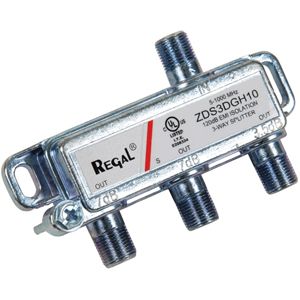 where as the balanced has all 3 legs at -5.5db 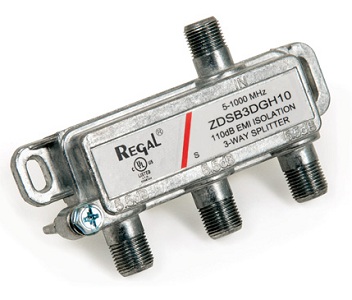 Is this a marketing scheme or would this be beneficial? Second, If I chose a standard 3 way would -7db hurt my HDTV reception? Or verse visa would the -5.5db hurt my Internet? |
|
New member Username: SpookyjrgPost Number: 1 Registered: Jan-10 | I have a question about the functionality of a splitter. I have four cables coming directly out of my satellite dish, and as far as I can tell they seem to go directly to wall plates. Enter problem- I'm canceling the satellite service and putting up an antenna in the attic. The four coaxial lines are accessible in the attic and I plan to splice them and attach the antenna via the following configuration: Antenna - amplifier- splitter. My question is can I use a passive four way splitter to consolidate the satellite lines into a manual switch to transfer between the antenna and satellite signal. Thoughts? |
|
New member Username: BrgmgbPost Number: 1 Registered: Jan-10 | I have a question about combining signals. We purchased two new HDTVs for Christmas. We have Dish Network satellite service and an antenna. We have a DVR in the spare bedroom called "The Office". The DVR is set to provide TV in the office and living room. In the living room, I used a hybrid splitter to combine the antenna and Dish signals. We can watch very clear Dish and over-the-air TV. I can't believe how clear the local channels are with digital TV! The Dish programming comes in on analog channel 23 on this TV. The distance between the DVR and splitter/combiner is about 75 feet. Happy with the setup, we purchased a new TV for the office. When I put a hybrid splitter to combine the antenna and Dish signals, the Dish signal (on channel 3) was fuzzy. The OTA local channels were sharp & clear. The distance between the DVR and splitter/combiner is about 3 feet. I am reusing the coax provided by Dish when they installed everything. On the Office TV, if I hook up the Dish directly to the TV, it comes in clear. If I hook the antenna wire to the antenna-in on the back of the DVR, I lose some local channels. If I put a 12 dB amp after the splitter/combiner, the Dish signal is still fuzzy. The way it sits now, the amp is between the DVR and the splitter/combiner, and the Dish comes in as clear as it does with nothing between. Why do I have no problems with the long stretch of coax but all kinds of problems with the short run? I have ruled out the hybrid splitter/combiner because when I swap input sides, there is no change. I also rules out the wire between the hybrid splitter/combiner and the TV because the local channels come in from the antenna. Does the DVR boost the 2nd line output knowing it will be a longer run? |
|
Silver Member Username: JrbayLivonia [Detroit area], Michigan USA Post Number: 923 Registered: Feb-08 | Greetings Bill, Please try swapping your "hybrid splitter" between the two set ups. If my image of what you are trying to do you should be using diplexers to combine an antenna signal with your DISH network signal. If my image of this setup is not correct I would need some model numbers of the boxes to help further. You might also do some research on the latest equipment that DISH offers (mostly free to existing customers) that would also resolve your issues as well as offer a much happier viewing experience such as High Def on many other channels as well as your locals. |
|
Silver Member Username: JrbayLivonia [Detroit area], Michigan USA Post Number: 924 Registered: Feb-08 | Please note that all new questions will be answered a lot faster/more efficiently if you all start new threads. |
|
New member Username: Mgr146Post Number: 1 Registered: Jan-10 | I installed a 2 way cable splitter, and don't have reception on 1 of the tvs. The tv doesn't pick up the cable signal in the set up mode to auto program the tv. Any suggestions? |
|
Silver Member Username: JrbayLivonia [Detroit area], Michigan USA Post Number: 967 Registered: Feb-08 | Try switching the cables between the two outlets on the splitter. If the signal then goes to the second (previously not working) TV but not the first (previously working) you have a bad splitter. If not, then perhaps the cable to the second TV needs some attention. |
|
New member Username: XathicaPost Number: 1 Registered: Feb-10 | I currently use comcast cable and after the digital switch over I couldn't get alot of channels. I have the new cable box that they provide. The main line coming into the hose is split in two places. One output which goes up stairs and the other output to my studio. I then split the line coming into my studio to two tv's. When I hook up the cable box to just one tv with no splits it gets all the channels and are very clear. But when I put a splitter into the picture I only get about a quarter of the channels. I had a tech come by and he gave me a comcast splitter and it still doesn't work. the splitter is 5-1002 MHz. I called them again and they said it might be the cable line after the splitter. The cable is printed with 2200 Mhz. Is there such a thing as compatibility issues with cables and splitters. Oh almost forgot to mention I only have one box and it's one of the little ones, not the master one. So coming into my studio line from outside to a splitter, then to one tv without a box and one tv with a box. I apologize if this sounds confusing but I know nothing about cable. Appreciate any info I can get thanks. |
|
Gold Member Username: JrbayLivonia [Detroit area], Michigan USA Post Number: 1054 Registered: Feb-08 | Greetings, I believe what Comcast is saying is that the cable you are using after the splitter is damaged or bad, not incompatible. The simplest way to check is to use a different cables from the splitter. If you are a bit more adventurous look for shielding strands inside the connectors of the old cables as the most likely cause of the problem. Other trouble can occur is an area that is crushed. |
|
New member Username: XathicaPost Number: 2 Registered: Feb-10 | thanks jim i'll give it a try |
|
New member Username: RamonsPost Number: 1 Registered: Mar-10 | Very interesting thread. I'm currently remodeling an older house that needs phone, cable modem, and TV going into one room. Right now the incoming line is split fourfold, but I will only need three of the four lines to stay (the fourth one goes away no matter what). I wonder if it is possible to run one coax line from the fourth output and then split for TV and modem or if it is better to run two lines and put a five way splitter (or six way with one terminated output). The phone line is the least of my worries and gets used to hook up the existing distribution to the cable modem. |
|
Gold Member Username: JrbayLivonia [Detroit area], Michigan USA Post Number: 1136 Registered: Feb-08 | Greetings Dave, The modem should have priority to keep a decent connection going. If you are to have the modem and a TV in the same room I would run two lines to that room. Splitting the TV line to other locations is possible but leaving the modem line as close to a "home run" as you can. |
|
New member Username: RamonsPost Number: 2 Registered: Mar-10 | Hi Jim! Thanks for the instant reply. That is what I figured and pricewise it would end up to be the same. For the price of a decent splitter I might as well buy more cable. It is just that I have to go from the basement into a wall through a drop ceiling into the next room and from there hopefully end up under the stairs that are next to the target room. There is an outlet in the room next to it, but I will already split from there between STB and TV. My kids always "forget" where they put the STB remote and I hide the TV remote so that I can still watch, hehe. |
|
Gold Member Username: JrbayLivonia [Detroit area], Michigan USA Post Number: 1137 Registered: Feb-08 | I really can't help much with the remote issue, I wish I could but I have yet to figure a good solution! Regarding your wiring, what I would suggest is to look into your cable company doing the hard part of it. I mean you are paying them for the "service". |
|
New member Username: RamonsPost Number: 3 Registered: Mar-10 | Ahm, no, that service is not included in "the service". At least not for TimeWarner. They ask 24.99$ per outlet and 49.99$/per hour for a wall fish (aka doing it the right way). Since I am talking three cables (two coax and one phone) having them pull it will be a major investment. And no, even though the three cables come and go to/from the same place they will still charge for each separately and quoted at least two hours (well, that times three, so "six" hours). That made up my mind and I'll pull the cable myself. |
|
Gold Member Username: JrbayLivonia [Detroit area], Michigan USA Post Number: 1141 Registered: Feb-08 | I would SERIOUSLY look for another "service" even if you are comfortable with the work. Those costs are not too bad but for Time Warner to ask for them sure is! Either Satellite service, AT&T or Verizon should all have free installation. If you get stuck, we will be here to help! |
|
New member Username: DownrePost Number: 1 Registered: Mar-10 | i Got one of those splitters with 2 @ -7dbs & 1 with -3... Which one of those should i hook my modem connection into? Thanks |
|
Gold Member Username: JrbayLivonia [Detroit area], Michigan USA Post Number: 1203 Registered: Feb-08 | Neither, ideally! The modem should be a home run (direct line) to the first junction in your house. If you have no other choice try the -3 leg and see how stable your connection is. |
|
New member Username: DownrePost Number: 3 Registered: Mar-10 | This is what i get in the -3: Signal Acquired at 459.000 MHz SNR: 36.5 dB Received Signal Strength: 10.6 dBmV Bit Error Rate: 0.433 % Modulation: 256 QAM Frequency: 25.3 MHz Power Level: 38.0 dBmV Channel ID: 3 The Birrate Error % will get to 0, its cause i just plugged it in. This is what i get in the -7: Signal Acquired at 465.000 MHz SNR: 37.3 dB Received Signal Strength: 8.0 dBmV Bit Error Rate: 0.000 % Modulation: 256 QAM Connection: Acquired Frequency: 28.7 MHz Power Level: 50.5 dBmV Channel ID: 2 Modulation: 16 QAM I was getting these alot in the -7: Fri Mar 19 01:24:50 2010 Notice 6 TLV-11 - unrecognized OID Fri Mar 19 01:24:47 2010 Critical 3 DHCP WARNING - Non-critical field invalid in response. Fri Mar 19 01:24:44 2010 Critical 3 DHCP FAILED - Discover sent, no offer received Fri Mar 19 01:24:35 2010 Critical 3 No Ranging Response received - T3 time-out Fri Mar 19 01:23:48 2010 Critical 3 Received Response to Broadcast Maintenance Request, But no Un... Fri Mar 19 01:23:16 2010 Critical 3 Started Unicast Maintenance Ranging - No Response received - ... Fri Mar 19 00:07:04 2010 Notice 6 TLV-11 - unrecognized OID Fri Mar 19 00:07:01 2010 Critical 3 DHCP WARNING - Non-critical field invalid in response. Fri Mar 19 00:06:52 2010 Critical 3 No Ranging Response received - T3 time-out Fri Mar 19 00:06:43 2010 Critical 3 Received Response to Broadcast Maintenance Request, But no Un... |
|
New member Username: HarriettPost Number: 1 Registered: May-10 | Can the splitter from satellite be used for cable? I'm going from Directv to Comcast and opted for the self-install because the house was previously wired for Comcast. I'd be a lot easier if I could just bring the cable in to the splitter already in use. Thanks |
|
Gold Member Username: JrbayLivonia [Detroit area], Michigan USA Post Number: 1281 Registered: Feb-08 | Greetings Harriett, A Directv installation should not have splitters from the dish to the STB's. They could be used from the output of a STB to more than one TV however. Devices that look like cable splitters in a Directv installation may well be diplexers and will need to be replaced for a cable installation. Your explanation for the reason behind the change of service is a little confusing. Just for my curiosity, are you saying that the house had comcast cable, was switched to Directv and now you are going back to comcast? |
|
New member Username: HarriettPost Number: 2 Registered: May-10 | I had Comcast went to Directv now I'm going back to Comcast. The reason for the change...I need internet service. In this area Directv only offers Verizon and unfortunately this house is in an area that has poor Verizon wireless service. I literally have to go outside to use my cell phone. Comcast offers internet service with a wireless router, thus the change. We're only at this location seasonally so I'm trying to find the best solution for my needs |
|
New member Username: RamonsPost Number: 4 Registered: Mar-10 | Hi! One follow up on my previous question. I found that a phone cable went from the basement to the location I needed the TV/internet cables to go. I pulled new lines through the overly large phone line holes in the floors. In the end the job was done in no time. TWC wired it all up and claimed that my Home Depot cable is of way better quality than what they use. They did install new splitters and properly split the internet line off before the cable TV amp. Now to the DirecTV splitter question. I'd say it depends. I used to install satellite dishes in Europe and there a common solution was to use a converting LNB that switched the horizontal and vertical signals so that the sat receiver no longer needed to send a switch voltage. The benefit is that existing cabling can be reused and that you do not have to have a home run to each outlet. Also, splitters can be used as long as they pass the high frequencies needed (I usually ended up replacing those). That signal can also be amplified by in-line amps. There are also active and passive splitters for switching Sat signals. Passive splitters are rarely used or only in combination with an active splitter (such as hooking up two actives to an LNB with only an H and V output each). The passive splitters are the same that are used for cable TV with the difference that they pass through the switch voltage on all paths (which is why they are useless when you want to watch at two places at the same time). The active splitters are usually larger than cable TV splitters and have two inputs (one H and one V). The active splitters cannot be used for cable TV, the passive ones work fine. You can fairly easily differentiate between them. The passive ones have one input, the active ones have two, the passive ones are the size of a cable TV splitter, the active ones are the size of an amplifier and usually have a power supply. I don't know in which forms and fashions DirecTV systems come (I think the satellite service in the US is grossly overpriced, the European model with Astra and Eutelsat is much better), but you may want to have a second look and find out what really is installed. In regards to previous service, it was probably the previous owner that had Comcast so that wiring for that is still (partially) in place. The place where I lived before was fully wired for Verizon FiOS, but since they don't offer TV in my area I went with TWC and after some initial problems find their service to be adequate. The signal coming in appears to be too weak, but having lines nailed to poles and dangling in the wind makes me wonder that it works at all. |
|
New member Username: Hard2qillPost Number: 1 Registered: Sep-10 | I have Time warner .....cable and internet coming in on one line ...i have a 3 way time warner 5-1000mhz splitter in the box......one line dedicated to the internet .......second line to the living room and first bed room via a two way splitter......the third line runs to the 2nd and 3rd bedrooms via another two way splitter.....most of the lower channels in the living room are clear .....the from around 25 up they get fuzzy and grainy........the all 3 bedrooms have snowy, grainy pictures on all channels...... can you guys help me ? |
|
New member Username: RamonsPost Number: 5 Registered: Mar-10 | Hi hard! Do you have an amplifier installed? If not, that may be one option assuming two things: - cabling is OK (your own cable from Home Depot, not the cheap stuff from TW) - splitters are OK (TW splitters work, but there are clearly better splitters) - signal coming in is OK (TW's signals are often quite weak) If you install an amplifier make sure that you use a two way splitter right before going to the amp. One line is for internet, the other line goes to the amp, from there on to the splitters for TV. You cannot pull the internet line through the amp, that won't work. |
|
New member Username: Hard2qillPost Number: 2 Registered: Sep-10 | Dave... i found an bidirectional amplifier/splitter with a 7dB loss and 5x amplification for like $58.99 by Electroline. It has 4 output ports. EDA-2400 Would this work or do you suggest another? |
|
New member Username: RamonsPost Number: 6 Registered: Mar-10 | Hi hard! I haven't used any of these amps, but based on the description it should work. I didn't have one of these installed and when TW hooked the cable up the tech mentioned that they cannot go through the amp for internet. I pulled in a new cable exclusively for the cable modem and that goes off the first two way splitter. Do you have currently an amp installed ? If not, than adding one may be the way to go. With so many splits you have quite some loss. Does Internet connectivity work for you alright? If yes, then giving it its own cable will make things only better. How old are the cabling and the splitters? As mentioned in my first response, that is something to check no matter what. There is not much point in trying to compensate bad cabling by installing a big amp. You may also try and put a new 2way splitter into one line and see if that makes any difference. If yes, replace the other one as well. You can also try replacing the 3way with a 2way for testing leaving the internet line off. That is a bit comparing apples and oranges, but it will give you a clue as to where to work on in case it gets tremendously better. One thing you can try as well is loosen the F connectors on the splitters and the wall plates. The TW tech that installed our cable overtightened some connectors and loosening them down to hand tight made for better signal. Lastly, call TW. You pay them dearly each month and the least they can do is make sure stuff works everywhere. If they mention that new cabling is needed do that yourself. The TW tech who came to my place said their cable sucked and the one I got from Home Depot was ten times better. Good luck! |
|
New member Username: DylangerPost Number: 7 Registered: Sep-10 | do you have a link to that amp?I would suggest use a antronix or commscope amp. Most cable companies do not use electroline amps because they fail at a much larger rate then the amps mentioned above. Buy commscope or beldin cable, DO NOT buy anything from home depot. the TW guy you had at your house did not know what he was talking about. Your internet, you want before the amplifier but you also want that to be 7db down. A 2 way splitter is not going to be enough loss to make your modem stable, it IS going to flap and cause your service to be spotty. Do not buy your splitters from the hardware store or your big box. If you look for regal or antronix on ebay they are cheaper and a better product. Most cable systems are 1ghz systems now and the splitters you buy from those stores are rated to 700mhz or 900mhz. this does not seem like a big deal but it is when you are trying to get off air HD's, set top boxes, cable modems, or EMTAS. just a thought though, if you have questions on what to buy just ask me. |
|
New member Username: RamonsPost Number: 7 Registered: Mar-10 | Hi Dylan! Well, that depends. Internet is working very stable for me. And signal loss is not only from splitters, but also from cable runs. Besides that, the cable from TW is only double-shielded. The one I got from Home Depot is triple shielded and has a better dielectric insulator. I did cable TV, antenna, and satellite dish installs as a profession (although that is some time ago) and the Home Depot cable is decent cable. Can you buy better cable at a much higher price? Sure, but that is something to consider when I have to pull extremely long runs and any less in loss and distortion is key. I do agree that the flashy brand names typically sold in stores are not necessarily the best you can get. There is no relationship between quality and popularity (best examples are Microsoft Windows or Bose). |
|
Bronze Member Username: DylangerPost Number: 11 Registered: Sep-10 | Well to be coming off a 2 way and having your cable modem stable you either have junky signal coming in from your system or a junky drop to a room. Not too often have I ever seen a modem be truly stable coming off a 2 way. How long ago were you in the profession? From what I am reading people on this board are pretty much telling people to go buy pre-made 50 foot pieces of cable and telling them to use that stuff. If you house gets inspected by a true inspector, your house wont even pass because most of that stuff isnt even ul listed. Double shielded cable is perfectly fine. I find that quad and tri shielded fails on a much larger basis than double shielded. that could be to do with the region I am in though. I in fact cringe at the idea of any home owner running their own cable. Its never done correctly and almost always daisy chained. |
|
New member Username: RamonsPost Number: 8 Registered: Mar-10 | Line from the pole is coming into the basement, into a 2way, one line goes in a continuous run straight to the modem. That is the new line that I put in, because I wanted to run it through the wall inside the house and not have the TW guy do a hack job on the outside wall. Since they powered on the signal phone and modem are rock solid. Can't say that about the old cabling and splitters, which I need to check in my place, but aside from a few blocks here and there it is something I can live with. I did an apprenticeship in Germany for 3 years and finished best in the county. I built about 150 satellite installs and at least over 300 cable hook ups. Every single satellite installation that I did still works fine to this day (usually installed the Kathrein dishes prepared for digital, not this garbage the the US dish companies nail into people's front yards). I left the profession ten years ago when I moved to the US. That said, the cable I got from HD passed my test and it is of decent quality. It works and it works reliably on a 30 ft run. I had the TW guys crimp the connectors on it, because that is the way to do it rather than the manual install where you twist the plugs on. But yea, just because my cable modem works fine and comes from a 2way I must have done something wrong. Makes me wonder how good your advice is. |
|
Bronze Member Username: DylangerPost Number: 12 Registered: Sep-10 | My advice is fine, After all I AM CURRENTLY EMPLOYED IN THE INDUSTRY. Ive been working on anything from many different HFC plants and fiber plants. Ive built plant, both HFC and Fiber. I dont get service calls over my quality of work, so I think my advice is fine. chances are you did youre installations before reverse path was really much of an issue. Satellite is a joke, FYI. |
|
New member Username: Glach26Post Number: 1 Registered: Sep-10 | Okay, I stay in a condo which uses Charter cable. I dont have a cable box or anything. I plug the cable directly into the wall. If i use a cable splitter for two different tvs in the room, will i be able to watch two different channels at the same time on the tvs or will i have to watch the same channel? Thanks! |
|
New member Username: RamonsPost Number: 9 Registered: Mar-10 | The TV sets tune to the channels. That means that the cable coming out of the wall has all the signals for all the channels and the TV sets pick the one out that you chose. The TVs can tune to different channels as well as the same channel. A few things to keep in mind: take decent cables, don't bend the cables, don't coil up the cables, and keep the cables only as long as needed with a bit of wiggle room. Is the wall outlet behind a cabinet? In that case you may want to connect the splitter directly to the cable that is inside the wall. That way you save one connection cable (wall plate to splitter) and also a bunch of connections. Every connection deteriorates the signal and the less cable the signal has to pass the better it is. Having a splitter dangling from an open outlet box doesn't look pretty, so you may not want to do that. |
|
New member Username: D2038Post Number: 1 Registered: Oct-10 | http://www.amazon.com/PCT-BI-DIRECTIONAL-AMPLIFIER-BOOSTER-PASSIVE/dp/B000F28DP2 http://www.amazon.com/Motorola-Booster-484095-001-00-Bi-Directional-Amplifier/dp /B000066E6Y http://www.amazon.com/Electroline-2100-1-port-CATV-Amplifier/dp/B000F3RKJ6 I'm in need of an amplifier, is there much difference within these 3?? Im thinking in the PCT one because of the price, but i could change to the motorola if its really worthy (a lot of good reviews...), and the only reason im including the electroline one (a little expensive) is because of the "Waterproof housing", but i think the other two have this, dont they?? Thanks, cheers!! |
|
Platinum Member Username: PlymouthCanada Post Number: 15251 Registered: Jan-08 | Welcome to eCoustics d2038! Both first are very good, the third doesn't have the path by-pass needed with a internet modem cable! |
|
New member Username: JbrubachPost Number: 1 Registered: Dec-10 | I have been using Bell Satelite TV for many years. Have had cable internet service with Rogers for 2 years and currently have about 25meg downloads. Just purchased a 4250hd Scientific Atlanta cable box used, and want to use this for TV as well as internet. Rogers installed the RG6 cable 2 years ago direct to their street side box. I have had techi experience for many years and accordingly have connected an OMEGA 4 way splitter 5-2400MHZ to the Rogers RG6 on the "in" port of the splitter and the Cable box SB50101 to the direct "out" side of the splitter. I have not activated the Rogers TV service but expect to do so shortly. Am feeding the wireless router for internet service from the Cable box and the TV 4250hd cable box from the 2nd "out" on the splitter. Get 25 Meg internet from this arrangement, but no TV to the Samsung monitor which I will use as the TV as well. The LOGO of the cable box 4250hd shows up so I feel that the connection with Rogers should work. Does this use of the setup sound oK. Will be checking with Rogers as well. Thanks for your advices. John B. |
|
New member Username: Steve_m33Post Number: 1 Registered: Feb-11 | I have Comcast HDTV, Phone and internet. The internet connection is in my office and I want to add cable tv to the office. Can I attach a cable splitter to the cable that goes into my internet connection? If so, will I stil get good quality interment an TV? What cable splitter should I use? |
|
New member Username: RamonsPost Number: 10 Registered: Mar-10 | The best way is to keep the direct line for Internet. While splitting may work you will loose out on the Internet connection. You may want to see if you can pull a cable from the TV branch of the cabling. Alternatively, you may want to look into TV capable devices that hook up to your (wireless) network. Or you can try DTV, which brings you HD TV over 'rabbit ears'. It is not the same as cable in regards to channel variety, but if you are interested in the major networks that can be an option. If you want sports check out ESPN360. |


Main Forums
Today's Posts- Home Audio Forum
- Home Video Forum
- Home Theater Forum
- Car Audio Forum
- Accessories Forum
- All Forum Topics