Hooking up laptop to tv??
| Thread | Last Poster | Posts | Last Post | |
|---|---|---|---|---|
| Archive through November 11, 2005 | santosh kumar soni | 100 |
|
steve cash alias bluemoonsteve Unregistered guest | you are all a bunch of thickheads the question was answered in the second post and this is the most highjacked thread i have ever seen lol |
|
Unregistered guest | hi experts, i have an analog panasonic make camcorder. i wish to hook it up to my computer so that i can view the video on the pc/laptop & edit/burn it onto a cd/dvd. |
|
New member Username: Paulo_baptistaSydney, Nsw Australia Post Number: 1 Registered: Nov-05 | Hi Experts, I have a Sony Vaio PCG-K45 Laptop with RAC out put, no S.Video, can I hook up with my TV. My TV has S.Video & DVD connections, will I require a converter? Can you help. Many Thanks Paulo |
|
Unregistered guest | I have a dell inspiron 6000 is it possible to hook it up to my tv to watch my videos that are on my laptop? |
|
Macha Dala Unregistered guest | Hi, Compliments first : It was hilarious to go through all these posts. I came down looking for a decently priced cable, and look.. the world is already been taken over by ZORDS, who can't choose to read a thread but sob out their own stories. Generic answer : Any Laptop with a S-video / VGA out can be hooked with your TV (well most of them). What cables to use: 1. LOOK AROUND !! See all the ports/sockets on your PC, then do the same on your TV. 2. Once you know what all ports you have, go to eBay and search for them. make a query for 1 port each on your PC and TV. e.g. : http://search.ebay.com/vga-rca-converter_W0QQfkrZ1QQfnuZ1 ( thanks to someone who posted this in THIS VERY THREAD ! ) OR visit svideo.com , they have a good variety of products. 3. SEE the snapshot of the product. If it looks like it will fit into both ur TV and PC, purchase it. Wasn't that difficult was it ? (Maybe thats what they call 'common sense') To RICK : My apologies mate.. you just lost your prized posession to freaks like us.. a forum thread.. |
|
pianoman1972 Unregistered guest | Macha Dala: I, too, have read some of these posts and found some of them quite funny. I, too, have read the post from the "Unregistered Guest" and clicked on the eBay link to see the very solution to connecting my newly purchased Sony Vaio TX650 to my composite/S-Video TV. I had no idea those cables existed. This saved me a trip to Radio Shack tomorrow! Woo hoo! Anywho, thanks to "OffTheTopOfMyHead" for doing the footwork in finding the VGA to S-Video/RCA cable. Pure genius. Thanks to Macha Dala for simplifying tons of forum questions into 3 simple (and I mean simple) choices. And it's not hard to connect the cables at all. Just take a deep breath and you'll be connected to your TVs in no time flat. Most people like things to be simple without doing anything that would require much brain activity (trust me on that quote, I'm a teacher). Good luck to all but I know after reading the aformentioned post, any post after mine should read "Thank you!" or "I did it!" or "Woo Hoo!". |
|
pinkie Unregistered guest | i have an rca out on my laptop and when i plug it into my tv with an RCA plug i get a picture but it's black and white. how do i make it colour |
|
complete morons Unregistered guest | absolute buffoons, most people here are. i'm an anonymous user, whatever the f**k that means, because i can't be bothered to do anything other than add my worthless two cents (maybe that's why it's only 2c). why don't most of the whiners here do some research, like look up the entire thread before posting their repeated queries. one high-flier somewhere at top of the list says there's one setting he's not done on his laptop, and asks what'll happen if he tries it. maaan, grow up already, will you - try it yourself... then post what happened, instead of plugging inanities. i'll now go get a life too... my eyes are full of rca cables snogging s-video cables. |
|
Anonymous | I have a dell inspiron 1000. All I have in the back of my laptop is a VGA plug. I purchased a VGA to Svideo converter, but when I turn on my pc all I get is white lines up and down on the screen. |
|
Unregistered guest | Hey I have A Sony Vaio Laptop and I was wondering if there is any way possible that I can connect it to my Sony WEGA 32'' Plasma TV. The laptop does not have a tv output. E-mail me at cjlax139@aol.com or just IM me at CJSLAX13. Thanks! |
|
SaShiMe Unregistered guest | hi, i have an AMD computer with svideo port and a tv with only RCA port, is there a cable that connects the 2? or i must use the solution provided above, a svideo cable to a composite adapter to a RCA cable? |
|
Anonymous | hey i came here to find an answer to a Q i had...and I saw the same Q over and over but no one answered it until I saw damo444's post...thnx u helped me (and the other ppl who actually asked the same Q) out! also...for the guy who said to Google everything before asking...THIS THREAD CAME UP AS A TOP GOOGLE RESULT FOOL!!! :p |
|
Unregistered guest | i have an acer extensa 2350 with 3 usb ports and a montitor port as well as phone line, and a networking port but thats about it. how can i connect my laptop to a tv and watch movies on a larger screen? |
|
New member Username: Mike171562Post Number: 1 Registered: Dec-05 | ok, this probably isnt the right forum for this but im not sure where to go. Im trying to hook my Dell Inspiron 1000 to my tv so i can watch movies from my laptop to my tv. My tv has only one input a cable input. my laptop has only one output, a vga output, i purchased a vga to rca cable, where im confused is the cable has a vga on one end and three rca plugs on the other, red green blue. I know the audio needs to come out of my sound card headphone jack and i have a cable for that that has two rca plugs. Im going into an rf converter that has 3 rca input one video and two audio and one cable ouput. I plug the vga into my laptop and all three rca into the rf converter and put the cable into the cable in on my tv, only i cant see any video, only snow, the only time i see anything is when i turn on my laptop and get to a boot selection screen ( i have a dual boot linux and windows) I see the boot menu on my tv but its grey and fuzzy. Im not sure if this will even work, its pretty confusing. |
|
Laguna87 Unregistered guest | Hi I have an old 1992 RCA colortrack television and I want to hook it up to my computer which has an ATI Radeon 9800 graphics card, so that I c an play videos. I have used an s-video cable and it seems to have worked fine. The only problem is why cant I see WMP type files or VLC files when I try to play them. They won't show up on the television. Anyone have a solution to this problem? |
|
Anonymous | Hi I have a dell inspiron 700m and have been trying to connect it to use a tv as a monitor. so it works after lots of time wasted on it but i can't get the damn tv to project colour....so i try and change the setting to NTSC on the laptop but it ain't working....how the hell am i meant to do it?? |
|
New member Username: Norcal37Post Number: 1 Registered: Dec-05 | I have a Dell Latitude D600. I am using an S-Video cable with an RCA video converter. But when I go to Display Properties -> Settings -> Advanced -> Displays I noticed the TV signal is not detected. How do I force the detection? thanks |
|
Anonymously Unregistered guest | I succeeded - perhaps someone else can benefit from this. Thanks to someone at the top with a short single line. Having connected the S-video cable between my laptop and the tv - I then went to my Control Panel, and opened Display. Click Settings and I saw 2 squares representing 2 monitors. 1 my laptop and a second I presumed my tv monitor. I highlit square 2 and then checked the box that said "Extend my Windows desktop onto this monitor" Using AV2 my screen saver came up on my tv and then played my streaming visdeos from the net. Note - if you lose sight of your mouse on the laptop press Alt F4 and select "cancel" on the log out option screen. My thanks to BlokemasterJ above |
|
Macha Dala Unregistered guest | To Mike171562 : Dear, you've done quite a lot before calling out for help. Kudos to you for the effort. I suggest you do the following : RF converter : the RF converter you have (3 RCA to one Output), is meant for carrying both audio and video to your TV. Hence you'll need to plug two sources into this one converter. 1. Sound : You had it right. The sound HAS to be taken from your soundcard. you already have a 'stereo-jack to RCA' cable. these two plugs need to go into two of your RF converter. (You may need to hit-n-try which two) 2. Video : RCA devotes only one of its slot to video. you may try all 3 RCA plugs one by one to see which one is for video, or better still get a new cable which gives you 1:1 (VGA : RCA) option. For the Snow/Fuzzy output : similar to any other channel you watch, you need to fine-tune/search/set the channel on which you are 'playing' your laptop output. I hope this helps you any bit, if you've not already figured it out yourself. for any other query, feel free to respond on the same thread. |
|
Unregistered guest | hi. i need majer help.i have a compaq armada e500 and i want to hook it up to my big screen tv so i can wach movies. how do i hook it up i only have a vidio out on my computer and my tv has the vidio in but i conect it it dosent work my comp dosent hace a s-vidio but tv does.help.thax |
|
Amused by it all Unregistered guest | HAHAHAHAHAHAHAHAHAHAHAHAHAHAHAHAHAHA |
|
Unregistered guest | Hello I have a Hp Pavilion ze2000 and I need sound |
|
Anonymous | hey, i have a Toshiba Satellite R15 S822 Tablet PC, and i have a S-Video cable port on my PC and my TV, when i put the Channel on the TV, it does not show up???, what do i do???, what settings do i have to put on my PC/TV |
|
Anonymous | Meow!! For those that answered questions thanks for all the help!! And for those that stupidly repeat the same questions over and over that have already been answered please just read the posts above and use your common sense! So that hopefully we dont have to tell you to shut the f@&k up! |
|
remmi Unregistered guest | i have a dell dimension 8400 cant seem to find any s video ports & i dont see a vga port is there anyway i can run my comp to my t.v so i can watch movies on the t.v instead of comp? |
|
hemanth_ag Unregistered guest | How do i Connect my Dell D600 to TV. I have a male 4 pins S-video male to RCA female adapter. i have ATI Mobility radeon 9000 internal DAC 350MHZ Memory 32 MB and BOIS- BK8.0.0. When connected to TV and toggling between the mointor using fn + F8 key i see slight flickering. |
|
Unregistered guest | Hi, i have a laptop Hp OmniBook XE3(composite TV Out). graphic card: S3 Graphics Inc. Savage IX i connect the laptop to the TV and nothing happens. if i press fn+F5, the screen on the laptop juz "flickers with a black shade on the top,the bottom might have it too." Any driver updates needed?(i tried updating it(not sure if it's right)but still did not work) right now it's windows XP, thus driver update shows for windows 98,2000,NT thx for any help. |
|
New member Username: DjsupesPost Number: 2 Registered: Dec-05 | Soo many posts, but I reccomend Monster component cables - eBay has them for cheap. |
|
James Something Unregistered guest | I was wondering is it possible to use a Microsoft Xbox 360 VGA HDAV Cable to link a laptop to the TV |
|
womble99 Unregistered guest | This is the funniest thread ive read for ages and I dont even want to plug my laptop into a tv lol.Not sure why Im here,maybe I should get a life.lol. |
|
Liekeko Unregistered guest | HONK HONK |
|
Wow, LoveThisThread Unregistered guest | I would like to take my idiot-proof computer and plug it into my cheapass Walmart TV. Is there anyway I can do this while I still have my thumb stuck up my butt? |
|
nfambi Unregistered guest | hullo, i have a dell lattitude C600 with a port for a cable that really doesn't seem to be an S-video for it has 7 holes, but with a TV icon and an arrow above it. i got siemens adapter that fit there but the adapter is to be connected to a cinch cable which then has to be connected to a TV. i tried but all was in vain. can i still connect this machine to a TV set? how do i do it? thanks |
|
Unregistered guest | Ok, at first I thought people didnt understand how threads/disscusions work..much like others that have posted or that we "the herd", are just mindlessly trudging along staring up the butt in front of them...and then thought a minute of some cleaver up-ity reply to post, then ......and then....smashed someones laptop..so I got no VGA port,RCA,or Svideo (attached)...so i better make this project good! however getting back to the reason I first came here....does anybody know where I can find schematics, PCB's and/or pinouts for the mylar ribbon port attached to the LCD screen itself? I know that no 2 are alike..but some reference would be nice. For some reason toshiba and dell didn't want to share! Go figure. You can email or post something other than "So hey, I got a laptop and a tv...." Thanks -w Are people this stupid? Really now...the thing on your shoulders...not just a hat rack!!! HAsta\ |
|
Anonymous | Here is the solution you all seem to be searching for. First, read the whole thread (use Google for definitions of any of the words over 5 letters long). Secondly, ask why you need to connect your PC to your TV. Thirdly, with your PC on your left and the TV on your right go to the kitchen and fill a bucket full of water. Now here comes the choice, pick either left or right and then depending on which side you pick empty the contents of the bucket onto the said appliance. Now, if the image still does not appear on the TV, go to the shops and buy a really thick pen (even thicker than you are); then draw the image on the TV for yourself. You should now hopefully have a PC picture on your TV. |
|
mooooooooo Unregistered guest | i have a whorre thats wants to have an s-video up her backside. can i do that or will it screw the quality of the picture up? also her nippples are really big, can i get dolby surround through them? |
|
Reddy02 Unregistered guest | Is it possible to connect a Gateway 4025gz Laptop to a TV. If so, which of the outputs would I use? and what cable. Thanks, |
|
Anonymous | Hi i have an inspiron 9300 i was wondering how i could run my laptop monitor and the tv monitor at the same time using the svideo cord. |
|
Wow, LoveThisThread Unregistered guest | The thread that wont die! Lol....seriously...people keep asking new questions when it is ABSOLUTELY impossible the question has not already been answered. And people tell you their computer make like all the sudden, oh, I know the exact specs of that computer, despite the fact that their are soooo many options as far as video card, TV cards, etc... To close...read your manual...check your manufacturers website....skim this thread. If the answer cannot be found after alllll that..then you should just ask yourself one thing...do i REALLY need to projecting my monitor image onto my TV? If I am too dumb to figure this out, is it REALLY for me? |
|
Anonymous | I have inspiron 6000 dell notebook..what is the best way to hookup this one to SONY vega. |
|
Anonymous | I have a vaio s470.I want to know if I can hook it up to a tv and if yes, what device I can use to hook it up to a tv? |
|
Unregistered guest | Hi everyone I'm desperately trying to get my Toshiba satellite to piggy back off my Compaq to the TV satellite receiver so that I can re-record incoming stream from Argentina via the washing machine. At the moment it's wired in to the toaster with a RS-232Z9Blurb crossed pair erogenous bungle but the interference from the attached hairdryer affects the input to my Donald Duck radio. What should I do? |
|
Unregistered guest | Hello I have a cardboard box. I would like to attach it to another cardboard box with a piece of string. I only have 2 cardboard boxes and one piece of string though. Is this enough? If I manage to do this will I be able to record my favourite films and travel back to the dawn of time? Please help me. And lend me a cutting implement. |
|
the dude of life Unregistered guest | This question was asked 3 times but was never answered other then the cop out "your adapter is bad". My connection to Media center PC is black and white and all my stuff is brand new. WTF? I have set the out region to NTSC but still black and white. When I connect my laptop to the same s-vid port it works fine. Is there any other configuration that I might need I am in the US and all my stuff is US stuff. |
|
Long Shot Unregistered guest | Well I would first un-plug in your Coffee Pot (this should clear up your picture) then get your cutting implement back - forget the string between boxes and by an HDTV. Rent a DVD and get a high ball. Oh How do I connect my Computer to my TV? Any sugestions would be wonderful |
|
Long Shot Unregistered guest | Seriously I think it may be your TV is it old? |
|
tepru71187 Unregistered guest | i have a R52 IBM Thinkpad and im trying to get to run some videos from my laptop on my TV. Now both have S-Video Ports, so if i get an S-Video cable to connect the two how can i get the sound to play as well? |
|
Macha Dala Unregistered guest | tepru71187: Dear, you will need another cable (Stereo-pin to RCA converter) for this. S-Video will take care of Video part. |
|
New member Username: Bradylee30Post Number: 1 Registered: Feb-06 | I have an hp compaq nc8230 with a s-video, but my tv does not have a s-video what do i need to do to get it to work |
|
Unregistered guest | Is there any way to hook up your laptop directly into the cable port? That is, without using a TV at all? In other words, can you use your laptop as a TV and plug it directly into the cable port? |
|
skubi du Unregistered guest | wot up gangstaz |
|
skubi du Unregistered guest | wot up gangstaz |
|
average Joe Unregistered guest | i have no tv and laptop, where can i buy them ? thanks in advance . |
|
New member Username: QuadriPost Number: 1 Registered: Feb-06 | Hi!! I have a Compaq Presario 1500 model 1516us laptop with S- video output. I have connected S-video to my TV. The problem is that i do not see the desk top. I can only see the background image of my laptop on to the TV. One more strange thing on my laptop is that i do not have 640x480 settings. I have restarted, rebooted, did Function + f4. Nothing works. Can someone please suggest me a solution for this problem. Basically, I want my laptop to the TV. *Please HELP. When i go to display properties>>Settings Tab>> and click on Identify, It displays "1" on my laptop and "2" on my TV. EMAIL: MQUADRI@GMAIL.COM |
|
kazygeek23 Unregistered guest | I have a computer that is a build-up and has no s-video and I want my computer screen to show up on the TV? WHAT DO I DO? HELP!!!!!!!!!!!!!!!!! |
|
New member Username: Matt_whitlockPost Number: 1 Registered: Mar-06 | Hello everyone, I wrote the article at TechLore.com titled "How To Connect a Computer To Your TV". I know there are many who have found it useful, but there are still just as many that are still confused, especially when trying to connect a PC that only has a VGA output to a TV via S-video. To help those folks, I have updated the section on connecting via S-video, as well as a few other small revisions. I hope it helps. I know that the article addresses many of the questions I see posted here, which tells me that those who asked them either didn't read it, or found it difficult to understand. Assuming the latter, would anyone find the article easier to follow if I added pictures and screenshots? |
|
I'm a geek26 Unregistered guest | HI... I hope someone can help me!!! I have a PC that I really need to get on, and I don't have a moniter. Is there a way I can hook the computer into a tv? and for all who is helping my computer is a build-up and has no S-vidio input. HELP................ |
|
New member Username: QuendiqueenPost Number: 1 Registered: Mar-06 | I have a Dell Inspiron 2200 I want to use it as a DVD player. I have films on my hard drive. What the h**l lead do I need. I know nothing about stuf like this. I can see a VGA socket in the back of the laptop but not one in the TV the only thing in the back of the TV is a scart socket. I'm going crazy what do i do? |
|
New member Username: Jc113Post Number: 1 Registered: Mar-06 | The simplest and cheapest way to do this is get a s-video to scart lead and hook that up, whilst using the audio from the laptops speakers. SIMPLE. |
|
New member Username: VasilistamPost Number: 1 Registered: Mar-06 | For all those that try to connect their pc or laptop to the tv from S-Video to scart using a scart adapter and get black and white image without color, try this: Instead of connecting the scart adapter to the tv just plug the s-video into the adapter and for output use the RCA (see image) of the adapter (usually tv with scart have RCA for video and its yellow). Then try to change from PAL to NTSC e.t.c It worked for me, good luck. Vasilistam 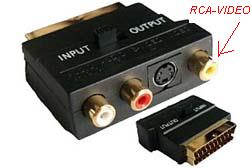 |
|
New member Username: FlyinballerPost Number: 1 Registered: Mar-06 | This question may already be asked but i couldn't find it in the list. I have a Dell Latitude Windows 2000 with a Mobolity radeon card. I know how to connect a s-cable to the tv and i kno witch channel 2 put it on. Wich button 2 press 2 switch screens. the problem is it doesn't switch, there is a short flash on the tv really short, so i know it's doing somthing but the image stays black. I thought i could be the wrong driver? could u help TNX |
|
New member Username: Screamin_dPost Number: 1 Registered: Mar-06 | Robin, Its probably not the driver. You need to toggle screens BEFORE inputing you DVD into the driver. I had the same problem on my sony Vaio with Mobility Radeon 7500. Hope that helps. |
|
New member Username: FlyinballerPost Number: 2 Registered: Mar-06 | nope the second screen stays black before or after i putin a movie tnx anyway |
|
New member Username: IluvparisPost Number: 1 Registered: May-06 | i have a hp pavilion dv1608tn when connected to the tv thr s-video out it shows only my desktop background.when i change the desktop background it also changes.is that possible for me to view what i see on laptop over a tv screen pls find time |
|
New member Username: Matt_whitlockPost Number: 2 Registered: Mar-06 | ranga, You're part way there. If you only see your desktop background on your TV screen, it means that Windows is extending your desktop real estate to cover both screens. In essence, you could drag a window over to that screen. If you only want to use the TV, or want to see a replica of your laptop screen on your TV screen, you'll find a checkmark in the display settings, labeled "extend my windows desktop". Uncheck it, and you should see the same thing on both screens. Matt Whitlock - Editor, TechLore.com Get more out of your Gear! Listen to the TechLore PodCapsule Today! |
|
New member Username: NyczreplicaPost Number: 1 Registered: Jun-06 | i have an inspiron 9300 with S-video out i'm just wondering, where will the sound come out of my laptop or my TV? |
|
New member Username: Gtskippy3Post Number: 1 Registered: Jun-06 | I am trying to connect my Dell Inspiron to my plasma TV. I have been able to connect it to a regular tv before but is it different connecting it to a plasma tv? |
|
New member Username: Cloud_malePost Number: 1 Registered: Jun-06 | pretty easy i just this very second hooked up my sony vaio laptop PCG-K415B laptop to my really old philips 14 inch tv using the cable i got with my canon digital camera..... just stuck it into the yellow hole on the laptop and the 2 lead to the 2 holes that look like they would recieve them...... went to fisplay advance...... picked tv...... put display to 640 x 480 and voila worked perfectly listened to streaming radio and watched streams through win media player..... erm the thread answere all the questions..... ppl use ur initiative!!!! |
|
New member Username: Lucky21Post Number: 1 Registered: Jun-06 | Inspiron 710m Pentium Intel Pentium M Processor 735 (1.7GHz), 12.1 inch WXGA Memory 1GB DDR SDRAM 2 Dimms Hard Drive 100GB 5400rpm Hard Drive Genuine Windows XP Professional Network Adapters Integrated Network Card I have S-video out and also a VGA Video Connector (15 Prong) All this talks about is getting your VIDEO (images) onto the T.v. I was wondering if there is a way to get not only whatevers on the laptop to the t.v. "ALSO" with (sound) coming from the laptop to the T.V. If so please email me ASAP. lucianokid@sbcglobal.net I have taken the time to read most the entire page. But have only heard about images, I want to know about the sound going to the t.v. coming from the laptop. And what can I buy to get it to do that with what I have? Example: Playing a DVD from my computer, I want the sound from my laptop to be coming from my tv, same with the video. Please let me know. lucianokid@sbcglobal.net |
|
New member Username: Matt_whitlockPost Number: 10 Registered: Mar-06 | Hi lucianokid, Check out the article below for guidance in getting both audio and video from your computer to your TV. You'll find the answer on pages 2, 3, and 4. http://www.techlore.com/article/10061/ If you need something more direct, this article should be of use to you. Check out the section labled "Headphone Output / Line Level Output". http://www.techlore.com/article/10039/ |
|
New member Username: Yankees214Post Number: 1 Registered: Jun-06 | i have a dell inspiron 1150 and im trying to connect it to my sony wega tube tv. my laptop has no s-video and my tv has no VGA...is it still possible to connect them? please help me out! |
|
New member Username: Shacky_vPost Number: 1 Registered: Jul-06 | Hi, I have almost a similar question as Finwall. I have a dell inspiron 1150 and it has a VGA output, and my TV has both an S Video input as well as RCA jacks. Please do let me know as to what I need to project my laptop screen onto my TV. Thanks. Please help out.. |
|
New member Username: Shacky_vPost Number: 2 Registered: Jul-06 | actually, i was lazy and didnt read the posts before this. thanks for the articles. ciao. |
|
New member Username: Nickturbo1Post Number: 1 Registered: Jul-06 | Hi all I have a dell latutude c610. IT has a s-veido. But I use the tv with it I get a black and white pic. NO toolbar or Icons. Can some one help me please. |
|
New member Username: QuestionmarkPost Number: 1 Registered: Jul-06 | someone told me if I hook my dell inspiron 1100 up yo my 52inch rca rear projection tv with a standard svideo cable it might damage my tv. could you assure me it wont hurt my tv. |
|
New member Username: QuestionmarkPost Number: 2 Registered: Jul-06 | Can a laptop hooked up to a rear projection TV Damage MY TV? (Just a simple yes or no).please reply.. |
|
New member Username: QuestionmarkPost Number: 3 Registered: Jul-06 | f u c k you.thanks for shitt. you could'nt just waste a fuckking second of your time to say yes or no you fucn nerds. |
|
New member Username: George_bushPost Number: 1 Registered: Jul-06 | hey, I want to connect my laptop to my neighbour TV. How to do this? |
|
New member Username: Paul_vegasAlacanteSpain Post Number: 1 Registered: Jul-06 | I'm totaly frustrated i'v had a dell inspiron 6000 since Jan 06 been extending notebook to tv via s video with a nice colour picture until recently with no warning the picture went black and white, i'v checked the cable and conections it's good i believe the problem is caused by a windows software up date but i don't know how to solve my black and white picture problem can anyone please help ??????? |
|
New member Username: SmellymellyPost Number: 1 Registered: Jul-06 | I have all the right cables and stuff but when I go to properites>display>settings>advanced>Intel Extreme Driver>Devices. There is no TV option. WHat should I do? |
|
New member Username: HobbsyPost Number: 1 Registered: Aug-06 | I have an Ibm T23, s-video plug. I have a s3 supersavage driver, but it won't let me change to tv, or crt. I want to use the s-video cable just want to get the tv going. I Win2000 + XP, i use XP to run. I have an s-video cable, plus a s-video rca converter. I have the (Fn key (F3-X) (F4-sleep) (F7-TV). I had a look at the S3Switch, it's all to complicated for me. If Anyone knows how to fix this problem, it would be great. Hobbsy |
|
New member Username: Nickturbo1Post Number: 2 Registered: Jul-06 | ok Well you have to reinstal the drivers for you graphis card in your laptop. Alsp wut tv are you hocking it up to And how old is you laptop. |
|
New member Username: HobbsyPost Number: 2 Registered: Aug-06 | My tv is a Phillps 68cm flat screen. It has AV1, AV2, AV-OUT, Component Video Input (Green Blue Red) and S-Video. IBM T23 Model - 26476GA S/N - 99AGW8C Do I just reinstall the driver for my graphics? |
|
New member Username: MuncherPost Number: 1 Registered: Aug-06 | Ignoring all the people who really don't care, lets get some serious solutions and stop being a bunch of wank shafts! I've got the same problem using windows xp and composite video, where the GUI and movie displays in media player, but only the GUI displays when using the composite to TV. |
|
New member Username: HkilaiPost Number: 1 Registered: Sep-06 | The easiest way: If the laptop has s-video out, and the Tv has s-video in. - Use and s-video to s-video cable - Make sure you have the latest drivers for you display card. (most latest drivers would have several output options LCD/CRT/TV). if not.... - Set the TV as secondary monitor under control panel -> Diplay propterties -> settings(right click on 2nd monitor and click "attached"). - This should work (make sure you have selected the correct video input in you TV (s-video1) or something like that (try all inputs anyway!) Good Luck Harrison Kilai Nairobi, kenya. |
|
New member Username: VixPost Number: 1 Registered: Oct-06 | I've read the techlore articles, and read this entire thread, and I feel really stoopid, because I still can't get playback on my TV. No problem getting the GUI to display on the tellie, but can't see the video in real player/media player, any of those (can see youtube stuff though). Using WINXP, ATI video card (latest drivers); s-video cable. Have tried following user's suggestions of making the TV the primary monitor, but have fiddled extensively with the display settings, advanced etc, and can't seem to find this as an option. (have all the ATI specific stuff there that shoes the TV as an option, but still unable it 'set it' as the primary monitor). I also can't fn+F7 to display TV only, as I read this might help too. I'm almost ready to give up...if anyone can provide specific, idiot-proof instructions, I would be most grateful. |
|
New member Username: Skillz1987Nashville, TN United States Post Number: 1 Registered: Oct-06 | Ok, this question has probably already been on here and answered, but I really didn't see it, could you guys help me?... Aight, I have a Dell Inspiron B130 Laptop, w/ no S-Video port, but it does have a VGA port. I also have a Mitsubishi Projection LCD HDTV with 2 HDMI Inputs, 2 Component Inputs, and a S-Video port, but with no VGA port. What cables do I need to connect my laptop to my tv? Could you please give me step by step instructions on how and what to do, thanks. |
|
New member Username: Ah522Post Number: 1 Registered: Oct-06 | ok. I made a movie of family pictures, with sound to it but I saved it on a CD not a DVD. So I am going to play the CD in my laptop and connect my laptop to my TV through a s-video cord. This just transfers the picture right? How do I get the sound of the movie to play on the tv too? |
|
New member Username: BrensweePost Number: 1 Registered: Oct-06 | I have successfully hooked my laptop to my CRT tv, with great results using an s video cable. However there are faint diagonal scrolling lines on my screen. I get the same result with other (again CRT) TVs. Why is this? Could it be the cable? Or something to do with CRT TVs? Any quick fix here? |
|
Bronze Member Username: Matt_whitlockPost Number: 11 Registered: Mar-06 | "Ignoring all the people who really don't care, lets get some serious solutions and stop being a bunch of wank shafts! I've got the same problem using windows xp and composite video, where the GUI and movie displays in media player, but only the GUI displays when using the composite to TV." TechLore has a forum thread on this exact issue, and a solution is provided: http://www.techlore.com/forum/thread/11241 And for this guy: "Can a laptop hooked up to a rear projection TV Damage MY TV? (Just a simple yes or no).please reply." Possibly. Inputting non-compatible scanning rates into a television 'could' damage it, though it's not really common. |
|
New member Username: Barry_jonersPost Number: 1 Registered: Nov-06 | When I hook up my Inspiron E1505 up to my TV via S-video, the image that shows up is extremely small. It literally is a strip across the middle fourth of the TV screen. Is there a way to change the video output settings or what can I do? |
|
New member Username: Adidas317Post Number: 1 Registered: Nov-06 | i have the VGN-SZ230P and it has the monitor cord to it, where can i get that cord so i can hook it up to my tv?? there a website at all? |
|
New member Username: TckyfrgPost Number: 1 Registered: Nov-06 | i have a dell aspire 3620 and i don't know how to hook it up....please help i am new to this type of thing.... |
|
New member Username: Kolada88Post Number: 2 Registered: Dec-06 | okay heres the deal, read everything here, and previously had a laptop to tv connection working perfectly. However now all i get is black and white, dell inspiron 6000 with 7 pin s-video to a sony trinitron with 4 pin s-video connec. does the board think this is a driver problem or a 4 to 7 prong connection error, or something else help is needed and appreciated |
|
New member Username: CrashoveridePost Number: 1 Registered: Dec-06 | hello i have a toshiba tecra m2 and i hav hooked up a s video and sound cable that goes from my headphone jack to red and white on my tv i get sound but no video only blue screen, i tried making it a second screen but it didnt work so wat do i do plz answer in step by step if possible |
|
New member Username: BubbleboyNone, None None Post Number: 1 Registered: Jan-07 | Everyone, Just Use S-VIDEO Then If You Get Messed Up Picture, Try Change The TV Format Arround (PAL, NSTC), Try Using n RGB Cable For The Newer Laptops Or An AV Cable, If All That Fails, Try Changing The Screen Resolution Of Your Laptop Screen To Fit The One Of The TV, Maybe Try Changing Channels On TV obtter Picture, Some TV's Produce Black And White Picture When On Certain Channels, Try Ajusting The Colour Settings On The TV. |
|
New member Username: Kristine09Post Number: 1 Registered: Jan-07 | Hello. Can someone please help me? I want to be able to watch my downloaded videos in my tv. I have already connected svideo from laptop with that yellow cable thinggy on my tv (video in). I tried to go to display settings already, click 2, attached and the display drop down box displayed (Default Monitor on Mobile Intel® 945GM Express Chipset Family) then i pessed apply then ok. Pressed function+f4 as well as function f7 but nothing happens on neither of my tv or laptop. Please, please, i need help. Sorry im not really a computer whiz like you guys. Im just a music video freak and I want to watch it on bigger screen. hehe =). Please help. Email: pretty_tine09@yahoo.com |
|
New member Username: CdschwabPost Number: 1 Registered: Feb-07 | Ok I really need help cuz I've tried all of this and I'm getting frustrated. I have a Bytespeed Laptop that is brand new...I have an Insignia TV and I really want to be able to watch streaming videos from my laptop on the TV. If anyone can help my e-mail is cdschwab@wisc.edu |
|
New member Username: Michael_jacksonPost Number: 1 Registered: Feb-07 | hi friends, any kids here |
|
New member Username: Michael_jacksonPost Number: 2 Registered: Feb-07 | friends? are you here? |
|
New member Username: BlertPost Number: 1 Registered: Apr-07 | Hi, My ACER notebook only has a 15 pin VGA output. My vedio projector has Female RCA input and S cable input. Is it possible to wire a cable using a VGA male plug to an S cable male plug? If so, is there a diagram i can use? Thanks |
|
New member Username: CoolmalayaleePost Number: 2 Registered: Apr-07 | Hi I have a Compaq Presario V2102AP laptop. I use to use the S-Video feature with this laptop and watch movies in my TV till yesterday. Suddenly from today the S-video feature doesnt seem to work. I have no idea what happened. When I connect the s-video cable and press the Fn+F4 keys to transfer the monitor to TV, the tv just blinks and shows some black and white grains on it but the desktop is not appearing on it. Can anyone tell me what could have happened. |
|
New member Username: HarryiyerPost Number: 2 Registered: Jan-05 | Hi I have this Sony laptop only with the VGA o/p. Do we need a RF converter to go with the VGA to RCA cables to connect it to TV Thanks Hari |
|
New member Username: SianyBromsgrove, Worcestershire United Kingdom Post Number: 1 Registered: Jul-07 | Thanks to everyone who took the time to explain how to do this or to provide links I really appreciate it. Sian |
|
New member Username: IndmovfanPost Number: 1 Registered: Aug-07 | Hi, Though many people have answered the question. I just thought I will explain the problem I faced will connecting my Laptop to TV. I used a D Video Cable to Connect to my TV. Issues: 1. The Audio was coming only from the Laptop. 2. Also, the video was appearing in Black & White & not in color. Resolution: 1. For the Audio issue, there is a separate RCA cable (or whatever its called) which has to be connected to the headphone provision in Laptop & other ends (2 Left & Right Speakers) to the TV Audio Ports. After that Audio was coming from TV itself. 2. For getting color I tried changing my TV color setting from Auto to PAL or other possible options, but nothing worked. Switched it back to PAL. Then I just tried connecting the other free ends of the S Video cable to the TV (as only the Video end os S Video cable is used). Earlier I connected the Yellow Pin in the Video Port in TV & I got B/W picture. After fixing the Red wire to the Video Port. I got color also. Now everything is fine. Hope it the above was helpful for some. Thanks, Prem |
|
New member Username: ElderburyPost Number: 1 Registered: Mar-08 | ok so i HAVE read the posts and followed the link to ebay, what im confused is this, they sell the blue ended adapter that connects to ure pc to the white yellow and red adapter that connects to ure tv, now the blue one will work but the red white and yellow one is the wrong gender of cable, i think thats how u say it, as in the tv has the woles for pins and so does the cable...hmmm, do i need ANOTHER cable that leads from red white and blue sockets to tvs red white and blue sockets, if so that would be 2 cables i need to buy not 1 |
|
New member Username: Milad73Post Number: 1 Registered: Jan-09 | Hi, my new Toshiba Qosmio computer when connected to my Sony TV, will only get black and white colors on TV, is there a setting I need to change somewhere, my TV is 8 years old. Thanks for your help. |
|
New member Username: IwantyourlaptopPost Number: 1 Registered: Mar-09 | I live in the Philippines & would like to connect a laptop to my tv. Only problem is I don't own a laptop... If one of you guys can give me yours, I bother to read the thread to decide what cables I need. You'll have to post it also & make sure you pay the insurance. Thanks |
|
New member Username: DoomsdayPost Number: 1 Registered: Mar-10 | Is it possible to take the video cord off of a computer monitor and attach RCA's to it? kind of like a redneck version of an adapter? i have a cut off cable from an old monitor and was just curious if it is possible.......RCA to a regular monitor output? |
|
New member Username: FaziPost Number: 1 Registered: May-10 | i have a toshiba laptop and i only have a vga output with a ati radeon 3100... a cable is available in the market which converts vga to rca component...i only want to ask that is it even possible to convert vga signals to rca component and connect my laptop to my tv?? |
|
Silver Member Username: Ieee488Post Number: 348 Registered: Dec-07 | You can't convert with "just a cable". You need hardware which certainly costs much more than a cable. If you don't believe me, buy that magic converter cable and try it. |
|
New member Username: FaziPost Number: 2 Registered: May-10 | i do believe you....cz i bought 2 three different type of cables and none of them worked...and i definitely need a conversion box....but one thing i don't understand that why are these cables being manufactured,as they are to no use, so whts the point in making these types of cables...?? just a waste of money or just to cheat people or if they doo work then with which type of device...? |
|
Silver Member Username: Ieee488Post Number: 349 Registered: Dec-07 | In some rare instances, the unused pins on the VGA connector will have the composite/s-video signals, so you can use just such a cable. Check the documentation for your laptop. Ffor the vast majority of people, the cables are useless. |
|
New member Username: ShikamaruPost Number: 1 Registered: Nov-10 | please help!!! i have a crt tv and i want to hook it up to my laptop which has a vga port. what cable do i ned to do this?? please help someone!! |
|
Silver Member Username: Ieee488Post Number: 510 Registered: Dec-07 | You cannot connect laptop to CRT TV with just a cable. You need to spend another $35 for a converter box. |
|
Silver Member Username: Ieee488Post Number: 511 Registered: Dec-07 | That should have said you cannot connect laptop VGA port to CRT Tv with just a cable. |
Main Forums
Today's Posts- Home Audio Forum
- Home Video Forum
- Home Theater Forum
- Car Audio Forum
- Accessories Forum
- All Forum Topics