DVR to Computer HD
|
New member Username: Mjp6492Sheridan, OR USA Post Number: 1 Registered: Dec-04 | I have a Dishnetwork 522 DVR. Can anybody tell me how to transfer the recorded movies from the DVR to my computer HD so that I can burn them on to DVD? |
|
Unregistered guest | Have you gotten any response to your question? I am wondering the exact same thing. |
|
Unregistered guest | Anyone out there know? I would like to know as well. |
|
New member Username: PstahljrPost Number: 10 Registered: Nov-04 | You'll probably need something like An ATI All-In-Wonder Card. If you have a Dell they might have Video package adapter card. Basically you're using you PC as a Video recorder and you need special hardware to do it. You can then get software to edit it before you burn it to a DVD. |
|
Bronze Member Username: PstahljrPost Number: 12 Registered: Nov-04 | You'll need to get some type of card for your PC like ATI All-In-Wonder Card. It will turn your PC into a DVR. There are also boards that will let you connect Video equipment so you can copy to you HD. Look on the Dell site they have some Multimedia - Video Capture / Editing that might do what you want to do cheeper. |
|
New member Username: Mjp6492Sheridan, OR USA Post Number: 2 Registered: Dec-04 | I appreciate all your responses. I believe I have found a solution. I am ordering it and will advise you if it works. It's rather inexpensive. |
|
raa Unregistered guest | Does anyone know if this would work with comcast digital cable's motorola HD receiver with DVR? I'd really love to be able to upload to my PC and burn DVDs from there. The DVR has an ethernet port and two USB ports. Also, is it possible to do this wirelessly through a linksys network using a USB adaptor? I'm hesitant to add the media card if the dvr does't support it or if comcast has that disabled somehow. |
|
Bronze Member Username: PstahljrPost Number: 13 Registered: Nov-04 | raa, Here's something I came across but I don't know if it will work as the firmware on your box may not be what is required. Here's the link, hope it doesn't break any rules for this forum: http://www.avsforum.com/avs-vb/showthread.php?s=&threadid=403695 I have a old PC with Window 2000 so I don't have this option. Pete |
|
Bronze Member Username: PstahljrPost Number: 14 Registered: Nov-04 | raa, Might be some info at the Motorola site also to help you: Send Comcast & Motorola a email, they may be able to give you some info. Pete |
|
Bronze Member Username: PstahljrPost Number: 15 Registered: Nov-04 | Mike, Did figure out how to do it yet? |
|
New member Username: Mjp6492Sheridan, OR USA Post Number: 3 Registered: Dec-04 | I recieved the new video capture card today and installed it. It works great for this. It's a V-Stream X-pert DVD maker card. I got it on e-bay brand new for 24.95. It comes with a composite and s-video converter and cyberlink software. Connect your DVR composite RCA output sources to the converter off the card and set your preferences through the software provided. Save the file as mpeg-2 and reload into your DVD burn software. Or burn it directly to your DVD burner. That's it! |
|
New member Username: Burnn1Post Number: 1 Registered: Feb-05 | So - here's what I got back from Comcast. Thank you for taking the time to write us. The cable boxes do not support PC connections at this time. Thank you for the opportunity to assist you. If you need further assistance with any of your Comcast services please reply to this email and we will be happy to assist you. Thank you again for choosing Comcast and we continue to appreciate your business. Sincerely, Craig Comcast Electronic Customer Care - New England |
|
Bronze Member Username: LamprightSyracuse, Utah USA Post Number: 46 Registered: Jan-05 | If you had a DirecTV Tivo, you could easily hack it, plug it into your computer network, and pull the shows off the hard drive onto your computer and burn them to DVD. It works great with no loss of quality! Your method with Dish will involve capturing analog video through a capture card and recompressing it into mpeg2 (which it was already in on the DVR hard drive). So, not only is it a major hassle and time consuming, but you're going to loose a lot of the quality in the recompression. Good luck! |
|
Bronze Member Username: LamprightSyracuse, Utah USA Post Number: 47 Registered: Jan-05 | If you're going to be doing this a lot, I would highly recommend that you purchase a stand alone Tivo, or a replay tv and use it to record the shows you want on DVD. The easiest would be to buy a standalone Tivo with a built in DVD burner. |
|
oswego Unregistered guest | I have charter cable. Can I plug the cable into the ATI "All In wonder card" and record content to my harddrive? Dennis? |
|
New member Username: JikerCarson City, NV USA Post Number: 1 Registered: Apr-05 | <if> I also have the "Dishnetwork 522 DVR". It too has a USB port on the back. Could you please explain the method "plug it into your computer network"? Pease |
|
New member Username: JikerCarson City, NV USA Post Number: 2 Registered: Apr-05 | "If you had a DirecTV Tivo, you could easily hack it, plug it into your computer network, and pull the shows off the hard drive onto your computer and burn them to DVD. It works great with no loss of quality!" I also have the "Dishnetwork 522 DVR". It too has a USB port on the back. Could you please explain the method "plug it into your computer network"? Please |
|
Anonymous | I have the DirecTV Hughes DVR and I was wondering about the same thing, the hack to put DVR Recordings on to my computer. Could you please explain? |
|
Unregistered guest | Are you aware of if they make one of these cards for notebook pcs? I have a dvr with lots of stuff that I want to put onto DVDS. Does the information have to be saved onto your computer or can you just transfer directly from dvr to dvd burner. Like is there a way to hack into the dvr memory from your computer to transfer to a dvd burner? |
|
Anonymous | I have a Dish 522 DVR. I would like to empty the information on on my computer. Does anyone know if I can transfer onto a Macintosh - iMac 20" or PowerBook G4 17"? |
|
MikeyB Unregistered guest | I just attempted to plug the Hard Drive from my DVR-522 into my PC, and it doesn't work... unfortunately. I know that and analog input device for the computer (mac or pc) will allow you to capture audio and video to your computer but, as mantioned above, there is a loss of quality... I also have a 12" powerbook, and an analog external video capture device, such as a 'Dazzle' or the like will work with iMovie or iDVD. Anyone know how to transfer digitally, direct from the dirve? |
|
Anonymous | Does anyone have any info on backing up the 522 straight to PC? Or is the only known way video capture? |
|
New member Username: NeedhelpSouth boston, Massachusetts Usa Post Number: 1 Registered: Jun-05 | I have a Cyberhome DVD recorder and I was wondering how I go about hooking it up to my Dell Notebook. I am very new at everything that is computers so I am completely blank on how to do it. Thanks |
|
New member Username: NeedhelpSouth boston, Massachusetts Usa Post Number: 2 Registered: Jun-05 | I have a Cyberhome DVD recorder and I was wondering how I go about hooking it up to my Dell Notebook. I am very new at everything that is computers so I am completely blank on how to do it. Thanks |
|
Robato Unregistered guest | I just got dish network with dvr today and was wondering if there was a possible way to get the recorded shows straight to my pc |
|
jinzo012 Unregistered guest | What's the USB, and Firewire ports on my DVR for? can't they plug into a Mac/PC? |
|
Infohog68@yahoo.com Unregistered guest | DishPVR508: Can it be used to record from tuners other than its own sattelite tuner? |
|
Kirkc Unregistered guest | Has anyone had luck connecting their Mac to the 522 via the USB port? It seems that if the unit has a USB port, you shouldn't have to deal with converting from analog. And, if you can transfer to your computer, can you also transfer back? I'm asking because the modem on my current unit is broken, and they are sending me a new one, but I want to save my movies. In addition, it would be nice to be able to save the movies back to the new box. Answers anyone? |
|
countershane Unregistered guest | it is possible that if youtake out the hard drive frm your dvr and connect via ide you can install the hard drive to your computer. though the hard drive appears to be blank, you can use partitionmagic to acess the hidden files on the hard drive and back them up to your pc. you will needa large amount of space for everything as the dish dvr522 has a 120 gb harddrive. i have done extensive research on this. the only problem is that by removing the hard drive from your dvr system you void yor warranty. |
|
Unregistered guest | I have connected my Dish DVR522 Hard Drive to my PC and upon inspection of the drive with partition magic I notice that it is 3 Linux partitions. I booted into Knoppix 3.6 and the 3 drives are automatically mounted and short cuts are created on the desktop. The 1st and 2nd partitions seem to be database files for the TV Guide and DVR Recordings I assume. The 3rd partition however, has all of the recorded files on it. The problem I've run into is all of these files are in a *.tsp file format. Staying in a Linux environment this is no problem as Xine Media Player will open and play these .tsp files with no problem. But we all seem to want to pull these files into a windows environment in order to edit out commercial and burn our recordings to DVD... Anyone out there know anything about .tsp files? How to convert them to an editable format? I hope some of this information helps someone come to a solution to this problem. I'll continue to research and see if I can come up with anything. It really sucks that Dish won't let us just plug into the USB port and back up these hard drives... Thanks! P. |
|
Unregistered guest | I HAVE A DELL COMPUTER DIMENSION 2400. IT'S ONLY READ DVD+RW DISK. CAN SOMEONE HELP, SO IT CAN READ THE OTHERS |
|
Unregistered guest | it seems to me that the best way to do this, rather than burn DVDs would be just to copy the files to an external firewire hard drive - that way, it is all digital, and you never have to remove any hard drives or anything. my motorola dct6412 HD DVR from comcast has 2 firewire ports, and i've got an external drive... i just can't get my brain around how to move files off the DVR and to an external drive. |
|
fx Unregistered guest | "... i just can't get my brain around how to move files off the DVR and to an external drive." It can't be done in this manner. the Scientific Atlanta 8300 DVR has a SARA external port which is designed to do just that. The new DCT-6412 Phase III boxes have a SARA port but it is up to the individual cable companies to activate the port via a firmware update. xvxvxvx |
|
Unregistered guest | Hey, P. Thanks for the info about what is on the hard drive. From what I've been reading, a .tsp file is normally a standard MPEG-2 (DVD) file. I am curious if a Windows machine would play it correctly if you just renamed the extension to .mpg. If not, then I wonder what info would be seen by AVICodec. I don't have one of these machines to play with - I am researching for a friend. If you get these answers, I would love to hear. I'll also let you know if I find out anytime soon. kirel |
|
Layton Unregistered guest | I have an Scientific Atlanta 8300HD dvr with an sata conn and 2 1394 firewire connections can someone tell me if I can hook that up to my pc ( micron 3.2 ghz with 1 gig of ram ) so I can burn the one program from it i want Email me at flajrnylvr@yahoo.com |
|
Unregistered guest | I also have a 522 DVR & would like to connect it to my PC just for the purpose of copying my DVR contents onto DVD's via my desktop PC DVD burner. If anyone knows what other hardware and/or software I need for my computer to do this - PLEASE let me know! |
|
Unregistered guest | Does anyone know if you can take the hard drive out of any DVR and connect it to your computer to be used as a regular hard drive? I have 3 damaged DVR units with 120GB drives that I'd like to use in a computer. I have tried by connecting them like any other hard drive, but even with partition magic, I'm told they can't be formatted. Do I need to put these drives in a computer and run a WIndows install on each in order to format? Help? |
|
New member Username: MongoosmikePost Number: 1 Registered: Sep-05 | Hi to Countershane and P, I have removed the hard drive, (120GB Seagate) from the DVR and hooked it to our computer and it is not recognized in the BIOS at all. I have tried hooking it up by itself, with another hard drive, tried cable select and all other possibilities and it is simply NOT recognized by the computer. This is on a P-4, Win XP Pro computer. Any info will be appreciated with this. Thank you. |
|
New member Username: UcladtvCerritos, California Usa Post Number: 1 Registered: Sep-05 | I have tivo and it is easy, connect a wireless to your home network via the usb port on back of tivo. You can then send anything you record to your hard drive. But you have to use the tivo software. Tivo records in .tivo so you cannot burn it to dvd until you buy some sonic software. but can be done very nicely for under 100 dollars. I personally prefer to record directly to my dvd recorder. |
|
New member Username: MongoosmikePost Number: 2 Registered: Sep-05 | Sorry, we don't have a network, or a Tivo unit. available.. Countershane said on Wed, Aug 3rd that he connected a DVR drive and the drive could be connected and using Partition Magis you could view the files. BUT first the drive has to be recognized by the computer BIOS.. We're wondering how this is possible if the drive isn't recognozed by the computer.?? Thanks again for the help.. |
|
fx Unregistered guest | Actually Countershane said: "it is possible that if you take out the hard drive frm your dvr and connect via ide you can install the hard drive to your computer. though the hard drive appears to be blank,....." This indicates it is a theory, and not a very good one at that. xvxvxvx |
|
New member Username: MongoosmikePost Number: 3 Registered: Sep-05 | Right you are FX, and I forgot to add that another poster said that he had done it,"P", which is the vey next post after Countershanes post. I wonder if we have to download Knoppix 3.6 and if so how do we make a boot disk for Knoppix? I really only want to erase whatever files are on the drive and use it as a regular computer drive. Here is what "P" said: QUOTE >P: I have connected my Dish DVR522 Hard Drive to my PC and upon inspection of the drive with partition magic I notice that it is 3 Linux partitions. I booted into Knoppix 3.6 and the 3 drives are automatically mounted and short cuts are created on the desktop. The 1st and 2nd partitions seem to be database files for the TV Guide and DVR Recordings I assume. The 3rd partition however, has all of the recorded files on it. The problem I've run into is all of these files are in a *.tsp file format. Staying in a Linux environment this is no problem as Xine Media Player will open and play these .tsp files with no problem.]] END QUOTE |
|
MiniPodMan Unregistered guest | Is there any way to connect an ipod with linux on it to the DVR since they are linux partions? Thanks |
|
New member Username: MongoosmikePost Number: 4 Registered: Sep-05 | I don't have the DVR unit anymore, just the hard drive from the DVR, (Seagate 120GB Drive). I am just trying to get the computer to recognize the hard drive from the DVR, so I can just use the hard drive in the computer. I would think that there should be some software/boot disk to recognize the hard drive I think the computer has to recognize the drive before a boot floppy of some sort would work. I know that Ghost and win 98 boot disk don't recognize the drive when it is hooked up as master, slave or cable select. Still looking for an answer. Thanks |
|
MiniPodMan Unregistered guest | USe linuz you can get Knoppix that will work and you dont need to instal anything. just burn it on a cd or dvd and put it in your comouter when it starts up. |
|
New member Username: MongoosmikePost Number: 5 Registered: Sep-05 | Thanks for the info MiniPOdMan. I did download the Knoppix 3.6 but thought it was Linux OS and didn't want to screw up Windows by installing it. OK, when I burn the 750 MB program to a CD, how does that boot up? Doesn't it have to installed on a computer or is it already set up to boot from a CD. Thanks again for the help. |
|
Tedster Unregistered guest | Anyone who has a dish network box, check out http://groups.yahoo.com/group/dishrip/ Seems someone has written special software to extract the video off the dish network hard drive (you will have to mount the hard drive). |
|
fx Unregistered guest | I thought I'd post this link for anyone with a DCT-6412 trying to copy to a pc: http://replayguide.sourceforge.net/dct6412/ xvxvxvx |
|
posdfgvcxbxchdgfh Unregistered guest | You can use the s-video port to empty out the recordings but takes awhile |
|
Unregistered guest | how about from DVR 522 to an external HD then to PC? |
|
oldgriff Unregistered guest | Or I even have a tv wonder pro with s-video.Will s-video give hd quality for burning? if not, how close? would that work to get DVD to PC? And Dish told me the USB port was INOPERABLE. If you plug into it, does something come out?! (data) |
|
IpodMiniMAn Unregistered guest | Mike, Linux will just boot of the cd. When using Knopix you dont have to install anything. Also when your done using it you just turn of your computer, take the cd out and you cant tell that u were using knoppix because it boots windows. |
|
Unregistered guest | Sorry to bother anyone, but I'm apparently not as computer literate as everyone else here. I want to know how to transfer DVR files to my Gateway laptop. I have DirectTV and whatever TIVO it is that they offer. Anyone spare a few minutes and tell me what to do? Thanks |
|
Anonymous | Hey, You can just copy the MPEG2 Video to your Computer HD for about $30 and a little research online. You just need the Atmel Atmega128 Card(JTag Interface), a little Cat5 Cable, and a Couple of Programs available for free over the internet; Jeepers, IRD2PC, WinVU Just do some searching.... |
|
DirecTech Unregistered guest | Oh yeah, you'll need a couple of things from RadioShack if you want to protech your DVR from Damage... Just do the (Start with a Search on EMU Cable or WinVU Cable) Research based on What DVR you have, and weather it's Dish or Direct.. Here's a place you can go to get some software... [link removed] |
|
Doc Audio Unregistered guest | To use the dvr hard drive in your windows pc, you will have to delete the linux partitions,then re-partition,format the hard. Everyone knows that linux is invisible to Windblows. |
|
HDjabba Unregistered guest | Here's how you do it. (This is for a Scientific Atlanta Explorer 8300HD DVR, but I suspect other DVR's will be similar): 1) Connect the red/white/yellow audio/video cables to the respective OUTPUT 2 connections on your DVR. 2) Connect the other ends of the red/white/yellow cables to a Pinnacle Systems Dazzle DVC 90 device (you need to install the DVC 90 ahead of time on your PC, so you end up with Instant DVD Recorder 1.5 on your PC). 3) Connect the USB 2.0 end of the Dazzle DVC 90 to your PC. 4) Start your Instant DVD Recorder software onyour PC, identifying where you want to copy the recording (PC hard drive or directly to a DVD burner). Complete all steps except the last one (i.e., "Start Recording"). 5) Select the playback options on your DVR, with the last being "Copy to VCR". 6) Hit "Start Recording" on your PC/Instant DVD Recorder. Works great. |
|
Unregistered guest | I have a DVR and from what Ive read on here, its complicated to get stuff off.. It looks like taking the harddrive out and connecting into your computer is the easiest way.. Now it was never finished on how to do the S-Video transfer.. Has anybody ever tried that way and is it easier.. |
|
poophead Unregistered guest | hey im wondering if now that the pocket dish is out someone is probley going to make some sort of emulator for it. im thinking that if you had an emulator on your pc you could fool the dvr into thinking it was a pocket dish and take all dvr files to pc. just a thought so if any one is a programer go for it. |
|
texan95 Unregistered guest | There are a lot of answers here that just tell how to hook up the video stream from the DVR. I think what the original poster is looking for, and what I'm looking for, is a way to transfer the FILES from the DVR to the HD, then convert them so they can be burned to DVD (or something else). I'm not interested in using capture hardware or software (unless there's a DVD recorder that can record HDef movies from a digital stream), I'm interested in transferring the files to HD. |
|
HDjabba Unregistered guest | texan95...my instructions above result in the file getting transferred from the DVR to your HD. All you need then is software like Roxio to take the transferred file and burn it to a DVD. |
|
lifes-a-trip Unregistered guest | HDjabba.. You're right that will get the files to the computer but it will take forever. The advantage of taking the files directly from the HD is that they are already MPEG and should burn at 16x to a DVD burner. And you wouldn't have to sit and wait for each movie. I just transferred 80 gigs of video from my 522 onto a linux server in about 30 minutes and I can watch them on my windows XP with Mplayer. I am now just trying to find out how to burn them to a DVD. |
|
Anonymous | i wanted to take this to the next step, once the files are transefered and are in any common media type, i wanted to convert them to MP4 and then put them on my ipod video, i know its crazy, especially since we dont have the first half down yet, but i believe its possible |
|
JayTech Unregistered guest | Hi all, does any body have any kind of emulator to copy from dish DVR to PC or how can I copy my DVR files to my PC without using S-video; thanks in advence. |
|
NeedAHack Unregistered guest | Lifes-a-trip You say transferred 80 gigs of video from your 522 to a linux server..... but how? Did you take out the HD and put it in your linux server? What the hell is that USB connection for? like to put a wireless usb network adapter on it but not sure that would get me anywhere either. |
|
Digital-Guru Unregistered guest | It all comes down to one word and that is "Proprietary". I too have a 522 DVR and yes I have been wrecking my brain trying to figure out a way to download my recording as files rather than in realtime. I am getting tired of vendors coming out with crap that is not compatible with all the GREAT TECHNOLOGY that exists today. Right now the only way is to either do it in realtime onto a DVD-R or a Pocket Dish(without voiding your warranty). But Friends my search is on and do check out some of the Torrent sites every once in a while. Keep hope alive!! |
|
Anonymous | I have looked in this group and found some good information: http://groups.yahoo.com/group/dishrip/ There seems to be both video and audio files that have to be synchronized when copying the files. I had quite a bit of difficulty trying to figure out the best way to copy the files to my hard drive using several versions of Linux. In the end I gave up after I inadvertently corrupted my Windows install trying to get the Linux boot loader to work correctly. Unless someone has some clear instructions for the process I will probably go the S-Video route. |
|
drglock Unregistered guest | Hi all. I am also looking for information on how to get the "files" transferred to my PC HD. I have already sucessfully set up streaming, playback and recording via IEEE Firewire from my Motorola 62xx, but I, as well as others here, are looking for the method to simply move all the files from the DVR HD to the PC HD, essentially copying the data across the firewire. If anyone comes up with something plz post! |
|
fx Unregistered guest | Hopefully I'll end all these requests for bulk file transfers from the DCT-6412 here and now. It won't happen, the FAT system on the Motorola DVR's is a proprietary allocation table. It cannot be used on a linux, Windows or any other type PC or server. The only way to transfer the data is via the firewire port. In case you remove the HDD and try to install or read from it on your PC nothing will happen, that is untill you reinstall it into the 6412, it amy then reformat and erase all your saved programming. Good luck to all, xvxvxvx |
|
redtedt Unregistered guest | What I've come up with is to "play back" each recording in real time as an input to my PC's TV tuner card. (A splitter to the TV and an additional section of RG-6 were all I needed and I had the RG-6 already in place to the PC.) Horrendeously slow and time consuming. The up side to this is I can FF through commercials so they won't be in final recordings. I can fit 3 one hour shows on a DVD instead of 2. |
|
New member Username: KdpikePost Number: 1 Registered: Jan-06 | HDjabba, I have the Scientific Atlanta 8300HD and I followed your instructions to the T. Even downloaded Pinnacle Instant DVD Recorder (since it doesn't come with the Dazzle dvc90 anymore. It will not work for some reason. I select the recording I want to copy, hit "copy to VCR" on the 8300, then hit "start recording" on the Instant DVD recorder software, and I keep getting a message that says: "Burner Error". I am trying to just copy to PC - not burn on DVD. Let me know if you have any suggestions. Thks. |
|
Unregistered guest | redtedt: I like your solution. sounds simple. I don't have a TV tuner card yet... there's just one show I have recorded on my Time Warner DVR that I want to copy to my PC. To achieve what you did (recording by playing back), is there any special kind of TV tuner I need or will just about any kind work? Also, can you explain what you did with the splitter more? Does that mean you need the signal to go to both the TV (so you can see it) and to the TV Tuner (so you can record it) at the same time? |
|
C5 Unregistered guest | I removed my 160 GB Seagate hard drive from my DishDVR 522 and have connected it to my PC using a USB External HD adapter. I found a program called Explore2fs which allows you to view/extract files from Linux volumes through Windows. The next item I need to figure out is which files I need (can I open a database to find which filename is which recording) and how to open the TSP file in Windows. |
|
C5 Unregistered guest | I found that Nero Showtime in Nero Ultra 7 is able to play the TSP files that are on the hd from my DishDVR 522. |
|
jstrahn Unregistered guest | Check this page for instructions on how to rip from the DVR. http://lyberty.com/mediatech/projects/dishrip.html |
|
New member Username: ProxyPost Number: 1 Registered: Jan-06 | Since we've established that you need to mount the DVR's hard drive to a PC... Could you connect the DVR to your PC via a direct USB or ethernet (crossover) cable? Is Linux smart enough to see the connected USB device (DVR)? |
|
New member Username: DrewskiierNew York Post Number: 1 Registered: Jan-06 | I have the movies and shows from my DVR on my external Hard drive, now what? I have a Scientific Explorer 8300HD DVR with a SATA II port on the back which was activated by Time Warner. I purchased a 250GB SATA internal Seagate HD and a SATA/USB/firewire HD encloser. Hooked up the SATA HD to the DVR(remember you need a SATA to SATA II cable)and recorded shows directly to the external HD. (Hope this helps people on how to get shows onto an external drive)Now comes the problem, I connected the HD to my pc via USB and the drive is visible but it says it is not formatted. How do I get the movies offthe HD. Any info or links will be appreciated. Thanks Drew |
|
New member Username: OkjackNYC Post Number: 2 Registered: Jan-06 | Hey Drew, Did you see pages Jack |
|
Todd in Los Angeles Unregistered guest | Okay, my two cents: How about some brilliant hacker-type creating a rootkit-type hack FOR THE DVR that will enable all the functions we all want? Better yet, make it a BIOS-based rootkit, so it sneaks around any safety checks the manufacturer and/or cable/sat. company put in the OS.  |
|
New member Username: DrewskiierNew York Post Number: 3 Registered: Jan-06 | Jack your files did not post. I don't have the user guide, i'll try to find it on the net. thanx Drew |
|
New member Username: Bolson85Post Number: 2 Registered: Feb-06 | Directv DVR r15, first can I network it on my home network, also could I just get a male to male usb cable to connect it to my laptop. |
|
Anonymous | You can also look in the dvr (comcast guide) and burn dvr to vhs! |
|
Imran Anwar Unregistered guest | Hi all. Maybe I am missing something, but the only person who posted here about easily viewing the TSP or whatever video files from a Dish DVR522 did NOT mention how he actually got the files on to his PC/Mac hard drive. Anyone get clarity on that issue? Thanks. Imran |
|
ktdt00 Unregistered guest | All the answers are up there. If you follow the links to the yahoo groups dishrip site or the lyberty.com dishrip site you'll learn how to remove the HD from your dish dvr, put it in your PC and copy the files off of it. There is no easy way to hook your DVR up to your PC for this purpose. There is also no software you can download and install and click on Start | Programs | Copy Dish To PC. It's an ugly hacking process that requires some skill and some risk and voids the warranty on leased units. If you get to this post and still haven't figured out how to get raw files off your dish DVR and onto your PC then go back to the top and start over! You missed it... |
|
Deano17 Unregistered guest | Hi there I have a directv DVR tivo and I am trying to get the files on my computer which is a dell dimension 8200 so that I can burn them to DVD. I'm not really good at this kind of stuff please help me. Thanks |
|
Deano17 Unregistered guest | Hi there I have a directv DVR tivo and I am trying to get the files on my computer which is a dell dimension 8200 so that I can burn them to DVD. I'm not really good at this kind of stuff please help me. Thanks |
|
justsomeguy Unregistered guest | OK PEEPs, I've got the answer everyone is looking for. It is somewhat primative and there may be other ways to do it, but I've got it. I have successfully converted video from my Comcast DVR DCT6412 to my PC and then ultimately to a DVD-R that is playable in my Playstation and my DVD player which is DVD-R compatible. If anyone is interested, send me an email: andrepwilliamson@hotmail.com |
|
justsomeguy Unregistered guest | Also, the method I propose is NOT hacking and DOES NOT void any warranties. It uses a combination of external hardware, video capturing software and burning software. Grant it, it loses quality in this process, but it beats not having it... |
|
FaniAnonymous Unregistered guest | You're talking using CapDVHS to capture video, something like Womble MPEG Wizard to convert .ts to .mpg and remove commercials and something like using Ulead to burn to DVD. ...unless you know of some way to "copy" files directly from Comcast DVR to PC. My 32 hours of episodes can be captured as above method in 32hours of capture + edit + burn If you can "copy direct from Comcast", you can capture the 32hours of episodes in like 5 mins. |
|
justsomeguy Unregistered guest | Yes, thanks Fani. Perhaps your time is too precious to read the disclaimer I so graciously provided. Now, if you had a little intuition, you can run the capture while you were at work, school, ma$turbating, what have you, spend another hour (depending on your skills and technical aptitude) to edit the material, but NO; you keep complaining and post useless messages like the one you just did to make your life seem meaningful. Well you have wasted enough of my time. So, go back and keep complaining while I enjoy my DVDs. You're free to go. |
|
insidecomcastguy Unregistered guest | For anyone who has attempted to pull the hard drive out of the back and tried to save the recordings directly from the hard drive to your computer. There is a way to get your recordings back! This works on the DCT6412 i am not sure about the older boxes. Once you put your hard drive back into the box and restart you should notice that there are no recordings in your My DVR however the space filled should be the same on the DVR press and hold select and the power button. Keep holding and unplug the power cord, dont let go of the buttons, wait 5-10 seconds then plug the power cord back in. Dont let go of the buttons yet! hold the select and power button until EF shows on the screen then let go, you may have to wait up to 30 minutes for the box to download the required information and for all the features to come back. This process is known as a "Cold reset" Some of your settings may be reset but at least you'll have your recordings. |
|
New member Username: IrootyouPost Number: 1 Registered: Feb-06 | Finally, we figured out how to make an emulator for pocket dish. Easy to put on computer with no video capturing card or S-card of any type. Cable goes from dish reciever, to pocket dish, to computer....works rather easy. I will post a link for all the info you need shortly after we finish the instructions. Thanks |
|
epreza50 Unregistered guest | I have an R15 DVR from direct tv and was wondering if I could get some info on transfering my episodes for dvd burning. I read through the entire forum and I saw nothing on the R15. |
|
New member Username: Chance1234Post Number: 1 Registered: Mar-06 | I have a DVR Motorola Broadband Media Center Moxi with Charter. What do I need to get so I could copy movies over to my PC with Windows XP? |
|
New member Username: ArmdenrdyPost Number: 1 Registered: Mar-06 | If i connected my Laptop computer to the DVR with a USB cable would i be able to take files from it that way? |
|
Bronze Member Username: Formerly_fxPost Number: 21 Registered: Mar-06 | No Matt, have you read this thread? xvxvxvx |
|
New member Username: T3chn0b0yPost Number: 1 Registered: Mar-06 | look for pvrexplorer it will work with the dish network harddrives from windows.. |
|
New member Username: CyberbobPost Number: 1 Registered: Apr-06 | i have a DCT6400 Phase III HD DVR cable terminal by Motorola and i want to know how to pull any files off of it. Can someone give me some help. (+[]%) |
|
Bronze Member Username: TedmacPost Number: 12 Registered: Apr-06 | Thanks Bob! |
|
New member Username: The_fanPost Number: 1 Registered: May-06 | I have been doing some research as well so hopefully this gets us closer to an answer. There was once an article on yahoo group Dishrip (http://groups.yahoo.com/group/dishrip/) about how to convert .tsp to .mpeg but I don't know how current it is now -- you can try it. Here's the link to the file - http://groups.yahoo.com/group/dishrip/files/z_Archive/ I have tried to use that method to demux the .tsp files but the recommended tool doesn't recognize the damn file. If anyone finds a way around it, please help. Thanks. |
|
New member Username: The_fanPost Number: 2 Registered: May-06 | Definitely follow the links I gave you above. That is a complete solution for Dish Network DVR 522 and 625. I've tested and it works. Enjoy! |
|
New member Username: CharterempPost Number: 1 Registered: Jun-06 | if u are looking to use a hard drive from a damaged dvr and u own it 100% legally u can use it for ur computer for u puter junkies it does need to be reformatted keep in mind if u do not own the dvr ur company has the right to charge u for that price!!!!!!!!!!!!!!!!!!!!!!!!!!!! |
|
New member Username: VylulaPost Number: 1 Registered: Jun-06 | I have a Direct TV DVR and a Toshiba laptop with a DVD burner. I want to burn DVD's with the shows I have recorded. I know this whole thread pertains to all of that but I am puter illiterate...can someone break it down in english for me...:-) |
|
New member Username: JuancagtPost Number: 1 Registered: Jun-06 | Let me try to help y'all... Forget the type, brand, and service provider for a second... You have 3 options to transfer things from the DVR, and each provides more/less capabilities: 1) Some people are using a TV tuner card to capture the images (imagine your computer as a digital vcr). Using this method, you would be able to get Audio/Video from any source (DVD, DVR box, XBOX, PS2, Cable, etc.), but not HD, since the TV tuner card doesn't have HD input (not commercialized yet I think). Pros: It works really easily and universally. You will have a guide that tells you what to do once you buy the tuner. Cons: You need to buy a TV tuner card if you don't have on, and it needs to support at least MPEG2 (DVD) to have high quality (check woot.com often, they sell 'em for ~ $20). *Note: MPEG4 is better, and after ripping to Vxid, DivX, and such you save space tons of space for a lil' loss of quality). Also, unless you are recording in real time, transferring files means RE-recording them. (Sequential Recording: 120min of video means 120min waiting time.) And no matter what, you will never get HD video this way, unless the TV tuner has HD input. 2) Others, like me, are trying to hack (hack = getting into the box; not illegal!) into the dvr cable box using either Usb2.0, Firewire, Smartcard, etc ... It's anyway of getting into the memory (the 120gb/160gb thingy in your DVR)... try google, and search for "your_brand_here firewire hack" or "your_box_here usb access" or so. And here, you have 2 sub-options?: a) Record live programs or old recording from the DVR using the firewire, just like you did with the TV tuner. (Same setup, but only a firewire cable needed). You will only have Read Access (you can only see the files, but you can't erase nor put new files into the DVR). This is all most of you want btw... or b) But since you already need a computer for this, why not go ahead and have Read/write Access right? (going a step further now though...) This allows you to transfer downloaded videos from your PC to your DVR, and erase old recordings/files, which is very useful since you save storage (linux/programming experience required, but it's really not that hard). I'm not explaining this because any person capable of running linux/programming should know how to do this without help. Pros: It's free if you have the cables. Data transfer is faster, since it's non-sequential. If saved as HD video, you could see them in your laptop as HD, and if you get to access the Hard Disk from your computer, you will have a Virtual Media Center which will allow playback from downloaded files. You can also manage your recorded content which allows for more recording time. Cons: You will need help (and probably no one will help you) so you really need to know your sh*t. Firewire cable required, Linux and programming knowledge may be needed. Also, you will need a higher Firmware than 7.10. Contact your Service provider for an upgrade. (This info is somewhere in a sticker around your DVR cable box) 3) A friend of mine here in college (PhD student ECE fellow) hooked up his cable box to the house network using a Ethernet port (his box came with one), and was able to hack into the box using the router-Ethernet access. He uses the box as Storage, Media Player, and TV broadcast system (he watches live TV anywhere he is since his connection is so fast). I don't know how to do this, but I do know it's possible, so anyone is welcome to post how. This transfers at roughly 1gbit connection running on a T3... so that's like a fiber optic connection. And with simple DSL he gets HD anywhere. Erm... sweet huh? Just for a legal reference, the only illegal action you can commit from doing all this is illegally sharing recorded programs. The next link is mentioned only as a reference on how to transfer recordings from your DVR to your computer (using DCT6412/DCT3412 and Windows XP) and then how to save recorded programs. Even if you don't have this specific box, look at it, and understand it, and see the required steps... All boxes will need something similar. http://replayguide.sourceforge.net/dct6412/ <--- Comcast in Atlanta, GA So, that's how you do it. Specifics are up to you, and some people here might help. So now try posting only your cable box model and maybe someone can help you hack into it, if that's what you want. Or ask for a good TV tuner Card. And no more "how to do this" questions; everything should be clear now ... Just so you understand the possibilities you have with this setup, let me say what I did: I have saved the following series, ripped to Xvid from HD, and it was automated using http://replayguide.sourceforge.net: "Friends, (10 seasons), The Shield (5 seasons), Nip\Tuck (3 seasons), and Simpsons (17 seasons), just to name a few". It all fits nicely in a 150 gb. I paid $5 for HD service + $40 hard disk... the 10 season Friends DVD special is around $150t... But TBS in HD gives them all for free... I use Method 2.b, since recording using a TV turner would take years to record all the things I have. Anyway, enjoy! Cheers, Juan GT "We all commit mistakes; let me know mine." |
|
Silver Member Username: Formerly_fxDallas, Tx Post Number: 132 Registered: Mar-06 | Nice post Juan, However this portion of your post: "Also, you will need a higher Firmware than 7.10. Contact your Service provider for an upgrade. (This info is somewhere in a sticker around your DVR cable box)" casts doubt on your entire post. Firmware by definition is a software download (as you indicated) but this will not be on any sticker on your STB. It is viewable depending on your brand of STB in the user menu settings. Also version 7.10 on one type of STB or cable system means absolutely nothing in reference to a different STB or cable company's systems. Also I am positive your PHD friend is not using a cable company supplied STB to use as his source as you have described. I am fluent in Linux and am positive he has not been able to perform any functions other than read only via a firewire connection. Other than that your post was very informative and may prove useful to many. xvxvxvx |
|
New member Username: MdeeterCedar Rapids, IA United States Post Number: 1 Registered: Jun-06 | Scooby Doo seems "possitive" that he knows a lot more than Juan... though I sincerely doubt it. What a doorknob. Thanks for your post Juan. I imagine that it will be most helpful to those of us whom are interested. P.S. justsomeguy is also a doorknob. |
|
Silver Member Username: Formerly_fxDallas, Tx Post Number: 133 Registered: Mar-06 | Michael, you are correct, I am positive that Juan has most of his facts mixed up. I'll offer you a hint, all the data on the STB DVR's are encoded in MPEG2 format but hardware encoded so neither Juan nor his PHD friend nor you will be able to deciper the data even if you could figure out how to write the the HDD in the first place. "AnyJuan" can write a bunch of drivel and find at least one lapdog like you ready to believe it. xvxvxvx |
|
New member Username: JuancagtPost Number: 2 Registered: Jun-06 | Thanks for the critizism: 1) firmware - An Often-used microprogram or instruction set stored in ROM. Usually refers to the ROM-based software that controls an unit. Firmware is found in all computer based products from Cameras to Digital Peripherals. The standard firmware that comes with the system is usually under the box. Trust me. If not, look in the system options inside the menu, or research online. That was just an example for MY box. What I meant was that if you try it out and it doesn't work, that might be why, since it's a common hard to troubleshoot error. Contact your Service provider and request an updated box. Comcast sends it to you if you put the ethernet cable. It's your right to have up-to-date technology. To whoever said the firmware doesn't matter is crazy, and should put a bullet through their head... (jk). At least for my box, in order to be compatible with drivers for XP they must of a higher firmware than that... but whatever man, don't believe me. Just check the link I posted. They mention it too. Since Windows creates a fake firewire device, some new technology is needed (kinda like upgrading the kernel in linux when installing a wireless card, that you might need ndiswrapper or so...). 2)My Ph.D. buddy records live to his DVR which is saved as a .ts file, which he rips instantaniously and then broadcasts through his connection... it took him a while to do it... but yeah, sorry, its not live tv, it has a 2 second delay!!! gosh... his server is dorm, and runs quad p4's 2 gb ram and so on. I guess when you pay 40k a year and go to GeorgiaTech you can afford such things. Anyway, none of you will ever do this so don't even bother talking about it... IT was just an example of the posibilities you have, and I don't care if you believe me or not. :-) 3) Scooby Doo, YOU are mixed up. The method that describes MPEG2 and MPEG4 is using the TV tuner (Method 1), (google for "Dazzle Tv Tuner", they have both formats available) You get to decide which is better when you buy it, and this has nothing to do with the format in which the DVR recorded it. Even if its on MPEG2 or MPEG4, the TV tuner will let you use MPEG4, since the advantage is that when ripped later you preserve more data. Just trust me ok? You meant that the video inside the DVR is mpeg2, yes, I never said it wasn't. It is in some anyway, but the new one even use MPEG4. And yes, it is encrypted sometimes. Using the website I gave (worked for my old box) .ts files can be grabbed and ripped. And some boxes are unfiltered. Just google for your box and someone probably already did. I know for a fact that some people just connect the box through the USB 2 or the Firewire and boot Knoopix (CD/DVD Boot Linux) and it is recognized. Each box is different though. Cheers, Juan GT "We all commit mistakes; let me know mine." |
|
New member Username: JuancagtPost Number: 4 Registered: Jun-06 | For the firmware question, I found a link online explaining in depth what was happening to my old and new box. I asked for an exchange and they did: http://www.avsforum.com/avs-vb/showthread.php?t=604142&page=4 Also, on line 16, his server is *dorm-based* ... ~JgT |
|
New member Username: Jas175Post Number: 1 Registered: Jul-06 | How about transferring from one DVR to another one using a USB or firewire? Do you have to go through a computer first, or is there a way to transfer the shows directly? Once I download it onto a computer, is it possible to upload the shows onto another DVR? I have a Hughes SD-DVR40 on Directv. |
|
New member Username: JuancagtPost Number: 5 Registered: Jun-06 | Jonathan Seif, I don't really know. Sorry. Buy your question would require a whole new thread; this is DVR to Computer HD. :-) Maybe someone else knows? |
|
New member Username: NeworderrrNJ USA Post Number: 1 Registered: Jul-06 | Would it be better to use the Coax input on PC TV tuner card or use the s-video and stereo RCA inputs on the card's breakout box. I have previously used the AIW to save mpeg2 files from the TV tuner and would like to have good quality saves from the Motorola DVR. Using ATI multimedia software w/ Roxio EMC 8. I have an ATI All In Wonder 9600 AGP card with Win XP home. I also have another PC with firewire, no extra video inputs, and Win MCE 2005. I have no firewire cables, no s-video cable, and have a Comcast-Motorola DCT3412 with 2% free space left on drive. Thanks! |
|
New member Username: JustsomeguyPost Number: 1 Registered: Jul-06 | Deeter, at least i'm not a hill-billy hick that lives in a corn field.....since when did they start providing internet up there? i didn't even know you had telephones or cable yet. my process dove-tails' Juan's option 1 but in a round about way...I have no tuner and those interested are still welcome to email me. And what contribution to you have to this thread other than pointing out an obvious typographical error (which not to mention is about a useful as taking a $hit in a sink). so whose the doorknob? |
|
New member Username: S0urskittl319Post Number: 1 Registered: Aug-06 | hi guys im new here...i read 1 person that had the same box as i do...its from dish network...can someone help me transfer files from my box to my computer to burn to a dvd... i put a 512mb removeable and it said not enough space or something like that...but it was able to read the removeable....if i get a higher capacity removeable and i transfer it to my computer will it work? i think it sounds easier than it is... any help will help me out! thanks alot |
|
New member Username: SuplayPost Number: 1 Registered: Sep-06 | I read this entire thing and I don't know if this is true but I read someone dettached their dishnetwork dvr HDD then used it on their comp then reattached it to their dvr and their shows were gone. Has this happened to any of you? |
|
New member Username: MoreaseAnchorage, AK United States Post Number: 1 Registered: May-07 | I have a 522 and have the same problem. I was thinking about getting one of the pocketdishs and downloading on it and from it to my computer. Does the pocketdish download to PC? James} |
|
New member Username: AcuitisPost Number: 1 Registered: Jun-07 | Here is a link for Motorola users: http://www.avsforum.com/avs-vb/showthread.php?postid=3818890#post3818890 |
|
New member Username: StuffPost Number: 1 Registered: Jun-07 | some of you are completely self absorbed and are only concerned with portraying yourselves as intelligent and maintaining that image. why dont you all fu/cking answer the thread eeh justsomeguy and scooby-doo instead of getting wrapped up in your own reputation, noone is going to be impresssed my your know-how and bow down to you, so just answer the thread and shutup about how hes wrong and shes right and everyone should know this or that, all it does it piss people off...eh me for example.(and people, read the thread before posting, repetitiveness is fu/cking annoying. i have this and this and you have that and this and those and we have these so what do we do with that...ahhhh)  and btw i wanted to know more about decoding the hard disks from dvrs. |
|
Silver Member Username: Formerly_fxDallas, Tx Post Number: 284 Registered: Mar-06 | Dear John Michael, We appreciate your useful input but please complete grade school before attempting to post on an adult tech forum. Your help will be appreciated in this matter. I might also suggest your parents find you an English and grammar tutor, you will not make it very far in life with your current lack of skills in this area. Best regards, xvxvxvx |
|
New member Username: StuffPost Number: 2 Registered: Jun-07 | are you serious? that's exactly what i'm talking about you dumb sh/it.why dont you try explaining some more geeky sh/it instead of telling people orthographic crap. oh, and any middle aged geek who spends this much time on these forums insulting people and not even talkin about the subject...needs some help... |
|
New member Username: StuffPost Number: 4 Registered: Jun-07 | are you serious? that's exactly what i'm talking about you dumb sh/it.why dont you try explaining some more geeky sh/it instead of telling people orthographic crap. oh, and any middle aged geek who spends this much time on these forums insulting people and not even talkin about the subject...needs some help... |
|
New member Username: Msimmons13Post Number: 1 Registered: Jun-07 | Jesus Christ I just read this entire thread and didn't learn a damn thing except you can piss geeks off by saying they're arrogant as*holes. God I LOVE america. And god by the way...The USB port on the front of some DVR's is for the ability to connect a keybord in the future when the "BIG" companys decide to release the chat software to allow that option. Jesus christ won't some of you people just call your provider and ask? What are they going to tell you NO?? I called Time Warner Cable (Now Comcast) and they walked me through the entire process. My Scientific DVR is now networked straight to my PC W/ Vista. It is nowhere near the hassle and is as complicated as this post has made it seem like. Took me a trip to the electronics store and 10 minutes.....wow some real hacking skills there buddy.And man about that Jaun guy with the friend PH.D??? God my Dell Precision 900 would blow that guys s**t out of the water.And it's on my desk. Quad P4's? WOW I'm impressed there(Sarcasism if you missed it). If anyone non computer savy just try the easiest thing. Call a real person not some techno wanna be on here. |
|
New member Username: Laura428Post Number: 1 Registered: Jul-07 | Michael, Could you tell me the exact process? I also have a Motorola DVR through comcast. Thanks. |
|
New member Username: Cclemons84Post Number: 1 Registered: Jul-07 | If anyone wants to transfer anything from the Dish DVR'S any of them go to http://lyberty.com/mediatech/projects/dishrip.html It works. |
|
New member Username: Ribeye6Post Number: 1 Registered: Jul-07 | Why isn't there a product out there for Windows based PC's that acts directly as a DVR? Basically it would just have a coax input and emulate the software on a traditional DVR so you can navigate and record TV--HD or regular. I assume the cable companies and Hollywood wouldn't be fond of it, but someone must have tried this ??? |
|
Silver Member Username: Formerly_fxDallas, Tx Post Number: 286 Registered: Mar-06 | Andrew, What you described is exactly what a DVR does. Why do you want your PC to be a DVR? DO you want your DVR to be a PC too? Sorry but I am a bit confused by your post. xvxvxvx |
|
Silver Member Username: CableguySomewhere on... U.S. Post Number: 987 Registered: Mar-05 | Andrew, Microsoft is introducing a new product called the Digital Cable Tuner, which relies on cable card technology. The unit is made by ATI and it connects via USB to your PC. The adaptor has a cable card slot, an RF input, USB out and composite video somethings (not sure if input or outputs). The PC can record shows live or scheduled and the guide data is pretty impressive. The only downside is you have to purchase a new PC that is compliant with the strick FCC guidelines, with the Windows Vista operating system. You can not updrade your current pc to do this. Do a google search for OCUR. Not sure if this is what you're referring to but it's a start. |
|
New member Username: Desiree655Post Number: 1 Registered: Sep-07 | scooby, don't be a d1ck. it's a valid question and one that apparently has occured to more than one person. Go deflate your head. |
|
New member Username: RsvcsPost Number: 5 Registered: Sep-07 | I may have missed the answer but can someone answer this for me please. From DirecTv HD DVR I want to save my HD movies and recorded shows to a dvd. I understand this can be done by using my laptop's dvd burner. Does anyone know how to connect this? Will it record in HD? Can it be done wirelessly? We have Comcast wireless internet set up. |
|
Gold Member Username: TapemanNew York City in-HD, NY Post Number: 1322 Registered: Oct-06 | What yo want is a video capture card This comes as an internal or external Yo also need a video studio editor software Price can vary from $30 to $200 depending on product EBAY is a good source check this item on e-bay Make sure yo read item specifications very well to make sure it will do what looking to do. Go on ebay type: USB 2.0 VHS TV To DVD Video Capture Card/Adapter 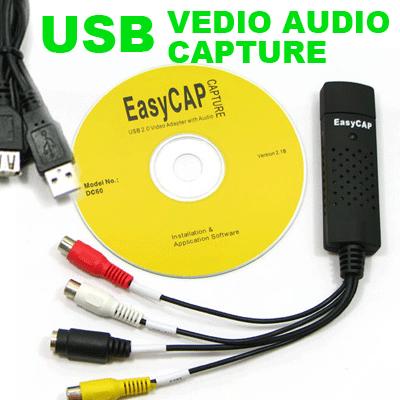 When it gets to live capture I prefer Mac G4 or G5 with Firewire instead of usb I also prfer free standing unit with hard drive and DVD burner PROBLEM Is they are so hard to find now days |
|
New member Username: RsvcsPost Number: 9 Registered: Sep-07 | It looks like this item or process requires 4gb of hd space. I don't even have 1 gb. So I guess the only thing for me to do is to download the shows to a DVR attached to my DirecTv box and tv. |
|
Gold Member Username: TapemanNew York City in-HD, NY Post Number: 1329 Registered: Oct-06 | Get a larger hard drive $40 can get you a large enough hard drive 4.2 Gb= 2 hours SP or 4HR LP or 6 hour EP |
|
New member Username: Alyankovicfan27Post Number: 1 Registered: Sep-07 | I have Graceba cable with HD and DVR. I was recently informed that I could transfer my DVRs from the box to my computer. How would I go about doing that? I connected the ethernet cable from the box to the computer as suggested but nothing happened. Do I have to buy something or what? |
|
Gold Member Username: TapemanNew York City in-HD, NY Post Number: 1392 Registered: Oct-06 | Yo can't transfer without the matching digital utility schemes. What yo can do is capture video at real time via RCA A/V cables converted to USB or Firewire to your computer. You'll also need video studio editor. Without minimum hardware as shown in post 1322 it can't be done. Real time means play at normal speed not high speed or download. |
|
New member Username: Vc_guyPost Number: 1 Registered: Dec-07 | The solution is actually very easy. A video capture device is needed, many of them are USB so they will work on any PC that is reasonably new. Most of these devices come with some basic software, that will be use to capture, and if desired, to remove part of the video like comercials. Simply plug the device into your PC (USB usually) and then plug the device into your video out connectors on your DVR. I have the SA device. Set the software to caputre from the inputs, then set the DVR to record to VCR. I have not found a fast way, so I must play through the entire recording at normal speed. When completed, set your PC software to end the capture. The video software then will allow you to view the file, and if you choose, delete sections like commercials. Simple, easy and really only requires your DVR to have record to VCR and for you to purchase a simple video capture device. Dazzle makes many of these devices, I use an older 150. } |
|
New member Username: Mikey123WA United States Post Number: 1 Registered: Jan-08 | wow your all STUPID keep the none dvd shows on the dvr and for those special shows, use an usb external TV tuner and windows xp mce2005, i have an hp adaptec dual tv tuner |
|
New member Username: McommanderCanyon Country, Ca USA Post Number: 1 Registered: Jan-08 | Does anyone know what program I can use to watch DVR files that is saved on my hard drive? These files have an extension of SLC. I transfered the files from an AT&T Uverse box. Please help! |
|
New member Username: WhocaresPost Number: 1 Registered: Jun-08 | wow, funny chit. So many goofy people out in this world. Hey Scooby, You really are a Scoob aren't ya... lol (moron) Some helpful advise, once I found my way through the BS. |
|
New member Username: Nks98jsue4vPost Number: 1 Registered: Jan-09 | Hello anyone. I have a Polaroid DVD recorder DRA160101A and I was able to remove the hard disk from the unit but when i put in my PC, Windows sees the drive as empty. I booted up Ubuntu but same thing. put it back in the unit and all the movies are still there. does anyone know what OS is this polaroid DVD recorder using/ |
|
New member Username: NdntechPost Number: 1 Registered: Jul-10 | ok peeps here is a few "clues, steps, mods" whatever ya wat to call em. YOU can run your dvr/cable/sat through your pc/mac. for you windows guys out there you will need xp media edtion and a tv tuner card. those of you with vista or windows 7, windows media center works .they do make them for notebooks/laptops, it is a usb stick/donggle/removable drive ,you will have to think of the pc as a "vcr" thats it.As to removing the hard drive and viewing that way, here is tip you can download and burn a linux disk from the linux site. most of the OS's there can be used as what is called/known as a live cd, which means you DONT have to load it on to pc, just run it like you would any other software (i.e most pc games require you to have the cd/dvd in a drive) then you can open/view the hard drive. Now to the guys who know everything out there on this subject. here is a tip. most peeps comin to this fourm know zip bout termology or tech jaggon, remember when you knew nothing? try to explain in simple english and not quote how "strong" your pc is. i bet most of the readers here have no idea what xp mce is. think carfully as how you word you answer and try to rememer when you knew nadda about pc's. |
|
New member Username: NdntechPost Number: 2 Registered: Jul-10 | Oh, by the way, most of linux has a GUI(say gooie) thats is an interface much like windows, and with a little poking around you can find you way around linux,they try to be like windows,look like windows, feel like, as for easy burning to dvd once it is on pc, heck there is a few programs out there.and to convert it,again there is a ton of programs out there. just watch how you word your search, and try differant search engines |
|
New member Username: FrankenePost Number: 5 Registered: Jul-10 | I have a dvd recorder with a firewire port. I do not have a dvd burner on my PC or laptop, but my laptop does play dvd's. How can I use my laptop dvd player to bypass the copyright protection and record on my dvd recorder? __________________ |
|
Silver Member Username: Ieee488Post Number: 388 Registered: Dec-07 | The DVD recorder's firewire port is an input. The laptop's firewire port if there is one is an input as well. Input connected to input = NOTHING |
|
New member Username: RadxPost Number: 1 Registered: Jul-10 | Holy thread necro, batman! It is pretty clear from many sources that you can get unencrypted *.tsp files off the internal Dish HD, which are really just rehashed mpeg2 videos. Unfortunately, everyone who previously posted is stuck in the DVD and SD era, using a convert to dvd program or proprietary media player to actually view the video. :< Skipping past the ego-inflated trolls who know how to use srsbizness computer terms, does anyone actually have a solution for converting the *.tsp videos? |
|
New member Username: NdntechPost Number: 3 Registered: Jul-10 | There is a few converters out there, what i have used in before is something called Need4 Video Converter 7.0 which will convert .tsp files. |
|
New member Username: DragonflykidPost Number: 1 Registered: Jul-10 | after reading all of the geek-ease (thanks for all of your posts I think the guy with the simple question never got an answer. Is it possible, does the cable exist to hook up the USB outlet from the back of the Directv DVR to the USB hookup in the back of the PC. It couldn't be that simple, could it? Ouch. Bye bye to the hours of Obama speeches that I carefully cropped and saved. Even one from before the election. I have an external hardrive, and was gonna leave a time capsule for people in the future. I didn't know they would want it back! eek. What a silly idea. I should have known they'd make it almost impossible, and quite frankly, my eyes glazed over about half way down the page. Great info if one had the time to use it. Thanks all. |
|
New member Username: BuzshawsPost Number: 1 Registered: Aug-10 | The original topic "DVR to Computer HD" is extremely vague. Yes, this is an old thread but people turn it up all the time in their google searches so all answers are still relevent. I have no answer (which is why I'm searching) but it;s clear the topic has gone silly. What is clear is this. The two primary methods are: 1) Analog out of DVR to a DVD set top recorder, or to a video capture card. Too easy to waste time explaining this route. If you need assistance hooking the output of one device to an input of another, you have bigger issues than video transfers to conquer. This method is done in real-time and though it works ok, it will not give genuine HD resolution and will take weeks or months to remove lots of video. Let's not bother wasting another sentance offering this as a "proper" solution. That would be like telling someone next to you that it's highly recommended to breath in order not to pass out. 2) Direct transfer of DVR to another hard drive. Drag and drop to another HD. This is what needs to be known. It's 1000x faster and frees up the DVR's HD. The transferred files can then be manipulated into DVD's at the user's will and spare time, or at least captured until a solution can be found as what to do with them. This is what people really want to do. If no one knows how, they should stay silent (don't show how lonely you are by posting "it can't be done", we all realize that at this point). There's enough nonsense here. If someone has clear delineated steps (putting up a link is a copout; post the directions or keep to yourself) please post them. If you don't have a solution, you don't need to post. There's various DVR's e.i. Dish Network, TiVo, Direct TV, etc. Be clear to explain what DVR your suggestion applies to. This thread should focus exclusively on getting the "data" quickly from a DVR to another source, NOT "real-time" transfers. You either have a direct and foolproof method or you have nothing to contribute. Let's see who's of the former and the latter, shall we? |
|
New member Username: SoccerisbombPost Number: 1 Registered: Aug-10 | I have time warner cable. My DVR is made by Scientific Atlanta. How can i make option number 2 above happen. My laptop has an HDMI port and i would like to transfer the shows via HDMI cable. A guy at Best Buy said that all I had to do was plug the cable in and the laptop would recognize the DVR but that isn't happening. What can i do? |
|
Silver Member Username: Ieee488Post Number: 398 Registered: Dec-07 | HDMI on your laptop is an output not an input, Option #2 above isn't going to happen easily if at all because the cable companies have made sure that their equipment can't do what you want to do to "protect" the copyright of the movies. |
|
New member Username: DvrcomputerPost Number: 3 Registered: Aug-10 | Transferring your movies from a DVR to a PC is easy with a few simple steps. Go to your DVR box and look for the USB port, which can be found on the back or front of the DVR. Plug your USB cable into the USB on the DVR, then plug the other end into an available USB port on your computer. |
|
New member Username: JuancagtPost Number: 6 Registered: Jun-06 | In a quick summary: option 1 = ROM (like a tape) <--- time consuming option 2 = RAM (like a usb key) <---- ideal if you have enough space For the previous poster that mention the front usb are solely for input/output, Most electronics that incorporate CMOS and BIOS run some kind of free *nix/BSD and then the company improves it, but it's still a computer, just like a PS3, which recently got the modchip through the USB. Problem is its dumbed down so that the user can just use what the company wants you to use. So Scooby, while trying to be a smart A.S.S. responding to someone's "stupid" questions went out of your way to prove your To make your stb box hackable, Just think of it as rooting a cellphone (google it...), if you get access to your box or/and somehow change the *firmware* of your particular box, you'll get root, and then figure out what encryption method they are using (if it hasn't been done already) and you are fine and dandy... Bare in mine that this requires really advanced linux (apparently way more advanced than what "scooby" thinks he knows or has, aside from encryption and basic electronic knowledge, AND tons of free time (usually a must-do step is with JTag, and in my case I had to redo my cables to match the pin connectors) and this is not done neither through USB nor firewire; that will be enabled later. ... and like I, and several other persons have asked in their posts, people that need or want help should a) say the equipment they have and b) what they have tried already, not simply; "i want this, and i want it now, but I'm not willing to learn or work for it." |
|
New member Username: BuzshawsPost Number: 2 Registered: Aug-10 | @ Juan, thanks for the added info. At least it adds to the understanding and could lead to a possible solution. As iee488 above said,"Option #2 above isn't going to happen easily if at all because the cable companies have made sure that their equipment can't do what you want to do to "protect" the copyright of the movies." I agree with the "protect" part... "copyright" is a euphamism smokescreen term }for profit. It's about money, not protecting rights in reality. I don't see the problem with saving episodes, of say, the The Office on the DVR and being able to burn them to DVD to watch later, because you can do that with a set-top DVD recorder, so why cripple the ability to drop them to a different hard drive? The problem is that's in real-time and could take weeks to remove broadcasts. I suppose the premium channel broadcasts might mean more to them, but it really only prevents normal users who only want to watch them for personal reasons, not the pirating people, because they're getting what they want somewhere else whether you encrypt this stuff or not. dvr-computer said: Transferring your movies from a DVR to a PC is easy with a few simple steps. Go to your DVR box and look for the USB port, which can be found on the back or front of the DVR. Plug your USB cable into the USB on the DVR, then plug the other end into an available USB port on your computer. If this was a viable option, many, many, many of us would not even be here. This is the kind of response that has made this thread so long and added confusion to people who then believe it's actually possible. If you really believe that, post the equipment you used and all the steps to get the files on your hard drive, then tell us what software read those files. You would be a hero if you could solve this that easy. I'll save the thanks till then, as it frankly isn't going to happen. |
|
New member Username: DawnmcreynoldsgmailcomPost Number: 1 Registered: Nov-10 | I have a Time Warner Cable DVR. Is anyone familiar with how to transfer a recorded program to my computer hard drive or how to burn a DVD directly? |
|
Silver Member Username: Ieee488Post Number: 492 Registered: Dec-07 | DawnMcReynolds, The simple answer is that you cannot transfer a recorded program easily to a computer hard drive, and there isn't a burner on the DVR itself. Your only option which *may* work is to connect a standalone DVD recorder to the DVR and connect the composite video and audio of the two devices to each other. This will give you about VHS tape video quality. Which model DVR do you have? |
|
New member Username: DawnmcreynoldsgmailcomPost Number: 2 Registered: Nov-10 | I have a Motorola Interactive Digital Communiction Dual Tuner DVR, DCT34161 |
|
New member Username: NdntechPost Number: 4 Registered: Jul-10 | Ok, here is a simple way to do this. First you must have a t.v. tuner card, some are pretty cheap now, you do not need a stand alone dvd recorder, the t.v. tuner card will work like a vcr, but the down side is you will have to watch the movie to move to computer. As for burning after it is on the PC, well there is programs on the web that will do the conversion. |
|
Silver Member Username: Ieee488Post Number: 493 Registered: Dec-07 | read http://replayguide.sourceforge.net/dct6412/ If that method doesn't work for you, you have the choice of using a TV tuner card or a standalone DVD recorder. The latter is much easier, but the choice is up to you. With either the TV tuner or standalone DVD recorder, the video quality is VHS. |
|
Gold Member Username: SamijubalPost Number: 4307 Registered: Jul-04 | VHS quality with a DVD recorder? Not hardly. Stop using 4-6 hours and use SP. Either that or you need a different recorder. My recordings are so close to the source it's very hard to tell the source from the recording. I do use Toshiba made recorders, not the Funai crap they sell now, and they were the best ever made, but I've used a lot of other recorders and NEVER seen any of them that look like VHS unless you're trying to fit too much on a disc. Discs are cheap. Don't go over SP and the quality should blow away ANY VCR. |
|
Silver Member Username: Ieee488Post Number: 498 Registered: Dec-07 | My reference about VHS quality is specifically in regards to the fact that in DawnMcReynolds' case video is going from the DVR to the DVD recorder via composite video or s-video. Only that and nothing else. |
|
Gold Member Username: SamijubalPost Number: 4308 Registered: Jul-04 | I use composite to record and make excellent quality recordings. I've been using DVD recorders since the first one sold in the U.S. 10 years ago, I've NEVER seen one that makes VHS quality recordings unless actually recording VHS and even then they look better on DVD than the VHS tape does as long as they are done in SP. The only way to get VHS quality is to have a very poor quality source or by trying to fit too much on a disc. |
|
Silver Member Username: Ieee488Post Number: 499 Registered: Dec-07 | composite and "excellent" are in the eyes of the beholder it's okay, but when compared to what DVD is capable of, I can't pretend to say that to me it is "excellent" |
|
Gold Member Username: SamijubalPost Number: 4309 Registered: Jul-04 | You're completely lost. Composite/s-video are 480i, DVD recorders record 480i. Composite and s-video are capable of every bit as good quality as the DVD recorder can record. The best DVD recordings I've EVER seen using a standalone recorder were from a c-band satellite using composite. C-band was the next best thing to HD and was better quality than ANY SD signal available today, that includes downconverted HD. The recordings form c-band using a Toshiba recorder are virtually indistinguishable from the source. The only way to get higher quality is to go to HD. DVD recorders DO NOT and NEVER will record HD. The movie companies would never allow recording HD to DVD. You better broaden your knowledge of DVD recorders before posting any more FALSE garbage here. |
|
Silver Member Username: Ieee488Post Number: 500 Registered: Dec-07 | DavidMassey, You are still not understanding what I mean, but whatever. There is no need for the nastiness in your post. Don't know what your problem is. Instead of attacking me, feel free to help DawnMcReynolds with your expertise. No one is stopping you. |
|
Gold Member Username: SamijubalPost Number: 4310 Registered: Jul-04 | No more than I've seen you "attack" many other people here. You need to refrain from posting false info in forums that people come to seeking answers. Other people are going to come here and read your posts and think DVD recorders record VHS quality when nothing could be farther from the truth. Vertical resolution of VHS is a maximum of half the resolution DVD recorders record. I get exactly what you are saying. You try to say if using composite recordings will be VHS quality. Your words "with either the TV tuner or standalone DVD recorder, the video quality is VHS", that is complete nonsense. The ONLY ways to get VHS quality out of a DVD recorder is a very poor quality source and/or recording in too slow speeds, IE 4-8 hours on a disc. A good DVD recorder will make recordings that are very close to the source as long as the record speed is SP, no VHS comes anywhere near that. I'll put my c-band composite recordings up against ANY DVD recording you can make and guarantee they are better and night and day from VHS quality. To record from a DVR all one needs is a DVD recorder and a stabilizer or TBC. |
|
Silver Member Username: Ieee488Post Number: 501 Registered: Dec-07 | DavidMassey, Suffering from PMS? Again, not sure what your problem is. You seem on turning this into some sort of personal vendeta. I have no issues with you, yet you feel need to attack me. Why? As retribution for your perception that I attack others here? Is that your justification? What kind of sicko mentality is that??? Your only contribution to this discussion so far was to attack me for putting forth "garbage". Where is your helpful answer to DawnMcReynolds? Was your attack on me your "helpful" answer? You couldn't have simply wrote what you did in a more civil manner? |
|
Gold Member Username: SamijubalPost Number: 4311 Registered: Jul-04 | You're the one that's taking everything as an attack. Your information is wrong and you just can't admit it so your turning this whole thing into something it's not. There's no personal vendetta here. I never made any "attack" on you, just your completely ridiculous information. Just stop posting false information for others to see and the whole thing is over. Tell me exactly what you've done to help Dawn except give false information on what to expect from DVD recordings? I REPEAT, all that's needed to transfer recordings from a DVR to DVD is a standalone recorder and a stabilizer or TBC, if the content is copy protected. With a decent recorder the recordings will be very close to the quality of the source, if it's SD and you don't go over SP on the recorder. |
|
Silver Member Username: Ieee488Post Number: 502 Registered: Dec-07 | DavidMassey, you write before posting any more FALSE garbage if that is not an attack, I don't know what is. you could have easily written - composite video is 480i and the DVD recorder records in 480i which is better than VHS quality and ended at that instead, you had to throw in for good measure the word "garbage" to demonstrate your superior "intellect" You write just stop posting false information for others to see and the whole thing is over. False information because I wrote words "VHS quality"??? Talk about arrogance Poor choice of words maybe, but I was trying to get across the point that DawnMcReynolds may be disappointed in the results. I err on the side of caution, because the spending of money on a DVD recorder isn't a trivial expense. I have a Magnavox. Even recorded at HQ, the video quality *to me* still seems inferior. But may be it is these old eyes. And your eyes are the only ones that matter, right?. If you say the recorded video is very close to the source material then they must be. Right? You are right; and everybody else's opinion is wrong? Isn't that how it is? No one has a right to express an opinion, right? everybody has to kow-tow at the feet of DavidMassey, right? get out of the way because he has spoken, and what he says is so, right? you write all that's needed to transfer recordings from a DVR to DVD is a standalone recorder and a stabilizer or TBC I wrote that she should get a DVD recorder, but because I wrote that the video quality would be "VHS", you jump all over me about writing "garbage" and in general you threw a hissy fit. I had thought you were a decent guy, but this episode just showed me that you were looking for the opportunity to jump on someone, it happened to be me this time, who wrote something you didn't agree with. This was not the first time you have done this. But maybe you get your jollys from acting in such a manner on a message board. If this is your method of "helping" people, God help those around you. Do it by overreacting in an obnoxious manner and calling what they write "garbage". Yeah, that's the civil way to act. If you yourself enjoyed being told what you wrote or said is "garbage", then you are kidding yourself. |
|
Gold Member Username: SamijubalPost Number: 4312 Registered: Jul-04 | Give it a rest. |
|
Silver Member Username: Ieee488Post Number: 503 Registered: Dec-07 | VHS quality |
|
New member Username: GodfatherbundyPost Number: 1 Registered: Nov-10 | how do the people that upload tv shows do it? thats what i wanna know. i downloaded some dexter episodes and they say 720p in the filename and they look awesome, 99.9% of the quality is in the file and only a gigabyte give or take, just as if i was at my friends house watching on his bigscreen i hd crystal clear, i am getting the 8300hd from cablevision in a few, i wanna figure out how to do this, i think the firewire are enabled, any clues, more recent clues that is and please dont pick a fight with me, haha |
|
New member Username: GodfatherbundyPost Number: 2 Registered: Nov-10 | and i hope only tivo ppl can't do that |
|
New member Username: CctvPost Number: 1 Registered: Dec-10 | I came here with the same question as the original poster, and I am trying to sift through the information and the infighting to get at a solution. Here's my situation. I have programs on my DVR, a Dish Network 625, that I want to transfer to my PC. They are not in HD. I don't care about quality or transfer time. From what I can tell, the easiest option is the tv tuner card. If there is a way to make the transfer quicker like copying files from one drive to another, please explain it to me. I do not feel comfortable physically removing the hard drive from my DVR. If I have to record the programs in real time, I'm ok with that. With these preferences in mind, is the tv tuner card the best option? Is there other software needed? |
|
Silver Member Username: Ieee488Post Number: 532 Registered: Dec-07 | Is the TV tuner card the best option? No, not in my opinion. But if you want to do it, you certainly can. |
|
New member Username: ShptakPost Number: 1 Registered: Dec-10 | Wow... I read this entire thread.... so, I actually have some experience with this. Basically I hate DVDs... I used to buy movies, only to have them "borrowed" by friends and family and then returned scratched, unusable, or not returned at all... So I turned to digital format. I have all the movies and shows I care about on my dedicated server at home and I stream them to the TV's in my home via wireless network... I use several products, including WD (Western Digital) TV http://www.wdc.com/en/products/wdtv/ It is really cool, mostly because you can use the two USB ports for flash drives or hard disks connected to the device. Primarily I use this product when my wife and I travel and we want to take entertainment with us... The best thing, really is a small form-factor PC right next to your TV running Windows 7 Ultimate (that has media center built in).... anyway, back to the original question... HOW THE HECK do you get your $^@$)^@)$^* stuff off your DVR??? Well first of all, your DVR (dish) records programming on a Linux (UNIX) file system. So those of you who have actually connected the hard disk to your computers... that is why you can't read a flippin thinkg off of it... (BOOOOOOOOOO) ... You can use a free app called PVR explorer that will read the hard disk file system... here is the PC and MAC version http://sourceforge.net/projects/pvrexplorer-pro/files/ The PVR Explorer supports Dish/Echostar 501/508/510/522/625 model numbers. so... now that you have the files.... <sigh> they are .tsp files.... have no fear! Another utility! http://www.lyberty.com/mediatech/projects/tsp-to-mpeg.html This will convert the TSP files to MPG but you can also download a player... Last but not least, there is a Yahoo Group called DishRip and they have really good forums and utilities... http://tech.groups.yahoo.com/group/dishrip/files/Utilities/ I hope some of this info helps. |
|
New member Username: Tadei173Post Number: 1 Registered: May-11 | I have a similar question. I have a Directv Plus dvr R-15. It quit working this morning, and is filled with 80 hours of programming. How to I move these programs to my PC before I have to return the receiver? |
|
Silver Member Username: Ieee488Post Number: 600 Registered: Dec-07 | ScottP explains how to do it. Did you bother reading his helpful hints??? |
|
New member Username: Tadei173Post Number: 2 Registered: May-11 | First of all ieee488, thank you for your quick response. Perhaps I was not clear enough. I have a DIRECTV PLUS DVR R-15. Scott P's info is for a Dish Network DVR. I am still hoping to hear from someone with experience with the standard [not HD] receiver. Thank you for your time. |
|
New member Username: Jmills90Post Number: 1 Registered: May-11 | Ii was wondering if it is possible to transfer recordings from a dish network dvr box to a comcast box. My mom doesnt wanna lose her friggin oprahs which is wicked lame cuz she wont let us switch to comcast untill she finishes her oprahs so if someone could tell me for sure i would b great cuz i have comcast comin out on monday n i wanna b able to do it b4 thanks |
|
New member Username: Jsliu111SingaporeSingapore Post Number: 1 Registered: May-11 | Damn Cool. This thread last in 7 years. Actually, I think there are only two ways. 1. Analog record 2. mount to linux system But, i also search it on google. For directv, and tivo, they have their own software to backup the data. There is the resource about how to backup the |
|
Silver Member Username: Formerly_fxDallas, Tx Post Number: 287 Registered: Mar-06 | Miss all the discussions in this thread. May it live forever!! |
|
Gold Member Username: TapemanNew York Citay in-HD, NY Post Number: 4586 Registered: Oct-06 | Actually there is always a way if yo can read digital files via USB port to a PC computer Gotta be be good with computers cuz there is no easy way around this There is a very poerful software called Called PowerDirector 9 Download the 30 day trial version Free and see of it works http://www.cyberlink.com/downloads/trials/powerdirector/download_en_US.html And if yo take it from the analog this is the most powerful PVR Or by transfering the files digitally Device called VIVO iy's about $120 I actually bought this for my father in law |
|
New member Username: AlanzopNevada, Arkansas France Post Number: 1 Registered: Dec-21 | If you had a DirecTV Tivo, you could easily hack it, plug it into your computer network, and pull the shows off the hard drive onto your computer and burn them to DVD. It works great with no loss of quality! |
|
New member Username: AlanzopNevada, Arkansas France Post Number: 2 Registered: Dec-21 | The only way to get higher quality is to go to HD. DVD recorders DO NOT and NEVER will record HD. https://techzpod.com/ https://get-mobdrovip.com |
Main Forums
Today's Posts- Home Audio Forum
- Home Video Forum
- Home Theater Forum
- Car Audio Forum
- Accessories Forum
- All Forum Topics