i havve a 65inch mitsu dlp tv that repeatedly tell me the room is too hot then shuts down. interestingly Best Buy no longer sells DLP the salesman says too many problems. did we buy a "pig in a poke"
Depending on the Model, using the TV front control panel buttons, press either the INPUT + MENU or DEVICE + MENU and hold both depressed for about 6 seconds. DO you get the flasinng green light indicating a ERROR CODE. If so, what is the error code.
Press the RESET button, using a paper clip or other item ... May fix the problem "short term"
Possible Issues:
1. Inadequate cooling ... unlikely 2. Cooling Fan intermittent or defective ... unlikely 3. Temperature Sensor is defective or not seated properly ... probable cause 4. Reseat the Temp Sensor ... may fix the problem 5. Remove and Replace the Thermistor.
i have a wd-65833 , it shut itself off today when i turn it on i hear a strange noice like the fan turning on then of, i get audio but no video, after like 30 seconds i hear the noise again then the tv shuts down and the red light turns on, could this be the lamp that blew out
I have a WT-A42, and I cannot turn it on. When I press the power button, the timer lights up for about two seconds, and then nothing. No sound, no picture, no power. Can anyone help me?
While the specifics of my problem may not be important, what I have not found posted anywhere is Mits apparent current policy for dealing with the "blue screen" problem.
They seem to recognize they have a component reliability problem and are prepared to work with the set owner on repair costs, even a 4 year old set.
My problem started with the set, after running 1-2 hours (62725-4 years old) suddenly going to a blue screen, the little green light flashing and then total shut down. Turned the set back on and all was well for a month of so. However, the problem happened again on an ever increasing basis. Time for a repairman. Called Mits and told them about the problem and that I knew that it was happening to a lot of people. They told me to get a written diagnosis at my expense from one of their recommended people, fax it to them and they would work with me.
Did that (charge was to be $75). Guy shows up, tries to tell me it is the bulb and he never inspected the chassis. After I insisted, he did inspect the caps on the chassis and found nothing unusual. He then wanted $375 for a bulb, brand x to boot. Gave him his $75 and told him to leave.
Called Mits. They arranged for a second repair company, at their expense. New tech says after checking a number of things, that it is definitely the chassis but not the typical power supply problem. He contacts Mits. They offer to take the chassis for repair, at their expense, including shipping, as long as I pay the tech's labor charge of $234, which includes everything. Mits will warranty the repaired chassis for 1 year.
Chassis is back at the repair shop. Since my problem was intermittent, the tech wants to run the set a few days to make sure the problem is gone.
Set is back with rebuilt chassis and all is well. Only had to pay labor of $240. Mits picked up the tab of $300 they charge repair companies for a rebuilt chassis.
slightly different problem on my ws 55859: no blinking green light from hell but-- the blue CRT is out, so the screen is orange. Is this fairly easy to replace? I found a crt for $75 on line...thanks!
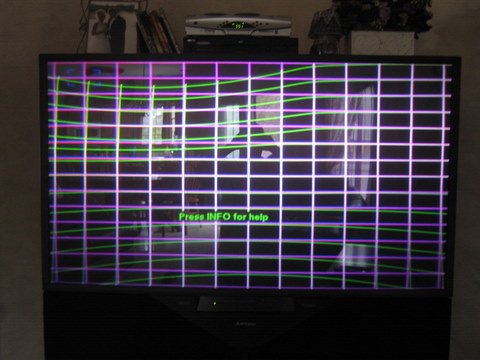
Great forum. I have the HOURGLASS, i guess? I have a Mitsubishi WS-65869 model, 65" projection. My convergence is fine(blue and red grid is good and square) but the alignment grid itself is totally meessed up. The green alignment grid (use to be white when aligned) is skewed from the top on the left side, HUGE DIP DOWN. Looks like the one projection gun is totally out of alignment. Also the bottom alignment grid is bowed like an hourglass, again only the grid itself (the blue and red are fine). My son was messing with the TV this am and i'm not sure if he did something or if it just went bad. when the TV is on, there is a huge green ghost image and the top left side is warped. What is wrong? How much will it cost to fix? Is this something, i can replace by myself? Not much of an electical guy but I am handy at fixing mechanical things. TV is 7 years old. Should i just replace it or fix it. Images attached.
Hi! I have Mitsu model WT-46809. Rear projection - has a great pic and works fine most of the time. When first turned on it has the "hour glass". Bowed inward from bottom and top of the screen. Bows are even and self correct on and off until the set warms up then it works fine. I know this will continue to degrade until it won't correct any longer. I have done some electronic repair on aircraft radios but have little knowledge of TV. Can someone tell me what I need to d to fix this. Thanks Jim
Hi- I have a Mitsubishi big screen, projection television model # VS-45605. We have a vertical screen problem. It began with a slow vertical roll and is now faster and last as long as the tv is on. It originally woud stop after about 30 minutes...it goes on for 8+ hours. Is there an adjustment I can do myself?
I have a particular problem with my WT-46809. Two days ago, I tried to turn it on, but it did not do anything. Then, I did all the troubleshooting I was able to do (Unplug the TV, Disconnect everything and wait). Well, it did not work and I decided to move the TV. I waited for half of day and plugged it back on the wall and did the Menu and Input test that some technician told me to do. When I get The LED lights to blink three times and then I tried to turn it on and it does not do anything. For some reason, I did press the A/V reset button for more than 10 seconds and use the remote control and the TV finally turn on. I put this monster back on place. After, two hours of watching TV, I could not turn it off. I turn the cable box off and the TV shut itself off after two minutes of inactivity. Then, I tried to turn it on and it does not. It is frustrating because I do not know what to do?
I need help! I have been trying to get a picture on my tv for an hour and a half. I get sound but no picture, then everything turns off and I have a solid red light. I see where several people have the same problem, but I did not see a solution. I thought I would try this before I call someone to fix it. I have a WD-52628. I bought this tv because I have had great luck in the past with Mitsubishi, but this is the last one I will ever own. Can someone please provide me with some guidance?
Hi ive got a 2001 vs-60607 with the vz8 chassis and rolling picture no codes colors fine found old repair for bypassing pip mod but this unit doesnt have it any help with this would be great there is 1 board vertically mount is this the pip board it worked yesterday for around 1hr but as soon as I hit the pip we were of to the races rolling again so i shut it down.
I have a WT-42413 it started shutting itself off . I tried to turn back on & it came on with a screen that goes from small to stretch to being convex. It shut off power & worked fine after getting reset for about 3hrs. & then it started doing it again. Any ideas?
I have WT-42313 Mitsubishi. My TV has blue and green light on- red is out. I recently replaced both stk chips due to convergence issues and bowing effects on screen. after installation of new chips, convergence seems fine, bowing image is gone but the red color is off too. looking at the back of the tv, the bottom of the lamp is glowing orange like the other two but no image is being output to the screen. any ideas on what's wrong or where to check? can i swap neck boards to see if i can get it to fire up? how about swapping the plugs on the flyback? thanks for any help or suggestions.
I have a mitsubishi medallion, model # WS-55819, I have a convergence issue, the red bulb has burned out and I can not find a place that sells them, any help is greatly appreciated
WS-48511 Worked fine a week ago. The other day I went to turn it on and got nothing. Unplugged it, waited one minute for timer. Nothing. Error code 12. You can hear transformer get power and when power button is pressed hear something hum for one second. I did a reset, checked all fuses and caps, none blown. Even everything in the DM is fine. Some one please help. Email me any suggestion at sam@chaoticduality.com
I called a repair place, they said $75 just to come out but average repair will be $300-$500. PLEASE HELP
My son was changing channels on the tv (Mitsibishi 1080 HD) and hit something I think because now the tv will turn on for about 3 seconds and then shut off, unplugged to reset, still not working....is there a reset button I am unaware of? Is there a combination of buttons to be pushed to reset? Is my tv broken? Do I need to replace something? Thanks for your help
What is the Model Number. Are you able to perform a diagnostic Error Code check. With limited information, your issue may be related to a "Vertical or Horizontal Deflection" fault.
Sam S, Does the Green light blink continuously, turn off after a few seconds, blink for a minute or more before turning off or other. What fuses and Capacitors did you check.
Green Light flashes for 1 minute then off. I checked all the fuses listed in the diagram inside, and looked over pretty much every capacitor in the tv. Everything in the dm looks beautiful
Sam, You need to re-check the Error Code. Based upon your description of the problem, it appears that you have either a IC issue or a Vertical/Horizontal issue and NOT a DM capacitor failure.
Sam, Error Code 12 with BGLOD indicates a DM Module issue and NOT a IC fault. Error Code 21 is indicative of a IC fault. Check fuses F9A04 and F9A05 for Continuity. If BAD, you probably have a IC issue.
Ok, SO it is the DM module that is bad. I am going to part out the rest of the tv. CRTs, powerboard, etc are fine. Who needs the parts. Make an offer. I have a ws-48511 but I know the parts are compatable with many tv's. Shoot me an email with an offer for what you need.
Yesterday when I turned on my 60 inch DLP TV, there was a popping noise. The TV shut itself off and the red lamp light came on. When I turned it on, the screen is blank and there is a static noise in the background. It shuts itself off after about 40 seconds. Is this just the lamp or is something else going on?
hello im reposting to seek assistance, i have a mistubishi tv ws55511, my tv just shut off while i was watching a movie, the tv never came back on. There is no power, audio, or light indication on the front panel that the tv is getting any power, it is as if the power plug is not pluged in the wall. any help will be appreciated. i took the back cover off to see if i can do anything, there was a fuse by the power plug but the fuse if good. i just put the cover back on since i did not know what i was doing.
I have a WS65613 model and I have noticed the screen is not centered vertically, I would like to adjust it by shifting the image to the left as the image is shifted to the right by about 1 or 2 inches. Its this possible?
I have a WD-52525 with a recently rebuilt chassis. Today snow began to appear intermittently on the picture. The problem comes and goes, sometimes with an almost x-ray quality, but now appears mostly constant. No other problems with TVs elsewhere in the house, so it definitely only the one set. Any thoughts?
I have a mitshubishi vs-60607.My problem is with the screen that rolls at times and the picture turns at the top and bottom backwards. Friend told me it was the convergence chip. What is that part number??? And where is it located in the tv???
Blinking green light of death. I understand to replace the caps but trying to figure out how to remove the box that contains the board. Any instructions on this would be greatly appreciated. Model Mits WS55511
I have a VS-6083 - It's a 60" rear projection from 1995. It has been great for all these years, then it started acting up. It has been shifting to a washed out look, with no contrast. Then a couple weeks ago it did the pop and shut off thing. It can be turned right back on, but does it about once a day now. Anyone have any ideas or info on a fix?
I have the HOURGLASS problem with a Mitsubishi WS-65869 model, 65" projection. Picture bows in the middle horizontally. In other words, it is compressed in the middle, but fine on the outside edges.
Where would one start on diagnosing this problem? Thanks for any and all help.
I have a Mitsubishi projection TV Model WS-55859. The unit will not power-on when plugged in. The green timer light keeps flashing continuously and will not stop even after hours. Is there a simple solution to this problem?
i have a Mitsubishi vs 6043. i read all the forums here and yet tv doesn't work. i turned on my tv on day and only got sound no picture. so i unplugged the tv. got a picture for about 4 seconds and then it turned off on its own. any idea what that can be so i can get the parts. and where to get the parts or just buy a new tv. its a 60+ inch
Mitsubishi WS-65315. Moved the TV 10 feet into another room to install flooring. After a week, put it back. HD channels come in okay. Others appear like cartoons (like Charles Schwab commercials. Help.
I have a WS-65513 (65" projection TV). The screen has started blinking (alternately between the picture and a black screen)...sometimes with just seconds between each "blink" and other times longer. When it does this, the remote control seems to stop working. Sometimes, if I turn off the set and/or unplug it, it will go away for a while, but it comes back. I haven't seen any error codes that I know of. Also, if I have the menu showing on the screen, it doesn't happen. It happens even on inputs with no signal coming in (ie. I can have a blue screen indicating no signal on that input, and it will still blink black). Any help in fixing this problem is appreciated. I am open to fixing it myself rather than having a repair man come.
i have a mitsubishi wd-62827 TV and i have a problem now that shuts down my tv after 3 hours.. says to "check the air flow"...then the orange status light stays lit... any ideas??}
John, I am NOT AN Expert, but it sounds like you have a dust bunny the size of a tennis ball clogging up the airflow. WHAT does the manual say....it is online if you have lost your hardcopy! shut it off, let it cool than later, unplug it if you want to have a go at vacuuming it from the outside only.
RPTVs have several fans. The lamp fan is critical and the lamp will last about 2 minutes without it. The other fan or fans for other circuits will also cause fault when clogged.
Start with the manual, than vacuum if you wish. I vacuum the exterior venting of my Sony RPTV about 2x/year and also pull the lamp cover door without disturbing the lamp. Original lamp lasted about 7300 hours. I also keep my house pretty cool which I'm convinced (no proof) helps the set cool. It kicks out a pretty good warm breeze.
I have a 65" rear-projection Mitsubishi that has the same convergence issue that everyone else seems to be complaining about: hour-glass-shaped picture, colors separating on the outsides. It even goes away sometimes when I rap on the side of the TV; lower right side works best. Nobody seemed to mention that intermittently the colors separate in a "staticy" manner intermittently, but it's pretty infrequent and seems to be related to the times that the convergence is going either in or out. Oddly enough, I spent thirty minutes reading every single post on here and there's not a single solution posted for this seemingly incredibly common issue. Can anyone help with this? I'm not too cheap to hire a repairman, I'm just currently unemployed and want to donate the TV to a retirement home or something when I have income to replace it with. I don't want to donate an expensive problem, though.
Read my post dated October 10, 2008. I explained how I fixed my 65" Mitsubishi RPTV's hourglass problem. And it is still working today, 18 months later.
I have a Mitsubishi 1080 Medallion model number WS-65819. I had it connected to my ps3 and was playing music on it with the internal speakers, and it was quite loud, and all of the sudden the sound just cut off. ive checked the SAP and speaker on/off settings, and it isnt on mute. I also checked all of the fuses and theyre fine too, so im stuck with no sound and no idea what to do next. help me out please??
Hi I have a 2003 mitsubishi tv It has allways worked great! I no longer seem to be able to receive any type of signals to the tv.My grandson likes to play his xbox live on input 3 but all we get now is a blue screen. When I turn on ant.1or 2 we get static.On input2 and 3 it now says s-vid after input 1 or 2 we do not think this was here before. Thankyou for any help you may give Pat
i have a ws 65315 hd1080,the problem is today thr picture started flickering and then when i got home it was{picture}GONE. no picture at all completely black. i have sound and have the channel number and all at top of screen when i change channels. just no picture.... whats going on? i leave it on all day for my dog..i know just thought that may have something to do with it.....HELP!!!!!!!!!!!!!!!!!!!!!!!!!!!!
I have an annoying problem with my 1080i Medallion 65" mitsubishi...
I cannot set the video properly to display a 480p input from my wii.
I know for a fact that I had it hooked up before, but now it displays a pink scrambled/garbled screen and won't switch to anything remotely proper - visually.
I just wonder if anyone knows - or knows of a manual for properly setting the video so it will display the wii game input.
I have a ws65905 My screen randomly goes black audio keeps working. I'll turn the tv off and wait before turning it back on. Sometimes the tv will work minuets other times it goes for a couple of hours. does anyone have suggestions on a fix?
I think I might be havig the same problem as MATT. The following is my setup: 73 inch Mitsubishi TV (WD-73734) connected via HDMI to an Onkyo AV Receiver (TX-SR805). I also have a Nintendo Wii connected to the TV (stupid Wii isn't HDMI compatible). To the receiver I also have a Cable Box (Scientific Altanta - Time Warner), X-Box 360 and a Blu-Ray player. The receiver is pushing sound through Polk Audio surround sound speakers and woofer. My problem is that since I am using sound through the Surround Sound system, I have the volume on the TV all the way down. When I play X-Box, everything is fine. When I watch a Blu-Ray, everything is fine. When I watch TV (Cable Box) I can hear crackling/popping noises coming from the TV speakers, and every few second the screen will flicker, sometimes go black for a couple of seconds, other times go snow storm mode for a few seconds, and then come back on with the little display showing what Input I have selected. It almost seems as if it lost the signal from the Cable Box, but the sound through the Surround Sound is flawless, and I can hear everything without missing a beat even though my TV goes black, or what not.
Hello everyone, I have read pages and pages of this website looking for some sort of help, I have found some light on my problem but seemed to have dug myself deeper into this Mitsubishi grave.... I received a WS65807 which had the usual convergence problem, there was some noticeable damage to the front 3.9 ohm resistors (maybe from CRT leakage?) but most everyone i showed it to said they were fine. After replacing the STK ICs with Sanyo parts, I turned it on and Still had the same problem, It sat for a few days then tried it again after my frustration went away and it was would not stay on just green blinking lights, I hear some clickin/firing but i dont know what could be the problem, would replacing all the 3.9 ohm resistors, fuses, and pico fuses solve my problem? I dont think there was significant CRT damage, but im hoping it will work without spending too much money.
Any help would be greatly appreciated!!! - Nick
Also is there a way to test the ICs? To see if they are still good or if they got fried along with some other component with it pooped out on me.
Our Mitsubishi WS-65613 is experiencing severe image distortion. The picture is "squiggly / wavy ". Multiple bands of horizontal distortion moving up and down the screen vertically, varying in intensity and speed ... almost like looking through water. Hitting the reset and then powering back up will fix the problem for about one or two minutes, but the problem returns and will not go away no matter how long the set remains on.
In the past, the problem was intermittent and would only occur when the TV was first powered on. It would distort for a a moment and then return to normal. At times when it would persist, simply powering down and back on was the remedy.
We first noticed this symptom a year ago immediately following repairs on the TV. We'd previously experienced the "blinking green light of doom" and spent $700 replacing one of the boards. The only tech we had in the area is now retired and we have no other avenues for repair other than having someone drive in from out of town which would be cost prohibitive. ANY help would be much appreciated.
Thanks for the help I havent got around to tryin the new parts, i will post again when it fails or works. Thanks again, im glad to see people offer help to get these old beasts running.
I have a Mitsubishi 60 inch TV. 6months old. Every 5or 6 minutes the screen goes black for a second then comes back on. Sometimes the screen goes green or yellow. Comcast changed everything and said it is the TV. Mitsubishi sent a guy who said the set is OK. Now Mitsubishi will not check it again. What do I do now?
Ok. I had the BGLOD problem with my Mitsu 55859. I replaced the 7 capacitors on the DM module daughter board and the light stopped. My TV once again powered on with a beautiful picture and all was right with the world....for about 5 minutes. Now I have no BGLOD, however the TV will not stay on for more than 5 minutes at a time when it shuts down. I have done a visual inspection of the pico fuses with no obvious signs of damage. Any suggestions would be greatly appreciated.
Help! I have a Mitsubishi 42 inch TV that is 2 years old. When we power it on there is a vertical rainbow pattern of lines about 8 inches wide just to the left of center. The sound and display around the lines is fine. The lines disappear after the set is on approximately 25 minutes. It works just fine after that. I can leave it on for days to avoid the problem but that doesn't seem like a good solution.
So... i turned my tv on today, and there's a weird redish/bluish hue over the screen, i can hear the sound, and still see whats on the screen it just has the color over it. i dont have this problem when in the menu screen, or the picture in picture, they are perfectly clear, but no matter what i connect to it, cable, dvd player, it remains like this when not in pip or on the menu screen. i tried doing a hard reset (leaving it unplugged for 4 hours), tried resetting the convergence, and just about everything else i could possibly think of.
anyone know any quick fixes, or what the problem might be? i thought since its a dual tuner tv, maybe one of the tuners wasnt working, but i didnt understand why when the menu screen was full screen it looks perfect?
Hi everyone, glad I found this thread. My ws-55807 model 55 inch mitsubishi just died.
When i run the diagnostic test, I get the 2-2 message. I see below someone researched that they needed: 2 new pico fuses, which are ordered and on their way - 2 new convergence ICs?
I have no idea what pico fuses are, where to order, what part number, or anything. Could someone help me out there?
Also, as this tv is 10 years old, could anyone estimate how much these parts are, and whether I need to hire someone to do the repair? Im trying to determine if the costs are worth it to repair, or if I should just dig her a grave?
I have a 48" Mistubishi Medallion HDTV & recently its been acting funny with the video. Ill be watching tv then the screen will go blue & when I turn the tv off & back on everything will be fine then itll do it again. So far anything that is plug in thru video it is affecting, dvd player & all. At first i thought it was just the HD settings from the direct tv, but after watching a movie on the DVD player & seeing that its doing the same. I havent tried the cable port yet, but does anyone know what I need to do fix this? Please help
I have a Medallion WS 65413 model Mitsibishi and when I cut the TV on it cuts right back off. The error code I am recieving is 22 which is a short circuit. Any ideas on how I can fix this problem~? Any help would be appreciated~! Thanks If you have any links you may send them to me at CarolinaBodford@yahoo.com
I have a 55" WS-55313 that started to make some mild crackling noise and the picture would flicker a little. The picture then went black and theTV shut off. When you turn it back on the green light stays on for a second and shuts off. Any Ideas please. It is 6 years old and worked great until now. No other problems.
I have a simmilar problem as scott. The coincidence is that I also have the same TV model, WS65613 manufactured on 2004. When I turn on my tv, the image has bars/waves like the ones described by Scott. They are sort of like a sine waves going down and then up. They first start start small and as the time passes they grow bigger and eventually disappear. At first, it was taking about 1 minute for the distortion to go away, now its taking almost an hour to go away. Once they go away the picture is as good as new.
Will this be the same IC9C25 (9-volt regulator) problem as you suggest to look for Scott's problem? Is the signal PCB the one close to the tv hook ups in the back? Where can I order this part from?
I have a 62" Mitsibishi rear projection tv and I've had it for about 3 or 4 years. A couple months ago we were watching a movie and the colors on my screen went from normal to pink and greens. I immediately thought it was the disk and paused the movie.. Put it on regular tv and what do you know, it's the tv. I called and they said it sounded like one of the engines and after estimating the cost, it will cost over a grand to fix it. I'm so mad because I hardly watch tv and don't even have a thousand hours of tv watching on this for it to mess up on me. Has anyone else had this problem?
I have a WS-73903 rptv - got it for free but needed to change the stk ic. But as soon as I've turned it on, I am having a big rectangular box in the middle of not screen (up and down and it's not the CLOSE CAPTION BOX, that is turned to off). It will not go away when I change the channel but it does change ratio when I hit the pip. There is nothing attached to the tv so I am not sure what is needed. The next step I need to do is open it up again and check the fuses etc. I've called Mitsubishi and they are no help at all, sorry, they seem to try to bounce it off different depts because they don't know what to do. I do have some pictures but can attached it.
have a Mitsubishi 1080 Medallion model number WS-65819. I had it connected to my ps3 and was playing music on it with the internal speakers, and it was quite loud, and all of the sudden the sound just cut off. ive checked the SAP and speaker on/off settings, and it isnt on mute. I also checked all of the fuses and theyre fine too, so im stuck with no sound and no idea what to do next. help me out please??
I have a 73" Mitsubishi 1080P Model number WD-65734. I have had no trouble with my tv at all. The tv is beautiful. It was manufactured in 07 and I bought it new in December of 09. Well, I was sitting down watching tv. The tv was working perfectly. Then I decided I wanted to watch a DVD. So I popped the DVD in and went to switch the tv from satellite to DVD. Thats when I noticed that the tv was not responding to the Remote control, I then tried to turn the tv off with the remote control. Still not responding. So I walked to the tv and pressed the power button. still not responding. So I unplugged it and then plugged it back in. The green timer light would flash for a minute or so, then stop. Still not able to turn it back on. I've hit the reset button with no luck. Please Help. PLEASE PLEASE PLEASE!!
chris, looks like you have a bad main board. Is that tv under 1 year old? If yes call Mits. to get repaired if not then: Main PCB part # 934C260001 Try to run self diagnosis, maybe it will show you the problem. Pressing the front panel "INPUT" and "MENU" buttons at the same time, and holding for 5 seconds, activates the Error Code Mode. Let us know the blink code thx
I have a similar problem. Was watching tele, fell asleep and woke to no picture, sound is fine. Have tried resetting to no avail. Unplugging and resting overnight, no go. Lamps glow when set is turned on. Self diagnosis check results in 1-2. Help?
Hello, I have a Mitsubishi WS-65869. My trouble is ..... when I turn on the TV, it will shut itself back off after less than 5 seconds. I first cut the power to the TV then tried to turn it on. Again less than 5 seconds later, it shut down. I disconnected the power plug from the extension cord it is plugged into (To completely remove its power source). While it was unplugged I pressed and held the power button to try to clear what was wrong that way (Similar to what I'd do with a computer) again less than 5 seconds later it shut down. Does anyone know what may be wrong? Does anyone know how to fix thie issue? Thank you very much, have a nice day.
I have a 60 inch rear projection mitsubishi television. I am not sure of the model number. I have had it for around to over 10 years. A few nights ago the convergence went wacky. I used the remote to fix the problem and it was fine, the green line had gotten lower somehow from the factory default. I bumped the tv while setting a coffee table and now in the upper left corner there is a color blob. The color is fine everywhere but this part of the screen. It is not a screen issue since I removed the screen and set it lower and that portion of it was just fine. It is pink with green lines sort of sagging from the corner. I go to the advance convergence menu and see the green lines no longer matching up in the upper left corner but I cannot change the green like I can with the red and blue. Is there some way to adjust the light with the remote? Should I call in a technician? Any help would be appreciated. Thank you all.
I'm getting a HDCP support error on my LT-55265 when trying to play back content from my AppleTV gen 1 via an HDMI connection. I know that the issue is not the source since when I plug the AppleTV into a HDMI monitor no error results. Anybody know how to fix this?
So I finally got around to opening the chassis to my WS65807 but there was significant damage to one of the mother board sections due to CRT leakage, I disassembled the wood work and have the components out. If any one wants some of the boards for parts we could set something up. There are brand new IC units and the only damage I know of are the 3.9 ohm resistors and possibly some pico fuses.
My WT-42413 will not turn on at the tv or the green power button and when I use the remote it clicks and the green power light comes on for 2-3 seconds and then off but tv never comes on. can anyone please help? would be very very much appreciated.Thank You.
PROBLEM WITH DEVICE SELECTION ON MITSUBISHI WS-55859 PROJECTION TV. When I switch device input to view DVD the screen goes blank and the Device selection button (on both the remote and on the front of the TV) is non-responsive...in other words, I can't go back to watching TV using the device selection button. In order to switch back to DVT input I had to unplug the TV from the wall socket, re-plug the TV, push the System Reset button, wait 1 minute for the blinking green light to go out, turn the TV on, use the Device selection button and select my TV input (DVT in my case). After this step I cannot switch back to input my DVD player. What's the problem and how can I fix it?
My mother has 62 inch MGA WD62725 with the green flashing light problem. No other power indication - no resetting. $108 service call resulted in $900 repair estimate with a 90 day warranty on repair. I can help her with repair if someone can advise parts to replace and capacitor PNs.
PLEASE HELP - My mother is in her 70s and doesn't need to be spending a bunch of money over a few dollars worth of parts
i have a 50 inch mitsubishi rear projection model vs-5061c from late 90,s, rolling horizontal pic until it warms up, about 15 min., also have contrast and brightness turned up full otherwise pic is dark, any thoughts, thanks
Hi i have a 2004 Mits. 65315 and it has been a great investment and given me many years of great service, suddenly the volume would turn itself down (no I was not blarring music or hooking a guitar to it lol) I would turn it off then back on usually after a time or two it would stay where I had it. Now soon as I turn it on green light comes on solidly and then it turns itself off automatically after just 2 seconds or so turning it off unpluggin disconecting and such doesnt help. i do not know if if volume problem and power problems are related but can anyone please point me in the right direction. I am disabled and on a very small income. thank you Ross
I had the same problem also and what I ended up doing was opening up the panel and cleaning up the buttons with alcohol and let it dried out. After that it seemed to have cleared up. I was told that the buttons were sticking and that it was either blaring the sound up or just turning itself off. Hopefully this helps.
Greg, You probably have a capacitor failure issue. Lots of info avail on this fault. Check for BGLOG failures (blinking green light of death). A rather straight forward fix, if this is the problem. Eagle
thank you Dee and Vic (well that is if Dee's comments were for me) I will do as you suggested and keep you posted, once again thank you for your time and assistance.
if it is to turn on then hold menu and input buttons down at the same time, that dont work the TV still turns off after 1.7 seconds, so I need moe advice, sorry for being a pain in the butt
Sounds as though you may have a "Convergence" failure with the WS-65313.
Ensure TV is turned "OFF": On the front panel of the unit press and hold the DEVICE + MENU (4 Capacitor DM) buttons at the same time for about 5 or 6 seconds. The unit should enter it's "Error Code Mode".
The LED will flash; count the number of flashes. It will then pause for about 1 second and the LED will flash once again; count the number of flashes. The unit will repeate this cycle 5 or 6 times.
You now have the two digit error code. The first time the led flashed is the first number of the error code, the next time the led flashed is the last number of the error code.
I have a mitsubishi 65" model ws-65511 that will not turn on and has a "blinking light of death" syndrome. I have tried to press & hold the reset button; tried pressing the menu+device buttons to get a flash code; tried unplugging for 24 hours; nothing changes the same constant blinking. I could try to change the capacitors but seems a liitle difficult procedure for a "ball-park" fix that may not do anything. And I definitely don't want to spend $150 for someone to come out to tell me that it will cost $1000 to fix. Do you have any advice?
I have a 60in mitsibishi tv and I first noticed last month that a small white dot appeared on my screen then now its a lot of white dots on my screen can anyone please help me to be able to fix this problem and save me some money
60735 Model - screen doesn't display 100% i.e. the bottom info bar on ESPN is partial hidden in standard format and not to be seen in other formatting options.
My computer put up its own qoute,Anyway Check your source in this case the set top box (cable box) make sure it aspect ratio is correct and all other VIDEO adjustments are correct.
If this is a DLP, your optical chip is blowed, usualy caused by a fan dusted!
DW
Try a TV Reset!
1. While viewing the TV, press MENU to display the TV Main menu. 2. With the Main menu displayed, press number keys 1 2 3 to display the Reset menu. 3. READ THE ON-SCREEN WARNING AND INSTRUCTIONS. - If you do not wish to use this reset, press EXIT or MENU to back out. - If you do wish to use the reset, press ENTER to erase
I have a WD-65733 Mits DLP that suddenly has a pixel problem in the upper right corner of the screen. It looks like a bright tiny star on the screen. Any ideas? The set is 3 1/2 years old and has been in the same location since it was installed.
Chuck, could you post a PHOTO of this....close up would be nice.
I have trouble believing it's the color wheel, which I'd expect to be a global problem....(effect entire pic?)
Places like Discount Merchant sell all sorts of parts for DLP and other TV repairs. I'm not sure what kind of reviews they get, but I was treated well. I drove to the will-call warehouse location way down South of me....near the Mexican Border. Ole'
defective pixels (mirrors) on the DLP chip itself makes sense for a problem limited to a few locations on the screen...and where the rest of the picture is OK.
I have a mitsubishi 1080 model # ws-65909. When I turn it on the green light stays on about 3 mins and turns off. I get error code 12. What should I do to try and fix this?
I have a Mitsubishi HD 1080 Series tv. The convergence is messed up on it but only when we're watching cable. If we're watching a DVD or playing a video game the colors are perfect. When we are watching cable though, there colors are messed up and its all green but the Reds and Blues stick out. all the other colors have a green tint to them. Any help with what it might be and how to fix it would be great. Please email me directly with any help! h.downs19@yahoo.com Thank you for any and all the help!
I have a Mitsubishi Electric dlp tv. I bought it in 2009. Model # WD60735 I was watching tv and I heard a "POP" and soon after I could smell a burn smell. The red lamp light was on in the front but no picture. I turned it off right away. I am bummed out. can someone please help. NFL starts soon thanks Jack
I have a 2004 Mitsubishi model WS-55513, 55". The problem is that it will shut off constantly when trying to view. The actual power button does stay on, but the picture and sound are gone. It may play from a second to an hour, but will eventually shut itself off. I have to turn the power off and then on again.
I have tried using the reset button with on avail.
I have a older Mitsubishi 1080 series, rear projection TV 57 in. I am not sure of the model #, maybe w5511. It will not power up, with button or remote. I have unplugged for over an hour and reset. I have a fast blinking green light by power button. It will not display any error codes. Any help out there?
I have a late 90's mitsu VS-55601 that I have had for over a year now. Two days ago, the unit completely shut off and will not turn back on. Power will stay on for one second and turn back off.
I have a Mitsubshi Diamond TV WS65909 when I turn it on a green light lights up and immediately the TV and light shut off. Anybody have a suggestion. We tried hitting the reset button and replacing the capacitors in the DM module. Thank you in advance.
I have a Mitsubishi 1080 series Model WS-55313. It works fine with a DVD player playing. When I try to use just regular cable in the ANT-1 or ANT-2 my picture is nothing but snow. Can this be repaired? Can you tell me what it could be? Any help would be appreciated.
I see lots of problems with just a few answers. So this is hard on those with problems. Anyway - my Mits WS-65909 went out and am in the process of trying to fix it. This post is to tell others what I learned.
1) You need to find out the error code of your problem. See Vic K. message Posted on Sunday, March 20, 2011 - 01:54 GMT.
Knowing what the problem is drives the solution.
The most common problems seen on the internet are blown convergence chips (error code = 22), or bad capacitors/fuses in the DM (blinking green light of death). You can find repair shops on the web ($50-$150) depending on how much you want to do yourself.
Other big hitters have to do with the lamps. These repairs seem to be easy from what I have read - just a bulb replacement though the cost of the bulb is around $100.
Then come the vertical and horizontal controls/deflection circuitry. From what I have read the repairs may be expensive ~ few $100's. These are not as common failure modes as others.
Tuning/convergence/distortion are also issues with projection TV's. These seem fairly common and can be caused by several different failure mechanisms.
Last trouble makers seem to be big failure where boards burn up due to HV shorts, etc..
So it boils down to time and money. How much time and how much money do you want to sink into these older sets compared to the cost of a newer set. This coupled with the increasing difficulty to integrate the older set with newer technology is making it harder to justify fixing these sets.
My advice is to document as much information as to what the problem is so that others can know what to tell you on your possible route to a solution.
Also important is that when you have fixed the problem you share the solution. There are lots of posts of problems with very little follow - so the solution is not shared. This makes troubleshooting more difficult - so please share your solution.
I have a mitsubishi 1080p DLP wd 65737(I Believe) Anyways, the tv keeps shutting itself of. I can turn it on and sometimes it has audio and visual and other times it only has audio, then after a few seconds it shuts itself off and the fan or something makes a wierd noise. I have replaced the lamp so I know it isnt that, I also have not recieved an error code of any sort. I am wondering if it is a dust problem or fan problem or overheating problem. I dont know but am super frustrated.
I have a Mitsubishi 1080p TV everytime I turn it on it stays on for about 20 seconds and turns off then it won't turn back on for about 30 seconds the lamp in the back and the lamp is lighting up so it's not the lance what could it be please help? Lol
I have Mitsubishi 60 inches rear projection TV. I disconnected the satellite and then reconnect the next day. Now, only the blue screen comes but no satellite programs. I can see the live TV in the small screen when I select PIP. I tried different settings and also changed the connections, but still no live tv on the screen. I think I am not connecting the right cables in the right slots. So, any help here will be much appreciated.