Wiring a pair of Sony earplugs/cable to new 3.5mm jack??
|
New member Username: Gizmo1990Post Number: 2 Registered: Mar-04 | Would anyone know how I can achieve this? Such as sites that go through what is wired to where? A pair of earplugs have broken (excessive wear broke the cable near the connector) so Ive brought a new jack and just thought I'd be able to solder the new one on... Trouble is of course Ive run into a snag. I'm not too sure which leads go where? Cutting the cable revealed 4 wires, 1 red with an accompaning copper wire and 1 green and with a bare copper wire. As far as I thought, I could just solder the respective red and green wires to each of the jacks pins and solder the 2 copper wires presumably to the ground. I've tried every combination and Im not getting anything, not even a crackle?? Could there be something special inside Sony 3.5mm jacks or something? I'd love to open up the old jack but the connection is moulded plastic and I don't think I can open it without practically destoying the joints in the process! What Im beginning to thin is that maybe the 'amount ' of bare wire making a connection needs to be more? Maybe this amplifies the signal strength? Or do these kind of things work on the 'if its touching then it will work' principal? Any ideas? I'd really of thought some bright spark would have done this already, especially on Sony stuff!? |
|
Anonymous | Most headphone cables contain enameled wire (the red and Green ones). This needs to be stripped back before they will solder effectivley. Try scraping the ends with a sharp scalpel or a very hot soldering iron then soldering. And yes the red and green should be right and left respectively and the bare ones ground (though these may be enamelled as well). |
|
Bronze Member Username: James_the_godDoncaster, South Yorkshire England Post Number: 39 Registered: Jan-05 | I can't believe this has actually come up! I've had a very similar problem a couple of days ago. However, this was problems I had with the actual earphone, not the jack. I had a green and copper wire on one earphone and a red and copper on the other, but i was just one of the earphones that needed fixing. I did manage to solder the wires that had come loose from the speaker cone, but like anonymous dude said, YOU WILL HAVE TO CUT BACK THE WIRE SLIGHTLY, if your at all fixing your earphones. If its the jack thats broke, then ull need to buy some new earphones. The best thing to do though if your earphones come loose is cut the wire back about half a cm, then cut off the black casing around the wires a further half a cm down the wire. This will leave you 2 fresh wires to solder to 2 parts on your headphone speaker cone. This is tricky and difficult as i found and today my other earphone broke. I think I'll just buy some new ones, its easier! I'd test the 2 FRESH wires and keep them 'fresh' on parts of the solder on your earphone speaker cone whilst plugged into an audio source, until you hear a bit of sound. Once souldered on, they will work, just be careful not to burn your actual speaker. Hope this helps, im not totally sure if its the jack on ure earphones thats broke or the actually earphones. |
|
Unregistered guest | I agree with Jelvis! It has taken me a 1/2 hour to find a forum discussing this...so here I am! My problem? The original Black L-Type casing "pin" plug on my headphones[Panasonic SBC HP550 folding type] twinked a bit and I guess the wires frayed inside. Could only hear out of one side. I cut back from the plug, carefully seperated the 4-wires(1 green-1 red-2 bare). I found a similar plug setup on an old headset. Cut that wire as close as I could get to the old headset. That cord had the same wire arrangement. I used a lighter to SLOWLY burn off the enamels on all wires. I used an exacto knife to carefully scrape off any remaining crap. I connected the wires red to red...green to green...and then the respective bare wires. I did one side, "heard the music"...did the other...heard both sides, then carefully ELECTRIC TAPED the 2 remaining wires seperately then together. Now I am kicking back and listening to LACUNA COIL!!! A GOTH band from Italy!! I could afford a new set BUT this set is like an old friend!!! hee hee hee My problem? The original Black L-Type casing "pin" plug on my headphones[Panasonic SBC HP550 folding type] twinked a bit and I guess the wires frayed inside. Could only hear out of one side. I cut back from the plug, carefully seperated the 4-wires(1 green-1 red-2 bare). I found a similar plug setup on an old headset. Cut that wire as close as I could get to the old headset. That cord had the same wire arrangement. I used a lighter to SLOWLY burn off the enamels on all wires. I used an exacto knife to carefully scrape off any remaining crap. I connected the wires red to red...green to green...and then the respective bare wires. I did one side, "heard the music"...did the other...heard both sides, then carefully ELECTRIC TAPED the 2 remaining wires seperately then together. Now I am kicking back and listening to LACUNA COIL!!! A GOTH band from Italy!! I could afford a new set BUT this set is like an old friend!!! hee hee hee |
|
New member Username: 3danimatorNJ USA Post Number: 1 Registered: Feb-05 | Figured while I was here that I would register! The plus side to the repair I did was that now I have a longer wire on my headphones without an extension jack!!! BTW...go to Yahoo Launch...register (for FREE!) and search for Lacuna Coil...click on their video section and listen to the song "Swamped". GOTH rules!!! If you are part of this forum, I hope your wiring repairs go well... |
|
Bronze Member Username: James_the_godDoncaster, South Yorkshire England Post Number: 51 Registered: Jan-05 | Nice one Mark, glad you got ure headphones working again...ive recently bought some Creative HQ1300s and they rock. Im planning to get the Sony 71s earphones, just reviews say they are very delicate. What I'd like to say though is Lacuna Coil....my FAVOURTITE band at present is Nightwish...they too are goth metal and absoulutely rule who have worked with Lacuna Coil! |
|
no_fear Unregistered guest | YAY! I cant believe i found a topic on this! Well, here's the story. I took 1 speaker from my Stereo set, leaving one speaker for the radio player, one for the laptop. I got the wires 'naked' and tried to hook them up when i came across something confusing. The plug, that you use for your PC's speakers, MP3 players, Discmans and such, i found one of those plugs lying around in the room being unuses. So i got that naked as well.. This is the speaker: This is that plug thingy that goes into the PC: This is the wire part of the speakers thats supposed to hook up with the wire part of the plug: (speaker wire) (plug wire) The speaker wire part - has 2 wires. Both copper. now here's the strange thing. When i got the plug wire 'naked' i found 3 wires. One red, one copper like. I only expected 2.. I tried some combinations to hook them up, but i heard manly some noise coming out of the speakers, and sometimes some actual sound came up. My question is: How do i make this work? I hope the whole thing is understandable and that you can read it.. |
|
Bronze Member Username: James_the_godDoncaster, South Yorkshire England Post Number: 61 Registered: Jan-05 | Well no fear your explanation is a little complicated and your links dont go anywhere... But, I have to ask, you found three wires-are you sure they're ALL wires, because if ones white then thats simply the string which supports the wires and stops them from fraying etc.. |
|
Unregistered guest | The pictures work. But when i twiddle with the green wire, some white threads do appear.. |
|
Anonymous | I have a similar problem - have a nice, cheap pair of retractable earphones (ooh! Classy!) but the L plug does not fit into my mp3 player (which uses the straight-type jack). I've also been having trouble with the inner wires (red and green). I guess I should've expected that they would be insulated, but didn't know how to get the enamel off. Although I haven't tried burning it off yet, I'll try tomorrow. Thanks! |
|
Anonymous | Yep, so I tried it, and it worked! Thanks again. |
|
ashot Unregistered guest | Thats awesome, the enamel just right burns off down the wire like a fuse. |
|
Xalapenyo Unregistered guest | I have a JVC CD player/receiver in my car. It has speaker wires for front and rear speakers, but I only have front ones. I want to wire the rear speaker wires into headphones, so that when I fade to the rear speakers, the headphones come on. Is there a device with a headphone output jack to which I can attach these four speaker feeds (2 per speaker)? If not, any suggestions for how I can get my car stereo sound into headphones? David |
|
Wendy S. Unregistered guest | So glad you have this site!!!!! Ok here's my problem. My all time favorite pair of headphones Maxell NC-11 w/noise cancellation started to crackle. The wire going into the on/off battery operated toggle switch appeared to be the prob. So, thought no prob, i'll just splice back together. Nope. 1st attempt failed, I think, due to poor soldering. Nine wires that small is a test of ones patience! Now my main and only problem is after undoing my "handy" work and setting project aside for a few. Roommate thought they were trash and pitched. Long story short (ha-ha) Have headphones but no toggle switch or plug. Can't afford new pair right now so any and all advise would be great. |
|
Unregistered guest | hi i've got a yamaha monitor speaker 40 watt.with 2 aux inputs in back and 2 mic inputs in front.am plugging a keyboard in back and mics in front.it has mix(volume)controls.all i want to do is take it apart and wire an output into it.either rca or an earphone jack so i can plug it into my sound card on my computer and record it digitally.is this hard to do myself or even like radioshack?any help would be appreciated. |
|
jdjs Unregistered guest | thanks for the info guys... I was able to remove the enamel coating from the copper and green wires using a soldering iron :o) (I tried stripping it with a blade first but that didn't work out too well)... now my earphones will probably last me a few more weeks... (enough time to get some new ones) |
|
Anonymous | My Sony MDR-EX71 earbud has 4 very thin wires: 1 red, i green, 2 copper. Inside each wire are very very fine hairy fibers, which is the enameled one? The hairy fibers or the red (green or copper)wires? I would think the colored wires are actual insulation (enameled)to separate from each other since they all bundled inside the black rubber cable and needs to be stripped back, am I right? Plus, they break very easily. Anyone? |
|
Unregistered guest | My left earphone for the ipod broke, so to save $40 and still ave the cool white look I salvaged an old Sony pair, half broken as well. My intention is to put one black sony earphone and one ipod earphone into the same jack. I googled it, and this site came up. Brilliant resource! I am now going to try and burn off the enamel, hopefully thats the solution! Thanks everybody for starting this thread. |
|
Gold Member Username: IlluminatorUSA Post Number: 1643 Registered: Apr-05 | Wouldn't that result in an unbalanced sound? It seems like you want to completely replace the left headphone with the old sony. By broke do you mean the left earphone was actually crushed? Then it would be best to just buy a new pair...if, on the other hand, the left headphone simply stopped working, it would obviously be a wiring problem-though in my opinion isn't worth repairing as well because they aren't meant to be taken apart... |
|
New member Username: Bass_masterPost Number: 1 Registered: Oct-05 | Hi everyone i have recently pulled appart a cd player takeing the 2 speakers out. i was wondering if i could get the end bit of the headphone wires and connect it up so i could plug it into my mp3 and use it as a portible speaker. if anyone knows how i would do this or if i can do it could u please tell me |
|
Hexmatic Unregistered guest | This answered my questions. Very very nice i thank you all, im smart but i would of never got it if you all werent here. once again thanks |
|
jhsnyc Unregistered guest | Anyone, I have successfully cut off my broken jack for Sony MDR V600 Headphones, and there are 3 wires, burned off the enamel, soldered it up and BAM! Explosive sound in both ears...ONE PROBLEM is that now I have the same thing in both ears, there is no panning/stereo effect, I tested this using Pink Floyd's On the Run which has tons of known panning effects...MY QUESTION IS, why does sound come out of both ears, but the stereo effects are now gone? (I tested this with another set of high quality headphones that I have and sure enough, there's no panning/stereo) |
|
New member Username: UserMburg Post Number: 3 Registered: Jan-06 | jhsnyc - you nailed the same wires together huh?!?! red=right, green=left, copper=ground. hehe...hope this helps. |
|
New member Username: Dan123456789Post Number: 1 Registered: Jan-06 | I'm trying to make an extention cable for my ear phones. From the ear phones to my stereo. Because the length from the phones is to short, but when I wired it all up, still no sound? Can anyone help? |
|
Selig87 Unregistered guest | I'm trying to change the jack connection on an old set of Pioneer headphones (from the 70s) to a 1/8" jack (from the current 1/4"). The new jack has been nabbed from some cheap hadphones and features 1 blue, 1 red, and 1 copper enamalled cables. The Pioneers have red, white and black cables. The white is to the left speaker. Any suggestions about how best to patch it all together? (I'm totally new to this sort of thing, I'm afraid). |
|
Gold Member Username: IlluminatorUSA Post Number: 2684 Registered: Apr-05 | Test it, then solder it. The black is a common ground, then the left and right speaker positives are the red or white. The cheap jack you have: copper is probably ground and the red and blue are most likely left/right. There's no true way of knowing unless you test it first. |
|
DVG Unregistered guest | This is a very helpful post- used it to figure our how to re-wire my PTT hands free throat mic (from Firefox) into my Giro helmet with audio (Tune-ups). I went the extra mile and wired everything inside the lining of my jacket so no exposed cables... so sweet! |
|
New member Username: RizhiiPost Number: 1 Registered: Mar-06 | Hey DVG I am trying to do something similar... I want to change out the ear bud for helmet speakers that I use for my mp3 player. I was doing a test run with switching the plugs- voice no sound and then when I tried to put the original plug back on the throat mic still no sound. I already had burned off the enamel. Simple wire to wire connect-white coat w/ bare & red enamel w/bare. any help would be great. e_var@hotmail.com |
|
New member Username: BeavermjrEast Greenbush, NY USA Post Number: 1 Registered: Apr-06 | ok. here's what I want to attempt: I have a cassette adapter in my car that I use as input for my Ipod. I recently added XM radio to my car. The FM transmitter on the XM radio stinks and I can't get good sound quality. I am going to buy a second cassette adapter and splice the cable from it into the cable of the existing cassette adapter. This will allow me to use one cassette adapter for devices without having to unplug anything. If I'm able to hide the wires as neetly as I hope all should work well. The only question I have is, how to determine which wire to splice into which wire. The reason I ask is that I don't want the second device to have reverse stereo. |
|
Gold Member Username: IlluminatorUSA Post Number: 2844 Registered: Apr-05 | Just curious, but why not buy an aftermarket headunit with an aux input? |
|
New member Username: BeavermjrEast Greenbush, NY USA Post Number: 2 Registered: Apr-06 | I wasnt to keep the car as stock as possible. |
|
New member Username: DemarcoPost Number: 1 Registered: Apr-06 | ........i have the same problem with my headphones.........I have a pair of SONY mdr-nc6 headphones and the wire got cut in two.........i tryed scraping it with a knife and putin the red with red and green with green but it didnt work........any ideas of how to wire them back together so that i can listine to my jams again........thanks |
|
Gold Member Username: IlluminatorUSA Post Number: 2911 Registered: Apr-05 | Have you tried soldering the wires back together? |
|
New member Username: AxlPost Number: 1 Registered: Jul-06 | I soldered a new headphone jack I got from Dick Smith, just had to melt the enamel off wires before applying solder. Red and Green are both channels two copper ones twist together for common. Worked a treat. |
|
New member Username: Jaw891Post Number: 1 Registered: Feb-07 | i just got a pair of these from my friend, and the right earbud doesnt work, how should i go about repairing this? i havent done that many audio related repairs, so step by step instruction would be awesome. thanks |
|
New member Username: Bedazzled1Post Number: 1 Registered: Nov-07 | hi I've got a slightly different problem. My headphones needed a new mini jack, so i decided to connect a new piece of cable with a jack on the end, as i've done many times before...but the 'phones have no shielding...just 2 wires on each side, one red, one blue, each with 1 copper wire. I've tried all the standard ways of conneting, but nothing. With no shielding, I cant work out how they stay separate.. any ideas? 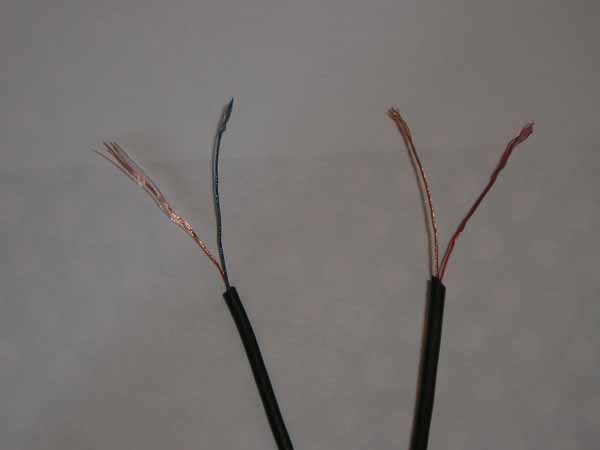 |
|
New member Username: AdabPost Number: 1 Registered: May-08 | I had the exact same problem, doing virtually the same thing - I got no noise when connected. So what I did was restripped some new wire and got my soldering iron and made sure that I'd melted 100% of the insulation. And connected as normal, (connecting the two copper wires together and connecting and then the red + green, then soldering). It worked perfect. |
|
New member Username: BabihrseDublin, The free state Ireland Post Number: 1 Registered: Jul-08 | ahh ye bast-ard! does anyone know how to rewire a sony mdr-150 headphone they have like 8 soldersopts and ive been solderin all mornin the left one is gone the right one is grand to make matters worse im half deaf i hear top range frequencies in one ear and lower end frequencies in the other ear this makes it extremely difficult to know if the sound im hearin is from the left or the right so im never sure if im onto anything ive heard the left crackle a coupla times then it fucked off ive burnt meself countless times holdin the solderin iron while readin this and sucked me thumb now ill proabably get lead poisionin! but seriously lads do the contacts need to touch multiple heads the green one is stuck to the second solder yoke and i the brown (earth?) is hangin around the place i think it crackeled when it was on 2 of the solderspots so im askin the question now? as for meltin the enamel ive been strokin the wire wi the solderyoke for 30 mins! me poor bleedin hand! |
|
New member Username: 3xtr3m1stPost Number: 1 Registered: Dec-08 | does anyone know what the other 2 solder points in the earphone are for? i mean, there are four solder points in the earphone, 2 are for the wires then theres another 2 that sort of connects to the 'main speaker body' or whatever you call it. im trying to repair my zune premium earphones that only have sound coming out on the left side. I used a voltmeter to test the connection on the 2 points where the wire goes and theres no 'beep' on the voltmeter. could my phones have blown out? |
|
New member Username: MadagaskarCarthage / Bremen, Missouri / B... USA / Germany Post Number: 1 Registered: Dec-08 | I have a pair of Sony MDR-V600 headphones I got unused from a relative, I Love them...and being a poor college student,I never spend more than $10 on a set of headphones (considering I lose or tear them up in a month or less)... Anyways, I was using them on my plane ride from the US to school in Germany and fell asleep with them plugged into the arm rest...bad idea!!! this bent the plug a bit...but when i took it out, it was easily bent back to it's normal position... I used them with my comp and iPod some more (but only while at home so they were stationary) but now the sound is cutting out...and it's acting like there is a short... being here in Germany away from home, I don't have access to dad's soldering iron, or electronic fixing expertise...nor do I have money to find one of my own...if I find a new plug, is it possible to do the repairs with just electrical tape? or should I find someone to fix them for me? I had only had the headphones for a month before they were bent...so I don't want to get rid of them...but I want to use them... any advice? (I can get sound still in the Left ear...but only when the plug is in a certain position...) -I included a pic...where you can see the place where they metal of the plug is messed up and the green underneath is exposed...if there is another way besides a new plug to fix this, let me know it too! thanks! 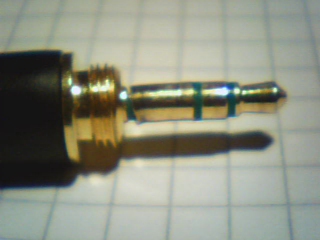 |
|
New member Username: Jarvik1234Post Number: 1 Registered: May-10 | Can anybody please tell me where to get the Jack only without any wires? |
|
New member Username: MarwolfPost Number: 1 Registered: Jun-10 | Mark Vincent, you are awesome. I was trying to splice a replacement plug end to a pair of skull candy earbuds that ripped out of the miniplug that it came with and after using a lighter to melt the enamel on the wires, they work perfectly! |
|
New member Username: SinoxaPost Number: 1 Registered: Aug-11 | Hi, I'm having the same god damned problem. I want to wire a male aux to a 2rca plug. All of these posts have been very helpful, but like other people here, I've tried "every" combination and I'm just getting low sound quality or crackling. I know one wire can be joined to 2 etc. I JUST WANT TO KNOW WHICH ONES!!!!! >_< I have this: 2RCA: 2 cords, --- 1 covered red---------- 1 exposed copper---------- --- 1 covered blue---------- 1 exposed copper---------- --- so i need to join those 4 to these 4: AUX: 2 cords, --- 1 covered red---------- 1 covered blue---------- --- 1 covered green---------- 1 covered copper/orange---------- --- So........ My first attempt was blue to blue and red to red and then... green to one exposed copper and covered orange to the other exposed copper. The strange thing here is that on the AUX cable, the red and blue are in the same protective black casing, while in the other casing there is orange/green. Should I stick with red/red and blue/blue? What about the orange/green? HELP!!! There is a picture in the next post with my problem in it........ |
|
New member Username: SinoxaPost Number: 2 Registered: Aug-11 | 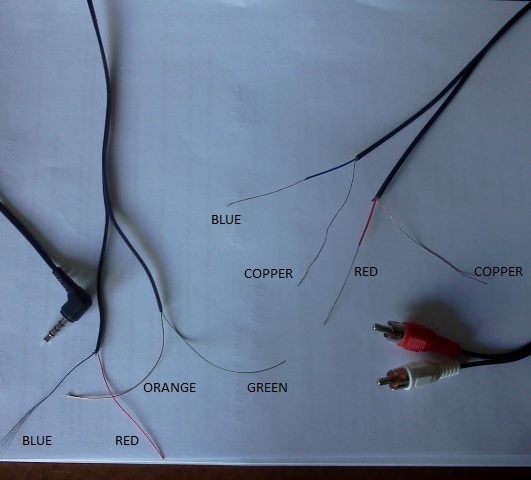 |
|
New member Username: BilljamesPost Number: 1 Registered: Nov-11 | The wires are very thin and break easily. It can be fixed. here's a step by step http://how-to-fix-earbuds.blogspot.com |
|
New member Username: Purplefox8CA United States Post Number: 1 Registered: Mar-12 | Hi everyone, thank the awesomeness that there is a forum about wiring on audio. I am trying to put on a new 3.5mm jack to a skullcandy aviator headset for a lady friend that accidentally snapped the original jack on it. so this model uses: a 3 band 3.5mm jack, (features are left and right speaker, in-line mic and lastly volume control.) (as seen here http://www.amazon.com/Skullcandy-Aviator-S6AVCM090-Over-ear-Headphones/dp/B003YL 3L9Y) (Skullcandy) I stripped off the shell and it reveals this set of wires: red, green, copper and red and green twisted together the jack I cut off another item uses the wires: red, (light) green, blue, 2x copper, and finally a green and copper twisted together. Which wires are going to which one? thanks in advance :D |
|
New member Username: Gizmo1990Post Number: 3 Registered: Mar-04 | I'd just like to say that I'd never have thought, 8 years on that there'd still be posts on this subject! I'm really glad this has helped so many people, me included and is still providing a source of information today. Great stuff! |
|
New member Username: 3xtr3m1stPost Number: 2 Registered: Dec-08 | Hey jim! I agree that it's truly remarkable that this thread is able to survive that long! I requested for help here 4 years ago, and is still receiving emails whenever someone posted something! |
|
New member Username: Purplefox8CA United States Post Number: 2 Registered: Mar-12 | yea, I made stinky forum come back to life |
|
New member Username: Baigm78692Post Number: 1 Registered: Jun-12 | Hey guys. I still I don't understand. I'm new to this forum and I really need help with my headphones. I have two pairs of headphones, both broken because the male connector jack stopped working. I've cut the jacks from the wires. One jack snapped right in half, the other is still fine. The jack i have is just completely barebone. No wires or anything else attached. I can see two solder points but I don't know where to put the wires. I mentioned earlier that I have two different sets of headphones I'm trying to repair. One is sony and the other is earpollution. The sony has one wire connecting to each stereo or whatever you call it. The left has a copper and green wire. The right has a copper and red wire. When I strip them further I realize that it's just a this metal wiring surrounding a fine fiber like wire. I need to know where to solder each wire on the jack. I won't worry about the earpollution headphones yet as i really want to get the sony headphones working first. I'll provide pictures later. Please help. Sorry this message was so long. |
|
New member Username: NicnlPost Number: 1 Registered: Jul-12 | I have the exact same problem. My headphone's jack is dead ( Soundmagic PL30 ). I cut it, opened it, and there's three colored wires : red, green and copper/gold. For example, the red wire is striped, and there's a very fine nylon fiber in it. I tried to weld it to a "normal" jack, ( red on right || green on left || copper on copper ) But it's doesn't work. |
|
New member Username: Baigm78692Post Number: 2 Registered: Jun-12 | yup same thing |
|
New member Username: DragnmastralexPost Number: 1 Registered: Jul-15 | I have a Sades SA 901 headset I'm trying to fix but the wiring is different on each side. its a USB headset look at the pictures. 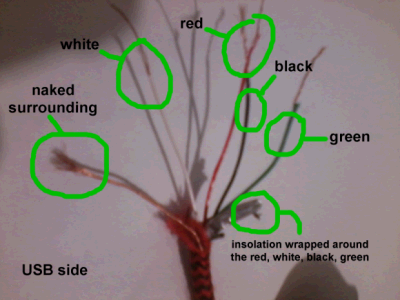  |