Sony RCD-W500C
|
New member Username: CpfletchPost Number: 1 Registered: 02-2004 | Any experience with the Sony RCD-W500C? 5 CD changer to record from multiple discs, plays MP3s,CD-Rs and CD-RWs. How is the sound quality, ease of recording, reliability? |
|
Unregistered guest | Chris, I've had it for almost a month and have had no trouble dubbing cd's, recording from optical and analog sources and Karaoke. I cannot comment on MP3. Once I became familiar with the functionality programming was easy. Sound quality is best I've heard through my Yamaha receiver. It has all the standard features including automatic converting copy protected cds copies to analog for dubbing. It stores up to five discs but is not a carousal-style unit - it uses a single tray to load all discs. You should be aware of the following: - There only are optical inputs and outputs for digital recording and playback (no coaxil) so be sure your receiver has the proper connections (I had to buy a coaxil to optical converter box). It does have standard inputs/outputs for analog. - You might receive recording error messages due to vibration if the unit is placed close to a speaker with the volume up; this happens with me with live Karaoke recording (on another post I was advised that CD burning is very sensitive to accoustical feedback so this is not a fault of the machine). Be aware that years ago many Sony cd players had trouble with opening and closing trays. I hope that is not the case now. Hope this helps with your decision. |
|
Unregistered guest | I have posted a question reguarding the way the music is recorded to a cd when from an analog source. my first cd came out like mono or all sound on the right channel. is it the machine settings or my connections which I had much faith in before recording.... thankyou |
|
Unregistered guest | My dog shredded my Sony RCD-W500C Instruction Manual. (Really.) I've tried to record without it and I'm lost. Does anyone know of a way I can get a replacement manual, or is someone willing to fax me some pages? Thanks, Teri |
|
Unregistered guest | I'm obviously a technology moron and I've lost my manual. Could some kind soul either send me the most basic pages to record on a RCDW500C or send me some dummy notes. I just want to burn a basic CD. Thanks so much |
|
Dan Stewart Unregistered guest | You can get owners manual by going to www.sony.com and going to the documentation section. |
|
Unregistered guest | Question -- I'm a new RCDW500c owner -- and I'm trying to record various songs onto a cd, one at a time, from various tracks on various cds. However, every time I stop and start the record deck, the track number advances by 2 instead of 1. (It advances just 1 at first, but 3 seconds into the song I'm recording, it advances again.) I e-mailed Sony and they said I need to take it in for repairs. Does that sound right? Or is there some harebrained combination of buttons I could be pushing that is causing the phenomenon? Thanks. PS I have no manual as I bought item "open-box" at Best Buy ---I'm trying to use the Sony PDF file manual, but pdf's unfortunately load and page very slowly on my iMac.That's a particular problem with these particular instructions because many of the steps refer you back to previous steps. E.G.: Step 1: Perform Steps 2 through 4 back on page 22  |
|
New member Username: KimPost Number: 2 Registered: Dec-04 | Am thinking about buying the sony 500c. Should I also consider the extended warranty? Thanx. |
|
RobG Unregistered guest | I just bought a Sony RCD-W500C and I cannot get it to finalize. I'm recording in manual mode, one song at a time from multiple sources. I've made three attempts at recording a few songs, on three different blank TDK CD-R Music discs, without success. I'm seeing C13 Rec Error sometimes when I try to continue recording after already recording a few tracks; and C14 TOC Error every time I try to finalize a disk and everytime I try to play it back before finalization. I've also seen PMA Writing Error appear a couple of times while the deck was paused between recording songs, but the PMA Writing Error does not prevent me from continuing with the recording session. Has anyone else run into these problems? Thanks. |
|
Unregistered guest | Hey, Forget about Sony or others, I'm using HHB CDR850 PRO for 5 years and i can tell you this, you not gona find better recorder. I have a fraind that used Sony, Philips and Pionner He went back to HHB because it is working horse. Evan that is made by Pioneer, Pionner is not as good as HHB. Sound quality of playback and recordings are excellent. It will copy all including HDCD. It will play any cd/cdr |
|
Unregistered guest | I was wondering if any of you just used a data/music cd media. I just bought the sony rcdw500c & it said 'compact disc digital audio' logo for which media is to use. My question is that I have 'compact disc recordable' media which i bought for my computer long time ago and I have about 200 of them. I was wondering if I can use it for the sony deck recorder? Thanx for your reply |
|
Unregistered guest | Sony RCD500C dose not have free SCMS Management system It can use only CDR for audio. If you have any other blanc cdr's that you used for your computer burner, they wont work with Sony RCD500C All home stand alone recorders like Sony, TDK, Yhilips, Yamaha..... are home use recorders and they need special blanc cdrs for AUDIO ONLY They cost more then media cdr's. the best way to avoid the problem is to buy PRO Recorder that use any blanc CDR SCMS is - "This nefarious little "feature" was designed by the ever-paranoid record labels to prevent evil-doers from digitally cloning CDs. Usually found on the S/PDIF ports of "consumer" (was there ever REALLY such a thing?) and "semi-pro" DAT recorders, SCMS is a bit flagging system that prevents digital copies from being made of digital copies. This means you can make as many digital copies of your original DAT tapes as you like, but you cannot digitally make copies of any of those copies. Beware of SCMS if you are sending backup DAT copies of your master tapes to a CD duplicator, or a collaborator. They may not be able to digitally transfer your work to another tape or media!" |
|
New member Username: OldnickYuma, AZ USA Post Number: 1 Registered: Mar-05 | Greetings Any, Recently purchased Sony rcd-500c and was wondering what L.Sync on the right hand side of the display means. Thanks for answers. Oldnick |
|
New member Username: OldnickYuma, AZ USA Post Number: 2 Registered: Mar-05 | Time will tell, so does the manual...if I read it to find the answers. Synchronization Level=L. Sync...something to do with maintaining uniform record playback levels during manual operations. Doesn't enter into anything I need the machine for which is to record live speakers using the preamp output from a PA amplifier then make copies for distribution using the same machine. Just finished making a test cd using a cassette player output into the analog input...no problem. Should work aces for our speaker meeting. Bought this unit "out of box" at Best Buy, had all documents and accessories with it: $30 discount. Oh, must use "music" cds. Got some at warehouse club: 50 music cds w/colored cases for $18. If it was for myself I'd buy on line for both these items. The online prices are much better. |
|
Anonymous | I am thinking of buying a Sony RCD W500c. How easy are they to use? What made you guys decide on this machine.I'd like to make my own karaoke recordings, but I'm not a tech wizard. |
|
New member Username: OldnickYuma, AZ USA Post Number: 3 Registered: Mar-05 | Hi, At the price the RCD W500 offered the best deal. I really didn't need the 5 disk capacity. You might find the ability to compile from several cds a very useful program tool. It worked great under "live" conditions: recording the speaker at the meeting we had. It copied that disk and other disks easily(must use "music" cds). In my search for info I came across machines that could tune out vocals for karaoke costly. I think you'd do better with software. Try using search engines for maybe free "ripping" programs. Try this bbs host for links. Study. A well informed user = wizard any day. oldnick{8~) An additional word to the wise: Make a copy of the instructions...make two! 8) |
|
verok Unregistered guest | I bought the rcd w500 and I am wondering why the cd's I record won't play on any other cd player? What's the point. I am about to take the machine back-is there something I'm doing wrong? Please e-mail me if you know! nonnyguy@aol.com |
|
Unregistered guest | I am having the same problem. I'm trying to record from my CD player as source via optical cable, the LED shows there is input, but when I press stop and it tries to write I get Write Errors. SONY tells me the product is defective but I don't believe it. I think I'm either not using the right kind of CD (Memorex- CD-R Music) or doing something wrong. |
|
Unregistered guest | I am having the same problem. I'm trying to record from my CD player as source via optical cable, the LED shows there is input, but when I press stop and it tries to write I get Write Errors. SONY tells me the product is defective but I don't believe it. I think I'm either not using the right kind of CD (Memorex- CD-R Music) or doing something wrong. |
|
New member Username: MauricioRidgefield, NJ USA Post Number: 1 Registered: Jun-05 | I just got a RCD-W500C and I can't record from CD to CD. I'm trying to record my James Brown CD onto a Sony CD-RW650 CD ReWritable and/or Memorex CD-R and it says "Data Disc" I called Sony tech support and they said to send it in for repair.... Please advise! Regards, Mauricio |
|
Unregistered guest | I lost my user manual, how can i get. I am from India. |
|
Unregistered guest | I cannot record from an external source on my RCD W500. I've tried optical in from a coaxial to optical converter from my Fostex Digital Recorder ,pure analog from an MP3 player,no data coming in at all,anyone have any clues as to why? It will record internally(from cd in deck A to deck B).When I connect any external source ,analog or optical,I do not even hear any audio through the head phone jack...HELP! |
|
Unregistered guest | I am looking for an LP to CD option and had the RCD-W500C recommended. Anyone have any experience recording from other sources other than another CD? |
|
New member Username: TurbodogPost Number: 9 Registered: Jul-05 | Yes, I have used the RCD-W500C to record from the stereo analog inputs. If the analog input is selected (or appropriate digital input), it should work. If not, sounds like a defective unit. |
|
CKE Unregistered guest | I recently bought a Sony RCD-W500C to dub from a Boss multi-track recorder. The Boss unit has both analog and digital optical outputs. I cannot get an audio level from either source. I have followed the instructions to the T and still no audio. Anyone have any ideas? Thanks. CE |
|
Anonymous | Our school has an RCD-W500C to record school programs. I would like to then edit the programs down and incorporate into video presentations (let the kids make a movie) - but cannot get Adobie Premiere acknowledge there even are tracks on the cd. Could this be because of the Audio CD 'can't make a copy of a copy'? Could anyone tell me what in format the tracks are recorded? How to convert to something Premiere may be able to acknowledge (wav, mp3 - just basic stuff) or a way to edit the content? |
|
jc-minnesota Unregistered guest | I just recently bought a rcd-w500C and used it for two days. Now none of the CD's eject. Is there some way to open the cd drawer as there is in the PC world? THanks |
|
New member Username: Fab0418Post Number: 1 Registered: Dec-05 | I just purchased the Sony RCD-W500C model. I would like to record from my digital cable music station to my cd recorder. I need help on how to set this up. Can someone help me out with the correct steps on to set this up. Has anyone ever did this? Thanks in advance- |
|
zheng me Unregistered guest | I just bought the machine and made a CD from external source. After the CD is made and LED said one track and 10 minutes, but when I try to playback on DECK B before I finalize, It did not playback. Can anyone help me? Thanks. |
|
Unregistered guest | I need help finding audio cd-rws that work in my rcd-w500c. Any suggestions ; retail or website & brand names Thank you. |
|
AudioPhil Unregistered guest | Wal-Mart has Music disks by Maxell that I have used on the Sony. They come in a spindle of 50 for under $16. I read some reviews somewhere where someone was reccommending them before I bought them. Somebody else said Make sure they are made in Japan, which mine are. They said they had trouble with some made in China or someplace. |
|
music teacher Unregistered guest | I have been having limited success using regular CDR Music disks. I haven't been able to reproduce my original work. Any suggestions? |
|
New member Username: KbogerPost Number: 1 Registered: Apr-06 | Sony RCD-W500C users: I have been using this unit to record sermons for our church and it works fine most of the time. However, every now and then when I go to stop recording and "finalize" I get an error message: "TOC error C14" and the entire recording is gone. Any help would be appreciated. Thanks. |
|
New member Username: BudbrewsterPost Number: 1 Registered: May-06 | I have the Sony W500C. The only problem is that I can't find any "CD digital audio rewritable" disks. CR-R's don't allow me to correct mistake, such as bad starts or incorrect input levels. Even the Sony web site doesn't contain "CD digital audio RW's". I did find Fuji "CD digial audio RW's" listed at Amazon, but that's the only one. Anyone know of others? |
|
New member Username: KbogerPost Number: 2 Registered: Apr-06 | Bud: I have found them at Best Buy, CompUSA, OfficeMax, Ebay, & Wal-Mart. Just make sure the say "CDR MUSIC" on label. KB |
|
New member Username: BudbrewsterPost Number: 2 Registered: May-06 | Keith: Thanks for the info. If they say "CDR Music", they wouldn't be RWs though, right? I found plenty of CD-R Music packs, but I can't find the RWs. Last night I ordered 10 3-packs of the "FUJI CDRW-80DA Rewritable CDs for Digital Audio". These are the only rewritable digital audio CDs I've found. As an old analog reel-to-reel tape and cassette tape man, I can't imagine using CDs that require me to get every individual song I add to a carefully produced CD exactly right the first time I try. I just gotta have those CD-RWs!!!! 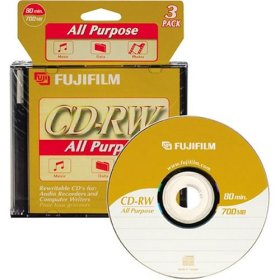 |
|
New member Username: KbogerPost Number: 3 Registered: Apr-06 | Bud: You are correct. I only use the unit to record sermons at our church, so have never needed or used the RW version. I am sure it will work just fine. I grew up on "reel to reel", 8 track & cassette, so I know what you mean. I would be the same way if we weren't doing live recording. You only get one shot. Thanks, KB |
|
New member Username: BudbrewsterPost Number: 3 Registered: May-06 | Just for your own enjoyment, here's a picture of my living room entertainment center, complete with some very old-but-beloved pieces of equipment from the golden age of analog recording. The picture includes a Teac A6010 reel-to-reel recorder, two Pioneer cassette recorders, one Technics cassette recorder, a Phillips DVD recorder, and two Mitsubishi hi-fi stereo VHS recorders (which work very well to create six-hour VHS audio tapes with CD quality sound). Recently I bought a Sony RCD-W500C CD recorder, which I put in the entertainment center in place of the Technics cassette recorder. As you can see, I get a big kick out of recording music in various formats. |
|
New member Username: BudbrewsterPost Number: 4 Registered: May-06 | For some reason, the picture of my entertainment center didn't post. I'm working on the problem. Hopefully I'll get it fixed soon. Sorry for the delay. Later, Bud |
|
New member Username: BudbrewsterPost Number: 5 Registered: May-06 | Well, hell -- the Fuji CD-RW rewritable "all purpose" CDs I bought to use with my Sony RCD-500C/W100 just plan don't work (see picture of useless product above). When I try to use them, I get the "data disk" message after it checks the "type of Compac Disc" (the dispaly shows READING TOC). That means it won't record diddly on these over-priced dics. And yet, the packages for these Fuji CDs claims that they are "specially designed for use with stand-alone audio CD recorders". ------------------- Annnnnnk! Wrong! When I emailed "Sony Support" about this, all I got was a message which said they were unable to solve the problem and I needed to call their 800 number so I could talk to a polite person from a distant foreign country. Anybody wiling to bet that whoever I talk to won't know their customer support associates from a hole in the ozone layer? I'm covering all bets here, guys. Let's see your money, huh? Bud |
|
New member Username: Oldschool57North Caroina Post Number: 1 Registered: Jun-06 | I am considering the purchase of a Sony RCD-W500C. The one thing that I am not clear on is 'Has anyone burned a CD that used songs from 2 or more of the 5 CDs on the deck?' |
|
New member Username: MjanemHawickScotland Post Number: 1 Registered: Jun-06 | Hey all, I am new to this but need help. I bought a panasonic DVD Camcorder, the VDR-M50EB. i can download it to the PC, but it will NOT burn onto a DVD. Any help would be greatly appreciated. Bonkers in Scotland |
|
New member Username: LandsharkriderPost Number: 1 Registered: Jun-06 | I logged on to this board with the same problems many of you are seeking help for useing the Sony RCD-W500. Mainly every thing seem to work just fine but nothing ends up on the disk or write errors. So after alot of spent CDs and bugging lots of folk I know in the recording bizz I have found that if you just use Sony CDs -r it works just fine even with a external sorce. Why ----don't know. But I bet Sony does. |
|
New member Username: DoctorgoYpsilanti, MI Post Number: 1 Registered: Jul-06 | The POST GAP FUNCTION instructions on page 34 of the manual reads: "You can insert the silence of 2 seconds between the songs, when recording more than two tracks at once." Since when can this unit record more than two tracks at a time? Has anyone done this? |
|
Bronze Member Username: TurbodogPost Number: 68 Registered: Jul-05 | Tony, I have done so. I set up programs for playing selected tracks from all 5 of the player-side slots, and record that program with the recorder-side. This is how I do most all of my 'compilation' CDs. It's the strong point of this unit. In other ways, the user interface is years behind the (now defunct) Philips recorders. |
|
New member Username: DavidhiloPost Number: 3 Registered: May-06 | RE Disks that will work with the RCD-W500c: The Sony doesn't seem to work with TDK disks, even if they're digital audio [You get C14-TOC and similar errors]. The Sony hacks at tech support may tell you that you have to use Sony CDR's, but that's pure nonsense. I've had good luck with the Memorex music CDR's: label says 700 mb/ 80 minute/ 40x. Made in Taiwan. Office Max has 'em, and probably a lot of other places. I have also used Memorex music CD-RWs (74 minute, 're-writable digital audio'.) Bought them in 2003, so I'm not sure where they're available now. For people who want to replace a lost manual: You can link to it on-line from the Sony support site for the RCD-W500C. Link as of 11/06: http://esupport.sony.com/US/perl/model-home.pl?mdl=RCDW500C&LOC=3 |
|
New member Username: DslPost Number: 1 Registered: Dec-06 | Can someone please tell me how to set up the RCD-W500C to record from a turntable that runs through a reciever? Which output should I use on the reciever to make the recorder work? Thanks |
|
New member Username: LmprodLos Angeles, Post Number: 1 Registered: Jan-07 | I have had some not so good results, not sure why. It is a new unit. When recording by syncro or anlog with memorex music CD's the results is mixed. Played back on the car or other cd players the sound is distorted like an old record. But when played on the computer or a Panasonic cheap cd unit it plays fine. Next step is to try a Sony Music CD. Has anyone else had this problem. Is the unit defective ? Thanks Gary |
|
New member Username: EarwickerPost Number: 1 Registered: Jan-07 | I have the RCD W500c but have lost the instruction manual. I have been unable to find a replacement. I need the directions for recording from an analogue source, including how to insert track numbers. Perhaps someone would be kind enough to type up or scan the instructions and send them to me? Thanks! |
|
New member Username: KbogerPost Number: 4 Registered: Apr-06 | Go to: http://esupport.sony.com/US/perl/select-system.pl?DIRECTOR=DOCS They should have your manual. Just type in model number. |
|
New member Username: Howard_helmanPost Number: 1 Registered: Feb-07 | After many problems, I followed the advice of a reviewer. Only use Sony CD-R digital audio blanks. It has worked for me so far. |
|
New member Username: Pgus58Post Number: 1 Registered: Apr-07 | I just bought a sony w500c. I got it to record but finalizing takes as long as recording process. The write-ups I've seen rave about finalizing speed. Can anyone help me out? |
|
New member Username: SsbweldingPost Number: 1 Registered: Jun-08 | I am interested in purchasing a rcdw500c to hook up to my bands mixing board to record and duplicate our own demo's. I was wondering if anyone else has tryed recording live tracks with this unit and if they have had any luck with this unit. |
|
New member Username: Jammaster_djPost Number: 1 Registered: Jun-09 | Ok, listen up for all that have the Sony RCD-W500C, Those hard to find ''Music CD-RW's,'' that are nearly impossible to find any that actually work on this model! I have found only one that works flawlessly and can record up to 79 minutes and 56 seconds, so know I can make perfect CD's again and burn them to my computer and them to a cheaper data disc. You guys know what a problem it is when you can't correct a CD-R disc when you screw up! It's a TDK CD-RW and it's only a certain one TDK of all the TDK's that are being sold till this very day. I have tried all the major brands that are being sold as Music CD-RW Consumer Audio. I though I pass this info on so you can enjoy easier, cheaper recording in the long run. I'm not going to say good luck with these because these work flawlessly on my Sony RCD-W500C and will work on yours, if for some reason they don't work on yours, then your unit is broken! I have a couple of pictures of the disc so you know what to look for because the picture of it is very important it differs a bit from the other TDK's that resemble the one that works. I have the bar code for it too. bar code: ''20356 47912'' and see if I can get a picture up if I know how, if not hit me up on my e-mail for a return pictures. I ordered one 4 days ago from Genesys DTP.com and got it today, they are $2 per disc and $8.37 for shipping. Amazon sells them in packs of ten for something like $14 plus shipping. These are the only places that sell them so it's getting very scarce!! Please post back here when you can if you bought any or already use them. |
|
New member Username: Jammaster_djPost Number: 2 Registered: Jun-09 | I finally down sized the picture for it will except it here. I tried the same disc on my Philips CDR775 and it work on that model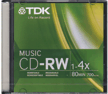 |
|
New member Username: FootiemadPost Number: 1 Registered: Sep-09 | please please help, i`ve bought a RCD-W100 and i`ve tried everything i can think of to get it to record from an external source (my cd mixer) and i just can`t get it to work, none of my levels are working and i`m getting no sound through it, can anyone help, thank you to the person that does, arsenal4677@ntlworld.com |
Main Forums
Today's Posts- Home Audio Forum
- A/V Receivers Forum
- Amps Forum
- Cassette Forum
- CD Players Forum
- CD Recorders Forum
- DAC & Transports Forum
- DVD-Audio & SACD Forum
- Equalizers Forum
- Integrated Amps Forum
- iPod Docks Forum
- MiniDisc Forum
- Mini Systems Forum
- Digital Music Systems Forum
- Phono Forum
- Preamps Forum
- Speakers Forum
- Subwoofers Forum
- Tuners Forum
- Home Video Forum
- Home Theater Forum
- Car Audio Forum
- Accessories Forum
- All Forum Topics